
1. Samfurin Ya Ƙareview
This manual provides detailed instructions for the installation, operation, and maintenance of your AINAVI 15-inch Android 13 Car Stereo Radio, designed specifically for Toyota FJ Cruiser models from 2007 to 2021. This unit integrates advanced features such as wireless CarPlay, Android Auto, GPS navigation, and a high-resolution QLED touch screen to enhance your driving experience.

Hoto na 1.1: Ƙarsheview of the AINAVI Car Stereo Radio's key features.
Mabuɗin fasali:
- Mara waya ta CarPlay & Android Auto: Stable signal flow for seamless smartphone integration.
- 15-inch HD QLED Touch Screen: 1920x1080 resolution for clear visuals and responsive interaction.
- Advanced GPS Navigation: Supports most satellite services with 5G WiFi for accurate real-time mapping.
- Babban Ayyuka: 8-Core CPU, Dual-Core GPU, 6GB RAM, and 128GB ROM for smooth operation and ampda ajiya.
- Integrated Audio Processing: 48-band EQ with DSP for customizable sound profiles.
- Na baya View Tallafin kyamara: 1080P AHD input for clear reversing visuals with trajectory display.
- Gudanar da Jiki: Two large knobs for AC temperature and fan speed, a central knob for volume, and dedicated AC function buttons.
- Ayyukan Allon Raba: Run multiple applications simultaneously on the display.
- USB to RCA Output: Allows independent video playback on multiple screens for rear passengers.
2. Me Ya Hada
Tabbatar cewa duk abubuwan da aka jera a ƙasa suna nan a cikin kunshin ku kafin fara shigarwa.
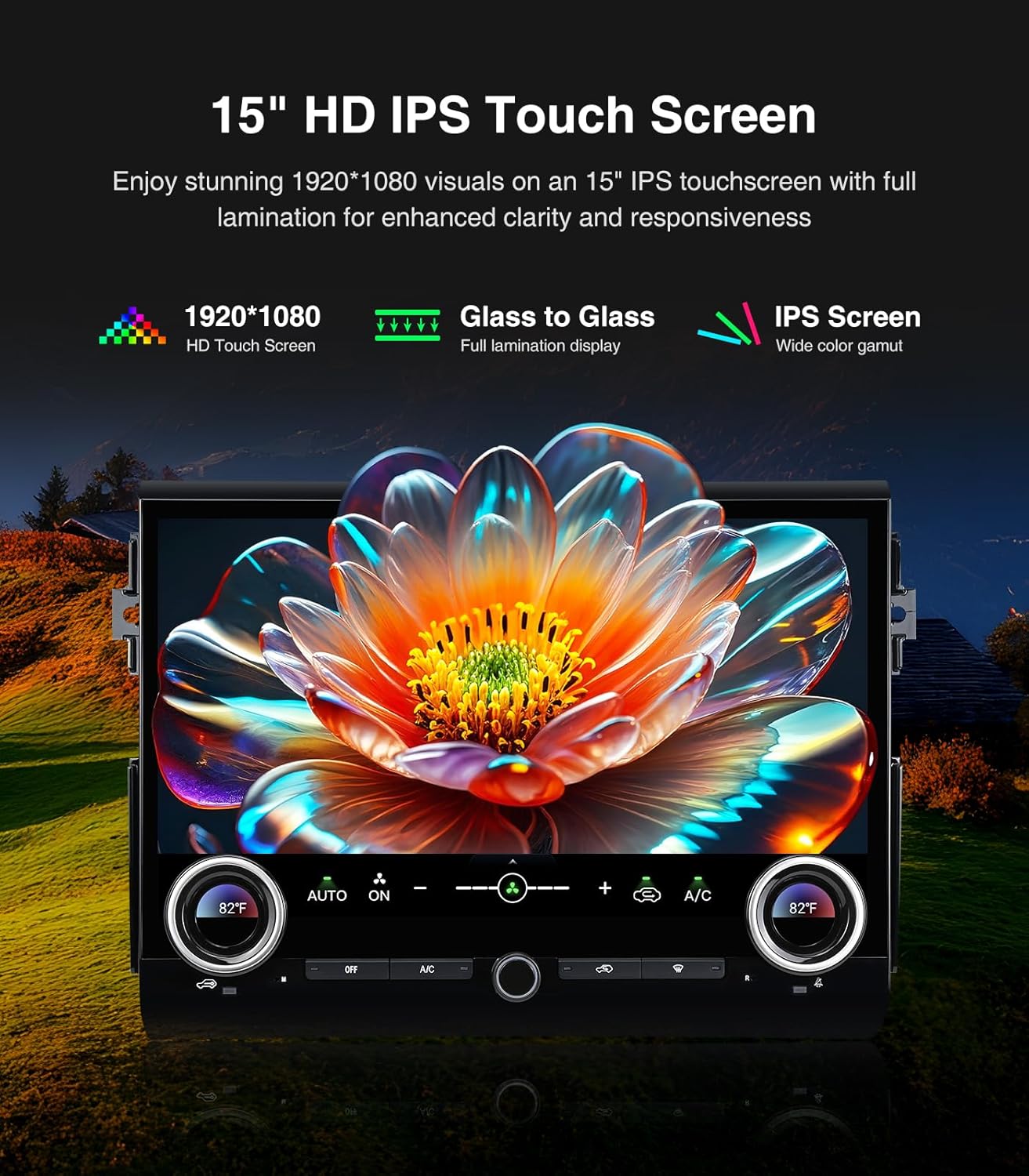
Image 2.1: Contents of the AINAVI Car Stereo Radio package.
- Car Head Unit with Frame for Toyota FJ Cruiser (1 unit)
- AHD 1080P Rear View Camera (1 unit)
- GPS Antenna (1 unit)
- USB 4-Pin Cable (1 unit)
- USB 6-Pin Cable (1 unit)
- Microphone (1 unit)
- Blue Frame Removal Tool (1 unit)
- Littafin mai amfani (raka'a 1)
- Power Cable (1 unit)
3. Saita da Shigarwa
Professional installation is recommended for this product. Ensure the vehicle's battery is disconnected before starting any electrical work. Refer to the provided wiring diagrams and follow these general steps.
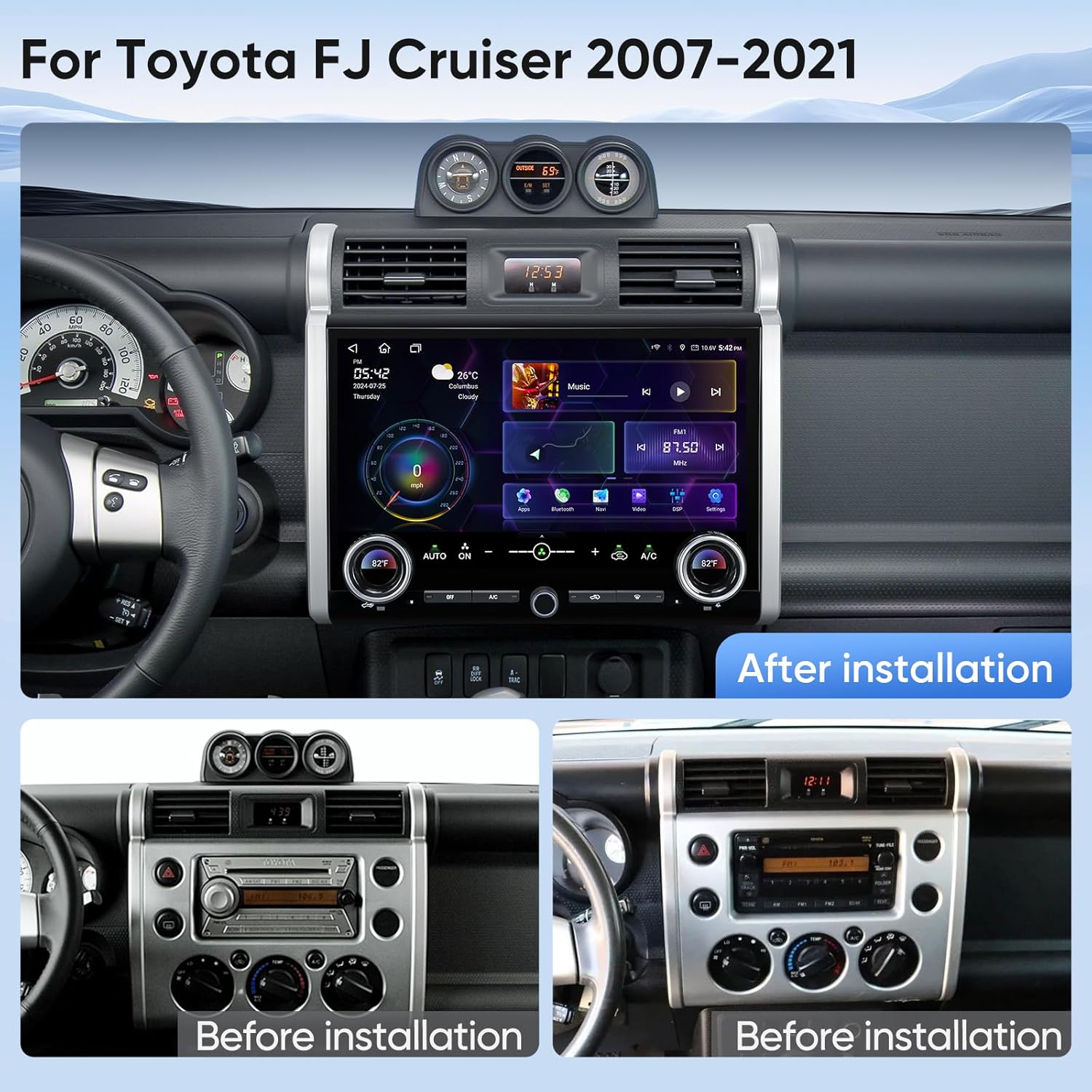
Image 3.1: Visual comparison of the dashboard before and after installing the AINAVI Car Stereo Radio.
3.1 Shigar da Na'urar Kai
- Carefully remove the original factory radio and dashboard trim using the provided frame removal tool.
- Connect the main power harness from the new head unit to the vehicle's wiring harness. Ensure all connections are secure.
- Connect the GPS antenna and external microphone to the designated ports on the head unit. Position the GPS antenna in a location with a clear view of the sky, and the microphone near the driver for optimal voice pickup.
- If applicable, connect the USB cables for external devices.
- Carefully mount the new head unit and frame into the dashboard opening. Secure it with screws if necessary.
- Reconnect the vehicle's battery and test the unit's basic functions before fully reassembling the dashboard trim.
3.2 Na baya View Shigar da kyamara
- Mount the AHD 1080P rear view camera in a suitable location at the rear of your vehicle, typically near the license plate light.
- Route the camera's video cable and power cable through the vehicle's interior to the head unit.
- Connect the camera's video output to the 'CAM IN' or 'REVERSE CAMERA' input on the head unit.
- Connect the camera's power wire to the vehicle's reverse light circuit (12V) so it receives power when the vehicle is in reverse.
- Connect the reverse trigger wire from the head unit's harness to the vehicle's reverse light signal wire. This tells the head unit to switch to the camera view lokacin da reverse gear aka tsunduma.
Bidiyon Shigarwa:
Video 3.1: Detailed installation manual for the AINAVI Car Stereo Radio in a Toyota FJ Cruiser (2007-2021).
Video 3.2: Instructions for installing a camera with the head unit.
4. Umarnin Aiki
This section details the various functions and features of your AINAVI Car Stereo Radio.
4.1 General Interface and Navigation
The 15-inch QLED touchscreen provides access to all functions. Swipe left or right to navigate between application pages. Tap icons to launch applications.

Image 4.1: GPS Navigation interface on the AINAVI Car Stereo Radio.
The built-in GPS module and 5G WiFi connectivity ensure accurate and real-time navigation. You can use pre-installed navigation apps or download others from the Google Play Store.
4.2 Mara waya ta CarPlay & Android Auto
Connect your iPhone or Android smartphone wirelessly to access navigation, music, messages, and more directly on the head unit's screen.

Image 4.2: Wireless CarPlay and Android Auto functionality.
4.3 Audio Controls and DSP
The unit features a professional DSP (Digital Sound Processor) with a 48-band equalizer. Adjust sound settings, including bass boost, surround sound patterns, and individual speaker volume, to customize your audio experience.

Image 4.3: DSP and Equalizer interface for audio customization.
Video 4.1: Demonstration of DSP settings and audio adjustments.
4.4 Air Conditioning Control
The unit integrates with your vehicle's AC system. Use the two large physical knobs to adjust temperature and fan speed. Press the knobs to switch between functions. Additional physical buttons control various AC modes.
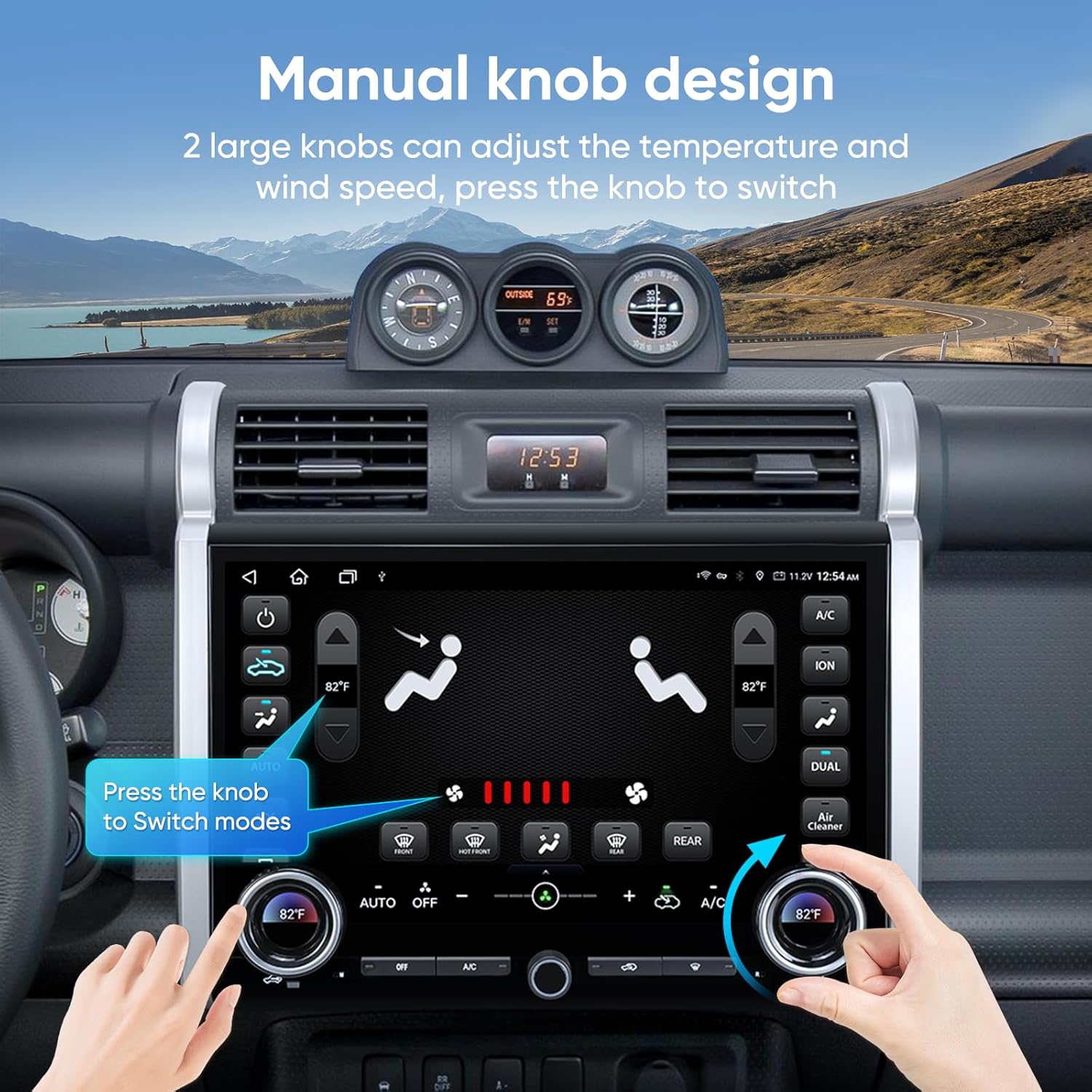
Image 4.4: Manual knob design for integrated AC control.
Video 4.2: Demonstration of AC control functionality on the touchscreen.
4.5 Rarraba Ayyukan allo
Utilize the split-screen feature to run two applications simultaneously, such as navigation on one side and music playback on the other.

Image 4.5: Split screen and mirroring capabilities.
4.6 Na baya View Nuni na Kamara
When the vehicle is shifted into reverse, the screen automatically displays the 1080P AHD rear view camera feed, complete with guiding lines for safe maneuvering.

Hoto 4.6: Na bayaview camera display with parking assistance.
4.7 Connectivity (WiFi & Bluetooth)
The unit supports 2.4GHz and 5GHz WiFi for internet access and Bluetooth for hands-free calling and audio streaming.

Image 4.7: WiFi and Bluetooth connection options.
4.8 Bidiyon Nunin Samfura
Video 4.3: A brief showcase of the 15-inch head unit's features.
5. Kulawa
To ensure the longevity and optimal performance of your AINAVI Car Stereo Radio, follow these maintenance guidelines:
- Tsaftace allo: Use a soft, lint-free cloth specifically designed for electronics to clean the touchscreen. Do not use abrasive cleaners or harsh chemicals.
- Sabunta software: Periodically check for and install software updates to ensure the system runs efficiently and has the latest features and security patches.
- Haɗin Kebul: Ensure all cables remain securely connected. Loose connections can lead to intermittent issues.
- Yanayin Muhalli: Ka guji fallasa naúrar zuwa matsanancin zafi, hasken rana kai tsaye na tsawon lokaci, ko danshi mai yawa.
6. Shirya matsala
If you encounter issues with your AINAVI Car Stereo Radio, refer to the following common troubleshooting steps:
- Babu Ƙarfi: Check all power cable connections. Ensure the vehicle's battery is charged and the ignition is on. Verify the fuse for the stereo is not blown.
- Babu Sauti: Check speaker connections. Ensure the volume is not muted or set too low. Verify audio settings in the DSP/Equalizer.
- Allon taɓawa mara amsawa: Try restarting the unit. If the issue persists, a factory reset might be necessary (note: this will erase custom settings).
- GPS Baya Aiki: Tabbatar cewa eriyar GPS tana da sarari view of the sky. Check GPS settings in the system menu. Update navigation maps if available.
- CarPlay/Android Auto Connection Issues: Ensure Bluetooth and WiFi are enabled on both the head unit and your smartphone. Try forgetting the device and re-pairing. Check for software updates on both devices.
- Na baya View Kamara Ba Ya Nunawa: Check the camera's video and power connections. Ensure the reverse trigger wire is correctly connected to the vehicle's reverse light circuit.
- AC Control Issues: If you experience problems with air conditioner control, please contact customer support for assistance.
For persistent issues not resolved by these steps, please contact AINAVI customer support.
7. Ƙayyadaddun bayanai
| Alamar | AINAVI |
| Nau'in Sabis na Abin hawa | Toyota FJ Cruiser 2007-2021 |
| Girman allo | Inci 15 |
| Nau'in Nuni | QLED |
| Nau'in Allon taɓawa | Capacitive |
| Tsarin Aiki | Android |
| Ƙarfin Ajiye Ƙwaƙwalwar Ƙwaƙwalwa | 128 GB |
| Fasahar Haɗuwa | Bluetooth, USB, Wi-Fi, Wired, Wireless |
| Tsarin Kewayawa Tauraron Dan Adam Goyon baya | BeiDou, GPS, Galileo |
| Yanayin Fitarwa na Audio | Kewaye Stereo |
| Hanyar sarrafawa | App, Nesa, Taɓa, Murya |
| Nauyin Abu | 3.01 kilogiram |
8. Garanti da Tallafawa
8.1 Garanti na masana'anta
This AINAVI Car Stereo Radio comes with a 12-month manufacturer's guarantee daga ranar sayayya. Wannan garantin yana ɗaukar lahani a cikin kayan aiki da aiki ƙarƙashin amfani na yau da kullun. Da fatan za a riƙe shaidar siyan ku don da'awar garanti.
8.2 Tallafin Fasaha
Our professional technical support team is available to assist you with installation, troubleshooting, and any questions you may have regarding your product. If you encounter any issues, particularly with air conditioner integration, please do not hesitate to contact us.

Image 8.1: Customer Installation Support contact details.
You can reach our customer service team via:
- Waya: +1 (833) 858-5016
- Imel: info@ainavi.com
- Operating Hours (PST):
- Monday - Friday: 9:00 AM - 9:00 PM
- Saturday: 2:00 PM - 10:00 PM
Please have your product model number (B0FCY3Z2D1) and purchase details ready when contacting support.