
CINMOORE CM-C2LU
CINMOORE Dummy Camera User Manual
Model: CM-C2LU
Alamar: CINMOORE
1. Gabatarwa
Thank you for choosing the CINMOORE Dummy Camera. This indoor security camera is designed to provide reliable surveillance and peace of mind for your home or office. Featuring advanced AI detection, two-way audio, and clear night vision, it offers comprehensive monitoring capabilities. This manual will guide you through the setup, operation, and maintenance of your device.

Hoto: Gaba view of the CINMOORE Dummy Camera, a white, spherical camera with a dark lens and a blue indicator light, featuring the CINMOORE logo at its base.
2. Me Ya Hada
Da fatan za a duba abubuwan da ke cikin kunshin don tabbatar da duk abubuwa suna nan:
- CINMOORE Security Camera × 1
- Mounting Bracket Base × 1
- Adaftar wutar × 1
- Data Cable × 1
- Screw Anchors × 1
- Littafin Mai Amfani × 1
3. Saita
The CINMOORE Dummy Camera offers flexible installation options for various indoor environments.
3.1 Zaɓuɓɓukan hawa
The camera can be installed using the following methods:
- Dutsen Rufi: Ideal for wide-angle coverage from above.
- Dutsen tebur: Simple placement on any flat surface.
- Bangon Dutsi: Secure installation on a vertical surface.
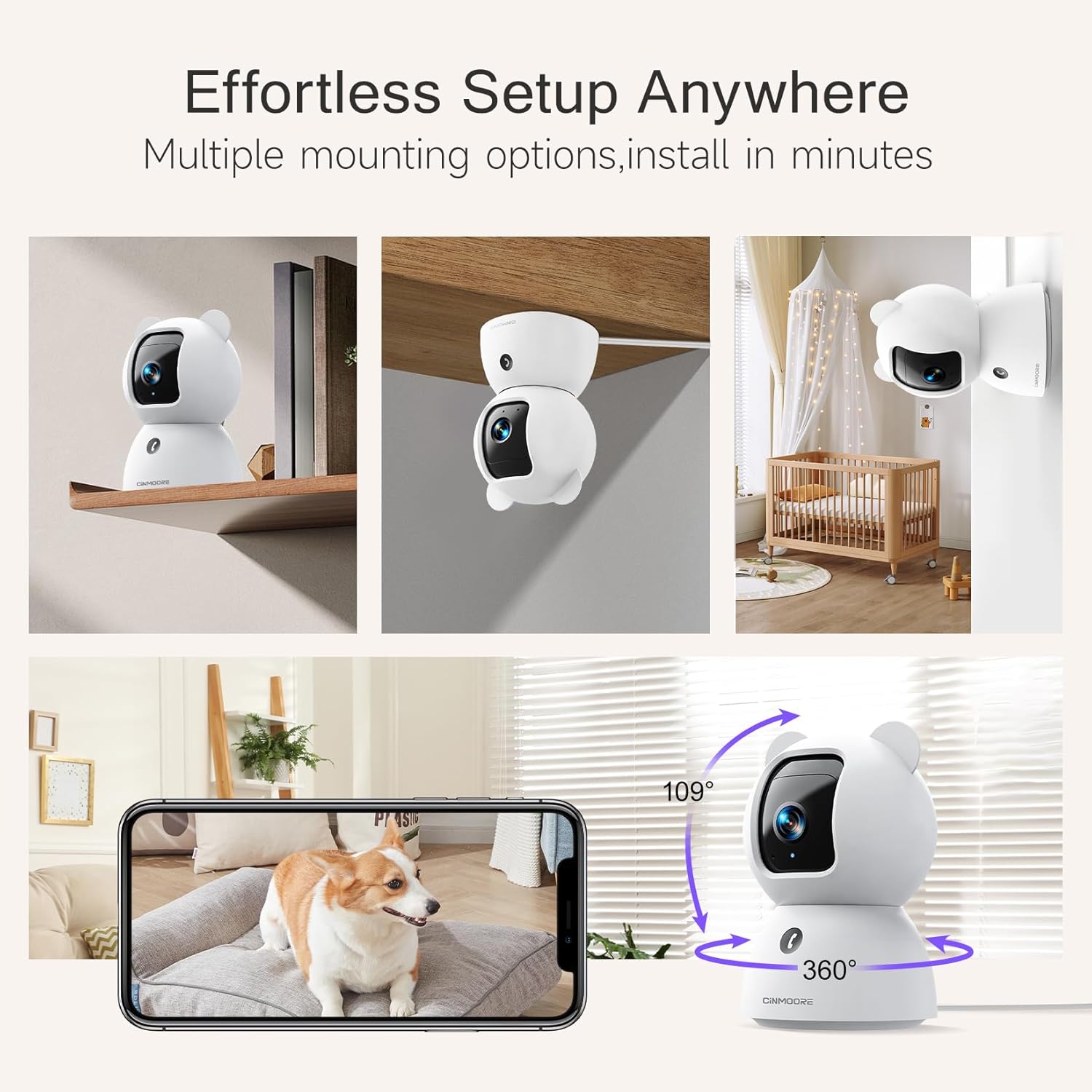
Image: A collage showing the CINMOORE Dummy Camera mounted in various positions: on a shelf, inverted on a ceiling, and on a wall, demonstrating its versatile installation options.
3.2 Matakan Saita na Farko
- Kunna Wuta: Connect the camera to the power adapter using the provided data cable and plug it into a power outlet.
- Zazzage App: Download the official CINMOORE app from your smartphone's app store (iOS/Android).
- Rijistar Asusu: Bude app ɗin kuma yi rajista don sabon asusu ko shiga idan kuna da ɗaya.
- Ƙara Na'ura: Follow the in-app instructions to add your new camera. This typically involves scanning a QR code on the camera or connecting to its temporary Wi-Fi hotspot.
- Haɗin Wi-Fi: Connect the camera to your home Wi-Fi network (2.4GHz recommended).
- Wuri: Position the camera in your desired location, ensuring it has a clear view na yankin da kake son saka idanu.
4. Umarnin Aiki
4.1 Video Quality and Viewing
The camera captures video in 2.5K resolution, providing clear and detailed images. You can view ciyarwar kai tsaye da foo da aka yi rikoditage through the CINMOORE app.

Image: A side-by-side comparison demonstrating the superior clarity of 2.5K resolution (left, showing a baby) versus 2K resolution (right, showing a puppy).
4.2 Pan & Tilt (PTZ) Functionality
The camera features PTZ (Pan, Tilt, Zoom) technology, allowing for 360-degree coverage. You can remotely control the camera's viewing angle through the app to monitor different areas of a room.

Image: The CINMOORE Dummy Camera surrounded by icons representing its features: Ultra HD 2.5K, Sound/Crying Alerts, Smart Night Vision, Encrypted Local Storage (up to 256GB), Secure Cloud Storage, Full Duplex Audio, Human/Pet Tracking, One-Touch Call, and Pan & Tilt, emphasizing its 360-degree protection.
4.3 Sauti Mai Hanya Biyu
Utilize the full-duplex two-way audio feature to communicate with people or pets in the camera's vicinity. This allows for natural, real-time conversations.

Image: A scene depicting a person speaking through a smartphone to a dog via the CINMOORE Dummy Camera, illustrating the two-way audio feature with speech bubbles.
4.4 Hangen Dare
The camera is equipped with clear IR night vision, providing 2.5K clarity even in low-light or complete darkness, with a range of up to 33 feet.

Hoto: Mutum viewing a black-and-white night vision feed from the CINMOORE Dummy Camera on their smartphone, showing a baby and a dog in a crib, demonstrating clear IR night vision in a dark room.
4.5 AI Alerts and Detection
The camera supports various AI-powered detection features without monthly fees, including:
- Gano Motsi: Alerts you to general movement.
- Gano Mutum: Specifically identifies human figures.
- Gano Dabbobin Dabbobi: Recognizes pet activity.
- Gano Kuka: Notifies you of baby crying sounds.

Image: Two children playing near the CINMOORE Dummy Camera, with icons below representing its AI detection capabilities: Person, Pet, Motion, and Crying, highlighting its no-monthly-fee AI alerts.
4.6 Zaɓuɓɓukan Ma'ajiya
The camera offers flexible and secure storage solutions:
- Adana Katin SD: Supports local storage via an SD card (not included), expandable up to 512GB. Ensure "SD Card Encryption" is enabled in the app for secure viewing.
- Ma'ajiyar gajimare: Offers AWS Cloud Storage with a 30-day free trial, providing bank-level encrypted storage for your recordings.

Image: A diagram showing the CINMOORE Dummy Camera with callouts for its storage features: SD card slot (expandable up to 512GB), Reset Button, and AWS Cloud Storage (30-day free trial), emphasizing encrypted and secure flexible storage.
5. Kulawa
To ensure optimal performance and longevity of your CINMOORE Dummy Camera, follow these maintenance guidelines:
- Tsaftacewa: A hankali shafa ruwan tabarau na kamara da jiki tare da laushi, bushe bushe. Ka guji yin amfani da sinadarai masu tsauri ko kayan shafa.
- Wuri: Ensure the camera is placed in a stable location, away from direct sunlight, extreme temperatures, and high humidity.
- Sabunta Firmware: Regularly check for and install firmware updates through the CINMOORE app to ensure your camera has the latest features and security enhancements.
- Tushen wutan lantarki: Yi amfani da adaftar wutar lantarki ta asali da aka bayar tare da kyamarar kawai.
6. Shirya matsala
If you encounter issues with your CINMOORE Dummy Camera, refer to the following common troubleshooting steps:
- Kamara A Wajen Layi: Check your Wi-Fi connection and ensure the camera is within range of your router. Restart the camera by unplugging and re-plugging the power adapter.
- Rashin ingancin Bidiyo: Ensure the lens is clean and free from dust. Check your internet speed; a stable connection is crucial for high-resolution streaming.
- Babu Audio: Verify that the microphone and speaker settings are enabled in the app. Ensure there are no obstructions blocking the microphone or speaker on the camera.
- Detection Not Working: Check the detection sensitivity settings in the app. Ensure the camera's view is clear and not obstructed.
- Ba za a iya Haɗawa da Manhajar ba: Ensure you have the latest version of the CINMOORE app. Try resetting the camera (using the reset button, if available) and re-adding it to the app.
For further assistance, please contact CINMOORE customer support.
7. Ƙayyadaddun bayanai
| Sunan Samfura | Tsaro na cikin gida Cam |
| Lambar Samfurin Abu | CM-C2LU |
| Alamar | CINMOORE |
| Fasahar Haɗuwa | Wayar hannu, Wi-Fi |
| Ƙimar Ɗaukar Bidiyo | 2.5K |
| Amfanin Cikin Gida/Waje | Cikin gida |
| Siffofin Musamman | 2 Way Audio, Cry Detection, HD Resolution, PTZ Technology |
| Range Na Dare | 33 Kafafu |
| Nau'in hawa | Ceiling Mount / Tabletop Mount / Wall Mount |
| Kayan abu | Acrylonitrile Butadiene Styrene (ABS) |
| Girman Abun L x W x H | 7.6 x 7.6 x 11.4 Centimetres |
| Nauyin Abu | 340g ku |
| Matsayin Juriya na Ruwa | Mai hana ruwa ruwa |
| Shawarwari Amfani | Baby Monitoring, Pet Monitoring, Indoor Home Security, Office Surveillance |
8. Garanti da Tallafawa
Garanti: The CINMOORE Dummy Camera comes with a 1-year warranty from the date of purchase. Please retain your proof of purchase for warranty claims.
Taimako: For technical support, troubleshooting assistance, or warranty inquiries, please visit the official CINMOORE website or contact their customer service team. Refer to the product packaging or the CINMOORE app for specific contact details.
Ask a question about this manual
Ask about setup, troubleshooting, compatibility, parts, safety, or missing instructions. Manuals+ will review the question and use this page’s manual context to help answer it.