
Gabatarwa
The Acora R22189132 LED Solar Outdoor Wall Light is designed to provide reliable and energy-efficient illumination for outdoor areas such as driveways, garden paths, and yards. This unit features an integrated solar panel for battery charging, a motion sensor for automatic activation, and a twilight sensor for operation in low light conditions. Control options include a remote control for adjusting brightness and operating modes. Constructed from durable plastic with an IP65 rating, it is built to withstand various weather conditions.

Hoto: Gaba view of the Acora LED Solar Outdoor Wall Light, showcasing its square design and central motion sensor.
Umarnin Tsaro
- Ensure all electrical connections are secure and protected from moisture.
- Do not attempt to open or modify the product. Refer servicing to qualified personnel.
- Mount the light and solar panel securely to prevent falling.
- Kiyaye tsaftataccen hasken rana kuma ba tare da cikas ba don tabbatar da ingantaccen caji.
- Zubar da samfurin da baturin sa bisa ga ka'idojin gida.

Image: Diagram illustrating different IP classifications for outdoor lighting, indicating suitable installation zones.
Abubuwan Kunshin
Tabbatar cewa duk abubuwan da aka gyara suna nan kafin shigarwa:
- Acora LED Solar Outdoor Wall Light unit
- Solar Panel with 2-meter connection cable
- Ikon nesa
- umarnin hawa
- Kayan aikin hawa (skru, anchors)
Saita da Shigarwa
1. Zabar Wuri
Select a location for the light unit that provides the desired illumination coverage. For the solar panel, choose a spot that receives direct sunlight for 8-10 hours daily to ensure optimal charging. The 2-meter cable allows flexible placement of the solar panel relative to the light unit.
2. Mounting the Light Unit
- Mark the desired mounting points for the light unit on the wall.
- Drill pilot holes and insert appropriate wall anchors if necessary.
- Secure the light unit to the wall using the provided screws.
3. Hawan Hasken Rana
- Mark the desired mounting points for the solar panel.
- Drill pilot holes and insert appropriate wall anchors.
- Secure the solar panel to the wall, ensuring it can be angled towards the sun.
- Connect the solar panel cable to the light unit's input port. Ensure the connection is tight and secure to maintain IP65 rating.

Image: The Acora light unit connected to its separate solar panel via a cable, ready for installation.
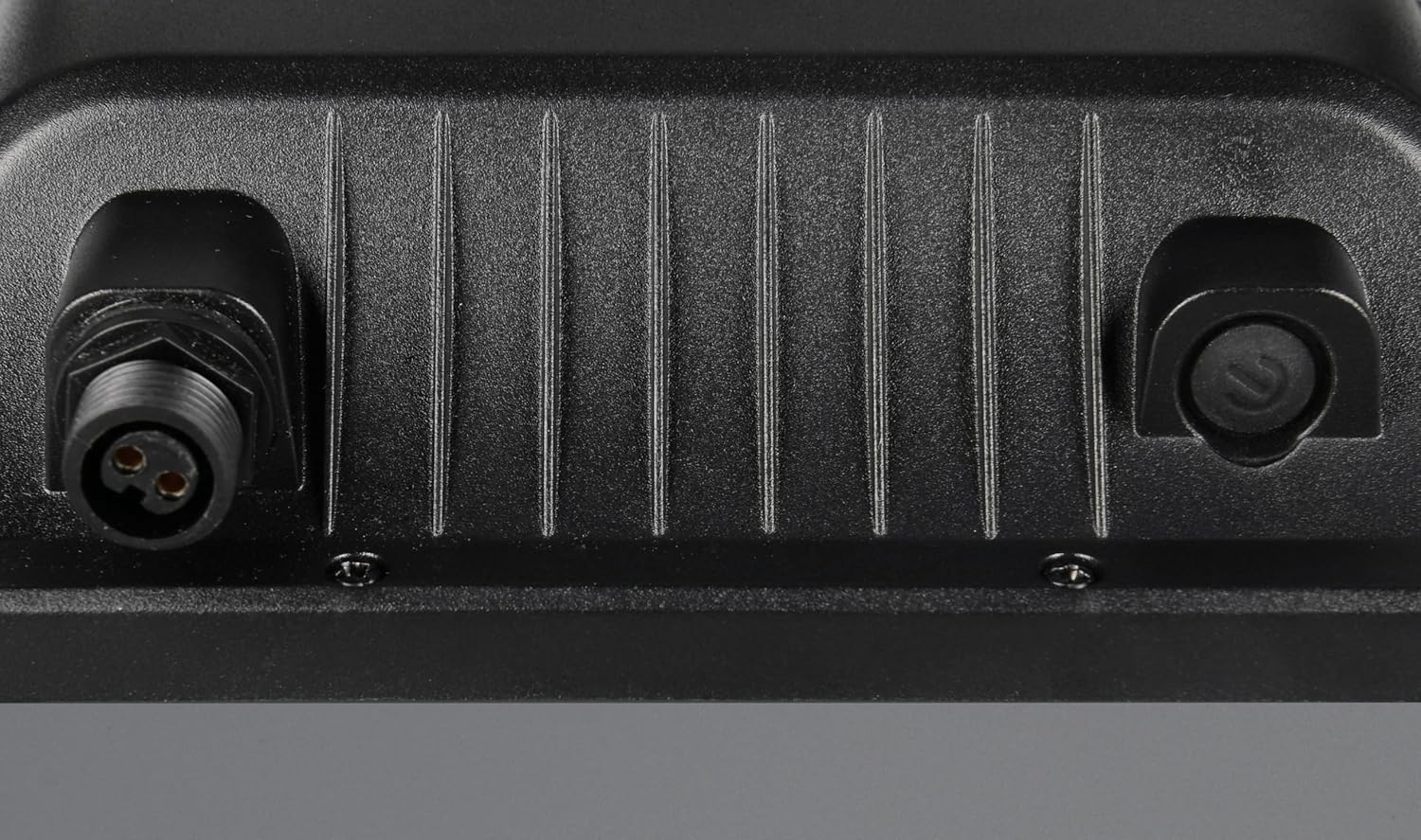
Hoto: Rufewa view of the secure, waterproof connection ports on the back of the light unit.

Image: The Acora light and solar panel installed on an exterior wall, demonstrating typical outdoor placement.
4. Cajin Farko
Allow the solar panel to charge the internal battery for 8-10 hours in direct sunlight before first use. This ensures the battery is fully charged for optimal performance.
Umarnin Aiki
The Acora light features a motion sensor, twilight sensor, and remote control for versatile operation.
Ayyukan Ikon Nesa
Use the provided remote control to select operating modes and adjust settings:
- Kunna/Kashe: Kunna ko kashe wuta da hannu.
- Haske: Adjust light intensity to 100%, 50%, or dimming options.
- PIR Mode with Orientation Light: The light activates at full brightness upon motion detection and then dims to a low orientation light after a set period of no motion.
- Auto Mode (30%): The light automatically turns on at 30% brightness in darkness and remains on.
- Mai ƙidayar lokaci: Set the light to operate for a specific duration (3h, 5h, or 8h).
Ayyukan Sensor
- Sensor Motsi: Detects movement up to 8 meters within a 120° angle. The light will activate or brighten when motion is detected, depending on the selected mode.
- Twilight Sensor: Automatically detects ambient light levels, enabling the light to operate only when it is dark enough.

Image: Graphic display of feature icons including remote control, 4000K color temperature, timer, battery, solar charging, twilight sensor, motion sensor, and IP65 rating.

Image: Detailed close-up of the integrated motion sensor, located centrally on the light unit.
Kulawa
- Tsaftacewa: Regularly wipe the solar panel and light surface with a soft, damp cloth to remove dust, dirt, and debris. A clean solar panel ensures efficient charging.
- Dubawa: Periodically check the mounting hardware and cable connections for tightness and signs of wear or damage.
- Baturi: The integrated battery is designed for long-term use. If the light duration significantly decreases over time, ensure the solar panel is receiving adequate sunlight and is clean.
Shirya matsala
| Matsala | Dalili mai yiwuwa | Magani |
|---|---|---|
| Haske ba ya kunna da daddare. | Insufficient solar panel charging. Battery depleted. Twilight sensor not detecting darkness. | Ensure solar panel is in direct sunlight for 8-10 hours. Clean solar panel. Check for obstructions blocking the twilight sensor. |
| Sensor motsi baya aiki. | An toshe firikwensin An zaɓi yanayin da ba daidai ba. | Clear any obstructions from the sensor's field of view. Use remote control to select PIR mode. |
| Light duration is shorter than expected. | Insufficient charging. Old battery. | Ensure maximum sun exposure for the solar panel. If the issue persists after prolonged use, the battery may be nearing its end of life. |
| Ikon nesa baya amsawa. | Remote battery depleted. Obstruction between remote and light. | Replace remote control battery. Ensure clear line of sight to the light unit. |
Ƙayyadaddun bayanai
| Siffar | Daki-daki |
|---|---|
| Lambar Samfura | R22189132 |
| Alamar | RL LIVE YOUR LIGHT |
| Kayan abu | Filastik |
| Launi | Matt Baƙi |
| Hasken Haske | Hadakar LED |
| Watatage | 18 Watts |
| Haske | 2600 Lumen |
| Zazzabi Launi | Kelvin 4000 (Fara mai tsaka-tsaki) |
| Tushen wutar lantarki | Mai Amfani da Rana |
| Siffofin Musamman | Motion Sensor, Twilight Sensor, Remote Control, Energy Efficient |
| Gano Sensor Motion | 8m/120° |
| Class Kariya | IP65 (Dust-proof, protected against jet water) |
| Lokacin Caji | Approx. 8-10 hours (full sunlight) |
| Lokacin Aiki | Approx. 8-9 hours (full battery) |
| Girman samfur (L x W x H) | 45L x 200W x 190H mm |
| Nauyin Abu | 1.93 kilogiram |
| Ajin Ingantattun Makamashi | F |

Image: Technical drawing showing detailed dimensions of the Acora light unit and its solar panel.

Image: Energy efficiency label indicating class F for the product.
Garanti da Taimako
Don samun bayanai game da garanti ko tallafin fasaha, da fatan za a duba takardun da aka bayar tare da siyan ku ko kuma a tuntuɓi masana'anta kai tsaye. Ajiye shaidar siyan ku don da'awar garanti.