
Gabatarwa
Thank you for choosing the EuroFone S3 Plus Motorcycle Intercom with 2K HD Camera. This device is designed to enhance your riding experience by providing seamless communication, high-definition video recording, and entertainment features. Please read this manual thoroughly before use to ensure proper operation and to maximize the product's lifespan.
Siffofin Samfur
- Babban Bluetooth 5.1: Equipped with a low-power Bluetooth 5.1 chip for faster, more stable, and energy-efficient connections, improving connectivity, communication speed, and range.
- 6-Person Group Intercom: Supports simultaneous communication for up to 6 riders, with a maximum communication distance of 1800-2000 meters in open areas.
- 2K HD Video Recording: Features a 14mm Sony HD F2.0 lens, 2K Ultra HD video camera at 30FPS for smooth, clear details. Includes anti-shake and anti-vibration technology.
- 135° Ultra-Wide Angle Lens: Yana samar da faffadan fanni na view, preventing blind spots in recordings.
- Tsawon Rayuwar Baturi: Built-in 2000mAh battery offers up to 45 hours of continuous talk time, 8 hours of video recording, 80 hours of music playback, and 1000 hours of standby time. Fully charges in approximately 1.5 hours via Type-C port.
- IP67 Mai hana ruwa & Mai hana ƙura: Designed with a silicone-tight structure for deep protection against rain and dust, suitable for various environments. (Note: Not suitable for prolonged use in heavy rain or submersion).
- CVC8.0 & DSP Dual Noise Cancellation: Windproof microphone eliminates call echoes and reduces engine noise and wind noise, ensuring clear communication.
- HIFI Audio Quality: Features 40mm high-output speakers for clear voice and music even at high speeds.
- Automatic Call Answering: Automatically answers incoming calls after approximately 10 seconds, allowing for hands-free communication while riding.
- Taimakon Mataimakin Murya: Compatible with Siri and other voice assistants, with voice navigation available in Japanese, English, and Chinese.
- Yarda da Duniya: Connects to most commercially available transceivers, smartphones, and navigation devices via Bluetooth.
- FM Radio & Music Sharing: Built-in FM radio for local broadcasts and music sharing function to enjoy music with friends or family.
- Large Multi-Function Buttons: Easy to operate even with gloves on, allowing for simple control of music playback, volume, and calls.
Abubuwan Kunshin
Kunshin ya ƙunshi abubuwa masu zuwa:
- 1 Bluetooth Host Unit
- 1 Type-C Cajin Cable
- 2 Helmet Clips (Screw Clip + Velcro Clip)
- 1 Naúrar kai na sitiriyo
- 1 Littafin mai amfani
- 2 Microphones (Hard Mic & Soft Mic)
Saita da Shigarwa
Follow these steps to install the EuroFone S3 Plus on your helmet:
- Remove Helmet Lining: Carefully remove the inner lining of your helmet to access the ear pockets and chin bar area.
- Install Mounting Clip:

Image: The mounting clip being attached to the side of a helmet.
Choose between the screw clip or the adhesive velcro clip. For a secure fit, the screw clip is recommended. Unscrew the screws on the metal buckle, position the buckle on the edge of the helmet, and tighten the screws. Ensure it is firmly attached. - Attach Main Unit: Gently slide the main intercom unit along the bracket until it clicks into place.
- Haɗa Masu magana:
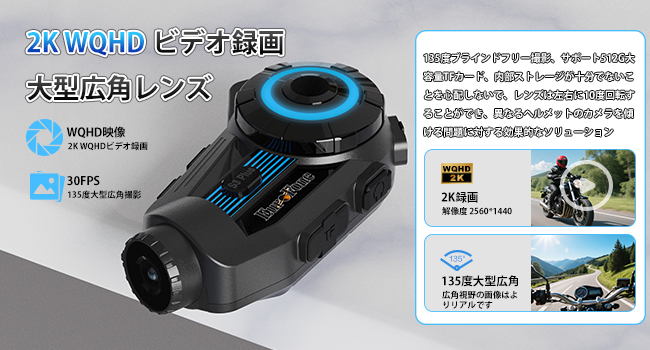
Image: Speakers being placed into the helmet's ear pockets.
Stick the headset with the longer wire to the ear pocket on the side away from the main unit. Stick the headset with the shorter wire to the ear pocket on the side close to the main unit. Use the provided 3M velcro pads to secure the speakers inside the helmet's ear pockets. Ensure they are positioned comfortably over your ears. - Shigar da Makirufo:

Image: A microphone being positioned near the mouth inside a helmet.
Connect the boom microphone to the speaker wire connector. Stick the microphone to the side of the helmet mouth area, ensuring it is close to your mouth for clear audio pickup. - Kebul na Hanya: Carefully route all cables under the helmet lining to keep them tidy and prevent interference.
- Reinstall Lining: Once all components are in place, reinstall the helmet's inner lining.
Shigarwa Video Tutorial
Video: A step-by-step guide on installing the EuroFone S3 Plus Motorcycle Intercom system onto a helmet, including speaker and microphone placement.
Aiki na asali
Familiarize yourself with the main functions of your S3 Plus intercom:
- Kunnawa/Kashewa: Dogon danna maɓallin wuta don kunna ko kashe na'urar.
- Haɗin Bluetooth:
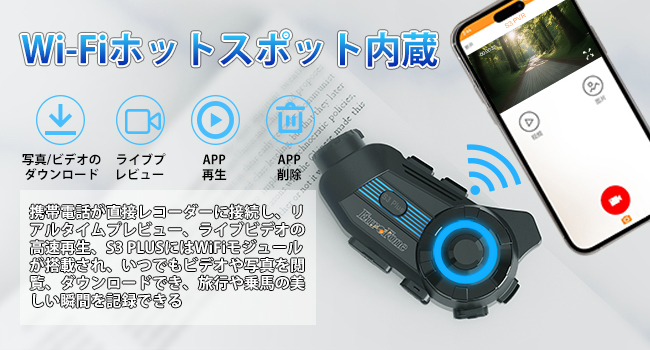
Image: Illustration of the Bluetooth 5.1 chip and its benefits for stable connection.
Long press the power button to turn on the S3 Plus. On your phone, go to Bluetooth settings and select "S3 Plus" from the list of available devices to connect. - Ayyukan Intercom:

Image: Depiction of multiple riders connected via wireless intercom.
The S3 Plus supports up to 6 riders for group communication. Refer to the detailed manual for specific pairing instructions for multiple units. The system features automatic communication recovery if a connection is temporarily lost. - Kunna Kiɗa:

Image: Two riders sharing music wirelessly while riding.
Once paired with your phone, open your music player. Click the multi-purpose button to play/pause. Rotate the jog dial clockwise to increase volume, counter-clockwise to decrease. Short press and rotate clockwise for the previous song, counter-clockwise for the next song. - Rediyon FM: Double-click the multi-purpose button to switch to FM Radio. Rotate the jog dial twice to the left or right to switch channels. Double-click again to switch off FM Radio.
- Automatic Call Answering:

Image: A phone screen showing an incoming call, with the intercom automatically answering.
When an incoming call is detected, the device will automatically answer after 10 seconds. To reject a call, single-click the multi-purpose button. - Mataimakin Murya:

Hoto: Examples of voice commands for GPS, music, and weather.
Activate your phone's voice assistant (e.g., Siri) through the intercom for hands-free control.
Basic Operation Video Tutorial
Video: Demonstrates basic operations of the EuroFone S3 Plus, including power, Bluetooth pairing, music control, and call handling.
Aikin Kamara
The S3 Plus features a 2K HD camera for recording your rides.
- Saka Micro SD Card:

Image: The S3 Plus unit highlighting the 2K WQHD video recording and wide-angle lens.
Open the cover and insert a micro SDXC card (Class 10 or higher recommended) into the designated slot. - Fara/Dakatar da Rikodi: Long press the record button to start recording. A single click will stop recording.
- WiFi Connection for App:

Image: A smartphone connected to the intercom via Wi-Fi, showing video playback and download options.
Download the dedicated app (Road Cam) to your smartphone. Long press the WiFi button on the intercom to enable WiFi. Connect your phone to the intercom's WiFi network (SSID: S3 Dash Cam). Once connected, you can view zauna fotage, playback recordings, and download files ta hanyar app. - Intelligent Gravity Sensor:

Image: A helmet with the intercom unit on the ground, indicating the gravity sensor locking video in case of impact.
In the event of an impact, the intelligent gravity sensor will automatically lock the current video file don hana sake rubutawa. - EIS Anti-Shake & Night Vision:

Image: Comparison of video quality with and without EIS anti-shake and night vision features.
The camera features Electronic Image Stabilization (EIS) for smoother footage and night vision capabilities for clear recording in low-light conditions.
Camera Operation Video Tutorial
Video: A demonstration of how to operate the camera functions of the EuroFone S3 Plus, including recording and connecting to the mobile app via WiFi.
Kulawa
To ensure the longevity and optimal performance of your S3 Plus intercom, follow these maintenance guidelines:
- Tsaftacewa: Yi amfani da taushi, damp cloth to clean the exterior of the unit. Do not use harsh chemicals or abrasive cleaners.
- Bayyanar Ruwa: While IP67 waterproof, avoid prolonged exposure to heavy rain or submersion in water. If wet, wipe dry immediately with a towel.
- Ajiya: Ajiye na'urar a wuri mai sanyi da bushewa, nesa da hasken rana kai tsaye da kuma yanayin zafi mai tsanani idan ba a amfani da ita.
- Kulawar Baturi: For optimal battery life, charge the device regularly and avoid fully discharging it for extended periods.
Shirya matsala
If you encounter any issues with your S3 Plus, refer to the following common solutions:
| Matsala | Dalili mai yiwuwa | Magani |
|---|---|---|
| Na'urar baya kunnawa | Ƙananan baturi | Yi cajin na'urar gabaɗaya. |
| Ba za a iya haɗa shi da waya ba | Bluetooth not enabled or device not in pairing mode | Ensure Bluetooth is on on your phone. Long press the power button on the intercom until the indicator light flashes, then select "S3 Plus" on your phone. |
| Intercom connection drops frequently | Hanyoyi ko nisa mai tsayi | Reduce distance between intercoms or move to an area with fewer obstructions. The device supports automatic reconnection. |
| Poor audio quality / Noise | Microphone position, wind noise, or interference | Adjust microphone position closer to your mouth. Ensure CVC8.0/DSP noise cancellation is active. Check for external interference. |
| Camera not recording / App not connecting | No SD card, full SD card, or WiFi not connected | Insert a compatible micro SD card. Format or replace the SD card if full. Ensure intercom WiFi is on and your phone is connected to "S3 Dash Cam" network. |
Ƙayyadaddun bayanai
- Sunan Samfura: S3 Plus
- Alamar: EuroFone
- Launi: Blue
- Fasahar Haɗuwa: Wireless (Bluetooth 5.1, WiFi)
- Factor Form na kunne: Full Wireless
- Ci gaba da Amfani da Lokacin: 8 Hours (Video Recording), 45 Hours (Talk Time), 80 Hours (Music Playback)
- Lokacin jiran aiki: 1000 Awanni
- Ƙarfin baturi: 2000mAh
- Tashar Caji: Nau'in-C
- Ƙimar Ɗaukar Bidiyo: 1440p (2K WQHD)
- Lens: 135° Wide Angle, Sony HD F2.0
- Nau'in Ƙwaƙwalwa: Micro SDXC Card (not included)
- Ƙididdiga mai hana ruwa: IP67
- Siffofin Musamman: Built-in GPS, Voice Assistant, FM Radio, Noise Cancellation (CVC8.0 & DSP), Automatic Call Answering, Music Sharing, Anti-shake, Night Vision, Intelligent Gravity Sensor
- Girman samfur: 5.7 x 10.5 x 3.5 cm
- Nauyin samfur: 360g ku
Garanti da Taimako
The EuroFone S3 Plus Motorcycle Intercom comes with a Garanti na shekaru 1. If you have any questions or require assistance, please feel free to contact our customer support team. We aim to respond within 24 hours.