
1. Muhimman Bayanan Tsaro
Da fatan za a karanta duk umarnin aminci a hankali kafin amfani da wannan samfurin. Ajiye wannan littafin don tunani na gaba.
- Kada a bijirar da na'urar ga ruwan sama ko danshi.
- Ka guji matsanancin zafi.
- Use only the provided power adapters.
- Kada kayi ƙoƙarin kwance ko gyara na'urar da kanka. Tuntuɓi ƙwararrun ma'aikatan sabis.
- Zubar da batura da kayan lantarki bisa ga ka'idojin gida.
2. Abin da ke cikin Akwatin
Tabbatar cewa duk abubuwa suna nan yayin buɗe akwatin:
- 1 x Desobry 14.2" Portable TV
- 1 x Manhajar mai amfani
- 1 x eriya
- 1 x Cajin Mota
- 1 x 12V AC Adapter
- 1 x RCA Cable
- 1 x Car Headrest Mount Holder
- 2 x AAA Baturi (don sarrafa ramut)
- 1 x Ikon nesa

Hoto: Duk abubuwan da aka haɗa a cikin marufin samfurin.
3. Samfurin Ya Ƙareview
Gashi da Gefe Views
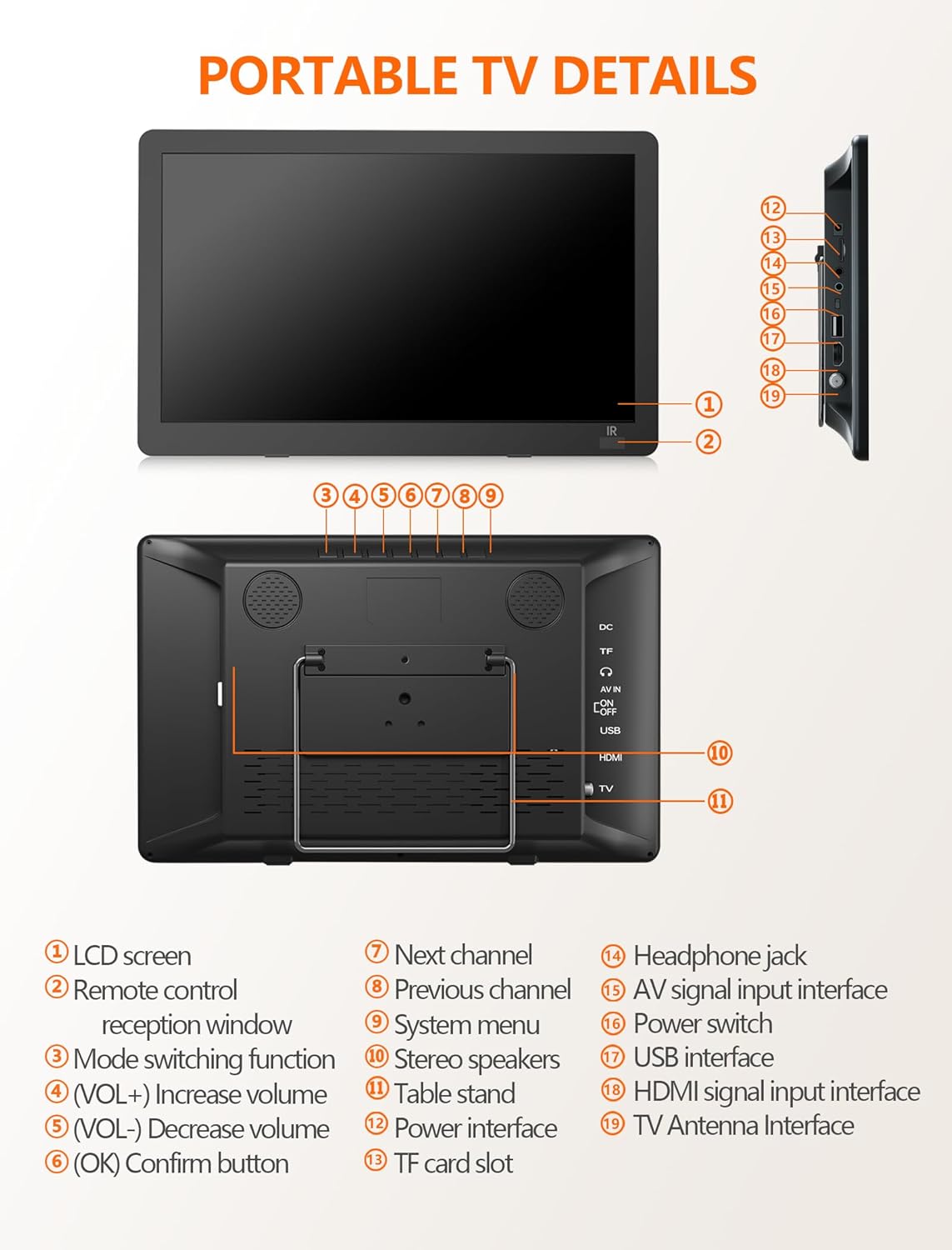
Hoto: Gaba da gefe view of the portable TV with labeled components.
- LCD allon
- Tagan liyafar nesa mai nisa
- Ayyukan canza yanayin
- Volume Up (VOL+)
- Volume Down (VOL-)
- OK / Confirm button
- Tashar ta gaba
- Tashar da ta gabata
- Menu na tsarin
- Masu magana da sitiriyo
- Tsayin tebur
- Ƙarfin wutar lantarki
- Ramin katin TF
- Jakin kunne
- AV signal input interface
- Canjin wuta
- Kebul na USB
- Hanyoyin shigar da siginar HDMI
- TV Antenna Interface
4. Saita
4.1 Powering the TV
The TV can be powered in three ways:
- Adaftan AC: Connect the 12V AC adapter to the power interface (12) and a wall outlet.
- Cajin Mota: Use the provided car charger to power the TV in a vehicle.
- Batir da aka Gina: The TV features a 4000mAh built-in rechargeable battery for portable use.

Image: Three charging systems for the portable TV.
4.2 Antenna Connection and Channel Scan
To receive free-to-air digital TV signals:
- Connect the detachable antenna to the TV Antenna Interface (19). For optimal signal, place the antenna near a window or outdoors.
- Tabbatar cewa an kunna TV ɗin.
- Navigate to the system menu (9) and select ATSC mode.
- Perform an auto-scan for channels. The TV will search and store available digital channels.

Image: Portable TV with antenna connected, displaying a baseball game.
Video: Demonstration of connecting the antenna and performing a channel scan on a portable TV.
Video: Step-by-step guide to connecting the antenna and initiating the channel setup wizard.
5. Aiki
5.1 Selecting Input Sources
The TV supports multiple input sources:
- ATSC: For digital TV channels via antenna.
- HDMI: Connect external devices like laptops, gaming consoles, or streaming sticks (HDMI cable not included).
- AV A cikin: Connect devices using the AV cable (AV cable included).
- USB: Kunna kafofin watsa labarai files daga kebul na USB.

Image: HDMI input screen mirroring from a smartphone to the portable TV.

Image: Portable TV connected via AV cable, showing a child watching content.
5.2 Mai kunnawa ta hanyar USB
The USB port (17) supports various media formats:
- Bidiyo: MAVI, MPG, MOV, MKV, MP4, TS, VOB, DAT
- Audio: MP3, WMA, M4A, AAC
- Hotuna: JPG, JPEG, BMP, PNG
- Rubutu: TXT

Image: Portable TV showing supported multiple formats for media playback.
5.3 Adjusting Volume and Channels
Use the VOL+ (4) and VOL- (5) buttons on the TV or the remote control to adjust the volume. Use the CH+ (7) and CH- (8) buttons on the TV or the remote control to change channels.
6. Features
6.1 High-Definition Display
The 14.2-inch widescreen LCD display offers 1080P high-definition picture quality for clear viewing.

Image: Comparison of 720P and 1080P picture quality on the portable TV.
6.2 Daidaitacce Tsaya
The TV includes a desktop stand and a headrest stand for versatile placement. The built-in table stand (11) is adjustable up to 180 degrees.
6.3 Dual Speakers and Headphone Jack
Enjoy audio through the built-in dual stereo speakers (10) or connect headphones via the headphone jack (14) for private listening.

Image: Portable TV with built-in dual speakers highlighted.
Bidiyo: Overview of the portable TV's features, including 1080P display, flexible connectivity, adjustable kickstand, dual speakers, and sleep timer function.
7. Kulawa
To ensure the longevity of your Desobry Portable TV:
- Tsaftace allon da waje tare da laushi, bushe bushe. Kauce wa masu tsabtace abrasive.
- Ka kiyaye na'urar daga ruwa da zafi mai yawa.
- Ajiye a wuri mai sanyi, bushe lokacin da ba a amfani da shi.
- A guji toshe buɗewar samun iska don hana zafi fiye da kima.
8. Shirya matsala
8.1 Signal Reception Issues
- Ensure the antenna is securely connected to the TV Antenna Interface (19).
- Place the antenna near a window or outdoors for better signal reception.
- Confirm the TV is set to ATSC mode for digital channels.
- If the local signal is weak, try connecting an outdoor antenna and performing a channel scan again.
8.2 Na'urar Kulawa Daga Nesa Ba Ta Da Amsawa
- Ensure the AAA batteries in the remote control are correctly inserted and not depleted.
- Point the remote control directly at the remote control reception window (2) on the TV.
- Maintain a distance of no more than 3 meters (10 feet) and within a 30-degree angle from the TV's IR sensor.
9. Ƙayyadaddun bayanai
| Girman allo | 14.2 inci |
| Nunin Fasaha | LCD |
| Ƙaddamarwa | 1080p |
| Matsakaicin Sassauta | 60 Hz |
| Fasahar Haɗuwa | HDMI, USB, AV |
| Siffofin Musamman | Gina-Cikin Kakakin, Mai Sauƙi |
| Ƙarfin baturi | 4000mAh (A ciki) |
| Nauyin Abu | 3.61 fam |
| Girman samfur | 2"D x 2"W x 2"H |
10. Garanti da Tallafawa
For warranty information or technical support, please refer to the contact details provided with your purchase documentation or visit the official Desobry website. If you encounter any problems with your portable TV, please do not hesitate to contact customer support for assistance.