
1. Gabatarwa
This manual provides comprehensive instructions for the Ivation Replacement Remote Control, model JID0TPT01. This remote is specifically designed to operate various Ivation Large Digital LED Timer Clocks. Please read this manual thoroughly to ensure proper setup and operation of your remote control.
2. Dacewar Samfura
This replacement remote control is compatible exclusively with the following Ivation Large Digital LED Timer Clock models. It is not a universal remote and will not function with other devices.
- JID0124TBLU, JID0124TRED, JID0124TWHT
- JID0136TBLU, JID0136TRED, JID0136TWHT
- JID0148TRED, JID0148TBLU, JID0148TWHT
- JID0160TRED, JID0160TBLU, JID0160TWHT
- JID0172TBLU, JID0172TRED, JID0172TWHT
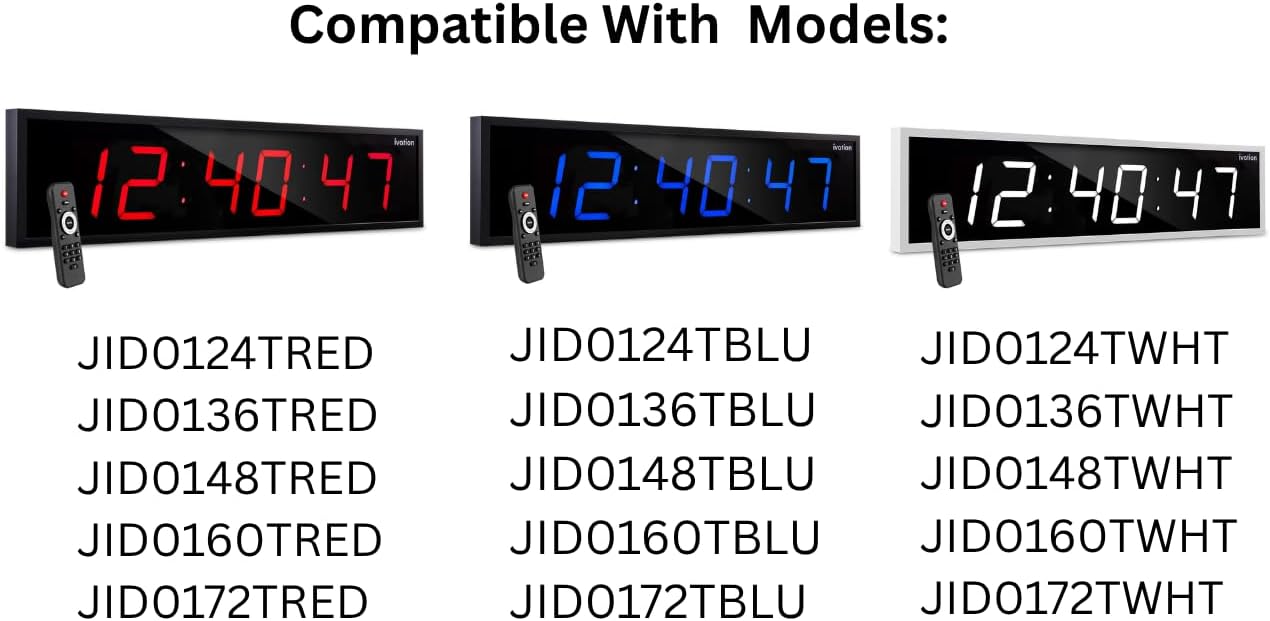
This image illustrates the various Ivation Large Digital LED Timer Clock models that are compatible with this replacement remote control. The clocks are shown in red, blue, and white display colors, each paired with the remote. Below the clocks, a comprehensive list of compatible model numbers is provided for reference.
3. Saita
3.1 Shigar da Baturi
- Nemo sashin baturi a bayan ramut.
- Zamewa buɗe murfin ɗakin baturin.
- Saka batura biyu (2) na AAA alkaline, don tabbatar da daidaiton polarity (+ da -) kamar yadda aka nuna a cikin ɗakin.
- Rufe murfin ɗakin baturi amintacce.
Lura: Koyaushe a maye gurbin batirin biyu a lokaci guda. Kada a haɗa tsoffin batura da sababbi ko nau'ikan batura daban-daban. Cire batura idan ba za a yi amfani da na'urar sarrafawa ta nesa na dogon lokaci ba.
4. Umarnin Aiki
The Ivation replacement remote control features a straightforward button layout for easy operation of your compatible Ivation Large Digital LED Timer Clock. Refer to the diagram below for button identification and functions.

This image provides a clear, labeled diagram of the Ivation replacement remote control. Each button is identified with its name and a brief description of its function, such as 'Clock' for showing time, 'Display' for cycling through time, date, and temperature, 'Mute' for toggling alert sounds, 'Brightness' for adjusting display intensity, 'Timer Functions' for stopwatch, countdown, or alarms, 'F/C' for temperature unit toggle, 'AM/PM 12/24' for time format, and the 'Number Pad' for manual settings.
4.1 Ayyukan Maɓalli
- Agogo: Displays the current time on the clock.
- Nunawa: Cycles through different display modes, such as time, date, and temperature.
- Yi shiru: Toggles alert sounds (e.g., alarm beeps) on or off.
- Haske: Cycles through 6 different brightness levels for the clock display.
- Ƙararrawa: Accesses alarm settings. Press to set or activate alarms.
- Fara/Dakata: Initiates or pauses stopwatch and countdown timer functions.
- Ƙidaya Kasa: Activates the countdown timer function.
- Set/Enter: Confirms selections or enters settings within menus.
- F/C: Yana canza yanayin zafin tsakanin Fahrenheit da Celsius.
- AM/PM 12/24: Cycles the time display between 12-hour (AM/PM) and 24-hour formats.
- Kushin Lamba (0-9): Used to manually input numbers for setting time, date, alarms, or timer durations.
5. Shirya matsala
Idan ka fuskanci matsala da na'urar sarrafa nesa, da fatan za a duba waɗannan hanyoyin magance matsalar:
- Remote baya amsawa:
- Ensure the remote has fresh AAA alkaline batteries installed correctly.
- Check for any obstructions between the remote and the clock's infrared receiver.
- Ensure you are within the effective operating range of the remote (typically up to 20 feet).
- Buttons ba sa aiki:
- Danna maɓallan da ƙarfi.
- Clean the remote's surface if there is any debris that might be obstructing button presses.
- Aiki na wucin gadi:
- Sauya batura da sababbi.
- Avoid strong light sources (like direct sunlight) that might interfere with the infrared signal.
If problems persist after attempting these solutions, please contact Ivation customer support.
6. Ƙayyadaddun bayanai
| Sunan Samfura | JID0TPT01 |
| Alamar | Ivation |
| Fasahar Haɗuwa | Infrared |
| Na'urori masu jituwa | Ivation Large Digital LED Timer Clocks (listed in Section 2) |
| Adadin Maɓalli | 3 (referring to main function buttons, not including number pad) |
| Nau'in Mai Gudanarwa | Ikon Maɓalli |
| Nau'in Baturi | Alkaline AAA (x2) |
| Launi | Baki |
7. Garanti da Tallafawa
For warranty information and customer support, please refer to the documentation provided with your original Ivation Large Digital LED Timer Clock or visit the official Ivation website. Ajiye rasidin sayan ku don da'awar garanti.