
1. Gabatarwa
Na gode da siyaasing the Audizio Laredo Bluetooth Turntable. This manual provides essential information for the safe and correct operation of your device. Please read it thoroughly before use and keep it for future reference.
Mabuɗin fasali:
- Integrated HiFi speakers with 160W total power output.
- Bidirectional Bluetooth for wireless audio streaming (in and out).
- High-quality Audio Technica cartridge for precise playback.
- Supports 7, 10, and 12-inch vinyl records at 33 and 45 RPM.
- Adjustable counterweight on the aluminum tonearm.
- RCA Line Out for external ampmasu magana / masu magana.
- AUX Input for connecting external audio sources.
- Elegant bamboo finish.
Abin da ke cikin Akwatin:
- Audizio Laredo Turntable Unit
- Jagoran Jagora
- Adaftar Wuta
- 45 RPM Adapter for singles
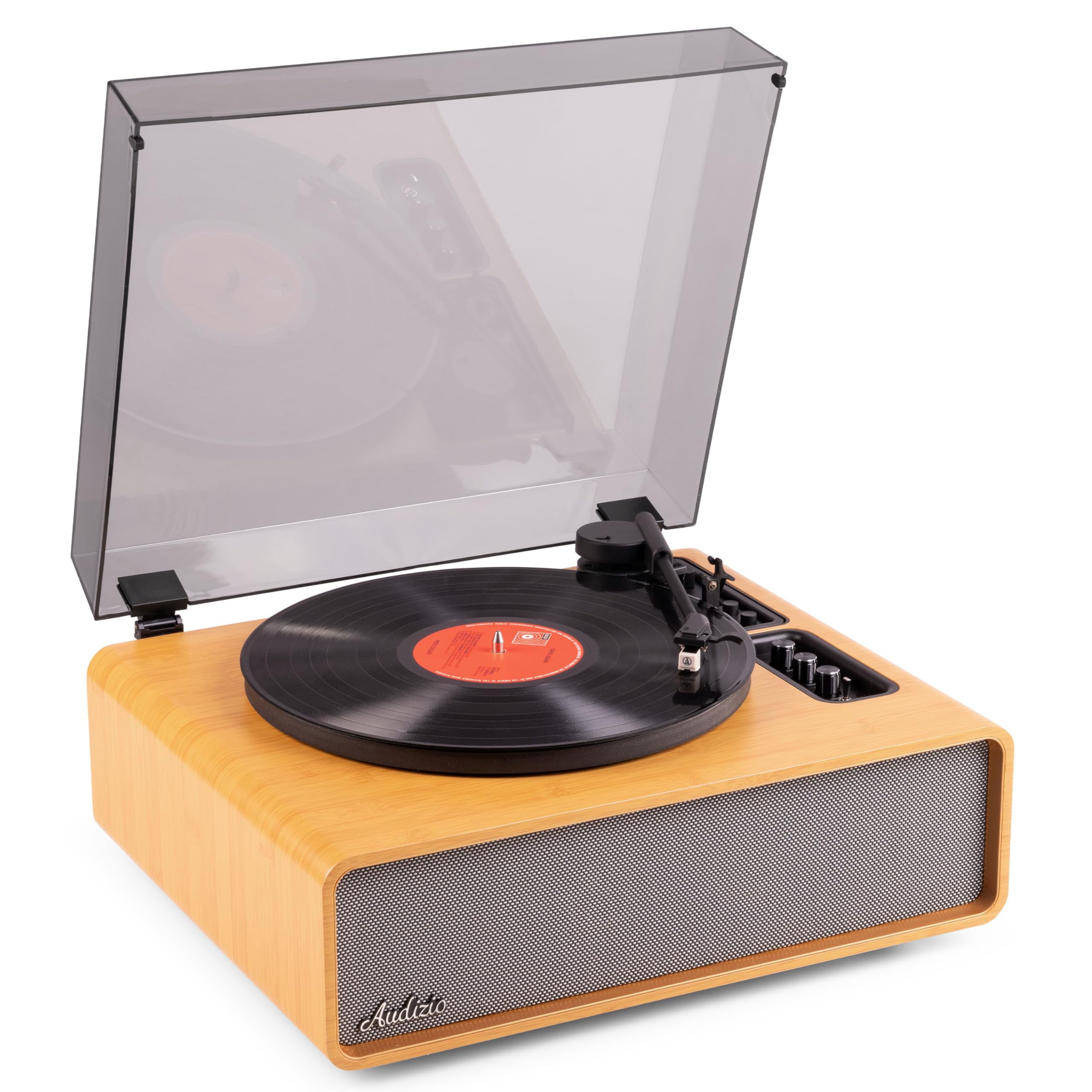
Figure 1.1: Audizio Laredo Turntable, overall view.
2. Umarnin Tsaro
Please read and follow these safety instructions carefully to prevent damage to the unit and ensure your safety.
- Kada a bijirar da naúrar ga ruwan sama ko danshi don hana gobara ko girgiza wutar lantarki.
- Kar a bude casing. Babu kayan aikin da za a iya amfani da su a ciki. A miƙa duk kayan aikin ga ma'aikata masu ƙwarewa.
- Place the unit on a stable, level surface to prevent it from falling.
- Ka kiyaye naúrar daga hasken rana kai tsaye, tushen zafi, da ƙura mai yawa.
- Tabbatar da samun iska mai kyau a kusa da na'urar. Kada a toshe hanyoyin samun iska.
- Yi amfani da adaftar wutar lantarki da aka bayar kawai.
- Cire na'urar a lokacin hadari na walƙiya ko lokacin da ba a yi amfani da shi na dogon lokaci ba.
3. Samfurin Ya Ƙareview
Familiarize yourself with the components and controls of your Audizio Laredo turntable.
Babban abubuwan:
- Platter: Supports the vinyl record.
- Sautin hannu: Rike da harsashi da stylus.
- Cartridge & Stylus: Reads the grooves of the record. (Audio Technica ATN-3600)
- Rufin ƙura: Protects the platter and tonearm from dust.
- Haɗaɗɗen jawabai: For direct audio playback.
- Kwamitin Gudanarwa: For power, volume, tone, and mode selection.
- Haɗin Baya: RCA Line Out, AUX In, Power Input.

Hoto 3.1: Sama view of the turntable with key components visible.

Figure 3.2: Control Panel for volume, bass, and treble adjustments.

Figure 3.3: Audio Technica ATN-3600 Cartridge and Stylus.

Figure 3.4: Tonearm base with speed and auto-stop controls.

Figure 3.5: Rear connection panel.
4. Saita
4.1 Buɗewa
- Carefully remove the turntable from its packaging.
- Remove all protective materials, including the stylus guard.
- A ajiye marufin don jigilar kaya ko ajiya a nan gaba.
4.2 Wuri
- Place the turntable on a stable, level surface to prevent vibrations and ensure proper playback.
- Avoid placing the unit near strong magnetic fields, heat sources, or areas with high humidity.
4.3 Dust Cover Installation
- Align the hinges of the dust cover with the slots on the back of the turntable.
- Gently push down until the cover is securely in place.
- The dust cover can be removed for playback if desired.

Figure 4.1: Turntable with dust cover.
4.4 Haɗin Wuta
- Connect the power adapter to the DC IN port on the rear of the turntable.
- Plug the adapter into a suitable wall outlet (220V).
4.5 Tonearm and Cartridge Setup
- The Audio Technica cartridge is pre-installed.
- The tonearm features an adjustable counterweight. Refer to the detailed instructions in the included manual for precise counterweight adjustment to optimize tracking force.
5. Umarnin Aiki
5.1 Playing a Record
- Place a vinyl record on the platter. If playing a 7-inch single, use the included 45 RPM adapter.
- Select the appropriate speed (33 or 45 RPM) using the speed selector switch near the tonearm base.
- A hankali ɗaga hannun riga ta amfani da maƙallin nuna alama.
- Position the tonearm over the desired track of the record.
- Slowly lower the tonearm using the cueing lever. The stylus will make contact with the record, and playback will begin.
- At the end of the record, the auto-stop function will automatically stop the platter rotation. Lift the tonearm and return it to its rest.

Figure 5.1: Playing a vinyl record.
5.2 Bluetooth Operation (Bidirectional)
The Laredo turntable supports both Bluetooth input (receiving audio from a device) and Bluetooth output (sending audio to a Bluetooth speaker/headphones).
Bluetooth Input (BT IN):
- Press the MODE/POWER button to select Bluetooth mode. The LED indicator will flash.
- On your smartphone or tablet, enable Bluetooth and search for 'Audizio Laredo'.
- Select the turntable to pair. Once connected, the LED will glow solid.
- You can now stream audio from your device to the turntable's integrated speakers.
Bluetooth Output (BT OUT):
- Ensure your Bluetooth headphones or speaker are in pairing mode.
- Set the BT OUT switch (located near the tonearm base) to 'ON'.
- The turntable will automatically search for and connect to the nearest Bluetooth audio device.
- Once connected, the audio from your vinyl record will be transmitted to your Bluetooth device.

Figure 5.2: Bidirectional Bluetooth functionality.
5.3 shigarwar AUX
- Connect an external audio device (e.g., MP3 player, CD player) to the AUX IN port on the rear of the turntable using a 3.5mm audio cable.
- Press the MODE/POWER button to select AUX mode.
- Audio from the external device will play through the turntable's speakers.
5.4 RCA Line Out
- To connect the turntable to an external amplifier or powered speakers, use an RCA cable (not included) to connect the LINE OUT ports on the rear of the turntable to the corresponding input on your audio system.
- Ensure the 'Speaker ON/OFF' switch on the rear is set to 'OFF' if you only want sound from external speakers.
5.5 Ikon Sauti da Sauti
- Use the VOLUME knob on the control panel to adjust the overall playback volume.
- Adjust the BASS and TREBLE knobs to fine-tune the audio output to your preference.
6. Kulawa
6.1 Tsabtace Sashen
- Wipe the dust cover and cabinet with a soft, dry cloth.
- Kada a yi amfani da masu tsaftacewa, kakin zuma, ko kaushi.
- For the platter, use a slightly damp zane da bushe sosai.
6.2 Stylus Care and Replacement
- The stylus is a delicate component. Handle it with care.
- Clean the stylus regularly using a soft brush designed for stylus cleaning, brushing from back to front.
- A stylus typically lasts for approximately 300-500 hours of playback. If you notice a decrease in sound quality or increased skipping, it may be time to replace the stylus.
- Replacement styli (e.g., Audio Technica ATN-3600L or compatible) can be purchased from authorized dealers. Refer to the detailed instructions provided with the replacement stylus for installation.
7. Shirya matsala
If you encounter issues with your turntable, please consult the following table before contacting support.
| Matsala | Dalili mai yiwuwa | Magani |
|---|---|---|
| Babu iko | Power adapter not connected; Power outlet not working. | Ensure power adapter is securely connected to the unit and a working outlet. |
| Babu sauti daga masu magana | Volume too low; Speaker ON/OFF switch is OFF; Incorrect mode selected. | Increase volume; Set 'Speaker ON/OFF' switch to ON; Select correct input mode (Phono, BT IN, AUX). |
| Skipping records | Record is dirty or damaged; Stylus is worn or dirty; Turntable not level; Tracking force incorrect. | Clean record; Clean or replace stylus; Place turntable on a level surface; Adjust tonearm counterweight. |
| Abubuwan haɗin haɗin Bluetooth | Device too far; Turntable not in pairing mode; Interference. | Ensure devices are within range; Re-enter pairing mode; Turn off other Bluetooth devices. |
| Karyawar sauti | Volume too high; Stylus worn; Record damaged. | Reduce volume; Replace stylus; Try a different record. |
8. Ƙayyadaddun bayanai
Technical specifications for the Audizio Laredo Turntable.
| Siffar | Ƙayyadaddun bayanai |
|---|---|
| Sunan Samfura | Laredo (101.537) |
| Girma (L x W x H) | 43.2 x 43.2 x 21 cm (17 x 17 x 8.3 inci) |
| Nauyin samfur | 7.65 kg (16.86 lbs) |
| Kayan abu | Wood (Bamboo finish) |
| Gudun Juyawa | 33 RPM, 45 RPM |
| Nau'in Katun | Audio Technica (ATN-3600) |
| Nau'in Motoci | Belt Drive |
| Tsarin sigina | Analog |
| Hadin Kan Magana | Yes, 160W total output |
| Sigar Bluetooth | 5.4 (Bidirectional) |
| Haɗuwa | Bluetooth (In/Out), RCA Line Out, AUX In |
| Tushen wutar lantarki | Wutar Lantarki |
| Voltage | 220 Volts |
| Na'urori masu jituwa | Speakers, Headphones, Smartphone, Tablet |
9. Garanti da Tallafawa
9.1 Bayanin Garanti
This Audizio Laredo Turntable comes with a Garanti na shekaru 2 from the date of purchase. This warranty covers manufacturing defects and faults under normal use. It does not cover damage caused by misuse, accidents, unauthorized modifications, or normal wear and tear (e.g., stylus wear).
Da fatan za a riƙe shaidar siyan ku don da'awar garanti.
9.2 Tallafin Abokin Ciniki
If you have any questions, require technical assistance, or need to make a warranty claim, please contact your retailer or visit the official Audizio website don albarkatun tallafi da bayanin lamba.
Official Audizio Website: www.audizio.com