
1. Samfurin Ya Ƙareview
The Osram Bayamo LED Ceiling Fan 590mm is designed to provide both efficient air circulation and flexible lighting for small to medium-sized rooms. Its compact design integrates discreetly into various interior styles, resembling a modern ceiling light fixture. This unit features adjustable color temperature (CCT) from 3000K to 6500K, full RGB color control, and six fan speeds, all controllable via the included remote. It delivers a powerful airflow of up to 1,935 m³/h and a dimmable light output of 2,530 lumens.
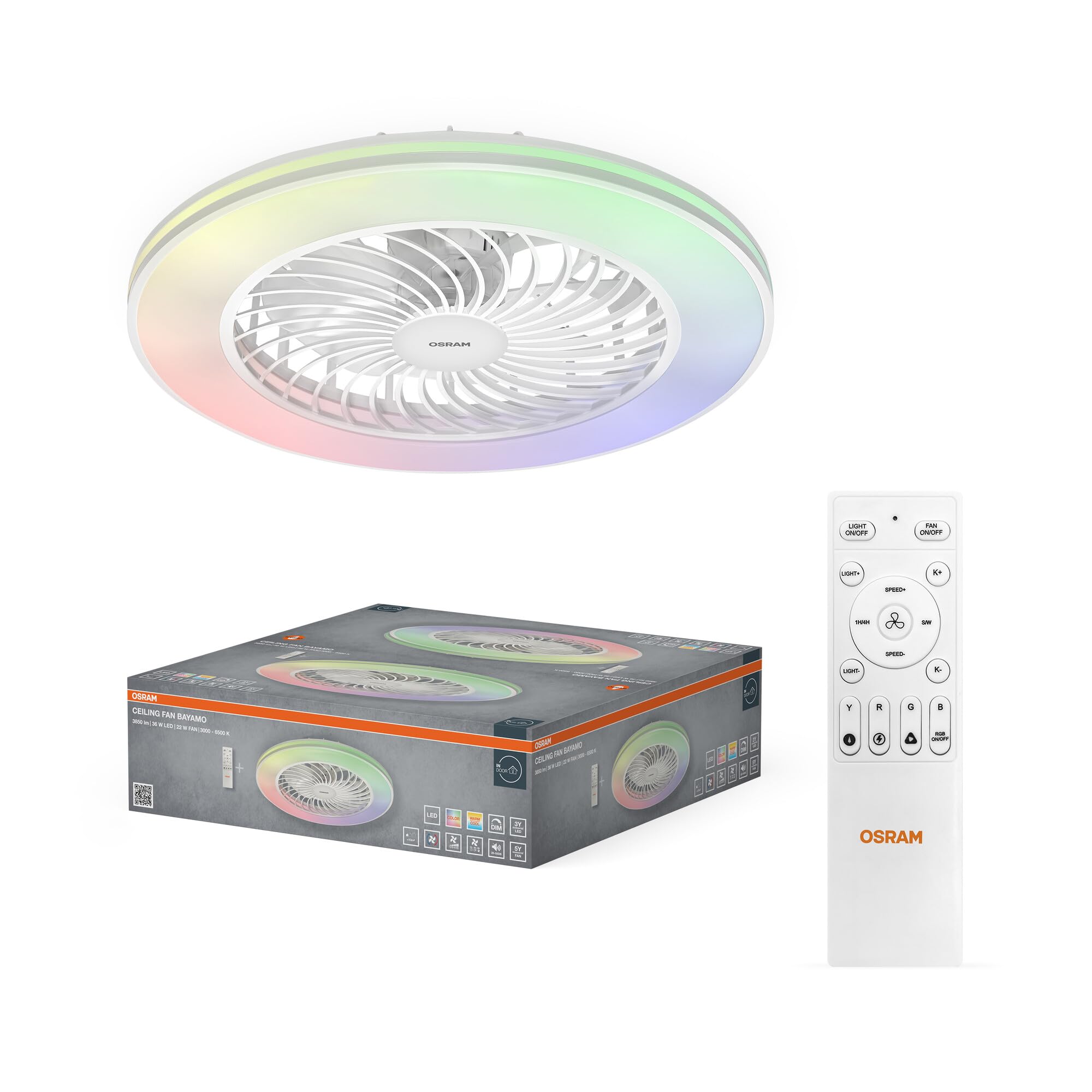
Image: Osram Bayamo LED Ceiling Fan, showcasing its sleek design with integrated light and fan blades, accompanied by its remote control.
2. Umarnin Tsaro
Please read all safety instructions carefully before installation and use. Retain this manual for future reference.
- Tsaron Wutar Lantarki: Installation must be performed by a qualified electrician or a person with electrical knowledge to avoid electric shock. Ensure the main power supply is switched off before installation or maintenance.
- hawa: The ceiling fan must be securely mounted to a structural part of the ceiling capable of supporting its weight.
- Share: Ensure there is adequate clearance between the fan blades and any obstacles (walls, furniture) to prevent injury or damage.
- Samun iska: Do not operate the fan in areas with high humidity or direct water exposure.
- Tushen Haske: This product contains a non-replaceable LED light source. Do not attempt to disassemble or replace the LED components.
- Yara da Dabbobi: Ka kiyaye yara da dabbobin gida daga fanfo yayin aiki.
3. Jagoran Girkawa
The installation process for the Osram Bayamo LED Ceiling Fan is similar to that of a standard ceiling light. However, careful attention to electrical connections is required.
3.1 Components Check
Before beginning, ensure all components listed in the packaging are present: Ceiling fan unit, remote control, mounting hardware.
3.2 Haɗa Fan
- Kashe Wuta: Disconnect power at the main circuit breaker before starting installation.
- Amintaccen Tushe: Attach the mounting bracket to the ceiling joist or a suitable electrical junction box using the provided screws. Ensure it is firmly secured.
- Haɗin Wutar Lantarki: Connect the fan's electrical wires to your household wiring. The product uses screw terminals for connection. It is recommended to carefully manage the wiring within the plastic housing, as space can be limited.
- Kebul na Tsaro: If provided, attach the safety cable to a secure point on the ceiling structure as an additional safety measure.
- Haɗa Na'urar Fanka: Carefully lift the fan unit and align it with the mounting bracket. Twist or secure the fan unit to the base as per the design, ensuring it locks into place.
Note: If you are unsure about any step of the electrical installation, consult a qualified electrician.
4. Umarnin Aiki
The Osram Bayamo LED Ceiling Fan is operated using the included remote control. Ensure batteries are inserted correctly into the remote control.

Image: Remote control functions diagram, illustrating the purpose of each button for comprehensive control over the fan and lighting features.
4.1 Haɗa Na'ura Mai Nesa
Upon first use or after a power outage, the remote control may need to be paired with the fan unit. This is a critical step not always explicitly stated in generic instructions.
- Ensure the main power to the fan is switched OFF.
- Switch the main power to the fan ON.
- Within the first 30 seconds of switching the power ON, press and hold the central fan button (often labeled with a fan icon or 'FAN ON/OFF') on the remote control for several seconds until the fan responds (e.g., a beep or a light flash).
- The remote control should now be paired and ready for use.
4.2 Ayyukan Haske
- Kunnawa/Kashe: Press the 'LIGHT ON/OFF' button to turn the light on or off.
- Dimming: Use the 'LIGHT+' and 'LIGHT-' buttons to increase or decrease the brightness (0-100%).
- Zazzabi Launi (CCT): Use the 'K+' and 'K-' buttons to adjust the color temperature between 3000K (warm white) and 6500K (cool white).
- Launukan RGB: Press the 'RGB ON/OFF' button to activate or deactivate RGB lighting. Use the 'Y' (Yellow), 'R' (Red), 'G' (Green), 'B' (Blue) buttons to select specific colors or cycle through them.
- Lighting Scene Modes: Some remotes may include buttons for pre-set lighting scenes (e.g., 'Horse racing', 'Lighting', 'Phantom'). Press these to switch between different dynamic light effects.
4.3 Fan Functions
- Fan Kunna/Kashe: Press the 'FAN ON/OFF' button to turn the fan on or off.
- Gudun Masoya: Use the 'SPEED+' and 'SPEED-' buttons to adjust between 6 fan speeds. Speed 1 is the lowest, Speed 6 is the highest.
- Seasonal Mode (Blade Rotation Direction): Press the 'SUMMER/WINTER' button to reverse the fan blade rotation. In summer, blades rotate counter-clockwise to create a cooling breeze. In winter, blades rotate clockwise to circulate warm air downwards.
- Mai ƙidayar lokaci: Press the '1H', '4H', or '8H' buttons to set the fan (and/or light) to turn off automatically after 1, 4, or 8 hours, respectively.

Image: Seasonal comfort illustration, demonstrating how the fan's reversible rotation helps cool in summer and distribute heat in winter.

Image: Ultra-silent operation, showing a person sleeping undisturbed and a graph indicating low noise levels (25 dB for quiet room, 55 dB for office).
5. Kulawa
Kulawa na yau da kullun yana tabbatar da kyakkyawan aiki da tsawon rayuwar fann rufin ku.
- Tsaftacewa: Ensure the power is off before cleaning. Wipe the fan and light fixture with a soft, damp zane. Kada a yi amfani da masu tsabtace abrasive ko sauran ƙarfi.
- Cire kura: Periodically clean dust from the fan blades and motor housing to prevent accumulation, which can affect performance and cause noise.
- Dubawa: Periodically check all mounting hardware for tightness. Loose connections can cause wobbling or noise.
6. Shirya matsala
If you encounter issues with your Osram Bayamo LED Ceiling Fan, refer to the following table for common problems and solutions.
| Matsala | Dalili mai yiwuwa | Magani |
|---|---|---|
| Fan or Light does not respond to remote control. | Remote not paired; dead batteries; obstruction. | 1. Ensure remote batteries are fresh and correctly inserted. 2. Re-pair the remote control (see Section 4.1). 3. Ensure no obstructions between remote and fan. |
| Fan makes a high-pitched noise. | Loose mounting screws; motor issue; dust accumulation. | 1. Check and tighten all mounting screws. 2. Clean fan blades and motor housing from dust. 3. If noise persists, contact customer support. |
| Fan yana rawar jiki. | Loose mounting; unbalanced blades. | 1. Ensure mounting bracket and fan unit are securely fastened. 2. Check for any bent or damaged fan blades. |
| Haske baya kunnawa | Power issue; LED failure. | 1. Check power supply to the fan. 2. If fan works but light doesn't, contact customer support as LED is non-replaceable. |
7. Bayanan fasaha
| Siffar | Ƙayyadaddun bayanai |
|---|---|
| Alamar | Osram |
| Lambar Samfura | 4058075858015 |
| Launi | White|Black |
| Kayan abu | Acrylonitrile Butadiene Styrene Copolymer (ABS) |
| Salo | 58W |
| Siffar Tsayawa | Hasken Rufi |
| Nau'in Daki | Cikin gida |
| Girman samfur (L x W x H) | 59L x 59W x 15.6 cm |
| Takamaiman Amfani | Gida |
| Tushen wutar lantarki | AC (Madaidaicin Yanzu) |
| Hanyar sarrafawa | Ikon nesa |
| Nau'in kwan fitila | LED |
| Yawan kwararan fitila | 1 |
| Voltage | 220 Volts |
| Launi mai haske | RGB |
| Watatage | 58 Watts |
| Haskakawa Tasiri | 2530 lm |
| Alamar Makamashi | F |
| Nau'in hawa | Rufin Dutsen |
| Zazzabi Launi | 3000-6500 Kelvin (Adjustable) |
| Max. Luminous Flux | 2530 Lumen |
| Ƙimar Airflow | 1935m³/h |
| Tsawon rayuwa | 50,000 hours |
| Nauyin Abu | 2980 Grams |
| Ƙasar Asalin | China |
8. Garanti da Tallafawa
Osram products are manufactured to high-quality standards and are backed by a manufacturer's warranty. For specific warranty details, please refer to the documentation included with your purchase or visit the official Osram website.
Tallafin Abokin Ciniki
If you have any questions, require technical assistance, or need to report a problem with your Osram Bayamo LED Ceiling Fan, please contact Osram customer support through their official website or the retailer from whom you purchased the product. Please have your model number (4058075858015) and proof of purchase ready when contacting support.