
1. Muhimmiyar Sanarwa
Please carefully check the store name and ensure you are purchasing products sold by "LUZHAN." We have received customer feedback stating that products received did not match the description and were of poor quality. Upon investigation, we found that these customers did not purchase the products from us. To prevent such incidents from happening again in the future and to avoid unnecessary misunderstandings, please carefully verify the store name LUZHAN.

Image: Important notice to verify seller name LUZHAN for authentic products.
2. Sama daview
The XIAOMI POCO X8 Pro Max 5G is a high-performance smartphone designed for advanced users. It features a powerful Mediatek Dimensity 9500s processor, a vibrant 1.5K 120Hz AMOLED display, a large 8500mAh battery with 100W HyperCharge, and a 50 MP Light Fusion 600 camera system with OIS. This manual provides essential information for setting up and operating your device.
Hoto: Gaba da baya view of the POCO X8 Pro Max 5G smartphone.
Bidiyo: An gamaview of the POCO X8 Pro Series, highlighting key features and design.
3. Saita
3.1 Abin da ke cikin Akwatin
- XIAOMI POCO X8 Pro Max 5G Smartphone
- Caja
- Kariyar Allo (an riga an yi amfani da shi ko an haɗa shi)
3.2 Saitin Na'urar Farko
- Kunna Wuta: Press and hold the power button located on the side of the device until the XIAOMI logo appears.
- Harshe da Yanki: Bi umarnin da ke kan allo don zaɓar harshen da yankin da kuka fi so.
- Haɗa zuwa Wi-Fi: Select your Wi-Fi network and enter the password to connect to the internet. This is necessary for initial setup and software updates.
- Asusun Google: Shiga tare da asusun Google ko ƙirƙirar sabo. Wannan yana da mahimmanci don shiga Google Play Store da sauran ayyukan Google.
- Canja wurin bayanai: If you are upgrading from another device, you may have the option to transfer your data (apps, photos, contacts) during this stage.
- Saitin Tsaro: Set up your preferred security method, such as a PIN, pattern, password, or fingerprint. The device supports an ultrasonic fingerprint sensor.
- Cikakken Saita: Follow any remaining prompts to finalize the setup process.
3.3 SIM Card and eSIM Setup
The POCO X8 Pro Max 5G supports physical SIM cards and eSIM functionality.
- Physical SIM: Use the provided SIM ejector tool to open the SIM tray. Insert your Nano-SIM card(s) into the tray, ensuring proper orientation. Close the tray securely.
- eSIM: For eSIM activation, navigate to Settings > Network & internet > SIMs and follow the instructions to add an eSIM profile provided by your carrier.
4. Umarnin Aiki
4.1 Abubuwan Nuni
Your device features a 6.83-inch 1.5K ultra-bright AMOLED display with a 120Hz refresh rate for smooth visuals and a 24x super resolution touch for enhanced responsiveness. It also includes eye protection features and Corning Gorilla Glass 7i for durability.
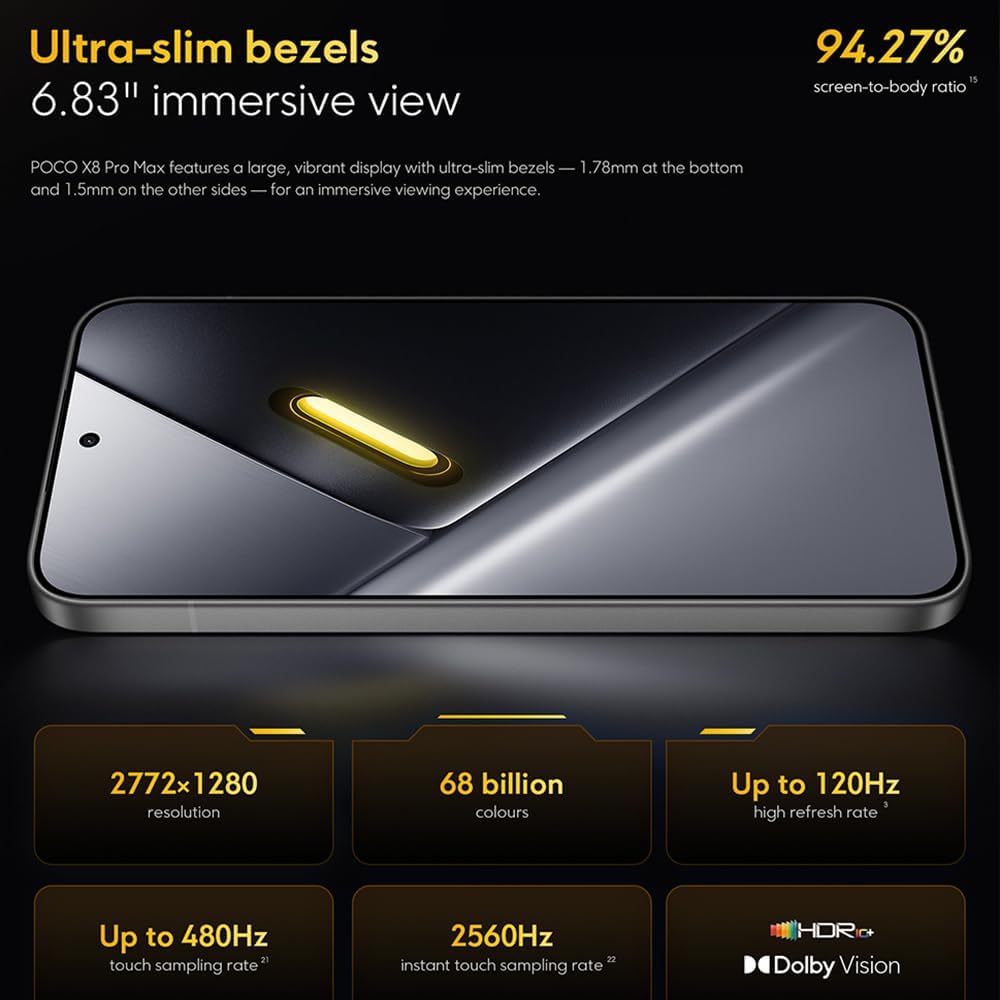
Image: The 6.83-inch 1.5K ultra-bright AMOLED display with minimal bezels.
4.2 Aiki
Powered by the Mediatek Dimensity 9500s chipset (3nm, 4+4 All Big Core architecture, NPU890 AI processor), the POCO X8 Pro Max 5G delivers high performance. The POCO 3D IceLoop cooling system ensures efficient heat dissipation, maintaining optimal performance during intensive tasks like gaming.

Image: Diagram illustrating the Mediatek Dimensity 9500s flagship platform.

Image: Illustration of the 5800mm² ultra-large LHP area for cooling.
4.3 Tsarin Kamara
The device features a 50 MP Light Fusion 600 main camera with OIS (Optical Image Stabilization) and an 8 MP ultra-wide camera. It supports portrait mode with bokeh + HDR and dynamic video-to-still conversion.

Image: Close-up of the 50 MP main camera and 8 MP ultra-wide camera system.
4.4 Baturi da Caja
Equipped with a massive 8500 mAh (typical) battery, the POCO X8 Pro Max 5G offers extended usage. It supports 100W HyperCharge, allowing for rapid recharging. A 16% ultra-high carbon-silicon content contributes to its high energy density.

Image: Illustration highlighting the massive 8500mAh battery capacity.

Image: Visual representation of the 100W HyperCharge technology.
4.5 Audio
The device features symmetrical dual stereo speakers (1115F) for a balanced and immersive audio experience.
4.6 Software
The POCO X8 Pro Max 5G comes with Xiaomi HyperOS 3 installed, offering an optimized and user-friendly interface based on Android 16.
5. Kulawa
5.1 Tsabtace Na'urar ku
- Yi amfani da laushi mai laushi mara lullube don goge allon fuska da bangon baya.
- A guji amfani da sinadarai masu tsauri, kayan shafa, ko feshin iska.
- Don taurin kai, dampen zane mai ruwa ko mai tsabtace allo wanda aka tsara don kayan lantarki.
5.2 Juriyar Kura da Ruwa
The device is certified for IP68 dust and water resistance. This means it can withstand immersion in up to 2 meters of water for 30 minutes under specific laboratory conditions. However, water and dust resistance may deteriorate over time with normal wear and tear. The warranty does not cover liquid damage. Avoid exposing the device to hot water, saltwater, or other liquids.

Image: Visual representation of the IP68 dust and water resistance.
5.3 Sabunta software
Bincika akai-akai don shigar da sabunta software don tabbatar da cewa na'urarka tana da sabbin fasalolin, facin tsaro, da haɓaka aiki. Yawancin lokaci kuna iya samun wannan zaɓi a ciki Settings > About phone > System update.
6. Shirya matsala
6.1 Batutuwa gama gari da Magani
- Na'urar baya kunna: Tabbatar cewa batirin ya yi caji. Haɗa na'urar da caja sannan ka jira na ɗan lokaci kafin ka sake kunna ta.
- Allon baya amsa: Try restarting the device by holding the power button for an extended period (e.g., 10-15 seconds) until it reboots.
- Apps suna yin karo: Share cache na app ɗin da ke da matsala (Saituna> Apps> [Sunan App]> Ajiye> Share cache) or reinstall the app. Ensure your device software is up to date.
- Rashin rayuwar baturi: Check background app usage, reduce screen brightness, disable unnecessary features like GPS or Bluetooth when not in use, and ensure your software is updated.
- Matsalolin haɗin yanar gizo: Restart your device. Check if your SIM card is properly inserted. Toggle Airplane Mode on and off. Reset network settings (Saituna > Tsari > Sake saitin zaɓuɓɓuka > Sake saita Wi-Fi, wayar hannu & Bluetooth).
6.2 Sake saitin masana'anta
If you encounter persistent issues, a factory reset may be necessary. Gargadi: Wannan zai shafe duk bayanai akan na'urarka. Ajiye mahimman bayanai kafin a ci gaba. Je zuwa Saituna > Tsari > Sake saitin zaɓuɓɓuka > Goge duk bayanai (sake saitin masana'anta) kuma bi umarnin kan allo.
7. Ƙayyadaddun bayanai
| Siffar | Ƙayyadaddun bayanai |
|---|---|
| Alamar | XIAOMI |
| Sunan Samfura | POCO X8 Pro Max 5G |
| Tsarin Aiki | Android 16 (with Xiaomi HyperOS 3) |
| Ƙarfin Ajiye Ƙwaƙwalwar Ƙwaƙwalwa | 512 GB |
| Girman allo | Inci 6.83 |
| Nau'in Nuni | AMOLED, 1.5K, 120Hz refresh rate |
| Fasahar salula | 5G |
| Launi | Noir (Black) |
| Nau'in Haɗawa | USB Type C |
| Tsaro na Biometric | Fingerprint Recognition (Ultrasonic) |
| Ƙarfin baturi | 8500 mAh (Lithium-polymer) |
| Cajin | 100W HyperCharge |
| Babban Kamara | 50 MP Light Fusion 600 with OIS |
| Ultra-wide Camera | 8 MP |
| Mai sarrafawa | Mediatek Dimensity 9500s |
| Dust and Water Resistance | IP68 |
| Shekarar Model | 2025 |
| Ƙasar Asalin | China |
8. Garanti da Tallafawa
For detailed warranty information and customer support, please refer to the warranty card included with your product or visit the official XIAOMI website. Ajiye shaidar siyan ku don da'awar garanti.
Online resources and FAQs may also be available on the XIAOMI support portal.