1. Gabatarwa
This manual provides comprehensive instructions for the setup, operation, maintenance, and troubleshooting of your COBY CR-A78 AM/FM Digital Alarm Clock with Time Projector. Please read this manual thoroughly before using the device to ensure proper function and to maximize your user experience. Keep this manual for future reference.
2. Samfurin Ya Ƙareview
The COBY CR-A78 is a versatile digital alarm clock featuring an AM/FM radio tuner and a unique time projection function. It is designed to provide reliable timekeeping, alarm functions, and radio entertainment, with the added convenience of projecting the current time onto a wall or ceiling.
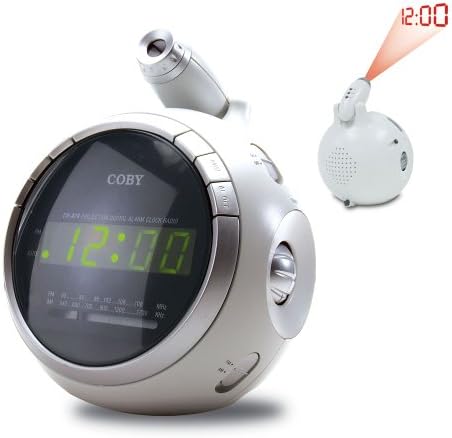
Hoto 2.1: Gaba view of the COBY CR-A78 digital alarm clock, showing the green LED display and the adjustable time projector. An inset image illustrates the time '12:00' being projected onto a surface.
3. Features
- AM/FM Digital Tuner: For listening to your favorite radio stations.
- Large Green LED Display: Provides clear visibility of the time.
- Integrated Time Projector: Projects the current time onto a wall or ceiling for easy viewing.
- Ayyukan Ƙararrawa Biyu: Set two independent alarms for different wake-up times.
- Aiki na Snooze: Yana ba da damar dakatar da ƙararrawa na ɗan lokaci.
- Lokacin Barci: Fall asleep to music with an automatic shut-off feature.
- Ajiyayyen Baturi: Yana kula da saitunan lokaci da faɗakarwa yayin wutar lantarkitages (requires 9V battery, not included).
4. Abubuwan Kunshin
- COBY CR-A78 AM/FM Digital Alarm Clock
- Adaftar wutar AC
- Jagorar mai amfani (wannan takaddar)
5. Saita
5.1. Haɗin Wuta
- Insert the small end of the AC power adapter into the DC IN jack located on the back of the unit.
- Plug the other end of the AC power adapter into a standard wall outlet (AC 120V, 60Hz).
- The unit will power on, and the display will flash, indicating it is ready for time setting.
5.2. Sanya Ajiyayyen Baturi
A 9-volt battery (not included) can be installed to provide backup power for the clock and alarm settings during a power interruption.
- Nemo murfin ɗakin baturi a ƙasan na'urar.
- Remove the cover by sliding it off.
- Connect a 9-volt battery to the battery connector inside the compartment, observing polarity (+ and -).
- Sanya batirin a cikin ɗakin kuma a maye gurbin murfin da kyau.
6. Umarnin Aiki
6.1. Kafa Lokaci
- Latsa ka riƙe LOKACI SET maɓalli har sai lambobi sun fara walƙiya.
- Danna maɓallin SAA maɓalli akai-akai don daidaita sa'a. Kula da alamar PM don daidaitaccen saitin AM/PM.
- Danna maɓallin MINTI button repeatedly to adjust the minute.
- Danna maɓallin LOKACI SET sake maɓalli don tabbatarwa da fita yanayin saitin lokaci.
6.2. Kafa theararrawa
The CR-A78 features two independent alarms, Alarm 1 and Alarm 2.
- Latsa ka riƙe Ƙararrawa 1 SET (ko Ƙararrawa 2 SET) button until the alarm hour digits flash.
- Danna maɓallin SAA maɓallin don saita lokacin ƙararrawa da ake so.
- Danna maɓallin MINTI maballin don saita minti na ƙararrawa da ake so.
- Danna maɓallin Ƙararrawa 1 SET (ko Ƙararrawa 2 SET) button again to confirm the alarm time.
- To activate the alarm, slide the Ƙararrawa 1 ON / KASHE (ko Ƙararrawa 2 ON / KASHE) switch to the 'ON' position. Select 'BUZZER' for a beeping alarm or 'RADIO' to wake to the radio.
6.3. Amfani da Aikin Snooze
Lokacin da ƙararrawa ke sauti, latsa faɗakarwar gajeren barci button. The alarm will temporarily stop and sound again after approximately 9 minutes. To turn off the alarm completely, press the RANAR ALMAR / KASHE switch to 'OFF'.
6.4. Aikin Rediyo (AM/FM)
- Danna maɓallin A KASHE/KASHE RADIO maɓallin don kunna rediyo.
- zamewa da AM/FM switch to select the desired band.
- Juyawa da TUNING knob to find your desired station.
- Daidaita ƙara ta amfani da MURYA dunƙule.
- Don kashe rediyo, danna maɓallin A KASHE/KASHE RADIO button sake.
6.5. Using the Time Projector
- Locate the projector lens on top of the unit.
- Danna maɓallin KUNNE/KASHE AIKIN button to activate the time projection.
- Rotate the projector lens to adjust the focus of the projected time.
- Adjust the angle of the projector arm to direct the time onto your desired surface (wall or ceiling).
- Danna maɓallin KUNNE/KASHE AIKIN button again to turn off the projection.
7. Kulawa
- Tsaftacewa: Yi amfani da laushi, bushe bushe don tsaftace wajen naúrar. Kada a yi amfani da masu tsabtace abrasive ko kaushi.
- Kulawar Lens: Gently wipe the projector lens with a soft, lint-free cloth if it becomes dusty.
- Wuri: Sanya naúrar a kan barga, fili mai faɗi nesa da hasken rana kai tsaye, tushen zafi, da danshi mai yawa.
- Madadin Baturi: Replace the 9-volt backup battery annually or if the unit experiences frequent power outages to ensure continuous backup functionality.
8. Shirya matsala
| Matsala | Dalili mai yiwuwa | Magani |
|---|---|---|
| Unit baya kunnawa. | AC adapter not properly connected. | Ensure the AC adapter is securely plugged into the unit and a working wall outlet. |
| Ƙararrawa baya yin sauti. | Ba a kunna ƙararrawa ko saita ta ba daidai ba. | Verify the alarm time is set correctly and the ALARM ON/OFF switch is in the 'ON' position (BUZZER or RADIO). |
| liyafar rediyo ba ta da kyau. | Antenna not extended or unit too close to interference. | Extend the FM wire antenna fully. For AM, rotate the unit for best reception. Move away from other electronic devices. |
| Projected time is blurry. | Projector focus not adjusted. | Rotate the projector lens to adjust the focus until the time is clear. |
| Lokaci/saituna sun ɓace bayan ikon kutage. | Backup battery is dead or not installed. | Install a fresh 9-volt battery or replace the existing one. |
9. Ƙayyadaddun bayanai
| Siffar | Ƙayyadaddun bayanai |
|---|---|
| Alamar | Coby |
| Samfura | CR-A78 |
| Nau'in Nuni | LED na Dijital (Kore) |
| Rediyo Tuner | AM/FM Analog |
| Tushen wutar lantarki | AC 120V, 60Hz |
| Ajiyayyen baturi | Batirin 1 x 9V (ba a haɗa shi ba) |
| Girman samfur (L x W x H) | 12.7 x 10.16 x 15.24 cm (5 x 4 x 6 inci) |
| Nauyin samfur | 567 g (1.25 lbs) |
| Launi | Azurfa |
10. Garanti da Tallafawa
For warranty information or technical support, please refer to the documentation provided at the time of purchase or contact Coby customer service. Keep your purchase receipt as proof of purchase for any warranty claims.


