1. Gabatarwa
This manual provides comprehensive instructions for the safe and effective use of the PeakTech True RMS P 3131 Clamp Meter with Multimeter. This device is designed for measuring AC/DC currents without circuit interruption, as well as AC/DC voltage and resistance, with continuity testing capabilities. It features a 3 3/4 digit LCD display with True RMS measurement for accurate readings.
Da fatan za a karanta wannan littafin jagora sosai kafin a yi amfani da na'urar kuma a ajiye shi don amfani a nan gaba.
2. Bayanin Tsaro
WARNING: Improper use of this meter can cause damage, shock, injury, or death. Always follow all safety precautions.
- Koyaushe riko da lambobin aminci na gida da na ƙasa.
- Do not use the meter if it appears damaged or if the insulation on test leads is compromised.
- Ensure the meter is set to the correct function and range before making measurements.
- Guji tuntuɓar da'irori kai tsaye. Yi amfani da kayan kariya masu dacewa (PPE).
- The device is rated for CAT II 600V. Do not exceed these limits.
- Sauya batura da sauri lokacin da ƙaramin baturi ya bayyana.
- Do not operate the meter in explosive atmospheres.
3. Samfurin Ya Ƙareview da kuma abubuwan da aka gyara
The PeakTech P 3131 is a robust and reliable clamp meter. Familiarize yourself with its main components:

Hoto 1: Gaba view of the PeakTech P 3131 Clamp Meter, showing the clamp jaw, function selector, LCD display, and input terminals.
- Clamp Muƙamuƙi: For non-contact AC/DC current measurement.
- Function Selector Dial: To select measurement modes (A~, A=, V~, V=, Ω/Continuity, OFF).
- Nuni LCD: Yana nuna ma'auni, raka'a, da masu nuni.
- Maɓalli: AC/DC, ZERO, H/MAX (Data Hold/Max Hold).
- Terarshen Input: COM (common) and VΩ (voltage/resistance) for test leads.
- Tsaron Hannu: Provides protection against accidental contact.
4. Saita
4.1 Shigar da Baturi
The PeakTech P 3131 requires two 1.5V AAA batteries (included). To install or replace batteries:
- Tabbatar an kashe na'urar.
- Locate the battery compartment cover on the rear of the meter.
- Yi amfani da screwdriver don buɗe ɗakin.
- Insert the two AAA batteries, observing correct polarity (+ and -).
- Sauya murfin ɗakin baturi kuma amintar da shi tare da dunƙule.
When the low battery indicator appears on the display, replace the batteries immediately to ensure accurate measurements.
4.2 Haɗa Jagoran Gwajin
Za voltage, resistance, and continuity measurements, connect the supplied test leads:
- Saka jagorar gwajin baƙar fata a cikin COM (common) input terminal.
- Saka jagorar gwajin ja a cikin VΩ tashar shigarwa.

Figure 2: PeakTech P 3131 Clamp Meter shown with its carrying case, test leads, batteries, and user manual.
5. Umarnin Aiki
5.1 Kunnawa / Kashewa
Rotate the function selector dial from the "OFF" position to any desired measurement function to power on the meter. To power off, rotate the dial back to "OFF". The meter features an automatic power-off function (can be deactivated) to conserve battery life.
5.2 AC/DC Aunawa na Yanzu (Clamp)
To measure current without breaking the circuit:
- Juya bugun kiran mai zaɓin aiki zuwa ga A~ (AC Current) ko A= Matsayin (DC Current).
- Danna maɓallin AC/DC button if you need to switch between AC and DC current modes (if the dial position combines them).
- Danna maɓallin ZERO button to zero the display before measuring DC current, especially for small currents, to compensate for residual magnetism.
- Bude clamp muƙamuƙi ta danna maƙarƙashiya.
- Enclose only daya conductor with the clamp jaw. Tabbatar cewa an rufe muƙamuƙi.
- Karanta darajar yanzu akan nunin LCD.
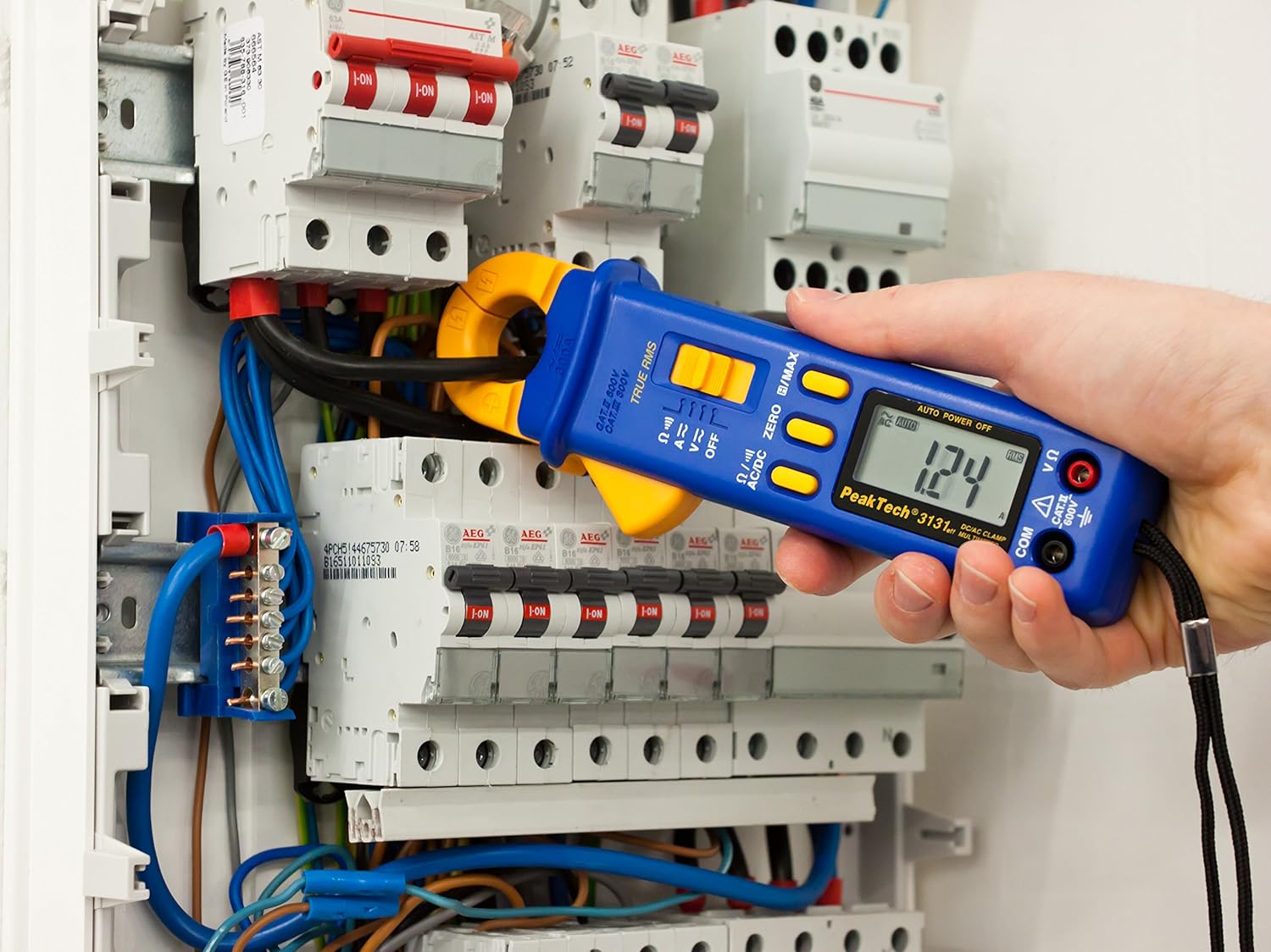
Figure 3: The PeakTech P 3131 Clamp Meter in use, measuring current on a single conductor within an electrical panel.
5.3 AC/DC Voltage Aunawa
Don auna voltage:
- Haɗa jagoran gwajin kamar yadda aka bayyana a Sashe na 4.2.
- Juya bugun kiran mai zaɓin aiki zuwa ga V~ (AC Volume)tage) ko V= (DC Voltage) matsayi.
- Haɗa na'urorin gwaji a layi ɗaya da da'irar ko ɓangaren da kake son aunawa.
- Karanta juzu'intage darajar a kan LCD nuni.
5.4 Resistance and Continuity Measurement
To measure resistance or check for continuity:
- Haɗa jagoran gwajin kamar yadda aka bayyana a Sashe na 4.2.
- Juya bugun kiran mai zaɓin aiki zuwa ga Ω/))) (Resistance/Continuity) position.
- For resistance: Connect the test probes across the component. Ensure the circuit is de-energized.
- For continuity: Touch the test probes to the two points you want to check. A continuous beep indicates a low-resistance path (continuity).
- Karanta ƙimar juriya akan nunin LCD.
5.5 Ayyuka na Musamman
- Gaskiya RMS: The meter measures True Root Mean Square values for AC voltage da kuma halin yanzu, suna ba da cikakken karatu ga siffofin raƙuman ruwa marasa sinusoidal.
- Riƙe Bayanai (H): Danna maɓallin H/MAX button briefly to freeze the current reading on the display. Press again to release.
- Maximum Value Hold (MAX): Latsa ka riƙe H/MAX button to capture and display the maximum measured value. Press again to exit.
- ZERO Function: Used to zero the display for DC current measurements to eliminate offset errors.
- Matsala ta atomatik: The meter automatically selects the appropriate measurement range.
- Kashe Wuta ta atomatik: The meter automatically turns off after a period of inactivity to save battery. This feature can typically be disabled by holding a specific button during power-on (refer to the device's on-screen indicators or a more detailed manual if available).
6. Kulawa
6.1 Tsaftacewa
Goge akwatin mitar da tallaamp mayafi da dan wanka mai laushi. Kada a yi amfani da abrasives ko kaushi. Tabbatar cewa mitar ta bushe gaba ɗaya kafin amfani.
6.2 Sauya Baturi
Refer to Section 4.1 for instructions on battery replacement. Always use two fresh 1.5V AAA batteries. Remove batteries if the meter is not used for an extended period to prevent leakage.
6.3 Adana
Ajiye na'urar aunawa a wuri mai sanyi da bushewa, nesa da hasken rana kai tsaye da kuma yanayin zafi mai tsanani. Yi amfani da jakar ɗaukar kaya da aka bayar don kariya.
7. Shirya matsala
| Matsala | Dalili mai yiwuwa | Magani |
|---|---|---|
| Mita baya kunnawa. | Matattu ko shigar batura ba daidai ba. | Duba polarity na baturi; maye gurbin baturi. |
| "OL" or "OVER" displayed. | Measurement exceeds selected range or meter's maximum capacity. | Select a higher range (if manual ranging) or ensure measurement is within meter's limits. |
| Inaccurate DC current reading. | Residual magnetism in clamp jaw. | Danna maɓallin ZERO button before measurement. |
| No continuity beep. | Open circuit or high resistance. | Check connections; ensure circuit is complete. |
If problems persist, contact PeakTech customer support or a qualified service technician.
8. Bayanan fasaha
| Siga | Ƙayyadaddun bayanai |
|---|---|
| Nunawa | 3 3/4 digit LCD, max. 3999 counts |
| DC Voltage (DCV) | 0.1 mV to 600 V (Accuracy: 0.5% + 2 digits) |
| AC Voltage (ACV) | 1 mV to 600 V (Accuracy: 1.5% + 5 digits) |
| DC Yanzu (DCA) | 10 mA to 300 A (Accuracy: 1% + 2 digits) |
| AC Current (ACA) | 10 mA to 300 A (Accuracy: 1% + 3 digits) |
| Resistance (Ω) | 0.1 Ω to 40 MΩ (Accuracy: 0.9% + 2 digits) |
| Gwajin Ci gaba | Ayyukan Buzzer |
| Gaskiya RMS | Yes, for AC measurements |
| Bude baki | 22 mm max. conductor diameter |
| Ƙimar Tsaro | EN 61010-1, CAT II 600 V |
| Tushen wutan lantarki | 2 x 1.5V AAA baturi |
| Girma (L x W x H) | 192 x 66 x 27 mm (kimanin 7.56 x 2.6 x 1.06 inci) |
| Nauyi | 205 g (kimanin 0.45 lbs) |
9. Garanti da Tallafawa
PeakTech products are manufactured under strict quality control. This product is covered by a standard manufacturer's warranty against defects in materials and workmanship. Please refer to the warranty card included with your product or visit the official PeakTech website don cikakken garanti sharuɗɗa da sharuɗɗa.
For technical support, service, or calibration inquiries, please contact your local PeakTech distributor or the PeakTech customer service department. Contact information can typically be found on the PeakTech webshafin ko a cikin marufi na samfur.


