1. Gabatarwa
This manual provides comprehensive instructions for the installation, operation, and maintenance of your Yale YSV/200/DB1 Value Electronic Safe. Please read this manual thoroughly before using the safe to ensure proper function and security.

Hoto: Gaba view of the Yale YSV/200/DB1 Value Electronic Safe.
2. Bayanin Tsaro
- Do not store the emergency override keys inside the safe. Keep them in a secure, separate location.
- Tabbatar an sanya akwatin ajiyar a wuri mai aminci don hana cirewa ba tare da izini ba.
- Replace batteries promptly when the low battery indicator appears to avoid being locked out.
- Keep the safe away from excessive moisture or extreme temperatures.
3. Abubuwan Kunshin
Tabbatar cewa duk abubuwa suna nan a cikin kunshin:
- Yale YSV/200/DB1 Electronic Safe Unit
- Maɓallan Gaggawa na Kashewa (2)
- 4 x AAA baturi
- Mounting Hardware (bolts/screws)
- Jagorar mai amfani (wannan takaddar)
4. Saita
4.1 Shigar da Baturi
The safe requires 4 AAA batteries for operation. These are included in your package.
- Open the safe door using the emergency override key (see section 5.3 if needed).
- Nemo ɗakin batirin a cikin ƙofar amintaccen.
- Saka batura 4 AAA, yana tabbatar da daidaitaccen polarity (+/-).
- Rufe murfin ɗakin baturi.

Image: Detail of the electronic keypad and manual override lock.
4.2 Shigar da Akwatin Tsaro
For enhanced security, it is recommended to securely mount the safe to a floor or wall using the provided hardware.
- Choose a suitable location for mounting. Ensure the surface is solid and can support the weight of the safe and its contents.
- Yi alama a wuraren haƙa ramin da aka riga aka haƙa a cikin akwatin ajiyar.
- Drill pilot holes into the chosen surface.
- Position the safe and secure it using the provided mounting bolts/screws.
- Ensure the safe is firmly attached and does not wobble.
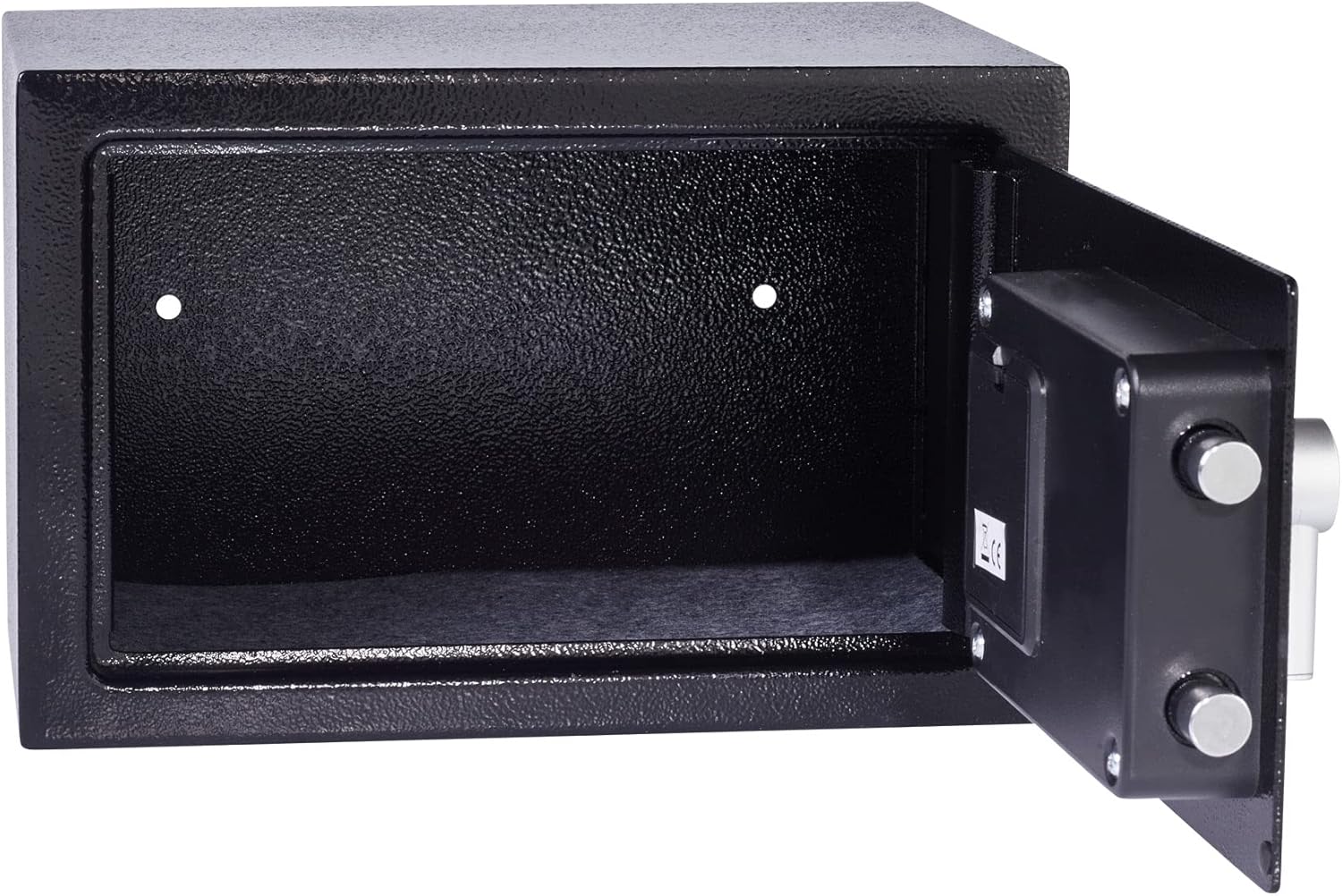
Image: Interior of the safe showing pre-drilled mounting holes.
5. Umarnin Aiki
5.1 Setting Your User Code
The safe comes with a factory default code (usually 1-2-3-4 or similar, refer to quick start guide if provided). It is crucial to change this immediately.
- With the safe door open, press the red or green reset button located on the inside of the door (often near the hinge or battery compartment). The safe will beep, and the yellow indicator light will illuminate.
- Enter your new personal code (3-8 digits) on the keypad.
- Press the 'E' or '#' button to confirm. The safe will beep again, and the yellow light will turn off, indicating the new code is set.
- Test the new code multiple times with the door open before closing it.

Image: Safe door open, revealing the interior and locking mechanism.
5.2 Opening the Safe with Your Code
- Enter your personal code on the keypad.
- Press the 'E' or '#' button. The green indicator light will illuminate.
- Within 5 seconds, turn the knob clockwise to open the safe door.
5.3 Using the Emergency Override Key
In case of forgotten code or battery failure, the safe can be opened using the emergency override key.
- Locate the keyhole, usually hidden behind a small cover on the keypad panel.
- Insert the emergency override key and turn it counter-clockwise.
- While holding the key turned, rotate the knob clockwise to open the safe door.
- Once open, remove the key.
Video: Demonstrates opening the Yale safe using the electronic keypad and the emergency override key. It shows the keypad entry, turning the knob, and the use of the hidden keyhole.
6. Kulawa
6.1 Sauya Baturi
When the batteries are low, the red indicator light will flash or remain on after entering your code. Replace all 4 AAA batteries promptly to ensure continued operation.
- Bude kofar lafiya.
- Nemo ɗakin batirin a cikin ƙofar.
- Cire tsoffin batura kuma jefar da su cikin gaskiya.
- Insert new 4 AAA batteries, observing correct polarity.
- Rufe murfin ɗakin baturi.
6.2 Tsaftacewa
Tsaftace wajen amintaccen tare da taushi, damp zane. Kada a yi amfani da masu tsabtace ƙura ko abubuwan kaushi, saboda waɗannan na iya lalata ƙarshen ko kayan lantarki.
7. Shirya matsala
| Matsala | Dalili mai yiwuwa | Magani |
|---|---|---|
| Safe ba ya buɗewa da lambar. | Incorrect code entered, low batteries, or keypad malfunction. |
|
| Keypad does not respond. | Matattun batura. | Replace batteries immediately. Use emergency override key to open if necessary. |
| Ƙofa ba ta rufe da kyau. | Obstruction, or locking bolts are extended. | Ensure nothing is blocking the door. Turn the knob to retract bolts before closing. |
8. Ƙayyadaddun bayanai
- Samfura: YSV/200/DB1
- Girman Waje (H x W x D): 200 x 310 x 200 mm (kimanin 7.87 x 12.2 x 7.87 inci)
- Internal Dimensions (H x W x D): 197 x 307 x 150 mm (kimanin 7.75 x 12.08 x 5.9 inci)
- Nauyi: 4.49 kg (kimanin 9.9 lbs)
- Iyawa: 8 lita
- Kayan aikin Kulle: Electronic keypad with 22mm motorized locking bolts, 6-lever double-bitted manual override lock.
- Abu: Alloy Karfe
- Ƙarfi: 4 x AAA Baturi (an haɗa)
- Siffofin Musamman: Laser cut door, reinforced hinge, armored steel anti-drill plates.
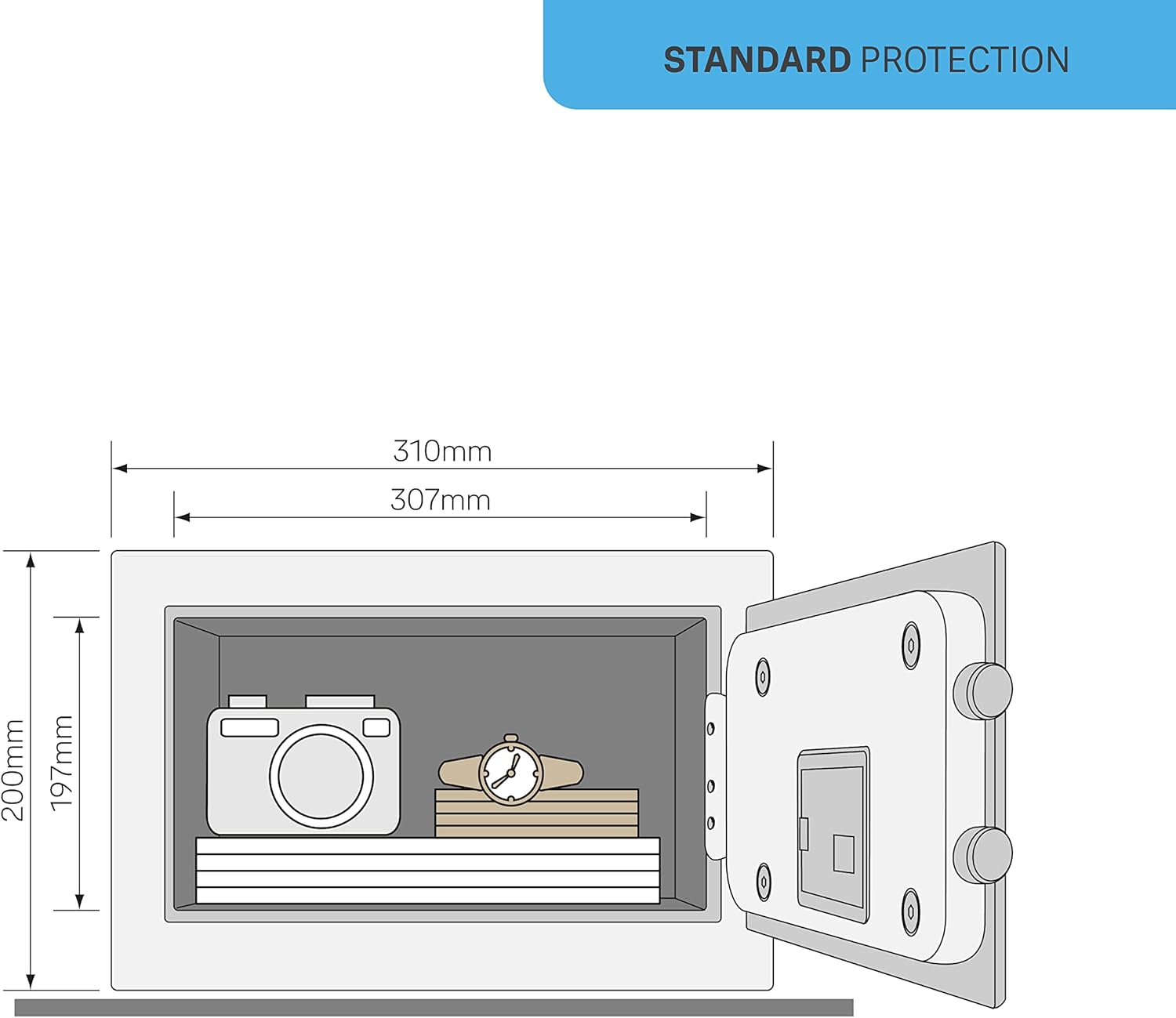
Image: Dimensional diagram of the safe, illustrating height, width, and depth.
9. Garanti da Tallafawa
For warranty information or technical support, please refer to the official Yale website or contact your local Yale distributor. Keep your purchase receipt as proof of purchase.


