Gabatarwa
This manual provides instructions for the Vivanco RR 220 remote control, designed for compatibility with Samsung Smart TVs. Please read this manual thoroughly before using the device to ensure proper operation and to understand its features.
Abubuwan Kunshin
- Vivanco RR 220 Remote Control
- Wannan Jagorar Mai Amfani
Lura: Ba a haɗa batura kuma dole ne a siya daban.
Saita
1. Shigar da Baturi
- Nemo sashin baturi a bayan ramut.
- Zamar da murfin baturin zuwa ƙasa ko danna latch kuma ɗagawa don buɗewa.
- Saka batura biyu (2) na AAA, don tabbatar da cewa tashoshin da ke da kyau (+) da kuma marasa kyau (-) sun dace da alamun da ke cikin ɗakin.
- Sauya murfin baturin, tabbatar da dannawa cikin aminci.
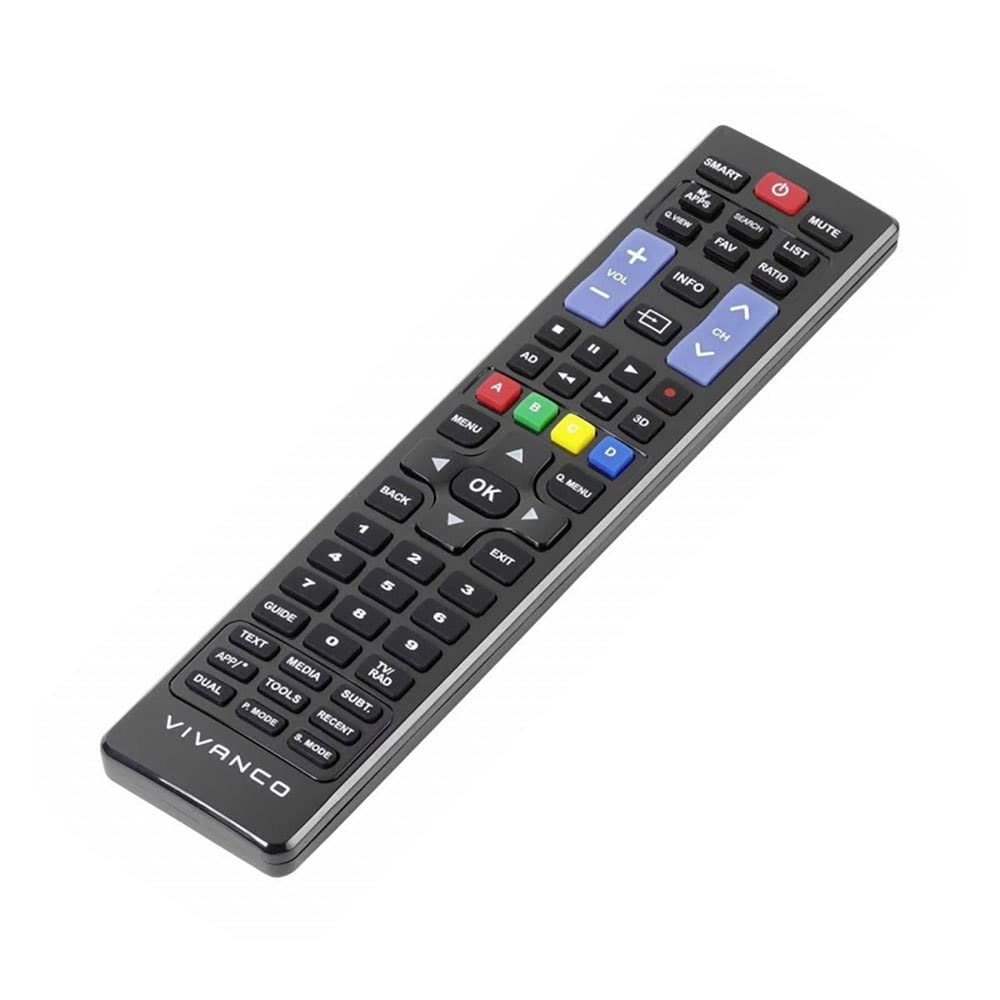
Hoto 1: Vivanco RR 220 remote control. This image displays the front of the remote control, highlighting its 57 buttons and ergonomic design. The battery compartment is located on the reverse side.
2. Amfanin Farko
The Vivanco RR 220 is pre-programmed for Samsung Smart TVs. No additional setup or pairing is typically required. Once batteries are installed, point the remote control towards your Samsung Smart TV and press the Power button to test functionality.
Umarnin Aiki
The remote control features 57 buttons, providing comprehensive control over your Samsung Smart TV and compatible devices. Below are common button functions:
- Maɓallin Wuta: Yana kunna ko kashe TV.
- Maɓallan Lamba (0-9): For direct channel selection or data input.
- Ƙarar Ƙarƙashin Ƙaƙwalwar Ƙaƙwalwa: Yana daidaita ƙarar mai jiwuwa.
- Tashar Sama/Ƙasa: Canza tashoshin TV.
- Mutuwar Button: Yayi shiru da sautin TV.
- Navigation Pad (Up, Down, Left, Right, Enter): Ana amfani da shi don kewaya menus da zaɓar zaɓuɓɓuka.
- Back/Return Button: Komawa zuwa allon da ya gabata ko menu.
- Smart Hub/Home Button: Accesses the Smart Hub or main menu of your Samsung Smart TV.
- Maɓallin shigarwa/Maɓallin shigarwa: Yana zaɓar hanyoyin shigarwa (HDMI, AV, da sauransu).
- Maɓallin Launi (Ja, Green, Yellow, Blue): For specific functions within certain applications or menus, as indicated on-screen.
- Ikon sake kunnawa (Wasa, Dakata, Tsaya, Ci gaba da sauri, Komawa): Controls media playback on compatible devices or apps.
For specific functions related to your TV model, refer to your Samsung TV's user manual.
Kulawa
Tsaftace Ikon Nesa
- Use a soft, dry cloth to wipe the surface of the remote control.
- Don datti mai taurin kai, ɗan dampa cikin rigar da ruwa ko mai laushi, mai tsabta mara lalacewa.
- Do not use harsh chemicals, solvents, or abrasive cleaning pads, as these can damage the remote's finish or internal components.
- Ensure no liquid enters the remote control through button gaps or the battery compartment.
Madadin Baturi
Replace batteries when the remote's response becomes sluggish or it stops functioning. Always replace both batteries simultaneously with new AAA alkaline batteries. Do not mix old and new batteries or different types of batteries.
Shirya matsala
| Matsala | Dalili mai yiwuwa | Magani |
|---|---|---|
| Ikon nesa baya aiki. |
|
|
| Some buttons do not function. |
|
|
Ƙayyadaddun bayanai
- Alamar: Vivanco
- Sunan Samfura: RR 220
- Lambar Samfurin: 38016
- Na'urori masu jituwa: Home cinema, DVD/Blu-ray player, Television (Samsung Smart TV compatible)
- Fasahar Haɗuwa: Wireless IR (Infrared)
- Adadin Maɓalli: 57
- Nau'in Baturi: 2 x AAA (Alkaline recommended)
- Batura sun haɗa da: A'a
- Girman samfur: 18 x 4.8 x 2.3 cm
- Nauyin samfur: 80g ku
- Matsakaicin iyaka: mita 15
- Siffofin Musamman: IPTV, DVB-T, HDTV compatibility


