1. Gabatarwa
Thank you for choosing the Antec HCG-850M 850W Power Supply. This manual provides essential information for the safe and efficient installation, operation, and maintenance of your power supply unit. Please read this manual thoroughly before installation and retain it for future reference.
2. Bayanin Tsaro
Always observe the following safety precautions to prevent injury or damage to your system:
- Kar ka bude wutar lantarki casing. Babban girmatages suna nan a ciki, koda lokacin da aka cire naúrar.
- Kar ka insert any objects into the power supply's ventilation openings.
- Tabbatar an shigar da wutar lantarki a wuri mai kyau.
- Use only the modular cables provided with this power supply. Using incompatible cables can cause damage.
- Disconnect the AC power cord from the wall outlet before installing or removing the power supply.
- This product is designed for use in personal computers only.
3. Abubuwan Kunshin
Tabbatar cewa duk abubuwa suna nan a cikin kunshin ku:
- Antec HCG-850M 850W Power Supply
- Modular Cable Set (PCI-E, SATA, Peripheral, CPU)
- AC Power Igiyar
- Hawan Haɗawa
- Jagorar mai amfani (wannan takaddar)
4. Samfurin Ya Ƙareview
The Antec HCG-850M is an 850-watt, 80 PLUS Bronze certified, semi-modular power supply designed for high-performance personal computers. It features a quiet 135mm fan for efficient cooling and robust protection circuits to ensure stable power delivery.
4.1 Maɓalli Maɓalli
- 850 Watts Continuous Power
- 80 PLUS Bronze Certified Efficiency
- Semi-Modular Cable Management
- 135mm Silent Fan
- Farashin ATX
- Multiple Protection Circuits (OCP, OVP, UVP, SCP, OPP, OTP)
4.2 Rukunin Samar da Wuta
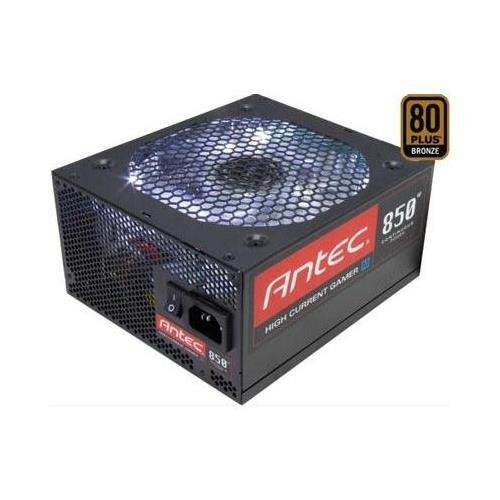
Hoto 1: Gaba view of the Antec HCG-850M 850W Power Supply, showing the fan grille and modular cable connectors. This unit provides stable power to your computer components.
5. Saita da Shigarwa
Follow these steps to install your Antec HCG-850M power supply:
- Shirya Tsarin ku: Tabbatar cewa kwamfutarka ta kashe gaba ɗaya kuma an cire haɗin daga mashigar bango. Buɗe akwatin kwamfutarka.
- Cire Tsohon PSU (idan ya dace): Disconnect all cables from your old power supply. Unscrew and remove the old PSU from the case.
- Sanya Sabuwar PSU: Carefully place the Antec HCG-850M into the power supply bay of your computer case. Secure it with the provided mounting screws. Ensure the fan is oriented correctly for optimal airflow (typically facing down if there's a bottom vent, or up if not).
- Connect Essential Cables:
- Connect the 24-pin ATX motherboard power cable.
- Connect the 4+4-pin or 8-pin EPS/CPU power cable to your motherboard.
- Haɗa Kebul na Modular: Attach the necessary modular cables for your components (e.g., PCI-E for graphics cards, SATA for hard drives/SSDs, Peripheral for fans/accessories). Connect them securely to both the power supply and the respective components.
- Na'urar USB: Route cables neatly to improve airflow and aesthetics.
- Rufe Harka da Wuta A Kunna: Close your computer case. Connect the AC power cord to the power supply and then to a wall outlet. Flip the power switch on the PSU to the 'ON' position. Power on your computer.
6. Umarnin Aiki
Once installed, the Antec HCG-850M operates automatically. Here are some general operating guidelines:
- Kunnawa/Kashewa: Use your computer's power button to turn the system on or off. The switch on the power supply itself should generally remain in the 'ON' position during normal operation.
- Tsantsar Tsari: Ensure your system is stable. If you experience unexpected shutdowns or reboots, refer to the troubleshooting section.
- Samun iska: Maintain good airflow around your computer case to prevent overheating of components, including the power supply.
7. Kulawa
Proper maintenance can extend the lifespan of your power supply:
- Tsaftace kura: Periodically clean dust from the power supply's fan grille and the interior of your computer case using compressed air. Always disconnect the AC power cord before cleaning.
- Duban Kebul: Occasionally check that all power cables are securely connected to the power supply and components.
- Muhalli: Operate the power supply in a clean, dry environment with stable temperatures.
8. Shirya matsala
If you encounter issues with your power supply, try the following steps:
8.1 Babu Wutar Lantarki ga Tsarin
- Ensure the AC power cord is securely plugged into both the wall outlet and the power supply.
- Check that the power supply's ON/OFF switch is in the 'ON' position.
- Verify all internal power cables (24-pin ATX, CPU, PCI-E) are correctly and firmly connected.
- Gwada mashigar bango da wata na'ura don tabbatar da cewa tana da wutar lantarki.
- If possible, test the power supply in another known working system or with a PSU tester.
8.2 System Instability or Random Shutdowns
- Ensure your system's power requirements do not exceed the 850W capacity of the PSU.
- Check for overheating components. Ensure proper case ventilation and clean any dust buildup.
- Verify all power connections are secure. Loose connections can cause intermittent power delivery.
- If the issue persists, it may indicate a fault with the power supply or another component. Consider professional diagnosis.
9. Ƙayyadaddun bayanai
| Siffar | Daki-daki |
|---|---|
| Lambar Samfura | HCG-850M |
| Fitar Wattage | 850 Watts |
| Takaddar Inganci | 80 PLUS tagulla |
| Factor Factor | Farashin ATX |
| Hanyar sanyaya | Air (135mm Fan) |
| Nau'in Modular | Semi-Modular |
| Na'urori masu jituwa | Kwamfuta ta sirri |
| Nauyin Abu | 9 fam (kimanin 4.08 kg) |
| ASIN | B00ESAI3M0 |
10. Garanti da Tallafawa
Antec products are backed by a manufacturer's warranty. For specific warranty terms and conditions, please refer to the warranty card included with your product or visit the official Antec website. For technical support or customer service, please contact Antec directly through their official support channels.
Official Antec Website: www.kwaiyanwatch.com


