1. Gabatarwa
This manual provides detailed instructions for the installation, operation, and maintenance of your Axis P1355 Surveillance/Network Camera. The Axis P13 series offers high-performance fixed cameras designed for both indoor and outdoor surveillance, delivering superb image quality with H.264 compression. These models support HDTV 720p/1080p video and are equipped with features like Wide Dynamic Range and Day/Night functionality for clear imaging in various lighting conditions. Specific models within the P13 series, including HDTV 720p, incorporate Axis Lightfinder technology for enhanced low-light sensitivity, while HDTV 1080p and 5-megapixel cameras feature P-iris control for optimized depth of field and lens resolution.
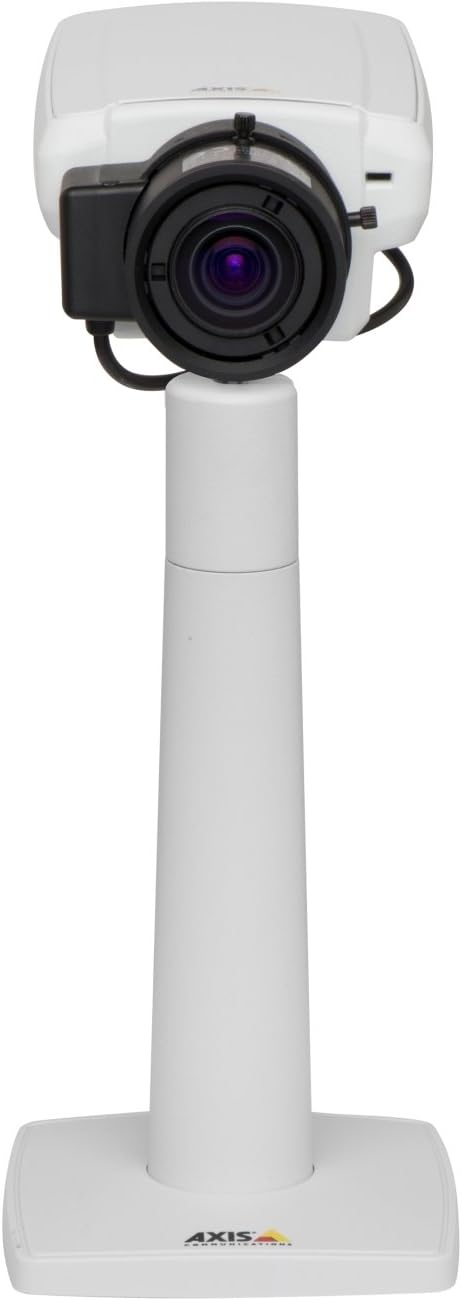
Hoto na 1: The Axis P1355 Surveillance Camera shown mounted on its stand. This image illustrates the camera's physical appearance and typical mounting configuration.
2. Bayanin Tsaro
Please read all safety instructions before installing or operating the camera.
- Ensure the power source matches the camera's requirements to prevent electrical hazards.
- Installation should be performed by qualified personnel in accordance with local electrical codes.
- Kada ka fallasa kyamarar ga yanayin zafi mai tsanani, danshi, ko muhallin da ke lalata ta.
- Avoid direct exposure of the lens to strong light sources, such as the sun, as this may damage the image sensor.
- Disconnect power before cleaning or servicing the camera.
3. Saita da Shigarwa
The Axis P1355 camera is designed for both indoor and outdoor use and supports various mounting options.
3.1 Haɗawa
The camera is typically designed for wall mount installation. Ensure the mounting surface is strong enough to support the camera's weight (approximately 2 pounds). Use appropriate screws and anchors for the chosen surface.
- Select a suitable location for optimal surveillance coverage.
- Securely attach the mounting bracket to the wall.
- Mount the camera onto the bracket, ensuring it is firmly in place.
- Adjust the camera's angle for the desired field of view.
3.2 Haɗi
The Axis P1355 camera primarily uses wired connectivity for reliable data transmission and power.
- Haɗin Wuta: Connect the provided power adapter to the camera's power input and then to a suitable electrical outlet. The camera operates on a corded electric power source.
- Haɗin Yanar Gizo: Connect an Ethernet cable from the camera's network port to your network switch or router. This provides wired connectivity for video streaming and control.
- Wireless Connectivity (Optional/Configuration): While primarily wired, the camera supports Wi-Fi for certain configurations. Refer to the Axis product documentation for specific wireless setup instructions if applicable to your model variant.
4. Umarnin Aiki
Once installed and connected, the Axis P1355 camera can be configured and operated via a network interface.
4.1 Initial Access and Configuration
- Use the Axis IP Utility or a similar network discovery tool to find the camera's IP address on your network.
- Bude a web browser kuma shigar da adireshin IP na kamara don samun dama ga ta web dubawa.
- Log in using the default credentials (refer to Axis documentation for default username/password, typically 'root' and 'pass' or similar, which should be changed immediately).
- Follow the on-screen prompts to set up basic network settings, date/time, and user accounts.
4.2 Video Monitoring and Features
- Rayuwa View: Access the live video feed through the web interface or compatible video management software.
- Ƙaddamarwa: The camera supports video capture resolutions up to 720p and effective video resolutions of 1080 pixels, with effective still resolution of 2 MP.
- Color and Monochrome Modes: The camera can operate in both color and monochrome (black and white) modes, automatically switching based on light conditions or configured manually.
- Hangen Dare: Utilize the integrated night vision capabilities for surveillance in low-light or complete darkness.
- Zuƙowa na gani: Adjust the optical zoom for detailed views of specific areas.
- P-Iris Control: For models equipped with P-iris, this feature allows precise control over the iris position to optimize depth of field and lens resolution, enhancing image sharpness. This can be configured via the web dubawa.
- Tsarin Bidiyo: Video is typically captured in MP4 format.
- Ikon nesa: The camera supports remote control for various settings and adjustments.
5. Kulawa
Regular maintenance ensures optimal performance and longevity of your Axis P1355 camera.
- Tsaftacewa: Gently clean the camera lens and housing with a soft, damp zane. Kauce wa masu goge goge ko kaushi.
- Sabunta Firmware: Periodically check the Axis Communications webshafin yanar gizo don sabunta firmware. Ci gaba da sabunta firmware yana tabbatar da samun damar sabbin fasaloli, facin tsaro, da haɓaka aiki.
- Duban Kebul: Regularly inspect all cables for signs of wear or damage, especially for outdoor installations.
- Duban Muhalli: Ensure the camera's operating environment remains within specified temperature and humidity ranges.
6. Shirya matsala
This section addresses common issues you might encounter with your Axis P1355 camera.
- Babu Ƙarfi:
- Verify the power adapter is securely connected to both the camera and a working power outlet.
- Bincika kebul na wutar lantarki don kowace lalacewa.
- Babu Haɗin Yanar Gizo:
- Ensure the Ethernet cable is properly connected to the camera and the network switch/router.
- Duba yanayin makullin cibiyar sadarwa/na'ura mai ba da hanya tsakanin hanyoyin sadarwa.
- Confirm the camera has a valid IP address and is on the same network segment as your viewna'urar.
- Rashin ingancin Hoto:
- Tsaftace ruwan tabarau na kamara.
- Adjust focus and zoom settings via the web dubawa.
- Check lighting conditions; enable night vision or adjust exposure settings if necessary.
- Ensure P-iris control is correctly configured for optimal sharpness (if applicable).
- Ba za a iya shiga ba Web Interface:
- Verify the camera's IP address.
- Ensure your computer is on the same network as the camera.
- Try restarting the camera and your network equipment.
7. Ƙayyadaddun bayanai
| Siffar | Daki-daki |
|---|---|
| Alamar | Sadarwar Axis |
| Lambar Samfura | Saukewa: AXIS P1355 |
| Amfanin Cikin Gida/Waje | Cikin Gida, Waje |
| Fasahar Haɗuwa | Wired (Wi-Fi capable for certain configurations) |
| Siffa ta Musamman | Hangen Dare |
| Tushen wutar lantarki | Wutar Lantarki (7.1 watts) |
| Ƙimar Ɗaukar Bidiyo | 720p |
| Ingantacciyar Tsarin Bidiyo | 1080 pixels |
| Ingancin Har yanzu Ƙaddamarwa | 2 MP |
| Nau'in Zuƙowa | Optical Zoom (2.9x Optical) |
| Nau'in Mai Gudanarwa | Iris (P-iris control) |
| Nau'in hawa | Dutsen bango |
| Girman samfur (L x W x H) | 3.07 x 5.94 x 1.69 inci |
| Nauyin Abu | 2 fam |
| Ƙimar Kariya ta Ƙasashen Duniya | IP54 |
| Tsarin Ɗaukar Bidiyo | MP4 |
8. Garanti da Tallafawa
For detailed warranty information and technical support, please refer to the official Axis Communications website ko tuntuɓi sabis na abokin ciniki kai tsaye.
Mai ƙira: AXIS COMMUNICATION INC.
Website: www.axis.com (Don Allah a ziyarci jami'in website for the most current support resources, drivers, and documentation.)


