Gabatarwa
This manual provides comprehensive instructions for the installation, operation, and maintenance of your Naxa NAA-350 High Powered Amplified Motorized Outdoor Antenna. Please read this manual thoroughly before use to ensure proper setup and optimal performance for receiving HDTV and ATSC digital television signals.
Me ke cikin Akwatin
- Amplified Outdoor TV Antenna with Remote Directional Control
Bayanin Tsaro
Koyaushe kiyaye matakan tsaro masu zuwa yayin shigarwa da aiki:
- Tsaron Wutar Lantarki: Ensure all power connections are made to a grounded outlet. Do not operate the antenna or control box with wet hands.
- Shigarwa a Waje: Exercise extreme caution when installing the antenna outdoors, especially on rooftops or elevated structures. Avoid contact with power lines.
- Kariyar Walƙiya: For added protection, consider installing a lightning arrestor (not included) between the antenna and your television.
- Na'urar USB: Secure all cables to prevent tripping hazards and damage from environmental factors.
Siffofin Samfur
- Amplified HDTV digital antenna designed for outdoor installation with a slim and modern profile.
- Motorized antenna rotates 360 degrees for optimal signal acquisition.
- Large antenna size enhances reception, picture clarity, and sound quality.
- Compatible with UHF, VHF, and FM signals.
- Frequency range: VHF 45-230MHz; UHF 470-860MHz.
Saita & Shigarwa
1. Cire kaya da Majalisa
Carefully remove all components from the packaging. Assemble the antenna elements according to the included diagrams, ensuring all connections are secure and tight.
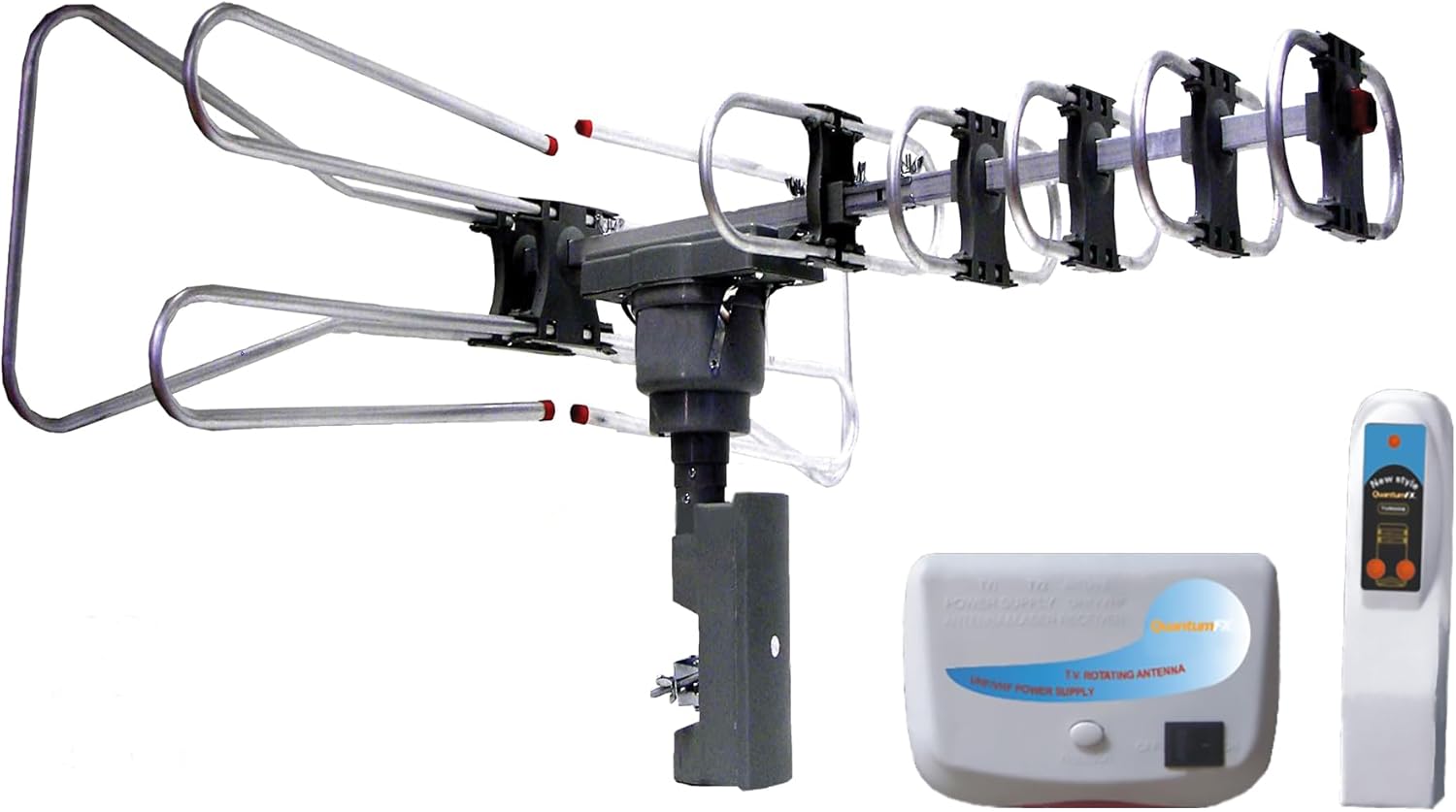
Image: Naxa NAA-350 antenna components including the main antenna unit, control box, and remote control.
2. Hawan Eriya
Select a suitable outdoor location for the antenna. For optimal signal reception, choose a high and clear spot, free from obstructions like buildings or large trees. Securely mount the antenna using appropriate mounting hardware (not included) that is suitable for your chosen surface (e.g., roof, pole).

Image: Naxa NAA-350 antenna installed on a rooftop, demonstrating typical outdoor placement for optimal signal reception.
3. Haɗawa da Talabijin ɗinka
- Connect the coaxial cable from the antenna to the 'Antenna In' or 'RF In' port on your television or digital converter box.
- Connect the control box to the antenna using the provided cable.
- Plug the control box into a standard electrical outlet.
Umarnin Aiki
1. Power On and Channel Scan
Ensure the control box is plugged in and powered on. Access your television's menu and navigate to the 'Channel Setup' or 'Auto Program' section. Initiate a 'Channel Scan' or 'Auto Tune' to find all available digital channels. This process may take several minutes to complete.
2. Antenna Rotation for Optimal Reception
Use the remote control to rotate the antenna 360 degrees. Press the directional buttons on the remote to adjust the antenna's orientation. While rotating, observe your TV screen for signal strength indicators or picture quality to find the optimal direction for each channel or for overall best reception.

Image: A hand holding the remote control, indicating the 360-degree rotation capability of the Naxa NAA-350 antenna for optimizing signal reception.
Kulawa
- Dubawa na yau da kullun: Periodically inspect the antenna, its mounting hardware, and all cables for any signs of wear, damage, or loose connections. This is especially important after severe weather conditions.
- Tsaftacewa: Gently clean the antenna elements with a soft, damp cloth. Avoid using harsh chemicals, abrasive cleaners, or solvents, as these can damage the antenna's finish or components.
Shirya matsala
Babu Sigina ko Mara Kyau na Karɓa
- Ensure all coaxial cables and power connections are securely fastened.
- Verify that the control box is powered on and its indicator light is active.
- Perform a new 'Channel Scan' or 'Auto Program' on your television.
- Use the remote control to slowly rotate the antenna 360 degrees, pausing at different orientations to check for improved signal strength.
- Check for any new obstructions (e.g., new buildings, dense foliage) between your antenna and the broadcast towers.
- Consider repositioning the antenna to a higher or clearer location if possible.
Ikon nesa Ba Amsa ba
- Check and replace the AAA batteries in the remote control if necessary.
- Ensure there are no obstructions between the remote control and the antenna's control box.
- Point the remote directly at the control box.
Ƙayyadaddun bayanai
| Siffar | Ƙayyadaddun bayanai |
|---|---|
| Alamar | Naxa |
| Lambar Samfura | NAA-350 |
| Nauyin Abu | 2.7 fam |
| Girman samfur | 31.1 x 15.75 x 25.59 inci |
| Atiarfin Mitar | UHF/VHF/FM |
| Yawan Mitar | VHF 45-230MHz; UHF 470-860 MHz |
| Siffofin Musamman | Amplification, Motorized Rotation |
| Ƙarfi (Nesa) | Ana buƙatar baturin AAA 1 |
| Kwanan Wata Farko Akwai | Fabrairu 21, 2014 |
Bayanin Garanti
For detailed warranty information regarding your Naxa NAA-350 antenna, please refer to the warranty card included in your product packaging. This document outlines the terms, conditions, and duration of the product warranty.
Taimako & Bayanan Tuntuɓi
Should you require technical assistance, have questions about your product, or need to report an issue, please visit the official Naxa Electronics website for support resources, FAQs, and contact options. You may also find additional support information on the product's retail page or within your product documentation.


