Gabatarwa
The Logitech UE Boom is a 360-degree wireless Bluetooth speaker designed for portable audio. It features a durable, go-anywhere shape and is equipped with a water and stain resistant acoustic skin. This speaker allows for wireless music playback, phone calls, and can be paired with another UE Boom for stereo sound.

Hoto: Gaba view of the Logitech UE Boom Wireless Bluetooth Speaker in Northern Light color.
Mabuɗin Siffofin
- Sautin Digiri 360: Delivers immersive audio in all directions.
- Zane Mai šaukuwa: Versatile, cylindrical shape for easy transport.
- Water and Stain Resistant: Features a colorful acoustic skin with plasma coating for durability against water and stains.
- Mara waya mara waya Connects via Bluetooth from up to 50 feet away. Easy pairing via NFC for compatible devices.
- Double Up Feature: Wirelessly connect two UE BOOM speakers in stereo using the UE BOOM app for enhanced sound.
- Tsawon Rayuwar Baturi: Rechargeable battery provides up to 15 hours of playback.
- Mayar magana: Integrated crystal-clear speakerphone for calls.
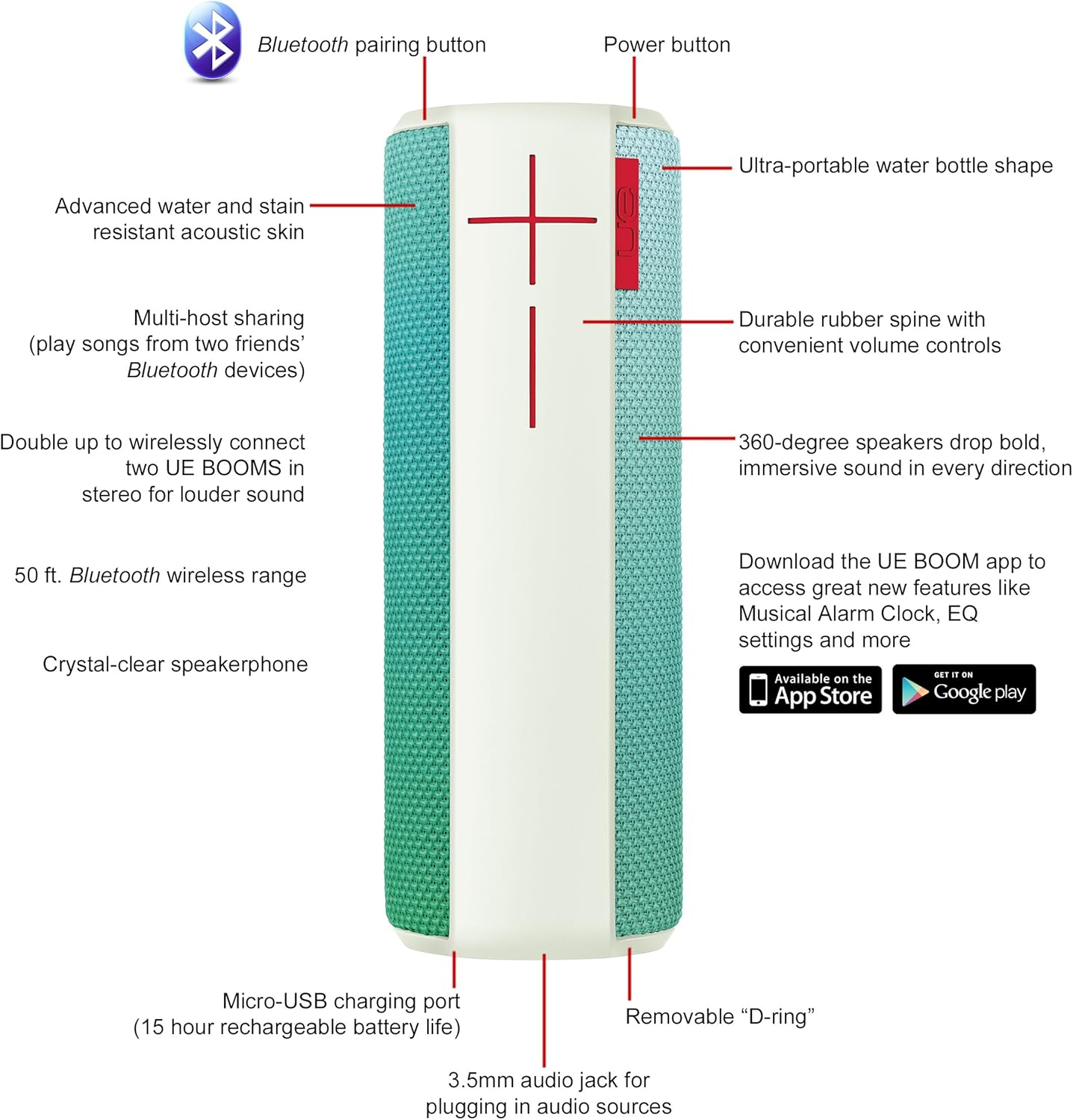
Image: Diagram highlighting key features and controls of the UE Boom speaker, including Bluetooth pairing button, power button, volume controls, micro-USB charging port, and 3.5mm audio jack.
Saita
Cajin Kakakin Majalisa
Before initial use, fully charge your UE Boom speaker. Connect the provided micro-USB cable to the charging port located at the bottom of the speaker and plug the other end into a USB power source. The speaker's battery provides approximately 15 hours of playback on a full charge.
Haɗa Bluetooth
- Power on your UE Boom speaker by pressing the power button.
- Press and hold the Bluetooth pairing button (usually indicated by a Bluetooth icon) until you hear an audible tone and the LED indicator flashes rapidly.
- On your mobile device (smartphone or tablet), navigate to the Bluetooth settings.
- Select "UE Boom" from the list of available devices to pair.
- Once paired, you will hear a confirmation tone from the speaker.
For NFC-enabled devices, simply tap your device to the NFC area on the speaker for quick pairing.
Umarnin Aiki
Abubuwan Gudanarwa na asali
- Maɓallin Wuta: Located on the top of the speaker to turn it on or off.
- Sarrafa ƙara: Large '+' and '-' buttons on the side of the speaker adjust the volume.
- Maballin Bluetooth: Yana fara yanayin haɗa haɗin Bluetooth.
Using the UE BOOM App
Download the official UE BOOM app from your device's app store (available on App Store and Google Play) to unlock additional features:
- Musical Alarm Clock: Wake up to your favorite music.
- Kunna nesa: Turn your speaker on/off from your device.
- Saitunan EQ: Keɓance sautin profile zuwa ga fifikonku.
- Sau Biyu: Connect two UE BOOM speakers for a stereo sound experience.
Aikin Lasisin Wayar Salula
When connected to a smartphone, the UE Boom can be used as a speakerphone. Incoming calls will be routed through the speaker, allowing for hands-free communication.
Kulawa
The UE Boom speaker features a water and stain resistant acoustic skin. To clean, gently wipe the speaker with a damp cloth. Avoid using harsh chemicals or abrasive cleaners. Ensure all ports are dry before charging or connecting other devices.
Shirya matsala
- Babu Ƙarfi: Ensure the speaker is charged. Connect it to a power source using the micro-USB cable.
- Ba za a iya Haɗa ta Bluetooth ba:
- Ensure the speaker is in pairing mode (flashing LED).
- Bincika cewa an kunna Bluetooth akan na'urarka.
- Move your device closer to the speaker (within 50 feet).
- Gwada warwarewa da sake haɗa na'urar.
- Karancin Ƙara ko Karɓar Sauti:
- Daidaita ƙarar a kan lasifikar da na'urar da aka haɗa.
- Tabbatar da cikakken cajin lasifikar.
- Check for any obstructions around the speaker.
- App Ba Haɗawa: Ensure the speaker is powered on and connected via Bluetooth to your device. Update the app to the latest version.
Ƙayyadaddun samfur
| Sunan Samfura | Logitech UE Boom Wireless Bluetooth Speaker |
| Lambar Samfura | 980-001023 |
| Alamar | Logitech |
| Launi | Northern Light |
| Nau'in Kakakin | Waje |
| Fasahar Haɗuwa | Bluetooth, Wireless |
| Mara waya mara waya | Har zuwa ƙafa 50 (mita 15.24) |
| Tushen wutar lantarki | Ana Karfin Batir (Batir Lithium ion 1 ya haɗa) |
| Matsakaicin Rayuwar Baturi | 15 Awanni |
| Matsayin Juriya na Ruwa | Mai hana ruwa ruwa |
| Nauyin Abu | 2.2 fam |
| Girman Samfura (LxWxH) | 2.6 x 2.6 x 7.1 inci |
| Kayan abu | Filastik |
| UPC | 097855112125 |
Bidiyon Samfur na hukuma
Bidiyo: An gamaview of the Logitech UE Boom speaker's features, including 360-degree sound, water resistance, wireless connectivity, and the ability to pair two speakers for louder sound. This video demonstrates the speaker's durability and portability in various environments.
Garanti da Taimako
The Logitech UE Boom Wireless Bluetooth Speaker comes with a Limited Warranty. For specific warranty details, please refer to the documentation included with your product or visit the official Logitech website.
For technical support or customer service, you may contact Logitech at: 646-454-3200.


