1. Gabatarwa
This manual provides essential information for the proper installation, operation, and maintenance of your Simrad RI-12 Interface Box, designed for use with Simrad Halo Radar systems. The RI-12 acts as the processor, connecting the radar scanner to your Multi-Function Display (MFD).
The Simrad RI-12 Interface Box is a critical component of the Halo Radar system, enabling advanced pulse compression technology for superior target detection and clarity. It ensures seamless communication between the radar antenna and your vessel's navigation display.
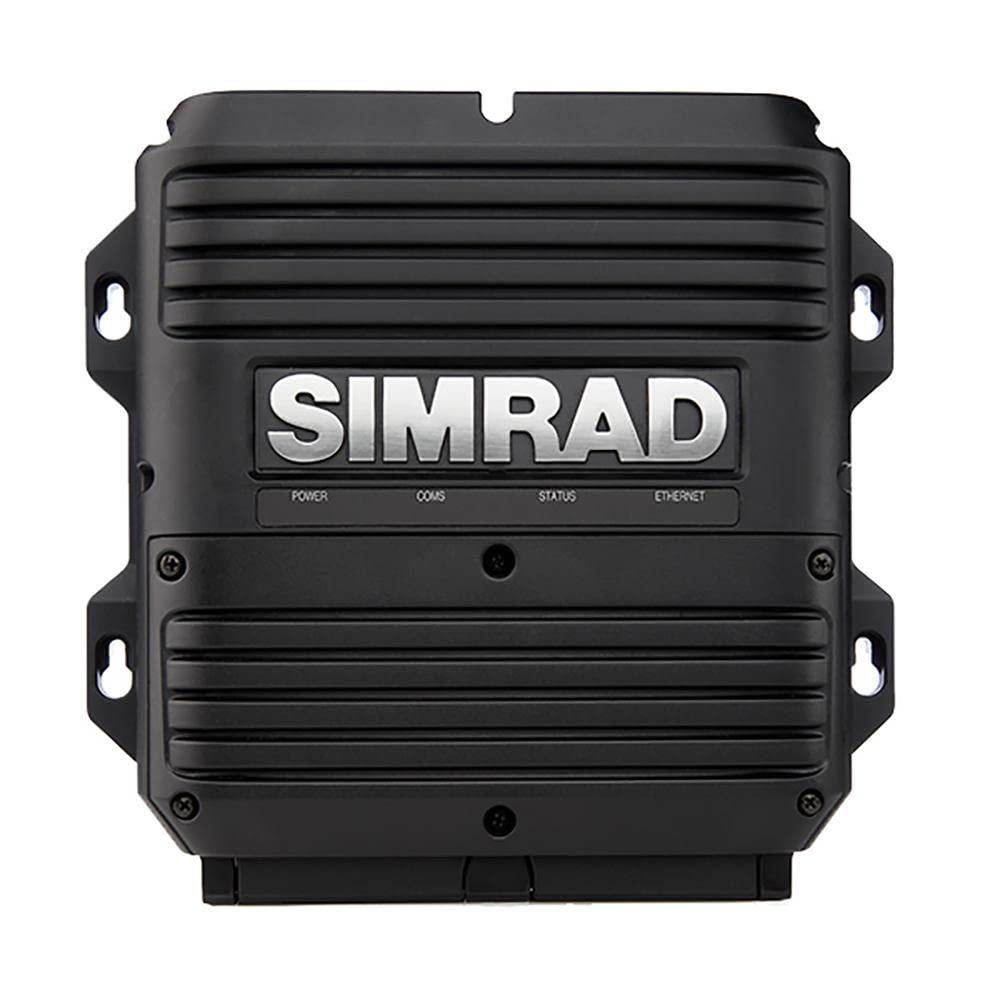
Image: The Simrad RI-12 Interface Box. This unit processes radar signals from the Halo scanner for display on compatible Simrad Multi-Function Displays.
2. Saita da Shigarwa
2.1 Buɗewa
Carefully unpack all components. Verify that all items listed in the packing list are present and undamaged. Retain packaging for future transport or storage.
2.2 Matsayi na hawa
The RI-12 Interface Box should be mounted in a dry, protected area, away from direct sunlight, excessive heat, and corrosive environments. Ensure adequate ventilation around the unit to prevent overheating. Consider accessibility for future maintenance or cable connections.
2.3 Haɗin Waya
The RI-12 serves as the central hub for the Halo Radar system's data and power distribution. Proper connection is crucial for optimal performance.
- Radar Scanner Cable: Connect the dedicated cable from the Halo Radar scanner to the designated port on the RI-12. Ensure the connection is secure and watertight.
- Haɗin Ethernet: Connect a marine-grade Ethernet cable from the RI-12 to your Simrad Multi-Function Display (MFD) or to a compatible Ethernet switch if multiple devices are on the network.
- Tushen wutan lantarki: Connect the power supply (12/24V DC) to the RI-12. Refer to your vessel's electrical diagram and the RI-12 wiring instructions for proper polarity and fusing. The RI-12 also supplies power to the radar scanner.
Note: This unit is the interface box only. A complete Simrad Halo Radar system requires a radar scanner and a compatible Multi-Function Display (MFD), which are sold separately.
3. Aiki
The RI-12 Interface Box functions as a bridge, processing raw radar signals from the Halo Radar scanner and transmitting them as usable data to your Simrad MFD. All user-controlled radar settings are managed through the MFD.
3.1 Kunnawa / Kashewa
The RI-12 powers on automatically when the vessel's main power is supplied to it. It enters a low-power standby mode when the MFD is turned off or the radar function is disabled on the MFD. The Halo Radar system features InstantOn™ technology, allowing for rapid startup (16-25 seconds from power-on) and instant recovery from standby.
3.2 Radar Control
All radar settings and operational controls, including range, gain, sea clutter, rain clutter, and mode selection (e.g., Harbour, Offshore, Weather, Bird, Custom), are managed directly through your connected Simrad Multi-Function Display (MFD). Refer to your MFD's instruction manual for detailed radar operation and feature utilization.
- Rage Biyu: Compatible MFDs can display two different radar ranges simultaneously, enhancing situational awareness.
- MARPA Target Tracking: The system is capable of tracking up to 10 targets (or 20 with dual range functionality), providing critical collision avoidance information.
- Beam Sharpening: Advanced signal processing improves target separation and definition.
4. Kulawa
The Simrad RI-12 Interface Box is designed for reliability and requires minimal routine maintenance.
- Tsaftacewa: Lokaci-lokaci ana goge wajen naúrar da taushi, damp cloth to remove dust and salt residue. Do not use abrasive cleaners, solvents, or high-pressure water jets, as these can damage the casing or seals.
- Haɗin kai: Regularly inspect all cable connections for signs of corrosion, fraying, or damage. Ensure all connections are secure and properly seated. Loose connections can lead to intermittent operation or signal loss.
- Sabunta software: Ensure your Simrad MFD and all connected devices, including the RI-12, have the latest software updates. Software updates often include performance enhancements, bug fixes, and new features. Updates are typically managed through your MFD or downloaded from the official Simrad website.
5. Shirya matsala
This section provides solutions to common issues you might encounter with your Simrad RI-12 Interface Box.
| Matsala | Dalili mai yiwuwa | Magani |
|---|---|---|
| No Radar Display on MFD | RI-12 not powered | Check power connections to the RI-12. Verify fuses and circuit breakers. |
| No Radar Display on MFD | Ethernet cable disconnected or damaged | Verify Ethernet connection between RI-12 and MFD. Replace cable if damaged. |
| No Radar Display on MFD | Radar scanner not connected to RI-12 | Check the dedicated cable connection between the RI-12 and the radar scanner. |
| Poor Radar Performance (e.g., weak targets, excessive clutter) | Incorrect MFD radar settings | Adjust radar settings (gain, sea clutter, rain clutter, range) on your MFD. Refer to your MFD manual. |
| Poor Radar Performance | Matattun software | Update MFD and RI-12 software to the latest versions. |
6. Ƙayyadaddun bayanai
Key technical specifications for the Simrad RI-12 Interface Box.
| Siffar | Daki-daki |
|---|---|
| Lambar Samfura | 000-11467-001 (DSI-013) |
| Girman samfur | 10 x 9 x 5 inci |
| Nauyin Abu | 72.1 fam |
| Shigar da Voltage | 12/24V DC |
| Display Type (via MFD) | LED (dependent on connected MFD) |
| Radar Technology | Solid-State with Pulse Compression |
| Max Range (with Halo Radar) | 64 nautical miles |
| Haɗuwa | Ethernet |
7. Garanti da Tallafawa
For detailed warranty information, terms, and conditions, please refer to the official Simrad website or the warranty card included with your product. Keep your purchase receipt as proof of purchase for warranty claims.
For technical support, service, or further assistance with your Simrad RI-12 Interface Box, please contact your authorized Simrad dealer or visit the Simrad customer support portal online. Expert advice is available to help with any questions or issues you may encounter.
Simrad Official Website: www.simrad-yachting.com


