1. Sama daview
The GIGABYTE GA-X99-Phoenix SLI is an ATX motherboard designed for high-performance computing. It supports Intel Core i7 Broadwell-E processors on the LGA2011-3 socket and features the Intel X99 chipset. This motherboard is equipped with Quad Channel DDR4 memory support, multiple PCIe slots for 3-Way/2-Way SLI and CrossFire configurations, and advanced storage options including NVMe PCIe Gen3 x4 M.2 and U.2 interfaces. It also integrates Intel USB 3.1 with Type-C, dual Intel Gigabit Ethernet, and Intel 802.11ac wireless connectivity.
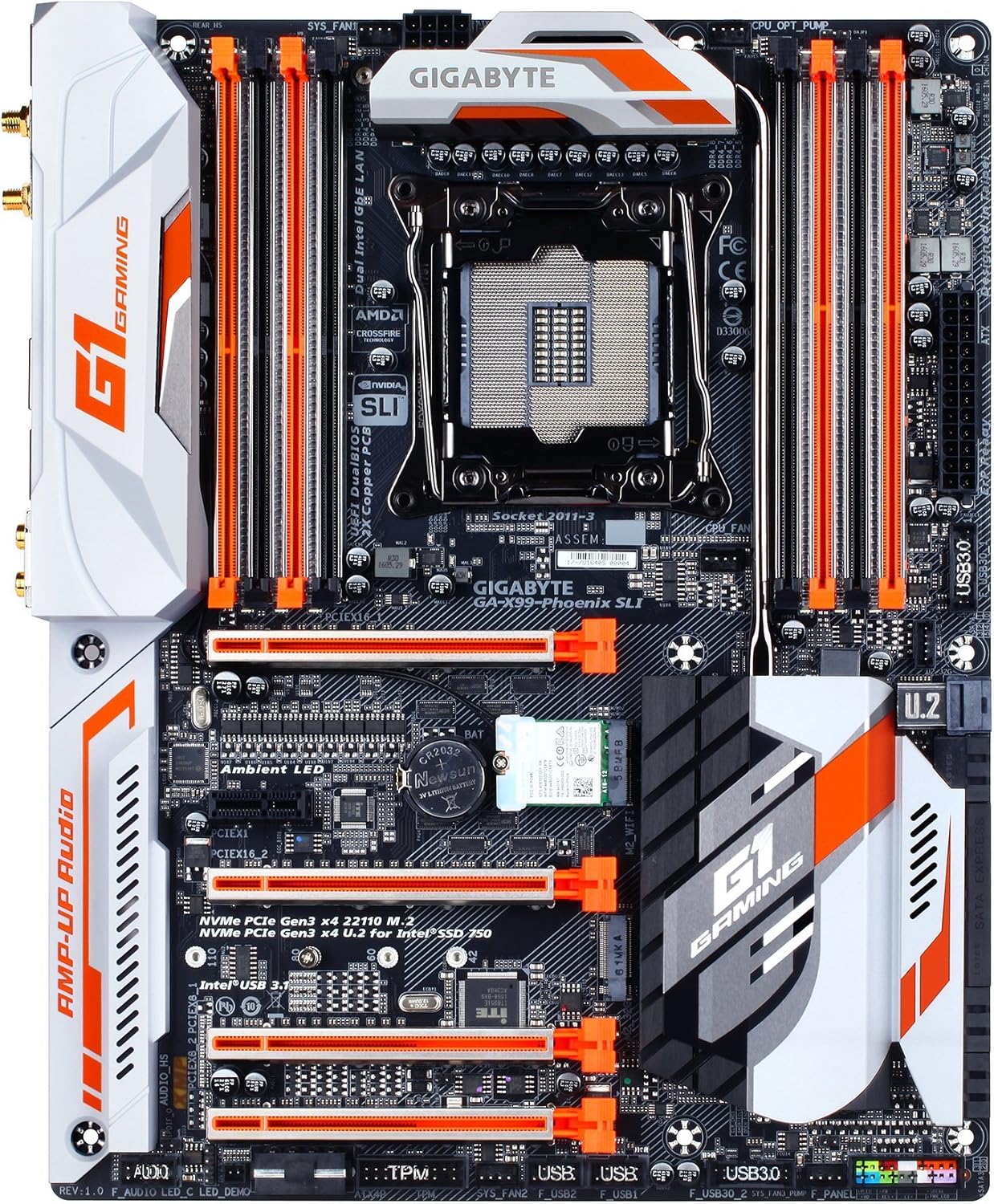
Hoto 1: Sama-sama view of the GIGABYTE GA-X99-Phoenix SLI motherboard, showcasing its layout including the CPU socket, RAM slots, PCIe slots, and various connectors.
2. Saita da Shigarwa
2.1 Jerin Lissafin Shigarwa
- Dacewar Harka: Ensure your PC case supports the E-ATX form factor. Standard ATX cases may not accommodate this motherboard.
- Mai sarrafawa: Verify you have an Intel Core i7 processor compatible with the LGA 2011-3 socket.
- Ƙwaƙwalwar ajiya: Use DDR4 DIMMs. The motherboard supports Quad Channel, Registered / Non-ECC Unbuffered DDR4.
- Tushen wutan lantarki: A stable power supply unit (PSU) with sufficient wattage is crucial for system stability.
2.2 Shigar da Motherboard
- Shirya Harka: Shigar da garkuwar I/O cikin buɗaɗɗen baya na akwati na PC.
- Dutsen Motherboard: A hankali daidaita motherboard ɗin da wuraren da ke cikin akwatin ku kuma ku haɗa shi da sukurori.
- Sanya CPU: Open the CPU socket lever, align the CPU with the socket (matching the golden triangle on the CPU to the mark on the socket), gently place the CPU, and close the lever.
- Sanya CPU Cooler: Attach your chosen CPU cooler according to its manufacturer's instructions.
- Shigar da RAM (RAM): Open the clips on the DDR4 DIMM slots. Align the memory modules with the slots, ensuring the notch on the module matches the key in the slot. Press down firmly until the clips snap into place. For optimal performance, populate memory in a quad-channel configuration as recommended by the motherboard manual.
- Haɗa Ikon: Connect the 24-pin ATX main power connector and the 8-pin CPU power connector from your PSU to the motherboard.
- Haɗa Kayan Ajiye: Connect SATA, M.2, or U.2 drives to the appropriate ports.
- Abubuwan Haɗawa: Connect front panel headers (power, reset, USB, audio), USB devices, and other peripherals.

Hoto 2: Angled view of the motherboard, highlighting the rear I/O panel and the layout of the PCIe and RAM slots.
2.3 Boot na farko da shiga BIOS
After connecting all necessary components, power on your system. During the Power-On Self-Test (POST), press the DEL key repeatedly to enter the UEFI BIOS setup. You may also press the Ƙarshe key during POST to access Q-Flash for BIOS updates.
3. Aiki da Motherboard
3.1 UEFI BIOS Navigation
The GIGABYTE UEFI BIOS provides a graphical interface for system configuration. While mouse navigation is available, some users may find the keyboard more responsive for precise control due to potential mouse lag within the BIOS environment.
3.2 Overclocking Features
This motherboard offers robust overclocking capabilities. For users new to overclocking, GIGABYTE's EasyTune utility (part of the APP Center) provides one-click overclocking options (e.g., 3.8GHz, 4.0GHz, 4.2GHz) for compatible CPUs. Memory overclocking can be adjusted directly in the BIOS by selecting desired speeds from a dropdown menu, allowing the motherboard to manage voltage settings automatically.
3.3 Kayan aikin Software
The GIGABYTE APP Center provides access to various utilities, including:
- EasyTune: For system tuning, monitoring, and overclocking.
- Cloud Station: For cloud-based data management and sharing.
- Other utilities for fan control, system information, and more.
3.4 Audio and Network
The motherboard features 115dB SNR HD Audio with a built-in rear audio amplifier for enhanced sound quality. Network connectivity is provided by Dual Intel Gigabit Ethernet LAN ports, which can be optimized with cFosSpeed Internet Accelerator Software, and integrated Intel 802.11ac Dual Band Wireless with Bluetooth 4.2.

Figure 3: Close-up of the rear I/O panel, showing various ports including USB, Ethernet, audio jacks, and wireless antenna connectors.
4. Kulawa
4.1 CMOS baturi
The motherboard uses a Lithium Metal battery (CR2032) to retain BIOS settings and the system clock when the computer is powered off. If you experience issues with incorrect time/date or lost BIOS settings, the CMOS battery may need replacement. Refer to the motherboard diagram for its location.
4.2 Sabunta BIOS
GIGABYTE's Q Flash Plus utility allows you to update the BIOS without installing a CPU, memory, or graphics card. Simply download the latest BIOS version from the GIGABYTE website, place it on a USB flash drive, and follow the instructions for Q-Flash Plus. Regular BIOS updates can improve system stability, compatibility, and performance.
5. Shirya matsala
5.1 Batutuwan gama gari
- System Fails to POST (Power-On Self-Test):
- Duba duk haɗin wutar lantarki (ATX 24-pin, CPU 8-pin).
- Tabbatar cewa CPU da RAM suna wurin da ya dace.
- Verify the CPU cooler is properly installed.
- Gwada yin booting tare da mahimman abubuwan haɗin gwiwa kawai (CPU, sandar RAM ɗaya, GPU idan babu haɗaɗɗiyar zane).
- System Freezes or is Unstable:
- Ensure the BIOS is updated to the latest stable version. Early BIOS versions may have compatibility issues.
- Duba yanayin CPU da GPU don kawar da zafi fiye da kima.
- Idan overclocking, komawa zuwa saitunan tsoho don bincika kwanciyar hankali.
- Gudanar da kayan aikin gano ƙwaƙwalwar ajiya don bincika amincin RAM.
- No Debug Code LED: This motherboard does not feature a debug code LED. Troubleshooting will rely on beep codes (if enabled) or visual inspection of components.
- Mouse Lag in BIOS: This is a known characteristic for some users. Use keyboard navigation for a more responsive experience.
6. Ƙayyadaddun bayanai
| Siffar | Ƙayyadaddun bayanai |
|---|---|
| Alamar | GIGABYTE |
| Sunan Samfura | GA-X99-Phoenix SLI |
| CPU Socket | LGA 2011-3 |
| Masu sarrafawa masu jituwa | Intel Core i7 (Broadwell-E) |
| Nau'in Chipset | Intel X99 |
| Fasahar Ƙwaƙwalwar RAM | DDR4 SDRAM |
| Tashoshin ƙwaƙwalwa | Tashar Quad |
| Ƙarfin Ƙwaƙwalwar Ƙwaƙwalwa | Up to 256 GB (8 DIMMs) |
| Bayanin Hotuna | PCIe Gen3 x16 slots (Supports 3-Way/2-Way SLI & CrossFire) |
| Ma'ajiyar mu'amala | NVMe PCIe Gen3 x4 22110 M.2, U.2, SATA Express, SATA 6Gb/s |
| USB Ports | Intel USB 3.1 (Type-A & Type-C), USB 3.0, USB 2.0 |
| LAN | Dual Intel Gigabit Ethernet |
| Haɗin mara waya | Intel 802.11ac Dual Band Wireless, Bluetooth 4.2 |
| Audio | 115dB SNR HD Audio with Built-in Rear Audio Amplififi |
| Factor Factor | E-ATX (14.48 x 12.2 x 3.85 inches) |
| Siffofin Musamman | Ambient Surround LED, Ultra Durable Metal Shielding, Anti-Sulfur Resistors, Anti-Rust Rear I/O, Dual Hybrid Fan Headers, GIGABYTE UEFI Dual BIOS with Q-Flash Plus |
| CMOS Baturi | 1 Lithium Metal baturi da ake bukata |


