Gabatarwa
This manual provides detailed instructions for the safe and efficient operation of your Telefunken RC1007BM Bluetooth Boombox. Please read this manual thoroughly before using the device and retain it for future reference.

Hoto: Gaba view of the Telefunken RC1007BM Bluetooth Boombox, showcasing its speakers, central control panel, and antenna.
Umarnin Tsaro
- Kada a fallasa na'urar ga ruwan sama ko danshi don hana gobara ko girgizar lantarki.
- Kar a toshe kowane buɗewar samun iska. Shigar daidai da umarnin masana'anta.
- Kada a shigar kusa da kowane tushen zafi kamar radiators, rajistan zafi, murhu, ko wasu na'urori (ciki har da amplifiers) masu samar da zafi.
- Kare igiyar wutar lantarki daga tafiya a kai ko a dunƙule, musamman a matosai, madaidaitan ma'auni, da wurin da suke fita daga na'urar.
- Yi amfani da haɗe-haɗe-haɗe-haɗe/na'urorin haɗi kawai da mai ƙira ya ƙayyade.
- Cire wannan na'urar yayin guguwar walƙiya ko lokacin da ba a yi amfani da ita na dogon lokaci ba.
- Koma duk sabis ɗin zuwa ƙwararrun ma'aikatan sabis. Ana buƙatar yin hidima lokacin da na'urar ta lalace ta kowace hanya.
Abubuwan Kunshin
Da fatan za a duba cewa duk abubuwa suna nan:
- Telefunken RC1007BM Bluetooth Boombox
- Adaftar Wuta
- Madaurin kafada
- Ikon nesa
- Jagorar mai amfani (wannan takaddar)
Samfurin Ƙarsheview
Ikon Gabatarwa da Haɗin kai
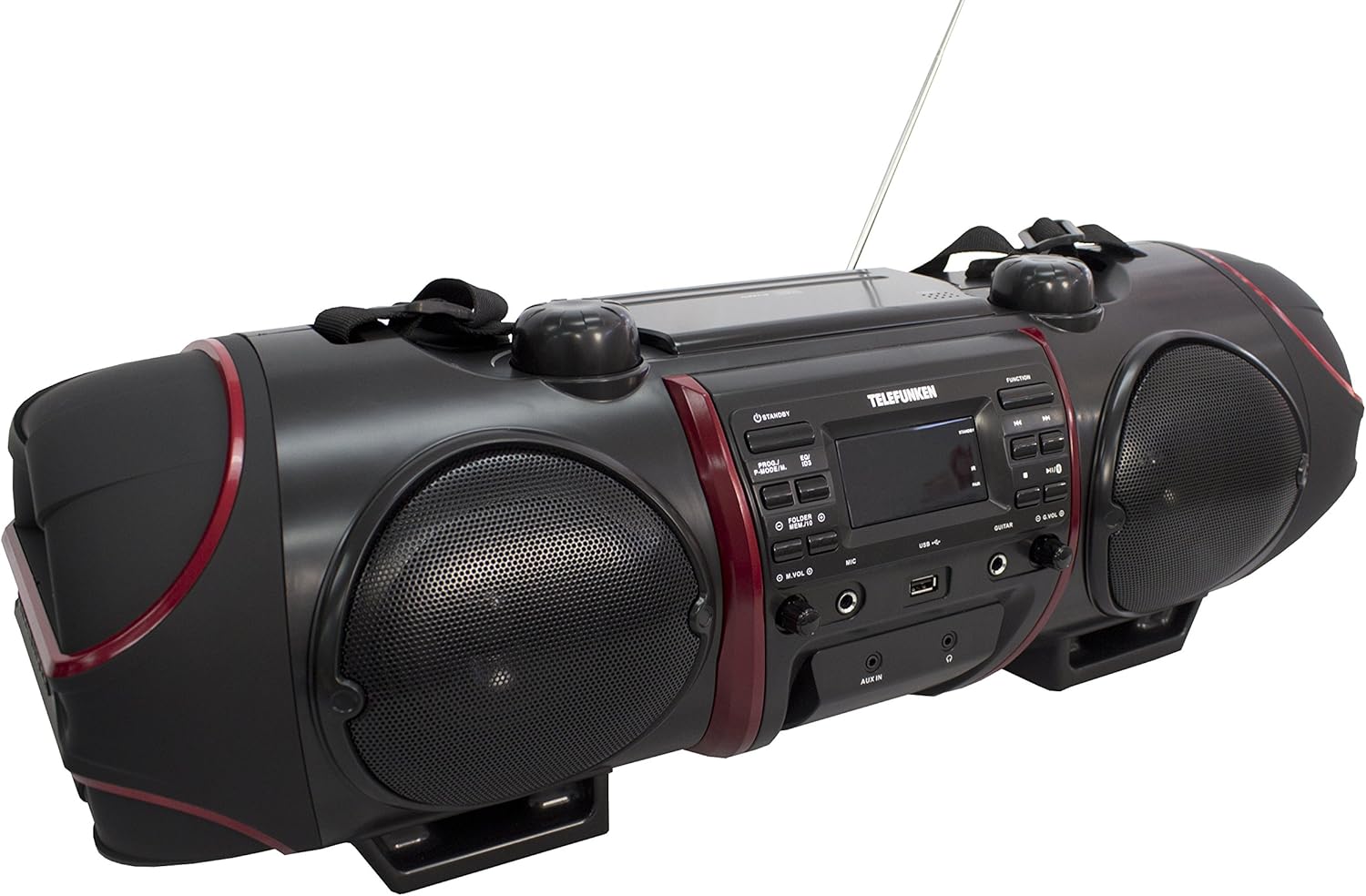
Image: Close-up of the central control panel, showing buttons, LCD display, USB port, and input jacks.
- Maɓallin JIRA: Yana kunnawa ko kashe naúrar.
- PROG./P-MODE/M. Button: Program CD tracks, select playback mode, or store/recall radio presets.
- EQ/ID3 Button: Select equalizer presets or display ID3 tag information for MP3s.
- FOLDER/MENU/TS Button: Navigate folders on USB/CD or access menu options.
- M.VOL (Microphone Volume) Knob: Yana daidaita ƙarar shigar da makirufo.
- MIC (Microphone) Input: 3.5mm jack for microphone connection.
- Tashar USB: Don haɗa na'urorin ajiya na USB.
- GUITAR Input: 3.5mm jack for guitar connection.
- G.VOL (Guitar Volume) Knob: Adjusts guitar input volume.
- Maɓallin AIKI: Selects input source (CD, FM, Bluetooth, AUX).
- Maɓallin WASA/DAKATARWA: Farawa ko dakatar da sake kunnawa.
- Maɓallin TSAYA: Dakatar da sake kunnawa.
- SKIP/TUNE Buttons (Previous/Next): Skips tracks or tunes radio frequencies.
- Maballin BIYU: Yana fara haɗa haɗin Bluetooth.
- VOL (Volume) Knob: Yana daidaita ƙarar ƙira.
- AUX IN Jack: Shigarwar 3.5mm don na'urorin sauti na waje.
- HEADPHONE Jack: 3.5mm output for headphones.
- Nuni LCD: Shows current status, track information, and radio frequency.
Top Panel (CD Compartment)

Hoto: Sama view of the boombox, highlighting the CD compartment with 'PUSH TO OPEN' label.
The CD compartment is located on the top of the unit. Press the 'PUSH TO OPEN' area to open the lid and insert a CD.
Rear Panel (Power and Battery Compartment)

Hoto: Na baya view of the boombox, displaying the AC power input and the battery compartment cover.
The AC power input and battery compartment are located on the rear of the unit. Ensure the correct power source is connected or batteries are inserted correctly.
Ikon nesa

Image: The remote control for the Telefunken RC1007BM, showing various function buttons.
The remote control provides convenient access to most functions of the boombox. Refer to the button labels on the remote for specific operations.
Saita
Haɗin Wuta
- Wutar AC: Connect the supplied power adapter to the AC input jack on the rear of the unit and then to a standard wall outlet.
- Ikon Baturi: For portable use, open the battery compartment on the rear of the unit and insert the required batteries (not included), ensuring correct polarity.
Gyaran Eriya
Extend the telescopic antenna fully for optimal FM radio reception. Adjust its position for the best signal.
Haɗe-haɗen madaurin kafada
Attach the provided shoulder strap to the designated loops on the sides of the boombox for easy portability.
Umarnin Aiki
Kunnawa/Kashewa
Danna maɓallin TSAYA TUKUNA maɓalli a kan gaban allon ko na'urar sarrafawa ta nesa don kunna ko kashe na'urar.
CD/MP3-CD sake kunnawa
- Danna maɓallin AIKI maballin don zaɓar yanayin CD.
- Open the CD compartment lid by pressing 'PUSH TO OPEN' on the top.
- Place a CD or MP3-CD with the label side facing up. Close the lid.
- Playback will start automatically. If not, press the WASA/DAKATARWA maballin.
- Yi amfani da SKIP/TUNE maɓalli don tsallake waƙoƙi.
- Danna maɓallin TSAYA maballin don dakatar da sake kunnawa.
- sake kunnawa shirin: While in stop mode, press PROG./P-MODE/M. to program tracks.
- Maimaita / sake kunnawa bazuwar: Latsa PROG./P-MODE/M. during playback to cycle through repeat modes (e.g., repeat one, repeat all) or random play.
Aikin Rediyon FM
- Danna maɓallin AIKI maɓalli don zaɓar yanayin rediyon FM.
- Auto Scan and Store: Latsa ka riƙe PROG./P-MODE/M. maballin don dubawa ta atomatik da adana tashoshin FM da ke akwai.
- Maning Tunani: Yi amfani da SKIP/TUNE buttons to manually tune to desired frequencies.
- Tuna Saitunan Latsa PROG./P-MODE/M. repeatedly to cycle through stored preset stations.
Haɗa Bluetooth
- Danna maɓallin AIKI maɓalli don zaɓar yanayin Bluetooth. Allon zai nuna "BT" da walƙiya, yana nuna yana cikin yanayin haɗawa.
- Activate Bluetooth on your smartphone or tablet and search for available devices.
- Select "RC1007BM" from the list of devices.
- Once paired, the display will stop flashing, and you can play music from your device.
- The effective transmission range is up to 10 meters.
Shigar da AUX
- Haɗa na'urar mai jiwuwa ta waje (misali, mai kunna MP3) zuwa ga AUX IN jack ta amfani da kebul na sauti na 3.5mm (ba a haɗa shi ba).
- Danna maɓallin AIKI maballin don zaɓar yanayin AUX.
- Play audio from your connected device.
Microphone da Guitar Input
- Haɗa makirufo zuwa MIC input jack and/or a guitar to the GUITAR shigar jack.
- Daidaita ƙarar makirufo ta amfani da M.VOL knob and the guitar volume using the G.VOL dunƙule.
Mai daidaita sauti
Danna maɓallin EQ/ID3 button repeatedly to cycle through the 6 preset equalizer levels: Flat, Classic, Pop, Jazz, Rock, and 3D. Select the one that best suits your audio preference.
Kulawa
- Tsaftacewa: Yi amfani da laushi, bushe bushe don tsaftace wajen naúrar. Kada a yi amfani da masu tsabtace abrasive ko kaushi.
- Kulawar CD: A riƙe CD ɗin a gefunansu. A tsaftace CD ɗin datti da kyalle mai laushi, ba tare da lanƙwasa ba, a goge daga tsakiya zuwa waje.
- Kulawar Baturi: Idan ba za a yi amfani da na'urar na tsawon lokaci ba, cire batirin don hana zubewa da lalacewa.
Shirya matsala
| Matsala | Dalili mai yiwuwa | Magani |
|---|---|---|
| Babu iko | Ba a haɗa igiyar wuta ba; Batura sun ƙare ko shigar da kuskure. | Ensure AC adapter is securely connected. Replace batteries or check polarity. |
| Babu sauti | Ƙarar ƙara ta yi ƙasa sosai; An zaɓi tushen da bai dace ba; An haɗa belun kunne. | Increase volume. Press FUNCTION to select correct source. Disconnect headphones. |
| CD baya kunnawa | CD inserted incorrectly; CD dirty or scratched; Disc format not supported. | Insert CD with label side up. Clean or replace CD. Ensure it's a CD-R/RW or MP3-CD. |
| Bluetooth baya haɗawa | Device too far; Bluetooth not enabled on external device; Unit not in pairing mode. | Move device closer. Enable Bluetooth on your device. Press FUNCTION to select BT mode and PAIR button. |
| Mara kyau liyafar rediyo | Antenna not extended or positioned correctly; Weak signal. | Faɗaɗa kuma daidaita eriyar telescopic gaba ɗaya. Gwada motsa na'urar zuwa wani wuri daban. |
Ƙayyadaddun bayanai
- Samfura: RC1007BM
- Alamar: TELEFUNKEN
- Tushen wutar lantarki: AC 100-240V ~ 50/60Hz or Batteries (not included)
- Jimlar Ƙarfin fitarwa (RMS): 52 W (2 x 8 W speakers, 2 x 18 W subwoofer)
- Sigar Bluetooth: 3.0
- Yankin Bluetooth: Har zuwa mita 10
- Tuner: Digital PLL FM/FM-Stereo
- Saitunan FM: 30
- CD sake kunnawa: CD, CD-R/-RW, MP3-CD
- Tsarin Sauti masu goyan baya: MP3, WMA, AAC, WAV
- Abubuwan shigarwa: 3.5mm AUX-in, 3.5mm Microphone, 3.5mm Guitar, USB
- Abubuwan da aka fitar: 3.5mm Naúrar kai
- Nau'in Nuni: LCD
- Saitattun masu daidaita daidaito: 6 (Flat, Classic, Pop, Jazz, Rock, 3D)
- Girman Samfura (L x W x H): 68 x 23 x 22 cm
- Nauyin Abu: 6 kg
Garanti da Taimako
For warranty information and technical support, please refer to the documentation provided at the time of purchase or contact your local Telefunken dealer or service center. Keep your proof of purchase for any warranty claims.


