1. Gabatarwa
The BOSS VE-8 Acoustic Singer is a compact, all-in-one preamp and effects solution designed for singers who play acoustic guitar. It provides studio-quality voice and guitar processing, real-time harmonies, and looping capabilities in a portable package. This manual provides detailed instructions for setting up, operating, and maintaining your VE-8 unit.
2. Mabuɗin Siffofin
- Hadakar Preamp and Effects: Combines vocal and acoustic guitar processing into a single, compact unit.
- Studio-Quality Vocal Processing: Includes four types of ambience effects, Enhance, and chromatic pitch correction for live vocal tuning.
- Real-Time Vocal Harmonies: Automatically creates natural vocal harmonies based on guitar input or manual key settings.
- Multiple Vocal Effects: Features vocal doubling, hard-tuned electronic voices, distortion, and radio voice effects.
- Dedicated Acoustic Guitar Channel: Offers Acoustic Resonance, reverb, chorus, tuner, various effects, plus phase invert and notch filter for feedback control.
- Looper Functionality: Provides 80 seconds of recording time with independent looping for guitar and vocals.
- Sarrafa Hankali: Simple, intuitive controls for dialing in rich, sophisticated BOSS sound processing.
3. Saita
3.1 Gabatarwar Gabaview
The front panel provides access to all primary controls for vocal and guitar effects, output levels, and memory functions.

Figure 1: Front panel of the BOSS VE-8 Acoustic Singer, showing knobs for guitar and vocal effects, output levels, and foot switches.
3.2 Haɗin Ƙungiyar Rear
The rear panel houses all input and output jacks for connecting your microphone, guitar, and external audio equipment.
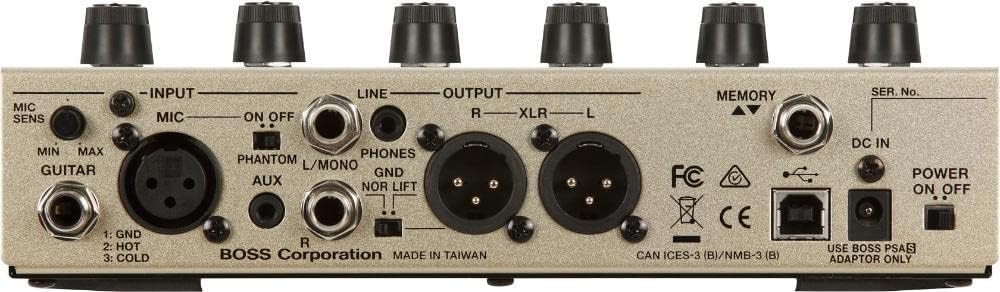
Figure 2: Rear panel of the BOSS VE-8 Acoustic Singer, displaying input/output jacks for microphone, guitar, XLR outputs, and power.
Haɗa Kayan Aikinku:
- Shigar da makirufo: Connect your microphone to the MIC IN (XLR) jack. Adjust the MIC SENS knob to an appropriate level.
- Shigar da Guitar: Connect your acoustic guitar to the GUITAR IN (1/4-inch) jack.
- Abubuwan da aka fitar: Connect the XLR OUT (L/R) jacks to your PA system or mixer. Use the PHONES/LINE OUT jack for headphones or line-level output.
- AUX A: Connect an external audio player to the AUX IN jack for backing tracks.
- USB: Connect to a computer for audio recording/playback or firmware updates.
- Ƙarfi: Connect the included BOSS PSA adaptor to the DC IN jack. Ensure the POWER ON/OFF switch is in the OFF position before connecting, then turn ON.
4. Yin amfani da VE-8
4.1 Vocal Section Controls
- KYAUTA: Adjusts vocal clarity and presence.
- GYARA: Applies chromatic pitch correction.
- REVERB (Type/Level): Selects reverb type and adjusts its intensity for vocals.
- HARMONY (Type/Level/Key): Selects harmony type (e.g., high, higher, low, double), adjusts its volume, and sets the key (AUTO or manual).
4.2 Guitar Section Controls
- ACOUSTIC RESONANCE (Shape): Restores natural acoustic guitar tone.
- REVERB (Type): Selects reverb type for guitar.
- CHORUS (Type): Selects chorus type for guitar.
- NOTCH/PHASE: Controls feedback suppression.
4.3 Looper and Foot Switches
The three foot switches control Chorus, Harmony, and Looper functions. They also allow for memory selection and tuner activation.

Figure 3: A user's foot interacting with the foot pedals of the BOSS VE-8, demonstrating real-time control during performance.
- CHORUS Foot Switch: Toggles chorus effect. Press and hold for 2 seconds to activate the tuner and mute output.
- HARMONY Foot Switch: Toggles vocal harmony. Press and hold for 2 seconds to bypass all effects.
- LOOP Foot Switch: Controls looper functions (REC/PLAY, OVERDUB). Press twice to STOP, press and hold for 2 seconds to CLEAR the loop.
- STOMP/MEMORY: Use the foot switches to cycle through memory presets.
5. Kulawa
To ensure optimal performance and longevity of your BOSS VE-8, follow these maintenance guidelines:
- Tsaftacewa: Yi amfani da laushi, bushe bushe don tsaftace naúrar. Kauce wa masu goge goge ko kaushi.
- Ajiya: Ajiye rukunin a bushe, wuri mai sanyi nesa da hasken rana kai tsaye da matsanancin zafi.
- Tushen wutan lantarki: Always use the specified BOSS PSA adaptor. Disconnect power when not in use for extended periods.
- Sabunta Firmware: Bincika BOSS lokaci-lokaci webrukunin yanar gizo don sabunta firmware don tabbatar da naúrar ku tana da sabbin fasaloli da gyaran kwaro.
6. Shirya matsala
If you encounter issues with your VE-8, refer to the following common troubleshooting steps:
- Babu Sauti: Check all cable connections, ensure power is on, and verify input/output levels. Check if the unit is in Tuner/Mute mode.
- Karkataccen Sauti: Reduce input gain (MIC SENS, GUITAR IN level) or output levels. Check for proper impedance matching.
- Jawabin: Use the NOTCH/PHASE controls in the guitar section. Adjust microphone placement.
- Harmonies Not Tracking: Ensure the correct key is selected or AUTO mode is active. Check guitar input signal quality.
- Looper Issues: Ensure sufficient recording time is available (80 seconds max). Check if the loop is cleared correctly.
For more detailed troubleshooting, consult the full owner's manual available on the BOSS website or contact BOSS customer support.
7. Ƙayyadaddun bayanai
| Siffar | Ƙayyadaddun bayanai |
|---|---|
| Lambar Samfura | VE-8 |
| Nauyin Abu | 3.3 fam (Kilogram 1.5) |
| Girman samfur | 13.3 x 8.9 x 5.1 inci |
| Kayan Jiki | Filastik/Metal |
| Nau'in Haɗawa | 1/4" (6.35mm), XLR |
| Interirƙirar Abun Taɗi | USB |
| Tsarin sigina | Analog |
| Tushen wutar lantarki | Corded Electric |
| Voltage | 9 Volts |
| Ampzamanin | miliyan 30amps |
| Baturi | Ana buƙatar batir AA 6 (an haɗa) |
8. Garanti da Tallafawa
For warranty information and customer support, please refer to the documentation included with your product or visit the official BOSS website. Ajiye rasidin siyan ku azaman shaidar siyan don da'awar garanti.
Tsare-tsaren Kariya: Extended protection plans are available for purchase separately. Please refer to your retailer for details on available plans.
9. Bidiyon Samfur na hukuma
No official seller videos directly related to the BOSS VE-8 Acoustic Singer were found in the provided product data.


