1. Gabatarwa
This manual provides essential information for the proper installation, operation, and maintenance of your Datalogic Scanning STD-G040-BK Basic Stand. Please read this manual thoroughly before using the product to ensure safe and efficient operation. This stand is designed to securely hold compatible Datalogic barcode scanners, such as the Gryphon 4130, enabling hands-free scanning functionality.
2. Bayanin Tsaro
- Ensure the stand is placed on a stable, flat surface to prevent tipping.
- Do not attempt to modify the stand. Unauthorized modifications may void the warranty and pose safety risks.
- Keep the stand away from excessive heat, moisture, and direct sunlight.
- Handle the stand with care to avoid damage to its components, especially the flexible gooseneck.
3. Abubuwan Kunshin
Tabbatar cewa kunshin ku ya ƙunshi abubuwa masu zuwa:
- Datalogic Scanning STD-G040-BK Stand (1 unit)
- Barcode sticker for scanner configuration (may be included for setting scanner to stand mode)
Idan wani abu ya ɓace ko ya lalace, tuntuɓi mai samar da kayayyaki nan take.
4. Saita
Follow these steps to set up your Datalogic Scanning STD-G040-BK Stand:
- Cire Tushen: Carefully remove the stand from its packaging.
- Sanya Matsayi: Place the stand on a stable, flat surface where it will be used. Ensure there is adequate space for the scanner and its cable. The base of the stand includes pre-drilled holes for optional secure mounting to a surface, if desired (mounting hardware not included).
- Insert the Scanner: Gently place your compatible Datalogic barcode scanner (e.g., Gryphon 4130) into the cradle at the top of the stand. Ensure it sits securely.
- Daidaita Gooseneck: The stand features a flexible gooseneck. Adjust the angle and height of the scanner cradle to optimize scanning ergonomics for your specific application.
- Configure Scanner (if necessary): If your scanner does not automatically detect stand mode, use the provided barcode sticker (if included) or refer to your scanner's user manual to scan the appropriate configuration barcode to enable 'stand mode' or 'presentation mode'. This typically optimizes the scanner for hands-free operation.
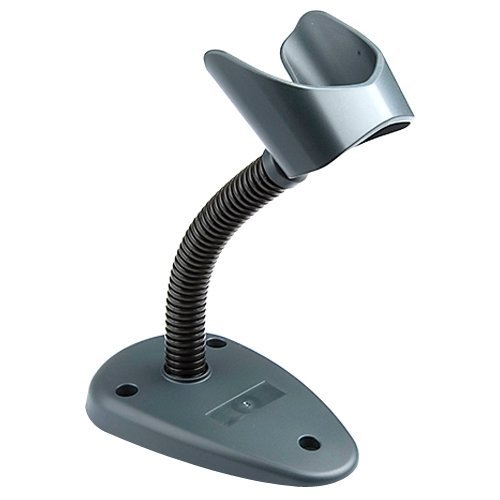
Image of the Datalogic Scanning STD-G040-BK stand, featuring a dark grey base, a flexible black gooseneck, and a dark grey scanner cradle.
5. Umarnin Aiki
Once the stand is set up and your compatible Datalogic scanner is placed in the cradle and configured for stand mode, operation is straightforward:
- Hands-Free Scanning: Present items with barcodes directly in front of the scanner's window. The scanner, when in stand mode, will automatically detect and read the barcode without requiring you to press a trigger.
- Mafi kyawun Matsayi: Adjust the gooseneck as needed throughout the day to maintain an optimal scanning angle and reduce operator fatigue.
- Scanner Removal: To use the scanner in handheld mode, simply lift it out of the cradle. Depending on your scanner's configuration, it may automatically switch to handheld mode, or you may need to scan a specific barcode to change modes.
6. Kulawa
The Datalogic Scanning STD-G040-BK Stand requires minimal maintenance to ensure its longevity and proper function:
- Tsaftacewa: Yi amfani da taushi, damp cloth to wipe down the stand's surfaces. Avoid abrasive cleaners or solvents, which can damage the finish.
- Dubawa: Periodically inspect the gooseneck for any signs of wear or damage. Ensure the scanner cradle remains secure.
- Ajiya: If storing the stand for an extended period, keep it in a clean, dry environment away from extreme temperatures.
7. Shirya matsala
If you encounter issues with your stand, consider the following:
- Scanner Not Entering Stand Mode: Ensure your scanner is compatible with the stand. Verify that you have scanned the correct configuration barcode to enable 'stand mode' or 'presentation mode' on your scanner. Refer to your scanner's specific user manual for detailed instructions.
- Stand Instability: Ensure the stand is placed on a completely flat and stable surface. If necessary, consider using the optional mounting holes to secure the base.
- Gooseneck Stiffness/Looseness: The gooseneck is designed for flexibility and durability. If it feels too stiff or too loose, ensure no foreign objects are obstructing its movement. Avoid excessive force when adjusting.
For persistent issues, contact Datalogic support or your product supplier.
8. Ƙayyadaddun bayanai
| Siffar | Daki-daki |
|---|---|
| Lambar Samfura | STD-G040-BK |
| Girman samfur | 4.21 x 6.97 x 3.19 inci |
| Nauyi | 1 Fam |
| Launi | Dark Grey |
| Siffar | Basic Stand with Flexible Gooseneck |
| Na'urori masu jituwa | Datalogic Gryphon 4130 and other compatible Datalogic scanners |
| Mai ƙira | BlueStar Inc. (for Datalogic) |
| UPC | 783555015759 |
9. Garanti da Tallafawa
This Datalogic product is manufactured by BlueStar Inc. and is covered by a standard manufacturer's warranty. For specific warranty terms and conditions, please refer to the documentation provided with your purchase or visit the official Datalogic website. For technical support, troubleshooting assistance, or to inquire about replacement parts, please contact your authorized Datalogic dealer or Datalogic customer service directly.
Lura: Sharuɗɗan garanti na iya bambanta ta yanki da dillali. Ajiye shaidar siyan ku don da'awar garanti.


