Gabatarwa
The Klipsch Reference RSB-6 Sound Bar with Wireless Subwoofer is designed to enhance your home audio experience. This system provides incredible sound with a wireless subwoofer, offering a turn-key solution to upgrade your TV's audio to a true home theater experience. Within minutes of unboxing, this 2-way sound bar and 6.5-inch wireless subwoofer deliver powerful, detailed sound.
Mabuɗin fasali:
- 4K Ultra-HD video pass-through
- Super easy to set up
- Featuring Klipsch Tractrix horns for detailed, impactful sound
- Integrated Dolby Audio for an incredible listening experience
- Automatically-connecting wireless subwoofer
Saita
Setting up your Klipsch Reference RSB-6 Sound Bar is designed to be straightforward. Follow these steps to connect your sound bar and wireless subwoofer.
1. Cire kaya da Sanya:
Carefully remove all components from the packaging. Place the sound bar directly in front of your television, ensuring it does not obstruct the TV's remote sensor. Position the wireless subwoofer in a convenient location within the room, ideally near the sound bar but it can be placed elsewhere for optimal bass distribution.
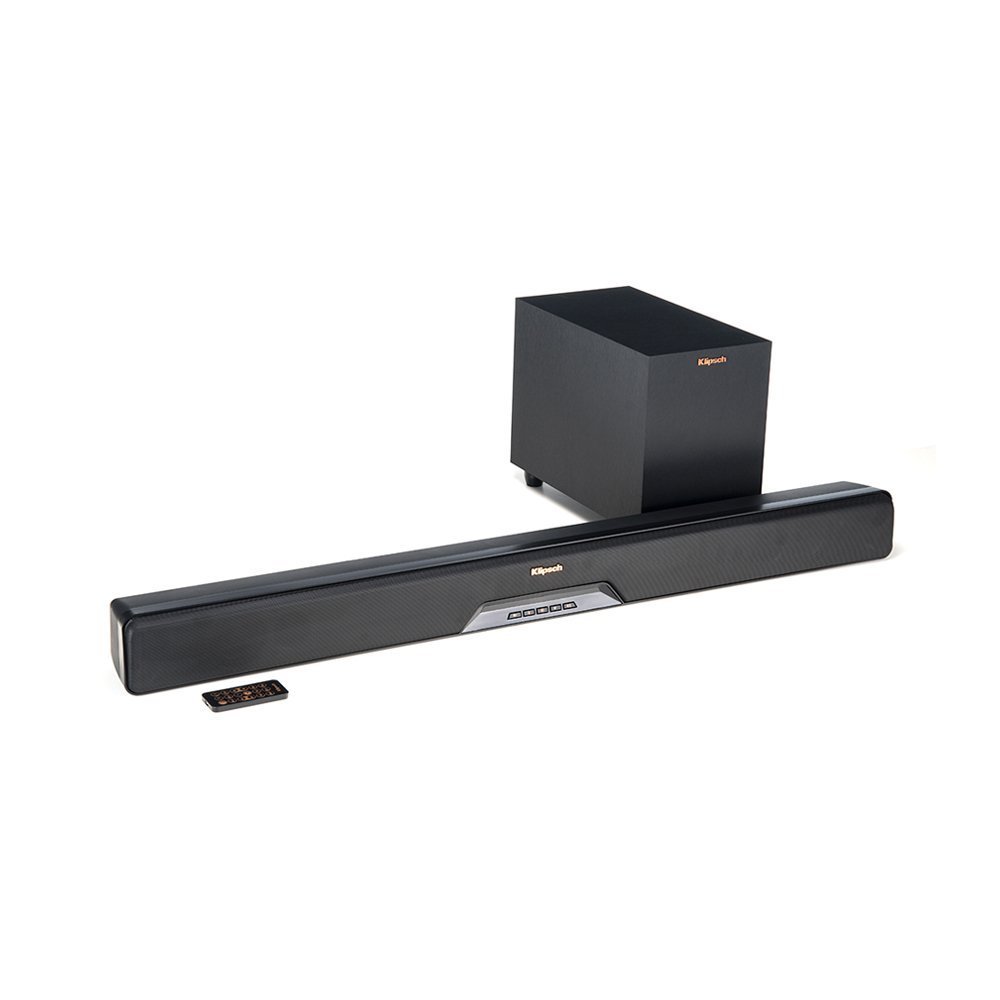
Image: The Klipsch Reference RSB-6 Sound Bar positioned in front of a television, with the wireless subwoofer nearby.
2. Connecting the Sound Bar to your TV:
The RSB-6 supports HDMI-ARC for the best audio quality and control. Connect one end of an HDMI cable (included) to the HDMI-ARC port on your TV and the other end to the HDMI-ARC port on the sound bar. Ensure your TV's HDMI-ARC feature is enabled in its settings.
Alternatively, you can use an optical cable to connect the sound bar to your TV's optical audio output. Connect the power cord to the sound bar and plug it into a wall outlet.
3. Connecting the Wireless Subwoofer:
The wireless subwoofer is designed to automatically connect to the sound bar upon powering on. Plug the subwoofer's power cord into a wall outlet. The subwoofer should automatically pair with the sound bar. If pairing does not occur automatically, refer to the troubleshooting section for manual pairing instructions.
Aiki
The Klipsch RSB-6 offers various modes and controls to optimize your listening experience.
1. Ikon nesa:
Use the included remote control to power on/off, adjust volume, select input sources (TV, Aux, Bluetooth), and switch between sound modes. The remote is compact and provides full control over the system's functions.
2. Yanayin Sauti:
- Dialogue EQ: This feature enhances vocal frequencies, making dialogue clearer and easier to understand, especially in movies or shows with complex sound mixes.
- Yanayin Kewaye: Activates a virtual surround sound experience, expanding the soundstage for a more immersive audio environment.
- Yanayin Dare: Reduces dynamic range and bass output, making it ideal for late-night viewba tare da damun wasu ba.
You can often combine Surround Mode and Dialogue EQ for a customized listening experience.
3. Haɗin Bluetooth:
To connect a Bluetooth device, select the Bluetooth input on the sound bar. Enable Bluetooth on your device and select "Klipsch RSB-6" from the list of available devices. Once paired, you can stream audio wirelessly from your smartphone, tablet, or computer.
Kulawa
To ensure the longevity and optimal performance of your Klipsch Reference RSB-6 Sound Bar, follow these simple maintenance guidelines:
- Tsaftacewa: Use a soft, dry cloth to wipe down the surfaces of the sound bar and subwoofer. Avoid using liquid cleaners or abrasive materials, as these can damage the finish.
- Samun iska: Ensure that the sound bar and subwoofer have adequate ventilation. Do not block any vents or place the units in enclosed spaces that could restrict airflow.
- Kauce wa Mummunan Yanayi: Keep the units away from direct sunlight, heat sources, and excessive moisture.
Shirya matsala
If you encounter any issues with your Klipsch Reference RSB-6 Sound Bar, try the following troubleshooting steps:
- Babu Sauti:
- Ensure the sound bar is powered on and the correct input source (TV, Aux, Bluetooth) is selected.
- Check all cable connections (HDMI, optical) between the sound bar and your TV.
- Verify that your TV's audio output is set to external speakers and HDMI-ARC is enabled if using an HDMI connection.
- Subwoofer mara waya baya Haɗawa:
- Ensure both the sound bar and subwoofer are powered on.
- If the subwoofer does not automatically pair, try manually pairing it. Consult the full user manual for specific manual pairing instructions, which typically involve pressing a pairing button on both units.
- Ensure the subwoofer is within range of the sound bar and there are no significant obstructions.
- Poor Bluetooth Connection/Range:
- Ensure your Bluetooth device is within close proximity to the sound bar (typically within 15-20 feet).
- Remove any obstacles that might interfere with the Bluetooth signal.
- Try unpairing and re-pairing your Bluetooth device.
- Voice Clarity Issues:
- Activate the Dialogue EQ mode on your remote control to boost vocal frequencies.
- Adjust the overall volume and bass levels to find a balance that suits your preference.
If these steps do not resolve the issue, please contact Klipsch customer support for further assistance.
Ƙayyadaddun bayanai
| Siffar | Daki-daki |
|---|---|
| Sunan Samfura | Bar sauti tare da Subwoofer mara waya |
| Nau'in Kakakin | Soundbar, Subwoofer |
| Siffa ta Musamman | Bass Boost, Subwoofer |
| Abubuwan Amfani Don Samfura | Gidan wasan kwaikwayo na gida |
| Na'urori masu jituwa | Talabijin |
| Subwoofer diamita | Inci 6.5 |
| Kewaye Sauti Kanfigareshan | 1.0 |
| Launi | Baki |
| Abubuwan da aka haɗa | Sautin Bariki |
| Nauyin Abu | 2950 Grams (6.5 fam) |
| Mai hana ruwa | Ba Mai Tsayar da Ruwa ba |
| Nau'in Garanti | Iyakance |
| Hanyar sarrafawa | Nisa |
| Fasahar Sadarwa mara waya | Bluetooth |
| Matsakaicin Ƙarfin Fitar da Kakakin | 120 Watts |
| Girman samfur | 11.4 x 43.3 x 8.3 inci |
Garanti da Taimako
The Klipsch Reference RSB-6 Sound Bar with Wireless Subwoofer comes with a limited warranty. For detailed information regarding warranty coverage, terms, and conditions, please refer to the warranty card included in your product packaging or visit the official Klipsch website.
For technical support, troubleshooting assistance, or any other inquiries, please contact Klipsch customer support. Contact information can typically be found on the Klipsch webshafin ko a cikin takaddun samfuran ku.


