1. Gabatarwa
The BLS T01L LED Closet Light is a versatile, motion-sensing lighting solution designed for various indoor applications. It features 20 super bright LEDs, offering 180 lumens of soft white light. This light can be powered by 3 AA batteries for wireless operation or via a 5V USB DC input for constant lighting. Its adjustable light beam and motion sensor provide customizable illumination and detection.

Image 1.1: The BLS T01L LED Closet Light, a 14-inch white light bar with a central motion sensor.
2. Abin da ke cikin Akwatin
Please verify that all components are present upon opening the package:
- 1 x BLS Under Cabinet Light (Model T01L)
- 1 x DC Cable
- 2 x 3M Manne Tefs
- 1 x Manual Umarni (wannan takarda)

Image 2.1: The BLS T01L LED Closet Light shown with its packaging, DC cable, and mounting accessories.
3. Ƙayyadaddun bayanai
| Sunan Samfura | T01L |
| Alamar | BLS |
| Nau'in Tushen Haske | LED (20 LEDs) |
| Haske | 180 Lumen |
| Zazzabi Launi | 6000 Kelvin (Cool White) |
| Watatage | 2 Watts |
| Tushen wutar lantarki | 3 x AA Batteries (not included) or 5V USB DC Input |
| Girman samfur | 14.7"L x 2.6"W x 1.1"H |
| Nauyin Abu | 7.8 oz (220 Grams) |
| Siffofin Musamman | Cordless, Motion Activated, Adjustable Angle, Adjustable Motion Sensor Sensitivity |
| Hanyar sarrafawa | Slide Switch (Auto/On/Off) |
| Nau'in Shigarwa | Screws or 3M Adhesive Tape |
| Amfanin Cikin Gida/Waje | Cikin gida |
4. Saita da Shigarwa
Follow these steps to set up your BLS T01L LED Closet Light:
4.1. Ƙarfafa Na'urar
The light can be powered by 3 AA batteries or a 5V USB DC input.
- Shigar da Baturi:
- Locate the battery compartment on the back of the light.
- Gently push to open the center part of the battery compartment cover.
- Insert three AA batteries (not included). One battery slides into the hole on the left, the second into the hole on the right, and the third goes into the open center between the first two. Ensure correct polarity (+/-).
- Rufe murfin ɗakin baturi amintacce.
- USB DC Power:
- Connect the provided DC cable to the light's DC input port.
- Plug the other end of the DC cable into a 5V USB power source (e.g., USB wall adapter, power bank).
- Lura: If using USB DC power, it is recommended to remove the AA batteries to prevent potential issues or unnecessary battery drain.

Image 4.1: Diagram illustrating the 14-inch length of the light and its power options: 3 AA batteries or USB cable.
4.2. Hawan Haske
The BLS T01L offers multiple installation options:
- Dutsen Adhesive: Peel the backing from the 3M adhesive tapes and firmly press the light onto a clean, dry surface.
- Screw Mounting: Use the provided screws to secure the light to the desired surface. This method offers a more permanent installation.
The light can be mounted either horizontally or vertically, depending on your application needs.

Image 4.2: Diagram showing horizontal and vertical installation options using screws or 3M adhesive stickers.
5. Umarnin Aiki
5.1. Yanayin Yanayi
The light features a slide switch with three modes:
- Yanayin AUTO: The light will automatically turn on when motion is detected within 10 feet in a dark environment. It will remain on for 20 seconds after motion ceases. The built-in light sensor ensures it only activates when ambient light is low (e.g., at night).
- Yanayin: The light will remain continuously on, regardless of motion or ambient light conditions.
- KASHE Yanayin: The light will remain off.
5.2. Adjusting Motion Sensor Sensitivity
The motion sensor can be adjusted to modify its detection sensitivity and range:
- The motion sensor module is designed to swivel. Gently rotate the sensor to adjust its detection angle.
- This allows you to fine-tune the area where motion is detected, preventing unwanted activations.
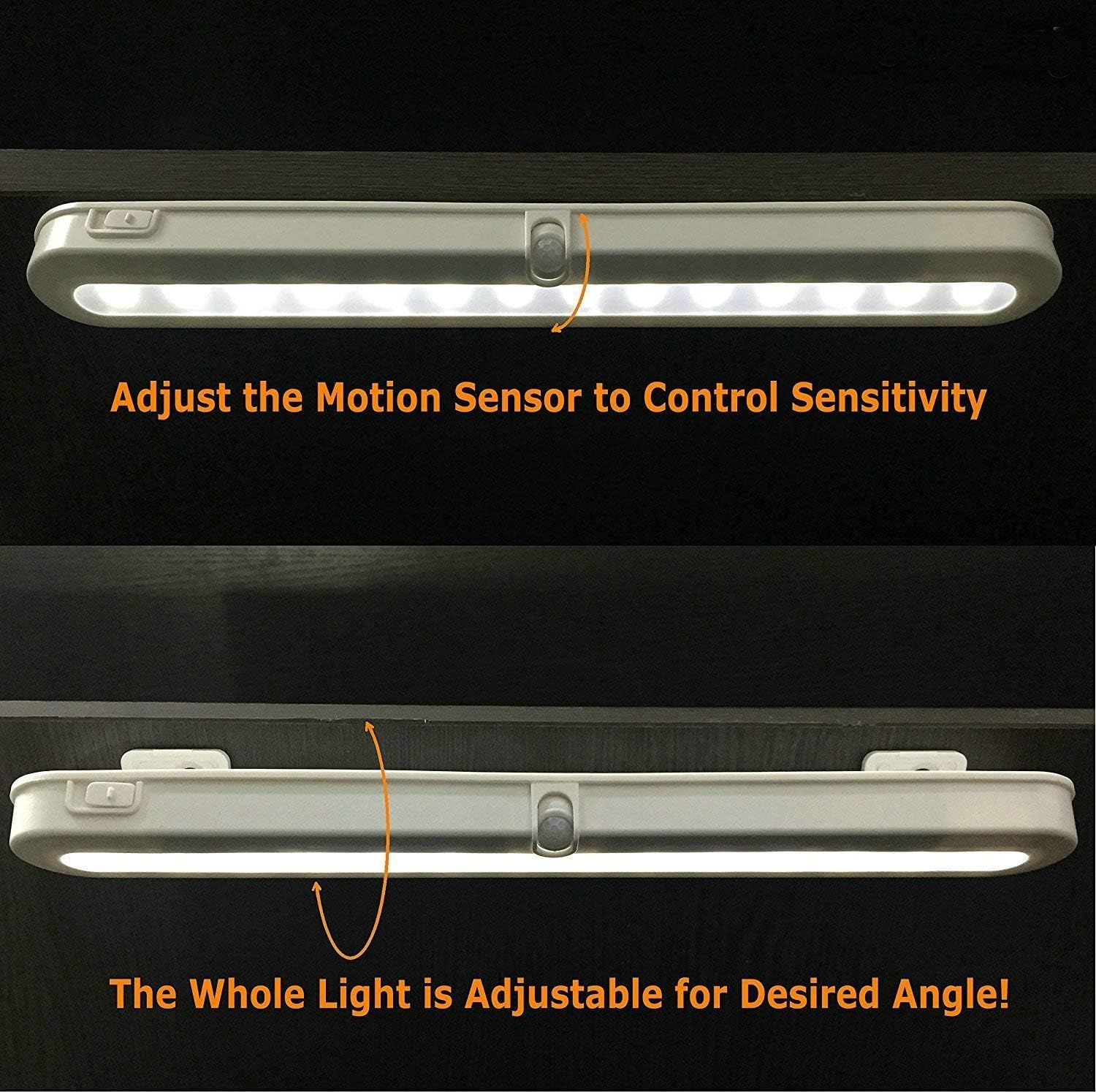
Image 5.1: Illustration of how to adjust the motion sensor to control sensitivity.
5.3. Adjusting Light Beam Angle
The entire light fixture can be adjusted to direct the light beam as desired:
- The light is mounted on a bracket that allows it to swivel.
- Gently pivot the light to achieve the desired illumination angle (e.g., 90°, 120°, 180°).

Hoto 5.2: Examples of adjustable light beam angles (90°, 120°, 180°) for optimal illumination.
6. Kulawa
6.1. Madadin Baturi
When the light output diminishes or the motion sensor becomes less responsive, it may be time to replace the batteries.
- Open the battery compartment cover as described in Section 4.1.
- Cire tsoffin batura AA.
- Insert three new AA batteries, ensuring correct polarity.
- Rufe murfin ɗakin baturi.
Lura: For optimal performance and to avoid frequent battery changes, consider using high-quality alkaline or rechargeable AA batteries. If using the USB DC power option, remove the AA batteries.
6.2. Tsaftacewa
To maintain the appearance and functionality of your light:
- Ensure the light is in the OFF position or disconnected from power before cleaning.
- Shafa saman tare da laushi, bushe bushe.
- Do not use abrasive cleaners, solvents, or harsh chemicals, as these may damage the finish or electronic components.
7. Shirya matsala
If you encounter issues with your BLS T01L LED Closet Light, refer to the following common problems and solutions:
| Matsala | Dalili mai yiwuwa | Magani |
|---|---|---|
| Haske baya kunnawa |
|
|
| Light turns on too frequently or not enough (in AUTO mode). |
|
|
| Shortan rayuwar baturi. |
|
|
| Haske ya dushe. |
|
|
8. Garanti Bayani
The BLS T01L LED Closet Light comes with an extended warranty. For specific details regarding warranty coverage, terms, and conditions, please refer to the warranty card included with your product or contact BLS customer support.
9. Tallafin Abokin Ciniki
If you have any questions, require technical assistance, or need further support, please contact BLS customer service through the following channels:
- Imel: Refer to your product packaging or the official BLS webshafin don imel ɗin tuntuɓar yanzu.
- Website: Visit the official BLS webshafin don FAQs da albarkatun tallafi.
- Shagon Amazon: Hakanan zaka iya ziyartar wurin BLS Store on Amazon don bayanin samfur da zaɓuɓɓukan tuntuɓar mai siyarwa.


