Gabatarwa
Na gode da siyaasing the OontZ Angle 3 Ultra Portable Bluetooth Speaker by Cambridge Soundworks. This manual provides essential information for setting up, operating, maintaining, and troubleshooting your speaker. Designed for superior sound quality and durability, the OontZ Angle 3 Ultra features a 14-watt output, rich bass, IPX7 waterproofing, and an impressive 30-meter Bluetooth range. Enjoy up to 20 hours of playtime on a single charge.

Image: The OontZ Angle 3 Ultra Portable Bluetooth Speaker, showcasing its sleek black, triangular design with control buttons on one end.
Saita
1. Abubuwan Da Aka Haɗa
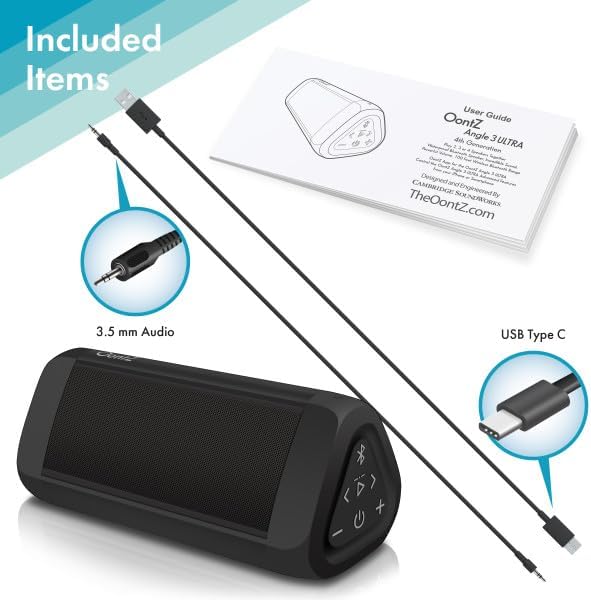
Image: The OontZ Angle 3 Ultra speaker along with its accessories: a Quick Start Guide, a 3.5mm audio cable, and a USB Type-C charging cable.
Before first use, ensure all components are present:
- OontZ Angle 3 Ultra Bluetooth Speaker
- Quick Start Guide (Full manual available online)
- 3.5mm Audio Cable
- USB Type-C Cajin caji
2. Cajin Shugaban Majalisar
The speaker comes with a built-in rechargeable Lithium-ion battery. For optimal performance, fully charge the speaker before first use.
- Locate the charging port on the side of the speaker, protected by a rubber flap.
- Connect the supplied USB Type-C charging cable to the speaker's charging port.
- Connect the other end of the USB cable to a USB wall charger (not included) or a computer USB port.
- The charging indicator light will illuminate. A full charge takes approximately 20 hours for the first charge, and subsequent charges will be faster.

Hoto: Kusanci view of the speaker's side, showing the 3.5mm AUX input and the USB-C charging port, typically protected by a waterproof flap.
3. Haɗa Bluetooth
Pair your OontZ Angle 3 Ultra with your Bluetooth-enabled device (smartphone, tablet, laptop).
- Kunna lasifikar ta latsa da riƙe maɓallin wuta (⏻) until the indicator light flashes blue.
- A kan na'urarka, je zuwa saitunan Bluetooth kuma tabbatar da cewa Bluetooth yana kunne.
- Look for "OontZ Angle 3 Ultra" in the list of available devices and select it.
- Once paired, the speaker will emit a confirmation tone, and the indicator light will turn solid blue.
4. Connecting via AUX Input
You can connect non-Bluetooth devices using the 3.5mm audio cable.
- Connect one end of the 3.5mm audio cable to the AUX IN port on the speaker.
- Connect the other end to the headphone jack or audio output of your device.
- Mai magana zai canza ta atomatik zuwa yanayin AUX.
5. Pairing Two Speakers for Stereo Sound (OontZ Dual Wireless Stereo)
Enhance your audio experience by wirelessly connecting two OontZ Angle 3 Ultra speakers for impressive stereo separation.

Image: Two OontZ Angle 3 Ultra speakers positioned to provide stereo sound, with two individuals enjoying music in an outdoor setting.
- Ensure both OontZ Angle 3 Ultra speakers are charged and powered on.
- Disconnect both speakers from any previously paired Bluetooth devices.
- On one speaker (this will be the Left Channel), press and hold the Bluetooth button (Ⓑ) for 3 seconds until you hear a tone.
- On the second speaker (this will be the Right Channel), press and hold the Bluetooth button (Ⓑ) for 3 seconds until you hear a tone.
- The speakers will automatically connect to each other. Once connected, you will hear a confirmation tone, and the indicator lights on both speakers will turn solid blue.
- Now, connect your audio device to the Left Channel speaker via Bluetooth as described in "Bluetooth Pairing" above.
- For video audio, connect your device or TV to the Left Channel speaker using the 3.5mm audio cable.
Umarnin Aiki
1. Sarrafa Samaview
| Button/Mai nuna alama | Aiki |
|---|---|
| ⏻ (Ikon) | Danna ka riƙe don kunna/kashewa. |
| + (Mai girma) | Latsa don ƙara .ara. |
| - (Muryar Saukar) | Latsa don rage ƙarar. |
| ▷ (Wasa/Dakata) | Danna don Kunna/Dakata da kiɗa. |
| < (Previous Track) | Latsa don zuwa waƙar da ta gabata. |
| > (Next Track) | Danna don zuwa waƙa ta gaba. |
| Ⓑ (Bluetooth) | Press to disconnect current Bluetooth device and enter pairing mode. Press and hold for 3 seconds to initiate OontZ Dual Wireless Stereo pairing. |
| Hasken Nuni | Flashes blue for pairing, solid blue for connected, red for charging. |
2. Kiran Kyautar Hannu
The OontZ Angle 3 Ultra has a built-in microphone for hands-free calls.
- When a call comes in, the music will pause. Press the ▷ maballin amsa kiran.
- Don ƙare kira, danna maɓallin ▷ button sake.
- Don ƙin karɓar kira, latsa ka riƙe ▷ button don 2 seconds.
- To activate Siri or Google Assistant, press and hold the ▷ button for 2 seconds when not on a call.
3. Waterproof Features (IPX7)
The OontZ Angle 3 Ultra is IPX7 certified, meaning it is fully waterproof and can be immersed in water up to 1 meter (3.3 feet) for up to 30 minutes.
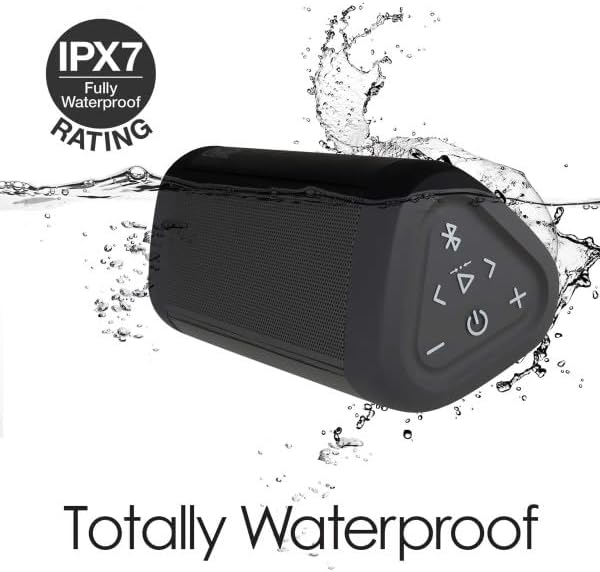
Image: The OontZ Angle 3 Ultra speaker shown partially submerged in water, illustrating its IPX7 waterproof capability.
- Ensure the rubber flap covering the charging and AUX ports is securely closed before exposing the speaker to water.
- Ideal for use by the pool, at the beach, or in the shower.
- Do not expose to salt water or chemicals. Rinse with fresh water after exposure to chlorinated water.
Kulawa
1. Tsaftacewa
Don tsaftace lasifikarka, yi amfani da lasifikar mai laushi, damp zane. Kada a yi amfani da masu tsabtace abrasive ko sauran ƙarfi.
2. Adana
Ajiye lasifikar a wuri mai sanyi, busasshiyar nesa da hasken rana kai tsaye da matsanancin zafi.
3. Kula da baturi
Don tsawaita rayuwar batir:
- Guji cikar cajin baturin akai-akai.
- Caji lasifikar a kai a kai, koda kuwa ba a amfani da ita, don kiyaye lafiyar batirin.
- Do not expose the speaker to temperatures above 60°C (140°F).
Shirya matsala
| Matsala | Magani |
|---|---|
| Kakakin ba zai kunna ba. | Tabbatar da cajin baturi. Haɗa lasifikar zuwa tushen wuta ta amfani da kebul na USB-C. |
| Babu sauti ko ƙaramin ƙara. | Check the volume level on both the speaker and your connected device. Ensure the speaker is properly paired via Bluetooth or connected via AUX. |
| Ba za a iya haɗa ta Bluetooth ba. | Ensure the speaker is in pairing mode (flashing blue light). Turn off and on Bluetooth on your device. Move the speaker closer to your device. Disconnect from other Bluetooth devices. |
| Sound distortion at high volume. | Reduce the volume on the speaker or your connected device. Ensure the audio source is not distorted. |
| OontZ Dual Wireless Stereo not connecting. | Ensure both speakers are disconnected from other Bluetooth devices. Follow the pairing steps carefully, ensuring both speakers are in pairing mode for stereo connection. |
Ƙayyadaddun bayanai
Key technical specifications for the OontZ Angle 3 Ultra Portable Bluetooth Speaker:
- Lambar Samfura: SWOA3UBLK
- Girma (L x W x H): 16.26 x 7.11 x 7.11 cm (6.4 x 2.8 x 2.8 inci)
- Nauyi: 480 grams (1.06 lbs)
- Ƙarfin Fitar da Kakakin: 14 Watts
- Sigar Bluetooth: 4.2
- Kewayon Mara waya: Up to 30 meters (100 feet) unobstructed
- Rayuwar Baturi: Up to 20 hours (at 2/3 volume)
- Ƙididdiga mai hana ruwa: IPX7 (Ana iya nutsar da shi har zuwa mita 1 na tsawon minti 30)
- Haɗin kai: Bluetooth, 3.5mm AUX Input, USB-C Charging
- Abubuwan Haɗe da: Speaker, 3.5mm Audio Cable, USB-C Charging Cable, Quick Start Guide

Image: Diagram showing the dimensions of the OontZ Angle 3 Ultra speaker: 6.5 inches in length, 3 inches in width, and 2.75 inches in height.
Garanti da Taimako
For detailed warranty information and customer support, please visit the official OontZ website. The full localized manual is also available there.
Na hukuma Website: www.theoontz.com
Cambridge Soundworks is committed to providing high-quality audio products and customer satisfaction.


