Gabatarwa
The Plantronics Voyager 8200 UC is a Bluetooth dual-ear (stereo) headset designed for professionals who require focus and high-quality audio for both communication and music. It is compatible with PC/Mac via USB-A and mobile phones, and works seamlessly with leading collaboration platforms like Microsoft Teams and Zoom.
Key features include dual-mode Active Noise Cancellation (ANC) for blocking background noise, and a boomless four-mic system for dynamic noise reduction during calls. Enjoy extended usage with up to 20 hours of talk time and 24 hours of listen time, and roam freely up to 98 feet (30 meters).
Me ke cikin Akwatin
- Plantronics Voyager 8200 UC Bluetooth Headset
- USB-A Bluetooth Adapter (BT600)
- 3.5 mm Cable na waya
- Kebul na Caji na USB (Micro USB)
- Aljihun Tafiya

Image: The Plantronics Voyager 8200 UC headset shown with its accompanying USB adapter.
Saita da Amfani na Farko
1. Charging Your Headset
Before first use, fully charge your headset. Connect the micro USB charging cable to the headset's charging port and the other end to a USB power source. The headset has a talk time of up to 20 hours and a listen time of up to 24 hours on a full charge.

Hoto: Gefe view of the headset, highlighting the charging port and controls.
2. Haɗawa da Na'urori
Pairing with PC/Mac (USB-A Adapter)
- Insert the BT600 USB-A adapter into an available USB port on your computer.
- Slide the power button on your headset to the "on" position.
- To initiate pairing, slide and hold the power button towards the Bluetooth icon for 3-5 seconds until the LED on the headset flashes blue and red.
- The adapter's LED will also flash blue and red. Once paired, the headset LED will turn off, and the adapter's blue light will turn solid.
Bidiyo: An gamaview of the Plantronics Voyager headset, demonstrating its features and connectivity options. This video is provided by the vendor.
Pairing with Mobile Phone (Bluetooth)
- Slide the power button on your headset to the "on" position.
- To initiate pairing, slide and hold the power button towards the Bluetooth icon for 3-5 seconds until the LED on the headset flashes blue and red.
- On your mobile device, go to Bluetooth settings and select "PLT V8200 Series" or "Plantronics Voyager 8200 UC" from the list of available devices.
- Once connected, the headset LED will stop flashing and remain solid blue.
Aiki da naúrar kai
Sarrafa da Ayyuka
The Voyager 8200 UC features intuitive controls located on the earcups for easy management of calls and media.
- Maɓallin Wuta: Located on the earcup, slides to turn the headset on/off and initiate Bluetooth pairing.
- Sarrafa ƙara: Adjust audio volume for calls and music.
- Maɓallin Kunna/Dakata: Sarrafa sake kunnawa mai jarida.
- Maballin Kira: Amsa ko ƙare kira.
- Mutuwar Button: Quickly mute/unmute your microphone during calls.
- Active Noise Cancellation (ANC) Switch: Toggle between different ANC levels (e.g., High, Low, Off) to manage ambient noise.

Image: Close-up of the headset earcup, detailing the various control buttons.
Ayyukan Audio
The headset features dual-mode Active Noise Cancellation (ANC) to effectively block out distracting background noise, allowing you to concentrate on your tasks or conversations. The boomless four-mic performance ensures dynamic noise reduction, providing clear voice pickup even in noisy environments.
Talk Time and Roaming Range
Enjoy extended use with up to 20 hours of talk time and 24 hours of listen time. The headset offers a roaming range of up to 98 feet (30 meters), providing flexibility to move around while staying connected.
Kulawa
To ensure the longevity and optimal performance of your Plantronics Voyager 8200 UC headset, regular maintenance is recommended.
- Tsaftacewa: A hankali a goge kunnuwa da madaurin kai da laushi,amp zane. Ka guji yin amfani da sinadarai masu tsauri ko kayan shafa.
- Maye gurbin Kunnen kunne: Over time, the earcup cushions may show wear. Replacement earcups are available to maintain comfort and sound quality. Refer to the official Poly webrukunin yanar gizo ko dillalai masu izini don saɓanin canji na gaske.
- Ajiya: When not in use, store the headset in its provided travel pouch to protect it from dust and damage.
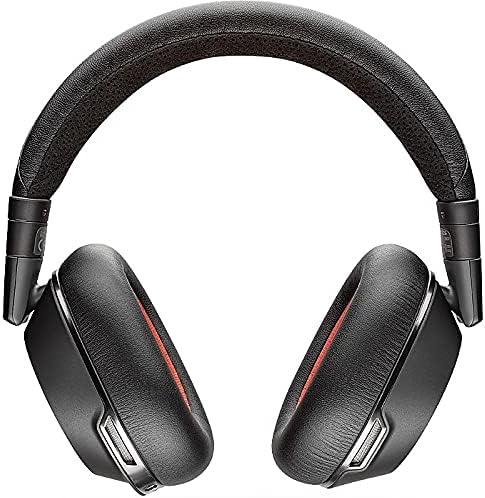
Image: The headset neatly folded and stored in its soft travel pouch.
Shirya matsala
| Batu | Magani mai yiwuwa |
|---|---|
| Headset not connecting to PC/Mac. | Ensure the BT600 USB adapter is properly inserted and its LED is solid blue. Re-initiate pairing mode on the headset and adapter if necessary. Check your computer's Bluetooth settings. |
| Difficulty switching between PC and phone. | Sometimes restarting the headset can resolve this. Ensure only one device is actively trying to connect at a time if experiencing conflicts. |
| Poor microphone quality / background noise on calls. | Ensure the headset is positioned correctly. Verify ANC is enabled to reduce ambient noise. Check microphone settings on your computer or mobile device. |
| Baturi yana gudu da sauri. | Ensure the headset is fully charged before use. If ANC is constantly on, it may consume more power. Turn off the headset when not in use. |
Ƙayyadaddun bayanai
| Siffar | Daki-daki |
|---|---|
| Sunan Samfura | Plantronics Voyager 8200 UC Stereo Bluetooth Headset With Active Noise Canc |
| Fasahar Haɗuwa | Mara waya (Bluetooth) |
| Kayan kunne Jack | 3.5 mm Jack |
| Abubuwan da aka haɗa | Bluetooth headset, Boomless Microphones, Travel Pouch |
| Lokacin Magana | Har zuwa awanni 20 |
| Lokacin Saurara | Har zuwa awanni 24 |
| Roaming Range | Har zuwa ƙafa 98 (mita 30) |
| Sarrafa amo | Active Noise Cancellation (Dual Mode) |
| Makirifo | Boomless four-mic performance |
| Salon Salon | Over the head, two ear headset |
| Nauyin Abu | 10.2 oz |
| Girman samfur | 6.69 x 2.76 x 6.3 inci |
| Mai ƙira | Poly |
| Launi | Baki |
| Kayan abu | Filastik |
| UPC | 017229158221 |
Garanti da Taimako
The Plantronics Voyager 8200 UC headset comes with a Garanti na duniya na shekara 2.
For further support, troubleshooting, or to access the latest software and firmware updates, please visit the official Poly support website ko tuntuɓi sabis na abokin ciniki.
Hakanan zaka iya ziyartar wurin POLY Store on Amazon don ƙarin bayanin samfur da na'urorin haɗi.


