1. Gabatarwa
Thank you for choosing the Eurom Alutherm 2000 Wi-Fi convection heater. This manual provides essential information for the safe and efficient operation, installation, and maintenance of your new heater. Please read these instructions carefully before use and keep them for future reference.
The Eurom Alutherm 2000 Wi-Fi is an elegant convection heater designed to integrate seamlessly into any interior. With a power output of 2000 W, it is capable of heating spaces between 49-65 m³, making it suitable for living rooms, bedrooms, or offices. This heater can be wall-mounted for continuous heating and features a built-in thermostat to maintain your desired temperature. Control is made convenient through the free Eurom Smart app, which also allows for connecting multiple heaters.
2. Umarnin Tsaro
Koyaushe kiyaye matakan tsaro masu zuwa don rage haɗarin gobara, girgiza wutar lantarki, ko rauni:
- Karanta duk umarnin kafin amfani da wannan hita.
- Kada a yi amfani da wannan na'ura a kusa da wanka, shawa, ko wurin shakatawa.
- Kar a rufe na'urar hita. Rufe na'urar hita zai iya haifar da zafi sosai da kuma wuta.
- Keep flammable materials such as furniture, curtains, and other combustible items at least 1 meter (3 feet) from the front and sides of the heater.
- Tabbatar da voltage indicated on the rating label corresponds to your mains voltage.
- Kada a yi amfani da hita da igiya ko filogi da ya lalace, ko kuma bayan hita ta lalace ko ta faɗi ko ta lalace ta kowace hanya.
- Wannan na'urar ba a yi niyya don amfani da mutane ba (ciki har da yara) tare da rage ƙarfin jiki, azanci ko tunani, ko rashin ƙwarewa da ilimi, sai dai idan an ba su kulawa ko umarni game da amfani da na'urar ta wurin mutumin da ke da alhakin amincin su.
- Ya kamata a kula da yara don tabbatar da cewa ba sa wasa da na'urar.
3. Samfurin Ya Ƙareview
The Eurom Alutherm 2000 Wi-Fi heater features a sleek design and intuitive controls. Below are key components and their descriptions.


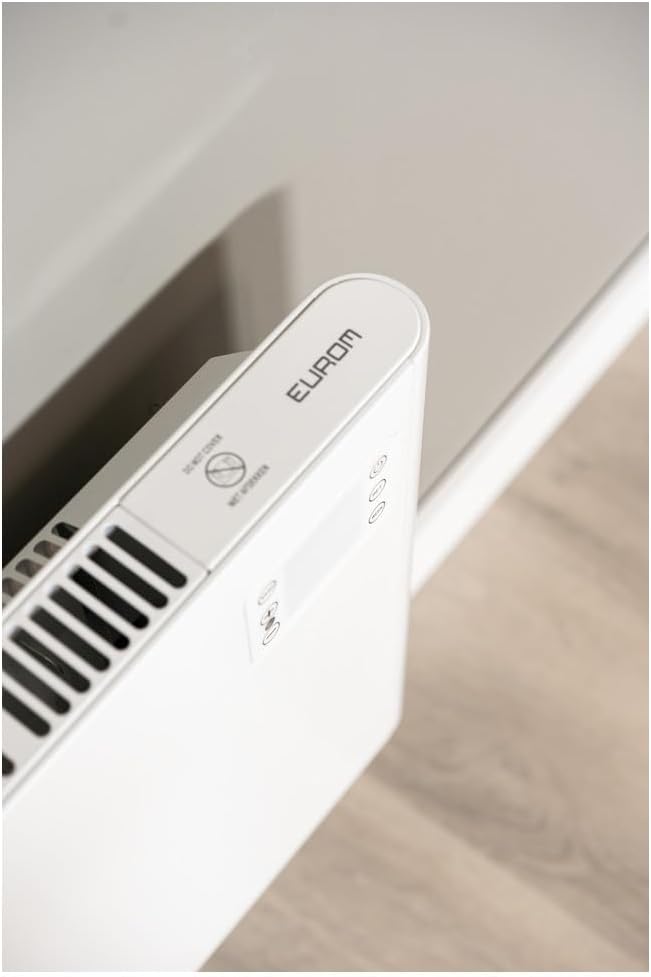

4. Saita da Shigarwa
The Eurom Alutherm 2000 Wi-Fi heater offers flexible installation options: wall-mounted or freestanding.
4.1 Hawan bango
For permanent heating, the unit can be securely mounted to a wall. Refer to the included mounting template and hardware for precise installation. Ensure the heater is installed at a safe distance from flammable materials and that there is adequate clearance for air circulation.

4.2 Freestanding Placement
If you prefer a portable solution, attach the provided feet to the base of the heater. Place the heater on a stable, level surface, ensuring it is not obstructed and has sufficient space around it for proper operation.

4.3 Haɗin Wuta
Once installed, plug the heater into a suitable electrical outlet. Ensure the main power switch (Figure 3.4) is in the 'OFF' position before plugging in. After plugging in, switch the main power switch to 'ON'.
5. Umarnin Aiki
The Alutherm 2000 Wi-Fi can be operated via its integrated control panel, the remote control, or the Eurom Smart app.
5.1 Aiki Panel
The control panel (Figure 3.6) allows direct adjustment of settings:
- Maɓallin Wuta: Yana kunna ko kashe hita.
- Maɓallin Yanayin: Cycles through different operating modes (e.g., Comfort, ECO, Anti-frost).
- Maballin SET: Confirms selections or enters settings menus.
- Daidaita Zazzabi (+/-): Increases or decreases the desired temperature.
- WEEK Button: Accesses weekly programming settings.
5.2 Aiki mai nisa
The remote control (Figure 3.5) provides convenient access to all heater functions from a distance. Its buttons mirror the functions available on the control panel.
5.3 Eurom Smart App Control (Wi-Fi)
For advanced control and scheduling, download the free Eurom Smart app. This app allows you to:
- Turn the heater on/off remotely.
- Set and adjust the desired temperature.
- Program weekly heating schedules.
- Connect and manage multiple Eurom Wi-Fi heaters.
Follow the in-app instructions for pairing your heater with the app and connecting to your home Wi-Fi network.
6. Kulawa
Kulawa akai-akai yana tabbatar da ingantaccen aiki da tsawon rai na hita.
- Tsaftacewa: Koyaushe cire na'urar dumama kuma bar shi ya yi sanyi gaba daya kafin tsaftacewa. Yi amfani da taushi, damp zane don goge saman waje. Kada a yi amfani da masu tsabtace abrasive ko kaushi.
- Ajiya: If storing the heater for an extended period, ensure it is clean and dry. Store it in a cool, dry place, preferably in its original packaging.
- Dubawa: Periodically check the power cord and plug for any signs of damage. If damage is found, do not use the heater and contact qualified service personnel.
7. Shirya matsala
If you encounter issues with your Eurom Alutherm 2000 Wi-Fi heater, refer to the following common problems and solutions:
| Matsala | Dalili mai yiwuwa | Magani |
|---|---|---|
| Mai zafi baya kunna. | Babu wutar lantarki; Babban kashe wutar lantarki; An kunna kariyar zafi fiye da kima. | Check power outlet and plug; Ensure main power switch (Figure 3.4) is ON; Unplug, allow to cool for 30 minutes, then restart. |
| Heater not heating to desired temperature. | Temperature setting too low; Room size exceeds heater capacity; Obstruction of air vents. | Increase temperature setting; Ensure heater is appropriate for room size; Clear any obstructions from air vents. |
| Matsalolin haɗin Wi-Fi. | Weak Wi-Fi signal; Incorrect app pairing; Router issues. | Ensure heater is within Wi-Fi range; Re-pair the heater with the Eurom Smart app; Restart your Wi-Fi router. |
| Heater overheats or runs continuously. | Thermostat malfunction; Air vents blocked; Software glitch. | Ensure vents are clear and heater is not covered; If issue persists, unplug and contact support. (Note: A user review mentioned potential overheating issues if the management module gets stuck. Always monitor the heater.) |
| Heater does not restart automatically after power outage. | Iyakance ƙira. | This model may require manual restart after a power interruption. |
If the problem persists after attempting these solutions, please contact Eurom customer support.
8. Ƙayyadaddun bayanai
| Siffar | Ƙayyadaddun bayanai |
|---|---|
| Alamar | Yuro |
| Lambar Samfura | EUM360776 |
| Launi | Fari |
| Girman samfur (L x W x H) | 101 x 46 x 12 cm |
| Nauyi | 6 kilogiram |
| Ajin Ingantattun Makamashi | B |
| Siffofin Musamman | Wi-Fi Compatible, Electronic Thermostat |
| Factor Factor | Hasumiya |
| Amfani na cikin gida/Waje | Cikin gida |
| Tushen wutar lantarki | Corded Electric |
| Hanyar dumama | Taro |
| Nau'in hawa | Dutsen bango |
9. Garanti da Tallafawa
For warranty information, please refer to the documentation provided with your purchase or visit the official Eurom website. If you require technical assistance, spare parts, or have any questions regarding your Eurom Alutherm 2000 Wi-Fi heater, please contact Eurom customer support directly. Contact details can typically be found on the product packaging or the manufacturer's website.