Gabatarwa
Thank you for choosing the ADE Professional Wireless Digital Weather Station, Model WS1703. This device combines a precise weather forecast station, indoor and outdoor thermometer, hygrometer, and barometer, all housed in a stylish genuine bamboo and high-quality ABS plastic casing. This manual provides detailed instructions for setup, operation, and maintenance to ensure optimal performance and longevity of your weather station.

Hoto na 1: ADE Professional Wireless Digital Weather Station main unit and outdoor sensor.
This image shows the main weather station unit with its large color display and a separate white outdoor sensor. The main unit features a bamboo frame, displaying various weather parameters like outdoor and indoor temperature, humidity, moon phase, and barometric pressure.
Abubuwan Kunshin
Da fatan za a bincika abin da ke cikin kunshin a hankali. Idan wani abu ya ɓace ko ya lalace, tuntuɓi dillalin ku.
- ADE Professional Wireless Digital Weather Station (Main Unit)
- Na'urar firikwensin waje
- Adaftar wutar AC
- 4 x AAA Batteries (for main unit and sensor)
- Jagorar mai amfani (wannan takaddar)
Saita
1. Powering the Main Unit
The main unit can be powered by either the included AC power adapter for continuous display illumination or by batteries for portable use.
- Wutar AC: Connect the AC power adapter to the DC input port on the back of the main unit, then plug the adapter into a standard wall outlet. The display will light up immediately.
- Ikon Baturi: Open the battery compartment on the back of the main unit. Insert 2 x AAA batteries (included), observing the correct polarity (+/-). Close the compartment. The display will illuminate for 15 seconds when a button is pressed.
2. Installing Batteries in the Outdoor Sensor
The outdoor sensor requires batteries for operation.
- Open the battery compartment on the back of the outdoor sensor.
- Insert 2 x AAA batteries (included), observing the correct polarity (+/-).
- Rufe sashin lafiya.

Hoto na 2: Powering the main unit and outdoor sensor. This image illustrates the options for powering the weather station: either via an AC adapter for continuous operation or with batteries for portable use. It also shows the battery installation for the outdoor sensor.
3. Sensor Placement and Synchronization
Place the outdoor sensor in a shaded, dry location away from direct sunlight and precipitation to ensure accurate readings. The sensor has a range of up to 60 meters (200 feet) from the main unit.
- Ensure the main unit and outdoor sensor are within effective range of each other.
- The main unit will automatically attempt to connect with the outdoor sensor upon power-up. This may take a few minutes.
- Once connected, the outdoor temperature and humidity will appear on the main unit's display. If connection fails, try repositioning the sensor or pressing the 'Sensor' button on the main unit (if available) to initiate a manual search.
Umarnin Aiki
Nuna Samaview
The large LED color display provides a comprehensive overview of all weather data and time information.

Hoto na 3: Key functions and display areas. This image highlights various sections of the weather station's display, including outdoor temperature, indoor temperature, humidity, barometric pressure, moon phases, date, time, and animated weather forecasts.
- Zafin Jiki da Danshi na Waje: Displays current readings from the wireless sensor. Includes Min/Max memory.
- Zafin Jiki da Danshi na Cikin Gida: Displays current readings from the main unit's internal sensors. Includes Min/Max memory.
- Animated Weather Forecast: Icons indicate sunny, partly cloudy, cloudy, rain, heavy rain/thunderstorm, heavy snowfall. Includes a trend indicator.
- Matsalar Barometric: Shows current atmospheric pressure and a 12-hour history graph.
- Lokaci & Kwanan Wata: Radio-controlled clock (DCF) with perpetual calendar, day of the week (in 8 languages), and moon phases.
- Frost Alarm: An indicator for potential frost conditions.
Saita Lokaci da Kwanan Wata
The weather station features a radio-controlled clock (DCF) that automatically synchronizes the time and date. Manual adjustment is also possible.

Hoto na 4: Radio-controlled clock and manual settings. This image illustrates the radio-controlled time synchronization feature and highlights the snooze button and adjustable backlight.
- Upon initial power-up, the unit will attempt to receive the DCF signal. This may take several minutes or hours depending on your location.
- If the signal is weak or unavailable, you can manually set the time, date, and language using the buttons on the back of the unit (refer to the detailed manual for specific button functions).
Ƙararrawa da Ayyukan Kararrawa
The weather station includes an alarm clock with a snooze feature.
- Press the 'ALARM' button (or similar, refer to detailed manual) to set the alarm time.
- When the alarm sounds, press the 'SNOOZE' button to temporarily silence it for a few minutes.
- To turn off the alarm, press any other button or let it sound for a set duration.
Ƙararrawa Zazzabi
You can set programmable upper and lower limits for outdoor temperature alarms.
- Consult the detailed manual for instructions on setting temperature alarm thresholds.
- An audible alert will sound if the outdoor temperature exceeds or falls below your set limits.
Nuna Hasken Baya
The display backlight behavior depends on the power source.
- Wutar AC: The display backlight is permanently on with 3 adjustable brightness levels (full, low, off).
- Ikon Baturi: The backlight illuminates for 15 seconds when any button is pressed to conserve battery life.
Kulawa
- Tsaftacewa: Goge babban na'urar da firikwensin da laushi, damp zane. Kada a yi amfani da masu tsabtace abrasive ko sauran ƙarfi.
- Madadin Baturi: Replace batteries in both the main unit and outdoor sensor when the low battery indicator appears on the display, or if performance degrades. Always replace all batteries at the same time with new ones of the same type.
- Kulawar Sensor: Ensure the outdoor sensor's ventilation openings are clear of dust and debris. Periodically check its placement to ensure it remains protected from direct weather elements.
Shirya matsala
| Matsala | Dalili mai yiwuwa | Magani |
|---|---|---|
| Babu karatun zafin jiki/danshi a waje. |
|
|
| Lokaci/kwanan wata ba daidai ba. |
|
|
| Display is dim or blank (on battery power). |
|
|
Ƙayyadaddun bayanai
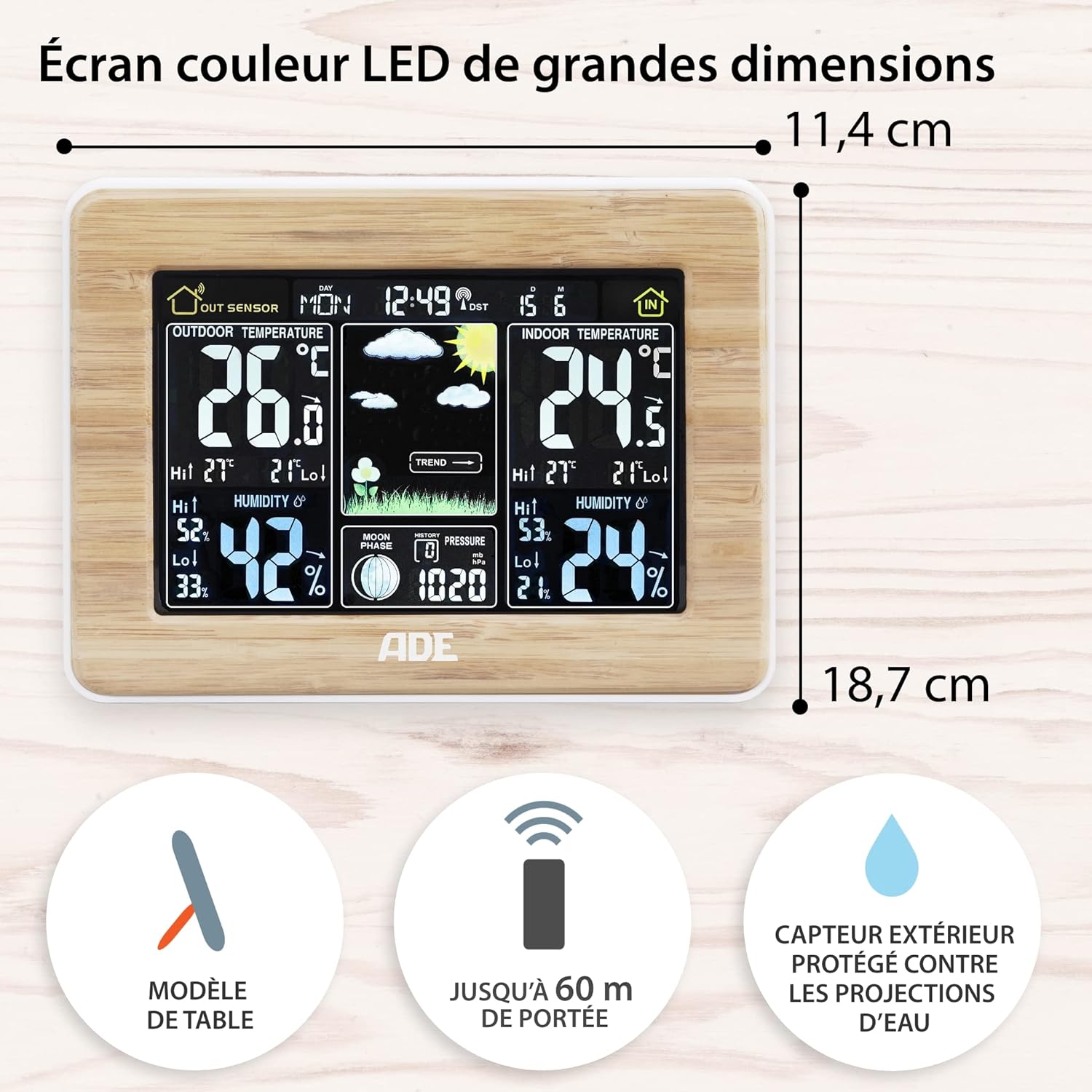
Hoto na 5: Main unit dimensions and sensor range. This image shows the dimensions of the main weather station unit and highlights the outdoor sensor's 60m range and splash-proof design.
- Samfura: Farashin WS1703
- Main Unit Dimensions (L x W x H): 16.5 x 22 x 5.3 cm (6.5 x 8.7 x 2.1 inci)
- Nauyi: 300g (kimanin)
- Abu: Genuine Bamboo and ABS Plastic
- Tushen Wutar Lantarki (Babban Na'ura): AC Power Adapter (included) or 2 x AAA Batteries (included)
- Tushen Wutar Lantarki (Firikwensin Waje): 2 x AAA Baturi (an haɗa)
- Outdoor Sensor Range: Har zuwa mita 60 (ƙafa 200) a cikin buɗaɗɗen wuri
- Zazzabi Nuni: ° C / ° F
- Tashin hankali: 20% - 95% RH
- Siffofin Musamman: Animated Weather Forecast, 12-hour Barometric Pressure History, Min/Max Temperature & Humidity Memory, Radio-Controlled Clock (DCF), Alarm with Snooze, Perpetual Calendar, Moon Phases, Frost Alarm, Adjustable Backlight.
Garanti da Taimako
Bayanin Garanti: This product is covered by a manufacturer's warranty. Please refer to the warranty card or documentation included with your purchase for specific terms and conditions. Retain your proof of purchase for warranty claims.
Taimakon Abokin Ciniki: For technical assistance, troubleshooting, or inquiries regarding your ADE Professional Wireless Digital Weather Station, please contact the retailer where you purchased the product or visit the official ADE website don albarkatun tallafi.
While this manual provides comprehensive guidance, additional support may be available through online FAQs or direct contact with the manufacturer.


