1. Gabatarwa
This manual provides essential information for the safe and efficient operation of your InFocus IN112XV Presentation Projector. The IN112XV is designed for business presentations and educational use, offering a long lamp life, high brightness, and clear image quality.
- Yawa Lamp Rayuwa: Enjoy over 15,000 hours of viewing.
- Babban Haskaka: 3800 lumens for clear images in various lighting conditions.
- Adadin Kwatance: 26000:1 for distinct whites and blacks.
- M Viewing: Projects images from 28 inches to 300 inches diagonally.
- Haɗin kai: Features HDMI input and SVGA (800 x 600) resolution.
2. Abubuwan Kunshin
Tabbatar cewa duk abubuwan da aka jera a ƙasa suna cikin kunshin ku:
- InFocus IN112XV Projector
- Igiyar Wutar Lantarki
- Ikon nesa
- Na'urar VGA
- Takaddun bayanai (wannan jagorar da sauran jagororin)
3. Samfurin Ya Ƙareview
Familiarize yourself with the components and controls of your InFocus IN112XV projector.
3.1 Gaba View
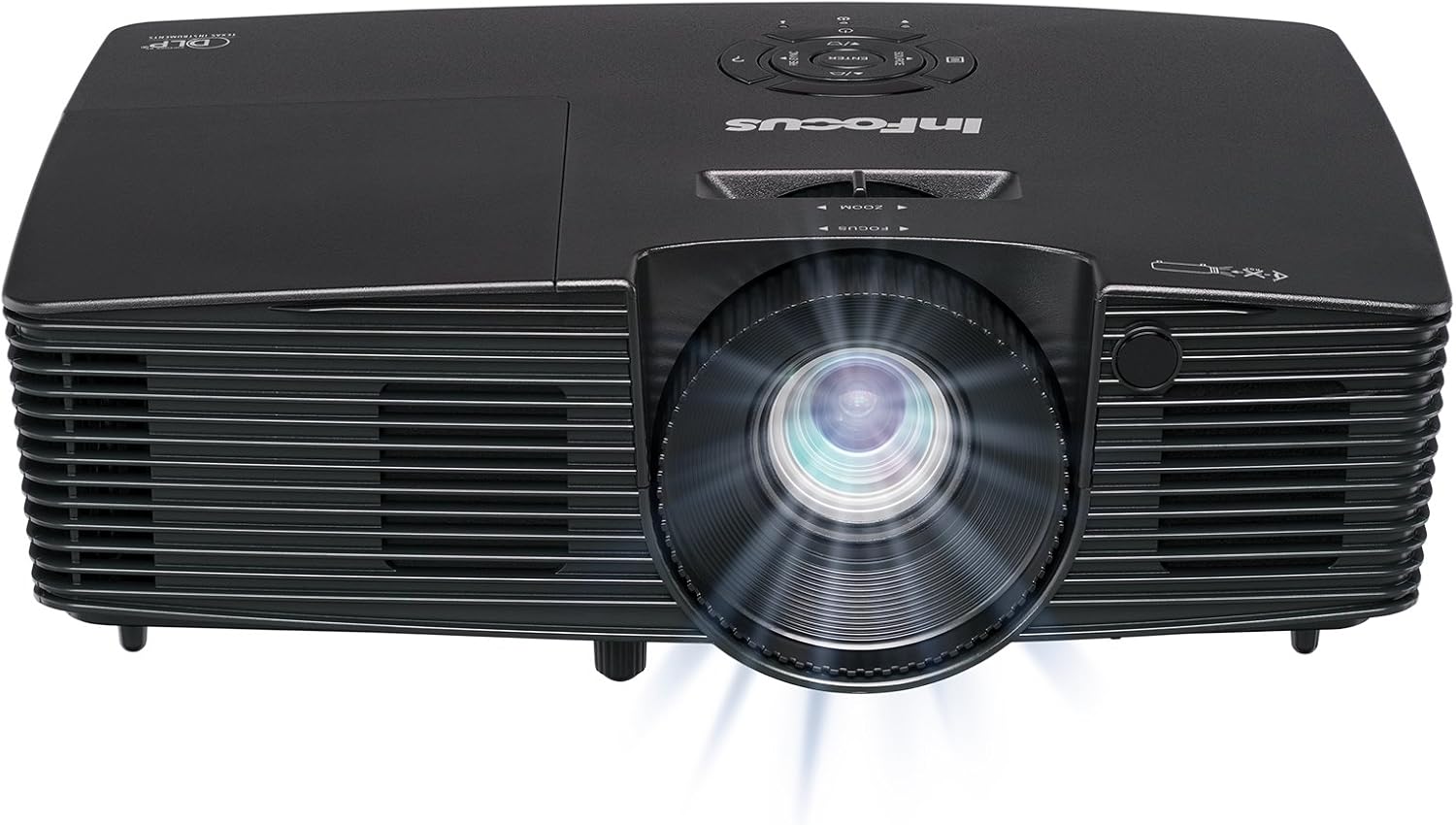
Hoto 3.1: Gaba view of the InFocus IN112XV projector. This image highlights the main projection lens and the front ventilation grilles.
3.2 Sama View da Control Panel

Hoto 3.2: Sama view of the InFocus IN112XV projector. The control panel is visible on the right, featuring buttons for power, source selection, menu navigation, keystone adjustment, and volume. The focus and zoom adjustment rings are located around the lens.
The control panel on the top of the projector allows for basic operation without the remote. Key buttons include:
- Ƙarfi: Yana kunna majigi ko kashewa.
- Source: Kewaya ta hanyoyin shigar da akwai.
- Menu: Yana shiga menu na nuni akan allo (OSD).
- Shiga: Yana tabbatar da zaɓuɓɓuka a cikin menu na OSD.
- Maɓallan Kibiya: Navigate menu options and adjust settings.
- Re-Sync: Synchronizes the image.
3.3 Na baya View and Connection Ports

Hoto 3.3: Na baya view of the InFocus IN112XV projector. This image displays the available connection ports, including Video In, S-Video In, Computer In (VGA), HDMI, and the power input.
The rear panel provides various ports for connecting external devices:
- Bidiyo A cikin: For composite video sources.
- S-Video In: For S-Video sources.
- Computer In (VGA): For connecting to computers via VGA cable.
- HDMI: Don kafofin bidiyo da sauti na dijital.
- Sabis: For service and maintenance purposes.
- Shigar da Wuta: Connects the power cord to an electrical outlet.
3.4 Ikon Nesa

Hoto 3.4: Remote control for the InFocus IN112XV projector. The remote provides full control over the projector's functions, including power, source selection, menu navigation, keystone correction, and volume.
The remote control offers convenient access to all projector functions. Ensure batteries are correctly installed.
4. Saita
4.1 Wuri
Position the projector on a stable, flat surface or mount it securely. Ensure there is adequate space around the projector for ventilation.
4.2 Haɗin Wuta
- Connect the power cord to the projector's power input port.
- Toshe dayan ƙarshen igiyar wutar lantarki cikin mashin wutar lantarki.
4.3 Haɗa Tushen shigarwa
The projector supports various input sources. Choose the appropriate cable for your device:
- HDMI: Connect an HDMI cable from your source device (e.g., laptop, media player) to the projector's HDMI port.
- VGA (Computer In): Connect a VGA cable from your computer to the projector's Computer In port. This is a plug-and-play connection.
- Video In / S-Video In: Use composite video or S-Video cables for older video sources.
- Na'urorin Waya: To connect an iPad or smartphone, a LightCast Key (sold separately) is required.
5. Umarnin Aiki
5.1 Kunnawa / Kashewa
- Don Kunnawa: Danna maɓallin Ƙarfi button on the projector's control panel or the remote control. The power indicator light will change.
- Don Kashe: Danna maɓallin Ƙarfi button again. A confirmation message may appear. Press again to confirm shutdown. Allow the projector to cool down before unplugging.
5.2 Selecting an Input Source
After connecting your source device, select the correct input:
- Danna maɓallin Source button on the projector's control panel or the remote control to cycle through available inputs (HDMI, VGA, Video, S-Video).
- Alternatively, use the dedicated input buttons (HDMI, VGA, Video) on the remote control.
5.3 Adjusting Focus and Zoom
For a clear and appropriately sized image, adjust the lens rings:

Hoto 5.1: Manual Focus Adjustment. This image illustrates the effect of adjusting the focus ring, transforming a blurry projection into a clear and sharp image.
- Mayar da hankali: Juyawa da Mayar da hankali ring on the projector lens until the image appears sharp and clear.
- Zuƙowa: Juyawa da Zuƙowa ring on the projector lens to adjust the size of the projected image.
5.4 Gyaran Jigon Maɓalli
If the projected image appears trapezoidal (wider at the top or bottom), use keystone correction to square it:
- Danna maɓallin Keystone+ or Keystone- buttons on the remote control to adjust the image geometry.
5.5 Kewayawa Menu
Access the On-Screen Display (OSD) menu for advanced settings:
- Danna maɓallin Menu button on the remote or control panel.
- Yi amfani da maɓallan kibiya don kewaya ta cikin zaɓuɓɓukan menu.
- Latsa Shiga don zaɓar zaɓi ko tabbatar da saiti.
- Latsa Menu sake fita daga OSD.
6. Kulawa
6.1 lamp Rayuwa
Mai aikin majigi lamp has an estimated life of over 15,000 hours. When the lamp reaches the end of its life, the projector may display a warning message or the image brightness may significantly decrease. Refer to the full service manual for lamp replacement procedures if necessary.
6.2 Tsaftacewa
- Mai aikin hangen nesa Casing: Use a soft, dry cloth to wipe the exterior of the projector. Do not use abrasive cleaners or solvents.
- Lens: Gently clean the lens with a lens cleaning cloth and specialized lens cleaning solution. Avoid touching the lens surface with your fingers.
- Buɗewar iska: Periodically check and clean the ventilation openings to ensure proper airflow and prevent overheating. Use a soft brush or compressed air to remove dust.
7. Shirya matsala
Wannan sashe yana magance matsalolin gama-gari da za ku iya fuskanta tare da na'urar jigon ku.
| Matsala | Dalili mai yiwuwa | Magani |
|---|---|---|
| Babu hoto da aka nuna |
|
|
| Hoton ba shi da haske |
|
|
| Hoton trapezoidal ne |
|
|
| Projector runs hot or smells of burning plastic |
|
|
| Babu sauti |
|
|
Muhimmiyar Bayani: This projector is not recommended for high-definition movie viewing. While it can accept a 1080p input signal, it projects at its native SVGA (800 x 600) resolution.
8. Ƙayyadaddun bayanai
| Siffar | Daki-daki |
|---|---|
| Lambar Samfura | IN112XV |
| Nunin Fasaha | DLP |
| Ƙudurin Ƙasa | SVGA (800 x 600) |
| Haske | 3800 Lumen |
| Adadin Kwatance | 26000:1 |
| Lamp Rayuwa | Har zuwa awanni 15,000 |
| Haɗuwa | HDMI, VGA (Computer In), Video In, S-Video In |
| Siffa ta Musamman | 3D-Shirya |
| Shawarwari Amfani | Business, Education |
| Girman samfur | 8.8 x 12.4 x 4 inci |
| Nauyin Abu | 5.5 fam |
9. Garanti da Tallafawa
9.1 Bayanin Garanti
The InFocus IN112XV projector is backed by a Garanti na shekaru 2. Wannan garantin yana ɗaukar lahani a cikin kayan aiki da aiki ƙarƙashin amfani na yau da kullun. Da fatan za a riƙe shaidar siyan ku don da'awar garanti.
9.2 Tallafin Abokin Ciniki
For technical assistance, troubleshooting beyond this manual, or warranty service, please contact InFocus customer support. Contact information can typically be found on the official InFocus webshafin ko a cikin takaddun da aka haɗa tare da samfurin ku.


