1. Gabatarwa
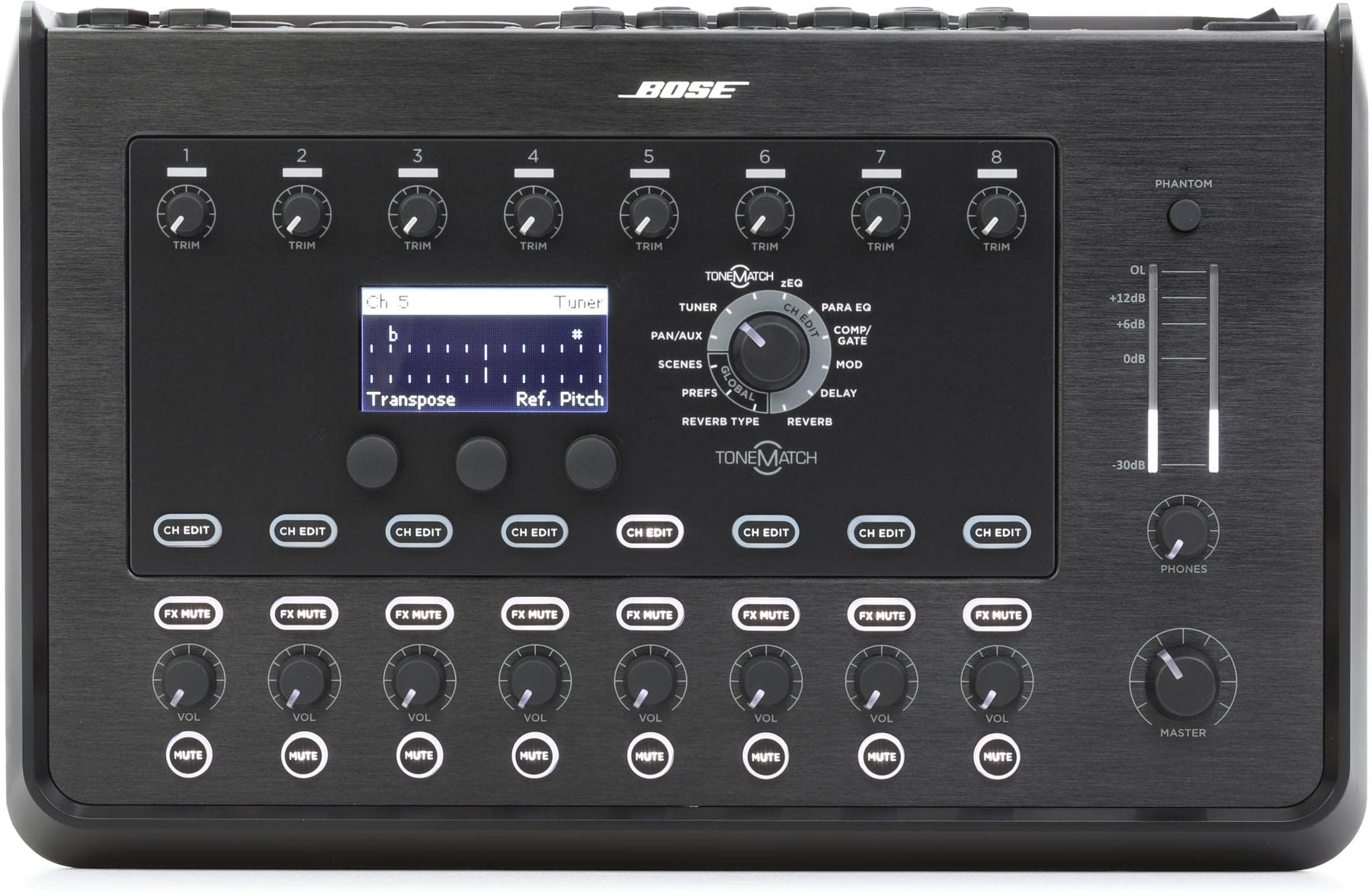
The Bose T8S ToneMatch Mixer is an 8-channel mixer designed for musicians and DJs, offering comprehensive control over audio. It features a powerful DSP engine for studio-quality EQ, dynamics, and effects, alongside Bose ToneMatch processing for optimized vocal and instrument sound. The intuitive interface with illuminated, tactile knobs and indicators ensures ease of use even in low-light conditions. This compact mixer includes XLR combo jacks, Aux sends, balanced stereo outputs, USB A and B for playback or PC/Mac interfacing, and a stereo headphone output. Additional functionalities like tap tempo delay, a built-in chromatic tuner, and recallable scenes enhance its utility for live performances.
2. Mabuɗin Siffofin
- Studio-quality effects and advanced digital audio processing: Ensures natural-sounding vocals and instruments.
- Tactile, illuminated controls: LED display and indicators are easy to read and use, even in dimly-lit stage.
- 8 high-quality audio Preamps: Features XLR-combo jacks for microphones or instruments, with switchable phantom power, 2 aux inputs, and 4 aux sends.
- USB-A and -B connectivity: For USB drive playback or PC/Mac interfacing.
- Stereo headphone and balanced stereo outputs: Provides versatile monitoring and output options.
3. Saita
Follow these steps to set up your Bose T8S ToneMatch Mixer:
- Haɗin Wuta: Connect the ToneMatch power supply to the mixer and a suitable power outlet. Ensure all other devices are powered off before connecting.
- Bayanai na Audio:
- Connect microphones or instruments to the 8 high-quality audio preamps via the XLR-combo jacks.
- If using condenser microphones, activate the switchable phantom power for the respective channels.
- Utilize the 2 aux inputs for additional audio sources as needed.
- Abubuwan Sauti:
- Connect your main PA system or recording device to the balanced stereo outputs.
- Use the 4 aux sends for monitor mixes or external effects.
- Connect headphones to the stereo headphone output for personal monitoring.
- Haɗin USB:
- For USB drive playback, connect your USB drive to the USB-A port.
- For PC/Mac interfacing, connect your computer to the USB-B port.
- Kunna Wuta: Once all connections are secure, power on the mixer.

Setup Video (Bose T4S ToneMatch Mixer - Similar Model)
Video 1: A closer look at the Bose T4S ToneMatch Mixer (a similar model), demonstrating its physical inputs, outputs, and control layout. This video provides a visual guide to the mixer's connectivity.
4. Umarnin Aiki
The T8S ToneMatch Mixer offers intuitive controls for shaping your sound:
- Ikon Tashoshi: Each of the 8 channels features dedicated controls for gain, EQ (ToneMatch processing, zEQ), dynamics, and effects. Use the illuminated, tactile knobs to make precise adjustments.
- ToneMatch Processing: Apply proven Bose ToneMatch processing to optimize the sound of your vocals and instruments. This feature automatically adjusts EQ settings for specific microphones and instruments.
- zEQ: Utilize the innovative zEQ feature for on-the-fly adjustments to your sound, allowing for quick and effective tonal shaping.
- Tasiri: Access a powerful DSP engine with studio-quality effects including reverb, delay, modulation, and compression/gate. Use the dedicated controls to dial in the desired effect parameters.
- Tap Tempo Delay: Synchronize delay effects to the tempo of your performance using the tap tempo function.
- Chromatic Tuner: Use the built-in chromatic tuner to ensure your instruments are perfectly in tune.
- Recallable Scenes: Save and recall your preferred mixer settings as scenes for quick setup and consistent sound across different performances.
- Sarrafa Jagora: Adjust the overall output level and monitor mixes using the master section controls.
5. Kulawa
To ensure the longevity and optimal performance of your Bose T8S ToneMatch Mixer, follow these maintenance guidelines:
- Tsaftacewa: Regularly wipe the mixer's surface with a soft, dry cloth to remove dust and debris. Avoid using abrasive cleaners or solvents.
- Ajiya: When not in use, store the mixer in a cool, dry place, away from direct sunlight and extreme temperatures. Use the provided cover to protect it from dust and scratches.
- Na'urar USB: Ensure all cables are properly coiled and stored to prevent damage to connectors and internal wiring.
- Dubawa: Periodically inspect all ports and connections for any signs of wear or damage.
6. Shirya matsala
If you encounter issues with your Bose T8S ToneMatch Mixer, consider the following common troubleshooting steps:
- Babu Ƙarfi:
- Ensure the power supply is securely connected to both the mixer and a working power outlet.
- Verify that the power switch on the mixer is in the 'On' position.
- Babu Fitar Sauti:
- Check all input and output cable connections.
- Ensure channel volumes and master volume are turned up.
- Verify that no channels are muted (check mute buttons).
- If using phantom power, ensure it is activated for the correct channels.
- Karkataccen Sauti:
- Reduce the input gain for the affected channel(s) to prevent clipping (indicated by red peak LEDs).
- Check the master output level to ensure it is not too high.
- Inspect cables for damage or improper connection.
- Tasirin Baya Aiki:
- Ensure the effects are enabled for the desired channels and the effect send levels are appropriately set.
- Check the master effect return level.
7. Ƙayyadaddun bayanai
| Siffar | Daki-daki |
|---|---|
| Nauyin Abu | 4 fam |
| Girman samfur | 12.25 x 12.25 x 3.25 inci |
| ASIN | B07CG81TLC |
| Lambar samfurin abu | 785491-0110 |
| Sunan Launi | Baki |
| Interirƙirar Abun Taɗi | USB |
| Tushen wutar lantarki | Corded Electric |
| Alamar | Bose |
| Yawan Tashoshi | 8 |
| Fasahar Haɗuwa | Interface |
| Kwanan Wata Farko Akwai | Afrilu 18, 2018 |
8. Abin da ke cikin Akwatin
The Bose T8S ToneMatch Mixer package includes:
- T8S ToneMatch mixer
- ToneMatch wutar lantarki
- Rufewa
9. Taimako
For further assistance, warranty information, or to access additional resources, please visit the official Bose support webshafin yanar gizo ko tuntuɓar sabis na abokin ciniki. Ajiye rasitin siyan ku da lambar jerin samfuran a hannu don duk wani tambaya.
Ziyarci Shagon Bose akan Amazon don ƙarin samfura da bayanai.


