1. Gabatarwa
This manual provides detailed instructions for the safe and efficient operation of your Energizer 3000W Modified Sine Wave Power Inverter, Model ENK3000. This device converts 12V DC battery power into 120V AC household power, enabling you to operate various appliances and tools from your vehicle or other 12V power sources. Please read this manual thoroughly before use and retain it for future reference.
2. Bayanin Tsaro
Adherence to these safety guidelines is crucial to prevent personal injury and damage to the inverter or connected devices.
- Samun iska: Tabbatar da isasshen iska a kusa da inverter. Kar a toshe hanyoyin samun iska.
- Muhalli: Operate the inverter in a dry, cool, and well-ventilated area, away from direct sunlight, heat sources, and flammable materials.
- Danshi: Do not expose the inverter to rain, water, or excessive moisture.
- Kasa: The inverter must be properly grounded. Refer to the installation section for grounding instructions.
- Haɗin baturi: Connect the inverter directly to a 12V DC battery. Ensure correct polarity (+ to + and - to -). Incorrect connection can cause damage.
- Ƙarfin lodi: Do not exceed the inverter's rated wattage (3000W continuous, 6000W peak). Overloading can cause the inverter to shut down or be damaged.
- Na'urorin Lafiya: This inverter is not suitable for use with life-support systems or other critical medical equipment.
- Yara: A kiyaye inverter daga isar yara.
- Hidima: Kada kayi ƙoƙarin buɗewa ko sabis ɗin inverter da kanka. Koma duk hidima ga ƙwararrun ma'aikata.
3. Abubuwan Kunshin
Tabbatar cewa duk abubuwa suna nan a cikin kunshin:
- Energizer 3000W Modified Sine Wave Power Inverter (Model ENK3000)
- Installation Hardwire Kit
- 3FT 0 AWG Battery Cables (Red and Black)
- Jagorar mai amfani (wannan takaddar)
4. Siffofin Samfur da Abubuwan da aka gyara

Hoto na 4.1: Gabaɗaya view of the Energizer 3000W Power Inverter, showcasing its robust design and primary connections.
4.1 Fasalolin Gaban Gaba

Hoto na 4.2: Dalla-dalla view of the inverter's front and rear panels, highlighting key components.
- Nuni Dijital na LCD: Shows battery output, output wattage, shigar voltage, and warning indicators.
- Main Shutdown Switch: Power button for turning the inverter on and off.
- 2 USB Ports (2.4 Amp Each): For charging USB-powered devices.
- Display Selector Switch: Used to cycle through display modes on the LCD.
- 2 Standard North American Outlets: 120V AC outlets for connecting appliances.
- Hardwire AC Output Connection: Terminal block for permanent AC wiring.
4.2 Featuren Panel na baya
- Negative Power Input Terminal (Black): Connects to the negative terminal of the 12V battery.
- Positive Power Input Terminal (Red): Connects to the positive terminal of the 12V battery.
- Ƙarshen Ƙasa: For connecting the inverter to an earth ground.
- High Speed Cooling Fan: Automatically activates to dissipate heat during operation.
- Remote Control Receptacle: For connecting an optional remote control unit (if applicable).
4.3 LCD Nuni Nuni
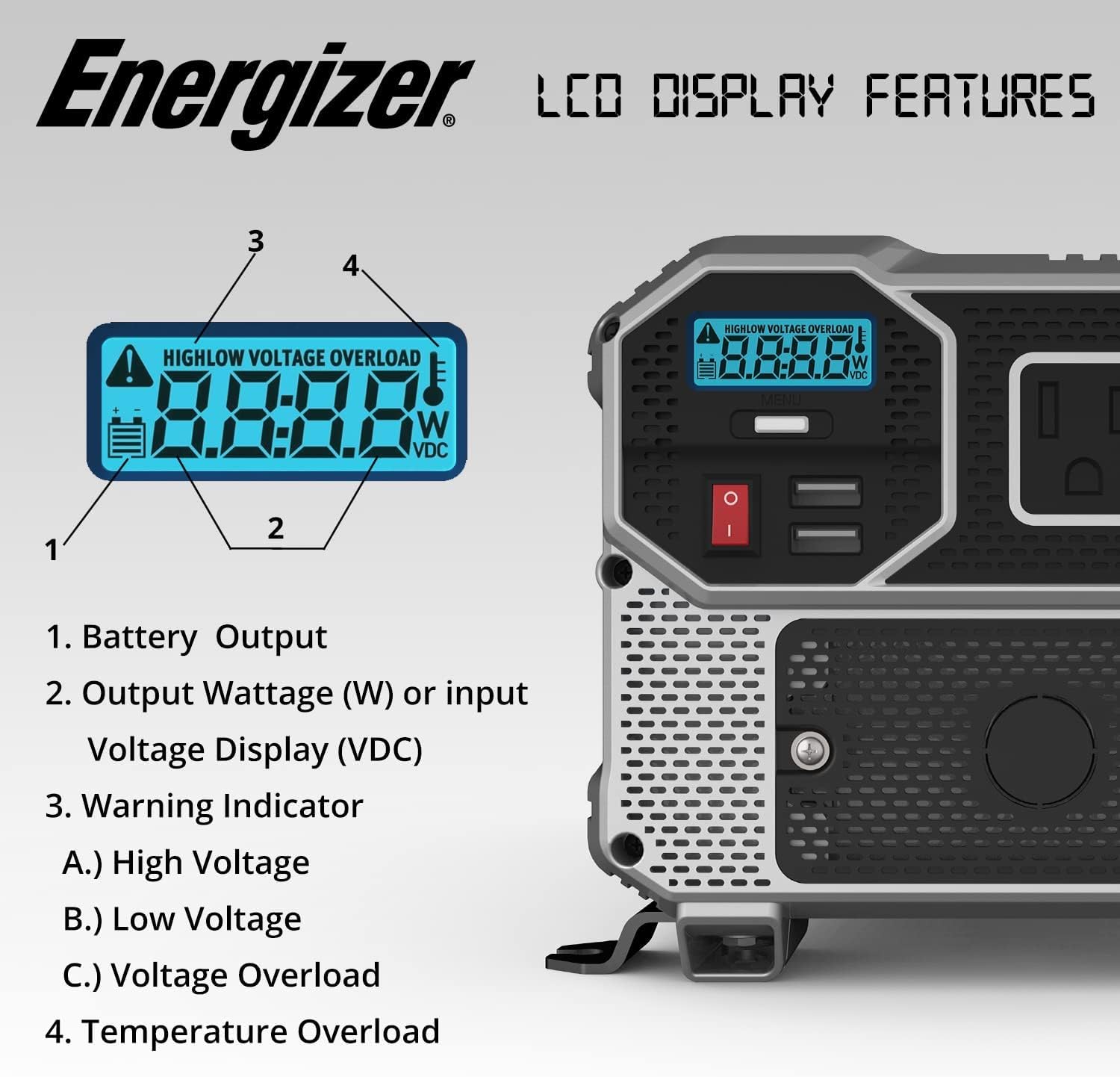
Hoto na 4.3: Close-up of the LCD display, detailing its various indicators.
- Fitar baturi: Yana nuna batir na yanzu voltage.
- Fitar Wattage (W) or Input Voltage Display (VDC): Shows the power consumption of connected devices in watts or the input DC voltage.
- Alamar Gargaɗi: Illuminates to signal specific conditions:
- Babban Voltage: Shigar da kunditage exceeds safe limits.
- Ƙananan Voltage: Shigar da kunditage is below safe operating limits.
- Voltage Overload: Connected load exceeds the inverter's capacity.
- Temperature Overload: Indicates the inverter is overheating.
5. Saita da Shigarwa
Proper installation is critical for safe and efficient operation.
5.1 Zaɓi Wuri
- Mount the inverter on a flat, stable surface.
- Ensure the location is dry, cool, and well-ventilated.
- Avoid areas with direct sunlight, heat, or moisture.
- Maintain at least 6 inches of clear space around the inverter for proper airflow.
5.2 Grounding the Inverter
The inverter must be properly grounded. Connect a heavy-gauge wire (not included) from the inverter's ground terminal to a suitable earth ground point, such as the chassis of a vehicle or a dedicated ground rod.
5.3 Connecting to a 12V Battery
Use the provided 3FT 0 AWG battery cables for connection. Ensure the inverter is turned off before making connections.
- Haɗa da ja cable to the inverter's tabbatacce (+) terminal and then to the battery's tabbatacce (+) tasha.
- Haɗa da baki cable to the inverter's korau (-) terminal and then to the battery's korau (-) tasha.
- Ensure all connections are tight and secure. Loose connections can cause overheating and damage.
5.4 Hardwire AC Output Connection
The included hardwire kit allows for permanent AC wiring. This connection is suitable for fixed installations where direct wiring to a distribution panel or specific appliances is desired.
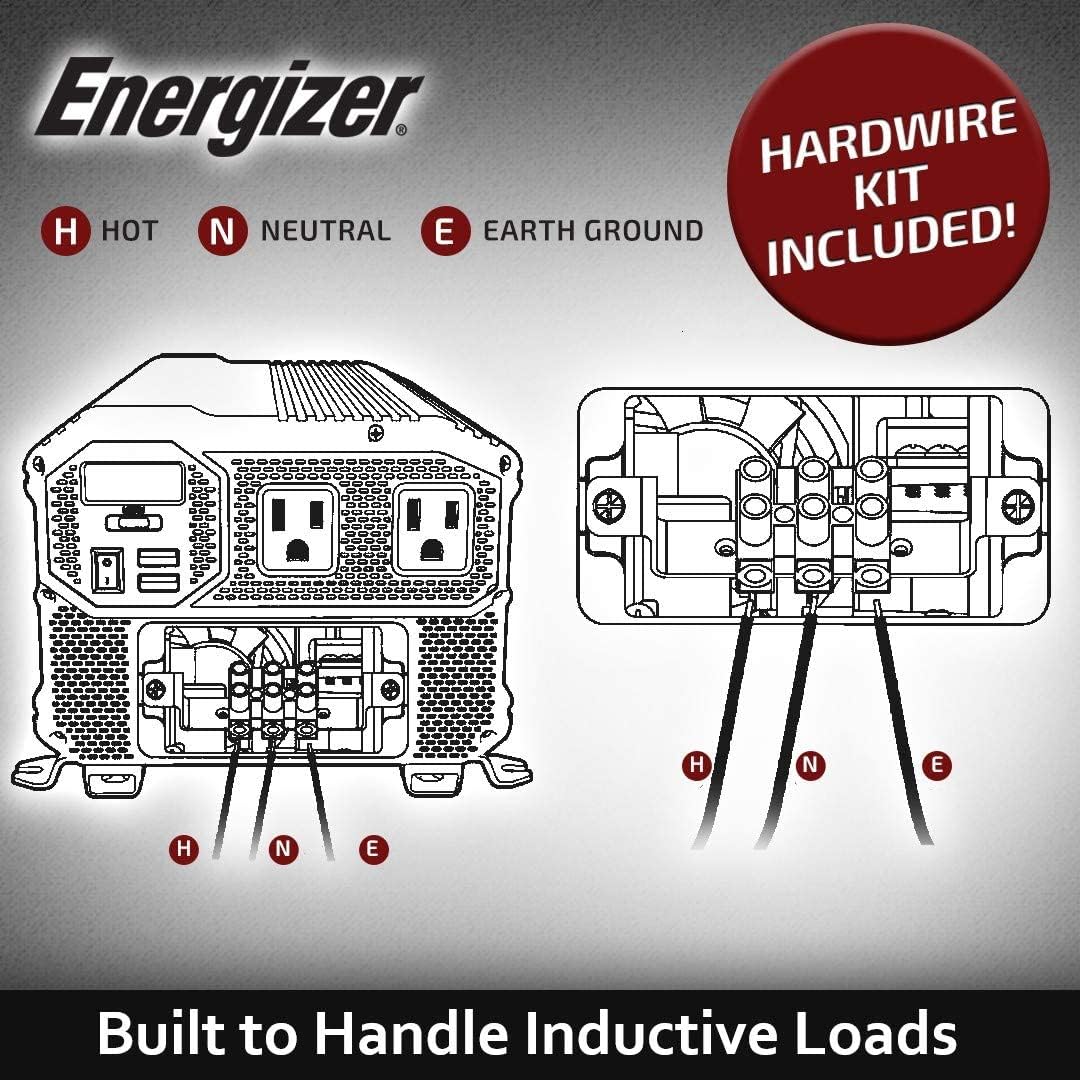
Hoto na 5.1: Diagram illustrating the hardwire AC output connection points (H: Hot, N: Neutral, E: Earth Ground).
Consult a qualified electrician for hardwire installations to ensure compliance with local electrical codes and safety standards.
6. Umarnin Aiki
6.1 Ƙarfafawa Akan Inverter
- Ensure all DC and AC connections are secure.
- Press and hold the Main Shutdown Switch (power button) on the front panel for a few seconds until the LCD display illuminates.
- The LCD will show the battery voltage da fitarwa wattage (if a load is connected).
6.2 Connecting AC Devices
- Plug your AC appliances into the standard North American outlets on the front panel.
- Tabbatar da jimlar wattage of all connected devices does not exceed 3000W.
- For devices with high startup (surge) power requirements, ensure the inverter's peak power rating (6000W) is sufficient.
6.3 Using USB Ports
The two 2.4 Amp USB ports can be used to charge compatible USB-powered devices directly.
6.4 Powering Off the Inverter
- Disconnect all AC appliances and USB devices.
- Press and hold the Main Shutdown Switch until the LCD display turns off.
7. Kulawa
- Tsaftacewa: Lokaci-lokaci tsaftace wajen inverter tare da bushe, zane mai laushi. Kada a yi amfani da masu tsabtace ruwa ko kaushi.
- Samun iska: Ensure the cooling fan and ventilation openings are free from dust and debris. Use compressed air to clear blockages if necessary.
- Haɗin kai: Regularly check battery and AC connections for tightness and corrosion. Clean any corrosion with a wire brush and baking soda solution.
- Kulawar Baturi: Maintain your 12V battery according to its manufacturer's instructions to ensure optimal performance and lifespan for the inverter.
8. Shirya matsala
| Matsala | Dalili mai yiwuwa | Magani |
|---|---|---|
| No power output / Inverter does not turn on |
|
|
| Overload warning / Inverter shuts down |
|
|
| Ƙara girmatage gargadi |
|
|
| Gargadi akan yawan zafin jiki |
|
|
9. Ƙayyadaddun bayanai
| Sunan Samfura | ENK3000 |
| Ci gaba Wattage | 3000 Watts |
| Peak Wattage | 6000 Watts |
| Shigar da Voltage | 12V DC |
| Fitarwa Voltage | 120V AC |
| Fitar Waveform | Gyaran Sine Wave |
| Fitar USB | 2 x 2.4 Amp USB Ports |
| Girman samfur | 13.31 x 7.68 x 5.63 inci |
| Nauyin Abu | 11.68 fam |
| Tushen wutar lantarki | Ana Karfin Batir |
| An Shawarar Amfani | Motoci |
| Mai ƙira | Batura masu kuzari |
10. Garanti da Tallafawa
This Energizer 3000W Power Inverter comes with a Garanti na Shekara 2 daga ranar sayayya. Wannan garantin yana ɗaukar lahani a cikin kayan aiki da aiki ƙarƙashin amfani na yau da kullun.
For warranty claims, technical support, or service inquiries, please contact Energizer customer support. Keep your proof of purchase for warranty validation.
Bayanin hulda: Refer to the Energizer official website or product packaging for the most current customer support contact details.


