1. Gabatarwa
The COMTEC ZDR-022 is a car dash camera designed to record driving footage in high definition. It features a 2-megapixel camera for clear video, enhanced night recording capabilities, and compatibility with LED traffic lights. The device also includes various recording modes and safety features to protect recorded data, providing reliable documentation of your journeys.
2. Mabuɗin Siffofin
2.1 High-Quality Recording
The ZDR-022 records in Full HD (1920x1080 pixels) with a 2-megapixel image sensor, ensuring clear and detailed video footage. This high resolution is beneficial for identifying details in the event of an incident.
2.2 Ingantattun Hangen Dare
Equipped with a 1/2.7-inch image sensor, the camera captures brighter images even in low-light conditions. The High Dynamic Range (HDR) function further improves night recording by reducing overexposure in bright areas and underexposure in dark areas, providing balanced and clear night footage. A dedicated Night Vision function is also included for recording in minimal light.
2.3 LED Traffic Light Compatibility
The ZDR-022 is designed to record LED traffic lights accurately across Japan, regardless of regional power frequencies (East Japan/West Japan). This ensures that the color of traffic lights is clearly captured in recordings, which is crucial evidence in certain situations.
2.4 Parking Surveillance System (Optional Accessory Required)
By connecting the optional parking surveillance/direct wiring cord (HDROP-09), the ZDR-022 can monitor your vehicle while parked. This function detects impacts and records footage before and after the event. It also supports continuous recording during parking surveillance.
- Impact Quick Recording: Activates recording upon detecting an impact while parked, minimizing power consumption during standby.
- One-Time Parking Surveillance Mode: Allows temporary activation of parking surveillance even if the function is normally set to OFF, useful for specific parking situations.
- Parking Surveillance Mode Pass Function: Temporarily disables parking surveillance, useful in environments prone to frequent impacts, such as mechanical parking lots or windy conditions.
- Rikodin Lokaci-Lokaci: Records still images at 1-second intervals and compresses them into a short video, enabling extended recording duration during parking surveillance.
2.5 Multiple Recording Modes
The device offers three primary recording modes to capture critical events:
- Ci gaba da Rikodi: Records continuously from engine ON to OFF. Older files are automatically overwritten when the storage limit is reached.
- Impact Recording: Automatically saves footage as impact data when the built-in G-sensor detects a significant impact.
- Rikodin da hannu: Allows users to manually initiate recording at any desired moment by pressing a button.
2.6 Data Protection Mechanisms
The ZDR-022 incorporates features to safeguard recorded data:
- File Ayyukan Kariya: A proprietary file system minimizes data corruption risk even if power is suddenly cut during an accident, increasing the likelihood of data recovery.
- SD Card Check Function: Upon startup, the device checks the microSDHC card for damage. If damage is detected, an LED indicator alerts the user, preventing missed recordings due to faulty storage.
- Emergency Recording Stop Function: In the event of a major impact, recording automatically stops to prevent important footage from being overwritten during subsequent vehicle movement or repairs.
2.7 Na ci gaba File System (No Periodic Formatting)
Wanda aka mallaka file system significantly reduces fragmentation of the SD card, eliminating the need for frequent formatting typically required by other dash cameras. This enhances convenience and extends the lifespan of the microSD card.
2.8 Noise Reduction Technology
The device is designed with noise countermeasures to prevent interference with digital terrestrial television reception and GPS signals from navigation systems.
2.9 PC Viewda Software
Sadaukarwa viewer software, downloadable from the COMTEC homepage, allows detailed review of recorded data on a PC. Beyond video and audio, it can display G-sensor information. Recorded data can also be converted and saved as video or still image files.
2.10 Recorded Image Inversion
The built-in G-sensor automatically detects the device's orientation and inverts the recorded image if mounted upside down (e.g., on the dashboard), ensuring correct video orientation.
2.11 Drive Support Function
Detects and alerts the driver to events such as rapid acceleration, rapid deceleration, and sharp turns.
3. Jagorar Saita
Abubuwan Kunshin 3.1
Tabbatar cewa duk waɗannan abubuwa suna cikin kunshin ku:
- Babban Sashi x 1
- Hawa sashi x 1
- Double-sided Adhesive Tape for Bracket x 1
- Hex Wrench for Angle Adjustment x 1
- Digiriasing Cleaner x 1
- Cigar Plug Power Cord x 1
- microSDHC Card (8GB) x 1
- Instruction Manual (with Warranty) x 1
3.2 Hawan Na'urar
The ZDR-022 can be mounted on the windshield or dashboard. Ensure the mounting location does not obstruct the driver's view or interfere with airbag deployment. Clean the mounting surface with the provided degreasing cleaner before applying the adhesive tape.
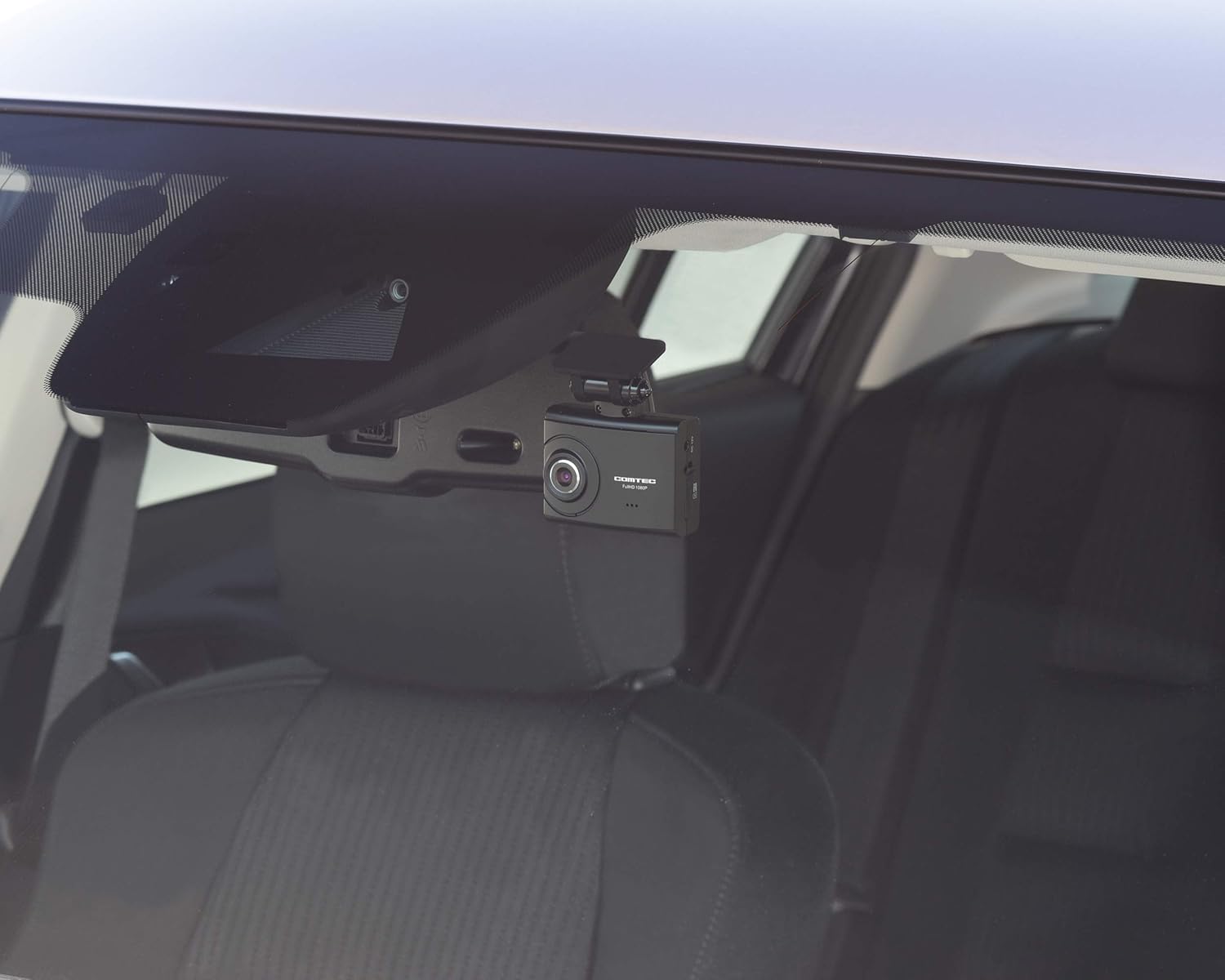
The ZDR-022 dash camera mounted high on the car's windshield, near the rearview mirror, providing a clear view na hanyar gaba.
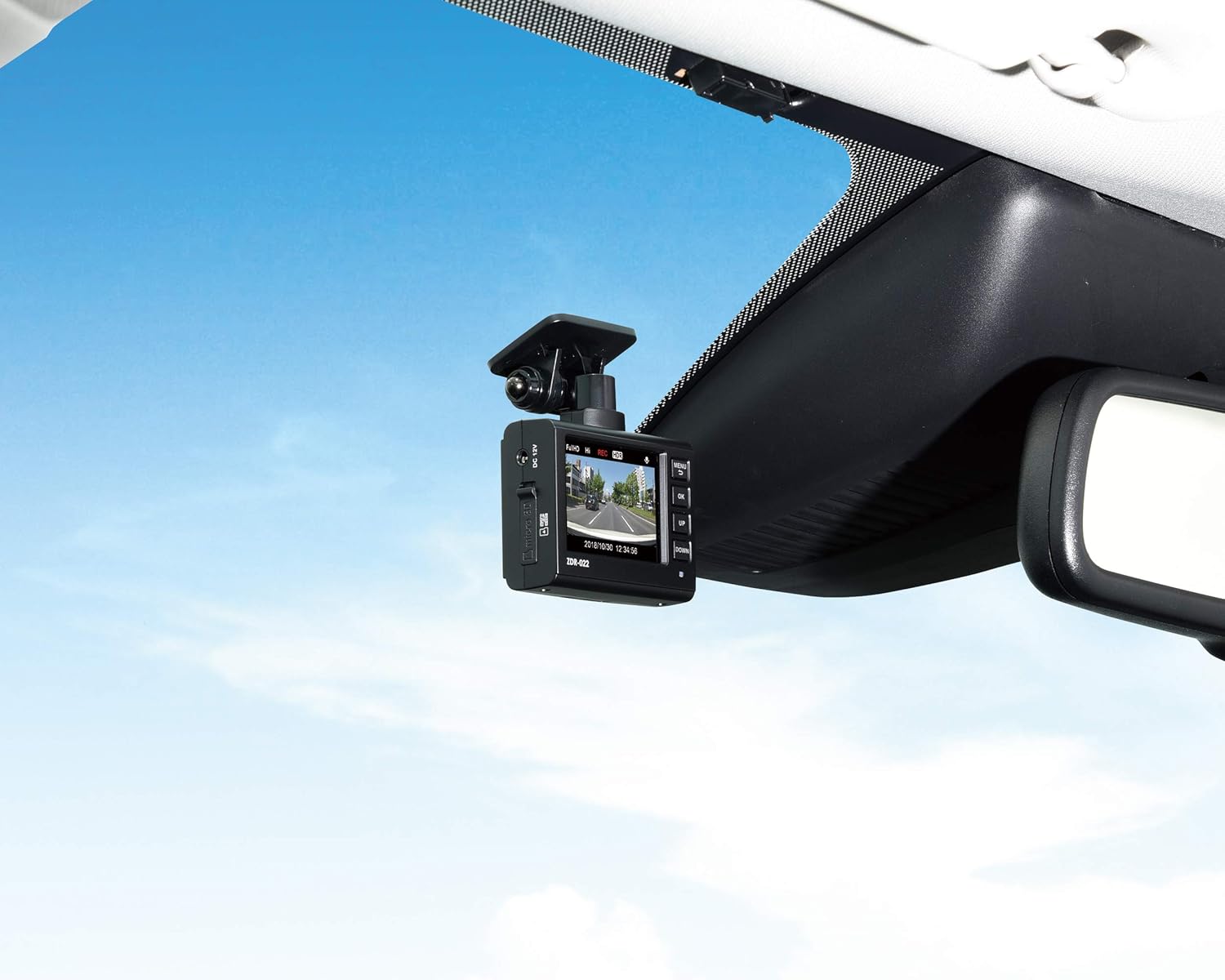
The ZDR-022 dash camera positioned on the car's dashboard, showing its screen displaying a live view na hanya.
3.3 Haɗin Wuta
Connect the provided cigar plug power cord to the dash camera and then to your vehicle's 12V cigar lighter socket. Ensure the connection is secure.
3.4 Shigar da Katin MicroSD
Insert the included 8GB microSDHC card into the designated slot on the dash camera. Ensure it is inserted correctly until it clicks into place.

A kusa-up view of the COMTEC ZDR-022 dash camera, showing its compact design and front lens, with the microSD card slot visible.
3.5 Saitunan Farko
After power-on, the device may prompt for initial settings such as date, time, and G-sensor sensitivity. Follow the on-screen instructions to configure these settings. The G-sensor sensitivity can be adjusted in 11 levels (including OFF).
4. Aiki
4.1 Starting Recording
The ZDR-022 automatically begins continuous recording shortly after the vehicle's engine is turned ON. Recording stops when the engine is turned OFF.
4.2 Rikodi na Manual
To initiate manual recording, press the designated button on the device. This will save the current footage as a protected file, preventing it from being overwritten by continuous recording.
4.3 Parking Surveillance Operation
If the optional HDROP-09 cord is installed, parking surveillance activates automatically when the engine is turned OFF. The device will record impacts or continuously record in time-lapse mode, depending on your settings. Refer to the detailed instructions for the HDROP-09 for specific setup and operation.
4.4 Shiga Saituna
Use the buttons on the device to navigate through the menu and adjust various settings, including recording quality, G-sensor sensitivity, and parking surveillance options.
5. Kulawa
5.1 Gudanar da Katin MicroSD
While the ZDR-022's file system reduces the need for frequent formatting, it is recommended to periodically check the card's health using the PC viewer software. If the SD card check function indicates an error, replace the microSD card.
5.2 Tsaftacewa
Gently wipe the camera lens and device body with a soft, dry cloth. Avoid using abrasive cleaners or solvents, which may damage the unit.
6. Shirya matsala
6.1 Na'urar Ba Ya Kunnawa
- Check if the cigar plug power cord is securely connected to both the dash camera and the vehicle's cigar lighter socket.
- Ensure the vehicle's cigar lighter socket is receiving power.
6.2 Recording Issues / SD Card Errors
- If the SD card check LED indicator shows an error, the microSD card may be damaged. Replace it with a new Class 10 microSDHC card (4GB-32GB).
- Ensure the microSD card is inserted correctly.
6.3 Rashin ingancin Hoto
- Clean the camera lens if it appears dirty or smudged.
- Ensure the windshield area in front of the camera is clean and free from obstructions.
- Check the recording resolution settings in the device menu.
6.4 Parking Surveillance Not Activating
- Verify that the optional HDROP-09 parking surveillance cord is correctly installed and connected.
- Check the parking surveillance settings in the device menu.
7. Ƙayyadaddun bayanai
| Kashi | Ƙayyadaddun bayanai |
|---|---|
| Alamar | COMTEC |
| Sunan Samfura | ZDR-022 |
| Sensor Hoto | 1/2.7 inch Sensor CMOS |
| Pixels masu inganci | Max 2 million pixels |
| Lens Angle (Horizontal) | 118° |
| Lens Angle (Vertical) | 59° |
| Lens Angle (Diagonal) | 150° |
| F-Value | 2.2 |
| Kayan Lens | Gilashin |
| Ƙarfi Voltage | DC12V |
| Max Yawan Amfani | Kasa da 400mA |
| Tsawon Zazzabi Mai Aiki | -10 ° C zuwa 60 ° C |
| Matsakaicin Tsari | 29.1 / 19.1 / 9.1 fps (LED signal compatible) |
| GPS | Babu |
| Mai rikodin rikodi | microSDHC card (8GB included, supports 4GB-32GB, Class 10 recommended) |
| G-Sensor | Yes (Adjustable from 0.1G to 1.0G in 0.1G increments) |
| Body Size (W x H x D) | 63mm x 49mm x 26.9mm |
| Nauyin Jiki | 70 g |
| Nau'in hawa | M |
| Launi | Baki |
8. Garanti Bayani
Wannan samfurin ya zo tare da a Garanti na shekaru 1 from the date of purchase. Please note that consumables (such as the microSD card) are excluded from this warranty. Retain your proof of purchase for warranty claims.
9. Tallafin Abokin Ciniki
For further assistance, detailed product information, or to download the dedicated PC viewer software, please visit the official COMTEC website. Contact information for technical support may also be found on the website or in the included warranty card.


