1. Gabatarwa
This manual provides detailed instructions for the installation, operation, and maintenance of your Linkstyle 4-in-1 Car Charger Panel, Model LS-CR08. This multifunctional panel integrates a dual USB charger, an LED voltmeter, a 12V cigarette lighter socket, and an LED rocker switch, designed for 12V/24V vehicle applications such as cars, marine boats, RVs, and trucks. Please read this manual thoroughly before installation and use to ensure proper function and safety.
2. Samfurin Ya Ƙareview
The Linkstyle 4-in-1 Car Charger Panel combines essential power and monitoring functions into a single, compact unit. Each component is designed for durability and ease of use in various vehicle environments.

Hoto na 2.1: Gaba view of the Linkstyle 4-in-1 Car Charger Panel, showcasing its integrated components: two USB charging ports, a digital LED voltmeter, a 12V cigarette lighter socket, and an illuminated rocker switch.
2.1 Abubuwan

Hoto na 2.2: An annotated diagram highlighting each component of the 4-hole panel: the ON-OFF Switch, LED Voltmeter (display range 6-24V), 12V Power Outlet, and 2 USB Charger Sockets (Output DC 5V/4.2A).
- Cajin USB biyu: Two 5V/2.1A USB ports (total 4.2A) for simultaneous charging of two devices.
- LED Voltmeter: Digital display showing real-time voltage (5-48V) of your vehicle's battery.
- 12V Tushen Wutar Sigari: Standard power outlet for various 12V accessories.
- LED Rocker Switch: An easy-to-operate ON/OFF switch with an LED indicator, rated for up to 10,000 cycles.
Abubuwan Kunshin 2.2

Hoto na 2.3: Image showing the package contents: the assembled 4-in-1 panel, blue insulated crimp terminals, and mounting screws.
- 1 x 4-in-1 Charger Panel (pre-assembled)
- 9 x Blue Insulated Crimp Terminals
- 4 x Masu Haɗawa
3. Saita da Shigarwa
Proper installation is crucial for the safe and effective operation of the charger panel. It is recommended to disconnect the vehicle's battery before beginning installation.
3.1 Majalisar
The individual components (USB charger, voltmeter, cigarette lighter, and switch) are designed for easy integration into the panel. They can be installed or replaced by screwing them into the designated holes on the panel.
Fim na 3.1: An instructional video demonstrating the assembly, wiring, and basic operation of the Linkstyle 4-in-1 Car Charger Panel, including testing the USB ports, cigarette lighter, and voltmeter.
3.2 Umarnin Waya
Refer to the wiring diagram below for correct electrical connections. Ensure all connections are secure and properly insulated.

Hoto na 3.1: Detailed wiring diagram illustrating the connections for the power outlet, voltmeter, USB charger, and switch. It specifies that the brass prong is negative ('-') and the silver prong is positive ('+') for the outlet, charger, and voltmeter, while the switch has specific silver and gold prongs for positive and negative connections.
- Gano Tashoshi: For the Power Outlet, Voltmeter, and USB Charger, the silver prong is the positive (+) terminal, and the brass prong is the negative (-) terminal.
- Canja Waya: The rocker switch typically has three prongs. Connect the positive (+) input to one of the silver prongs, the positive (+) output to the other silver prong, and the gold prong to the negative (-) circuit.
- Haɗa abubuwan haɗin gwiwa: Wire the positive terminals of the USB Charger, Voltmeter, and Power Outlet to the positive output of the rocker switch.
- Kasa: Connect all negative terminals of the USB Charger, Voltmeter, and Power Outlet, along with the gold prong of the switch, to a common ground point or the vehicle's negative battery terminal.
- Tushen wutar lantarki: Connect the positive input of the rocker switch to a fused 12V/24V power source from your vehicle's battery or accessory circuit.
Lura: Always use appropriate gauge wiring and an inline fuse (not included) for protection against overcurrent. Consult a professional if you are unsure about electrical wiring.
4. Aiki
4.1 Kunnawa / Kashewa
Use the integrated LED rocker switch to turn the entire panel's power supply ON or OFF. The LED indicator on the switch will illuminate when power is active.
4.2 Using the Dual USB Charger
Plug your USB-compatible devices into either of the two USB ports. The charger automatically detects your device and delivers optimal charging speed up to 2.1A per port, with a total output of 4.2A.
4.3 Monitoring Voltage with the LED Voltmeter
The digital LED voltmeter continuously displays the real-time voltage of your vehicle's battery (5-48V). This allows you to monitor battery health and prevent unexpected power issues.
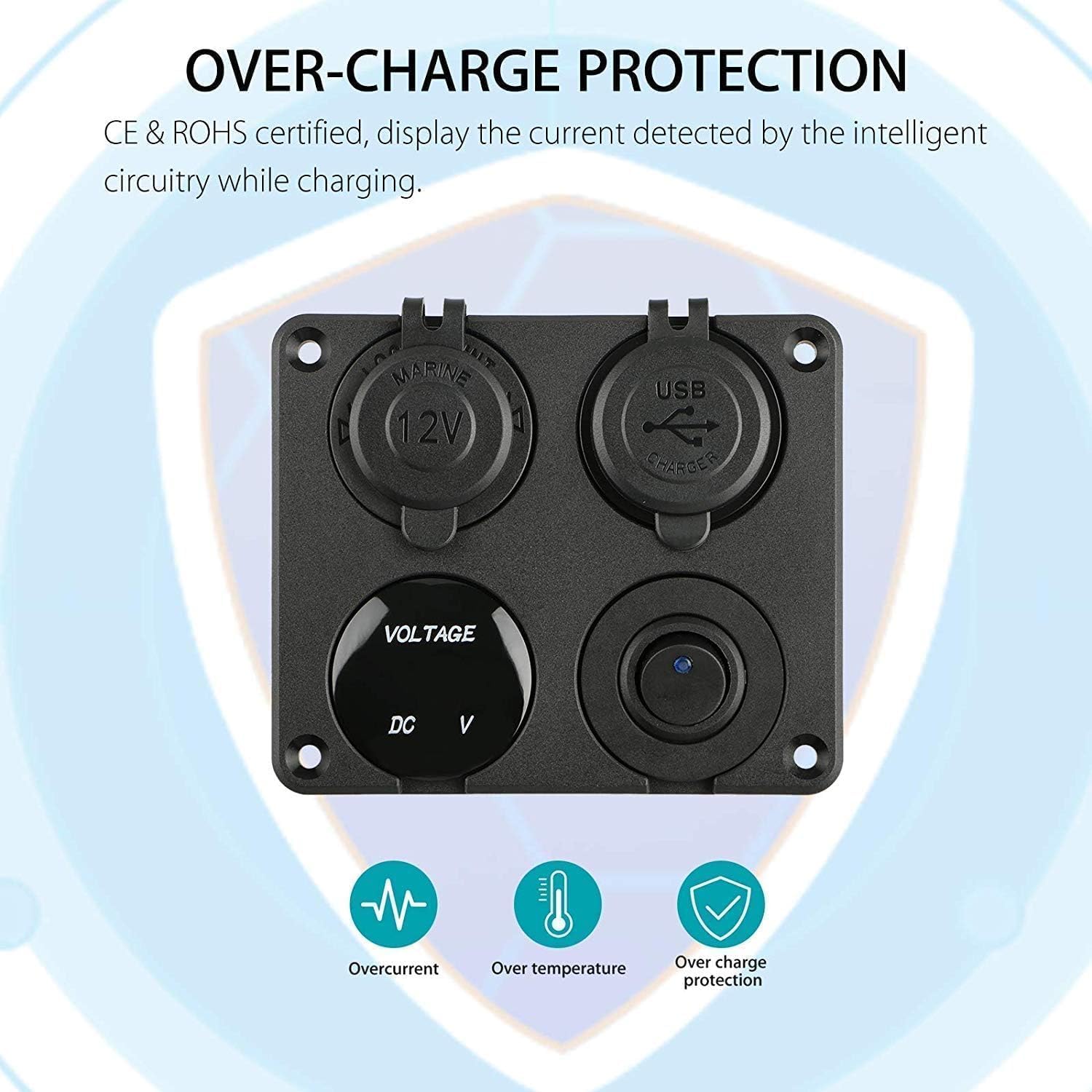
Hoto na 4.1: Diagram illustrating the built-in protection features of the panel, including safeguards against overcurrent, over-temperature, and over-charge, certified by CE & ROHS.
Na al'ada Voltage Ranges:
- Kafin fara motar: 13.4-14.8V
- After starting the vehicle: 12.2-12.8V
Idan voltage drops below 12V, it indicates an abnormal voltage, and the battery should be checked or replaced as soon as possible.
4.4 Using the 12V Cigarette Lighter Socket
Insert any compatible 12V accessory into the cigarette lighter socket. Ensure the accessory's power requirements do not exceed the panel's maximum current rating.
5. Bayanin Tsaro
- A cire batirin abin hawa koyaushe kafin a yi duk wani aikin lantarki.
- Ensure proper wiring polarity (positive to positive, negative to negative) to prevent damage to the device and vehicle.
- Use an appropriate inline fuse for the main power input to protect against overcurrent.
- Do not exceed the maximum current rating of the panel or individual components.
- Keep the rubber caps on the USB ports and cigarette lighter socket when not in use to protect against water and dust.
- This product is designed for 12V/24V DC systems only. Do not connect to AC power.
Hoto na 5.1: The Linkstyle 4-in-1 Car Charger Panel features protective rubber caps for the USB ports and cigarette lighter socket, enhancing its waterproof and dustproof capabilities.
6. Ƙayyadaddun bayanai
| Siffar | Ƙayyadaddun bayanai |
|---|---|
| Lambar Samfura | LS-CR08 |
| Shigar da Voltage | 12V / 24V DC |
| Fitar USB | 5V / 4.2A (2.1A per port) |
| Voltmeter Range | 5-48V |
| Fitowar Wutar Sigari | 12V |
| Girman samfur | 4.13 x 3.42 x 1.38 inci (10.5 x 8.7 x 3.5 cm) |
| Nauyin Abu | 4.2 oz (119 grams) |
| Kayan abu | Dogara ABS Plastics |
| Daidaituwa | Cars, Motorcycles, ATVs, RVs, Boats, Trucks |

Hoto na 6.1: Image displaying the physical dimensions of the panel, measuring approximately 10.5 cm (4.13 inches) in width and 8.7 cm (3.42 inches) in height.

Hoto na 6.2: Illustrates the wide compatibility of the charger panel, suitable for installation in various vehicles including cars, motorcycles, trucks, ATVs, boats, and RVs.
7. Shirya matsala
- Babu Wutar Lantarki zuwa Fane:
- Duba duk hanyoyin haɗin waya don ganin ko sun lalace ko kuma sun lalace.
- Verify the vehicle's battery has sufficient charge.
- Inspect the inline fuse (if installed) for being blown and replace if necessary.
- Ensure the rocker switch is in the 'ON' position.
- Tashoshin USB Ba A Caji:
- Confirm the panel has power (voltmeter or switch LED should be active).
- Try a different USB cable or device to rule out cable/device issues.
- Ensure the device's power requirements do not exceed the USB port's output (2.1A per port).
- Voltmeter Displaying Incorrect Readings:
- Check the voltmeter's wiring connections for secure contact.
- Compare the reading with another known accurate voltmeter to verify.
- Cigarette Lighter Socket Not Working:
- Ensure the panel is powered on.
- Test with a different 12V accessory to confirm the issue is not with the accessory.
- Check for any debris or foreign objects inside the socket.
8. Kulawa
- Regularly inspect all wiring and connections for signs of wear, corrosion, or damage.
- Keep the panel clean and free from dust and debris. Use a soft, dry cloth for cleaning.
- Ensure the rubber caps are properly seated over the USB ports and cigarette lighter socket when not in use to maintain their waterproof and dustproof properties.
- Avoid exposing the panel to extreme temperatures or harsh chemicals.
9. Garanti da Tallafawa
For warranty information or technical support, please refer to the product packaging or contact Linkstyle customer service through their official website or the retailer where the product was purchased. Please have your model number (LS-CR08) and purchase details available when contacting support.


