1. Gabatarwa
Na gode da siyaasing the Infocus 24-inch 720p LED TV, model IM24ED800. This manual provides essential information for setting up, operating, and maintaining your television. Please read this manual thoroughly before using the product and retain it for future reference.
Bayanin Tsaro
- Kada a bijirar da talabijin ga ruwan sama ko danshi.
- Kada a toshe wuraren samun iska.
- Tabbatar da ingantaccen wutar lantarki voltage.
- Kare igiyar wutar lantarki daga tafiya akan ko tsinkewa.
- Koma duk hidima ga ƙwararrun ma'aikatan sabis.
- A ajiye talabijin ɗin daga hasken rana kai tsaye, hanyoyin zafi, da kuma ƙarfin filayen maganadisu.
2. Abubuwan Kunshin
Da fatan za a duba akwatin don abubuwa masu zuwa:
- Infocus 24-inch 720p LED TV (IM24ED800)
- Remote Control (with batteries, if included)
- Igiyar Wutar Lantarki
- TV Stand (2 guda)
- Sukullu don Tsayin TV
- Jagorar mai amfani (wannan takaddar)
3. Saita
3.1 Haɗa Tsayin TV
To attach the stand to your Infocus TV:
- A hankali sanya allon talabijin a ƙasa akan ƙasa mai laushi, mai tsabta don hana ɓarna.
- Daidaita kowane yanki na tsaye tare da madaidaitan ramummuka a ƙasan TV.
- Tsare kowane yanki ta amfani da sukurori da aka bayar. Tabbatar an ɗora su da ƙarfi.
- A hankali ɗaga TV ɗin kuma sanya shi a kan barga mai daidaitacce.
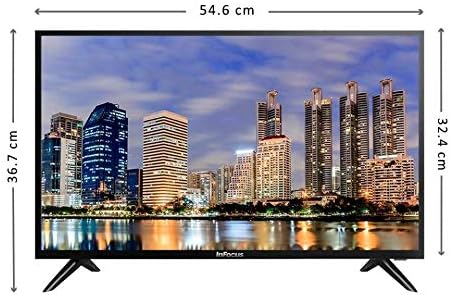
Hoto: Gaba view of the Infocus 24-inch LED TV with dimensions indicated. The TV measures approximately 54.6 cm in width and 36.7 cm in height with the stand.
3.2 Haɗin Na'urorin
Your Infocus TV features multiple input ports for connecting external devices.

Hoto: Na baya view of the Infocus 24-inch LED TV, highlighting the location of various input ports including HDMI and USB.
- Haɗin HDMI: Connect Blu-ray players, game consoles, or cable/satellite boxes to the HDMI ports. The TV has 2 HDMI inputs.
- Haɗin USB: Connect USB flash drives for media playback to the USB ports. The TV has 2 USB inputs.
- Eriya/Cable: Connect an antenna or cable TV signal to the RF input (if available, not explicitly listed but standard for TVs).
- Ƙarfi: Haɗa igiyar wutar lantarki zuwa shigar da wutar TV sannan zuwa mashin bango.
3.3 Ƙarfin Farko Kunna
After connecting all necessary cables:
- Ensure the power cord is securely plugged into both the TV and a power outlet.
- Danna maballin wuta akan ramut ko a kan TV kanta.
- Follow the on-screen instructions for initial setup, which may include language selection, time zone, and channel scanning.
4. Aiki da TV
4.1 Ikon Nesaview
The remote control allows you to access all TV functions. While specific button layouts may vary, common functions include:
- Ƙarfi: Yana kunna ko kashe TV.
- Shiga/Madogararsa: Selects the input source (HDMI 1, HDMI 2, USB, TV).
- Ƙarar Ƙarƙashin Ƙaƙwalwar Ƙaƙwalwa: Yana daidaita matakin sauti.
- Tashar Sama/Ƙasa: Canza tashoshin TV.
- Yi shiru: Yayi shiru da sautin TV.
- Menu: Opens the main menu for settings adjustments.
- Maɓallan kewayawa (Sama/Ƙasa/Hagu/ Dama/Ok): An yi amfani da shi don kewaya menus da tabbatar da zaɓi.
- Fita/Baya: Returns to the previous screen or exits the menu.
4.2 Aiki na asali
- Canza Tushen shigarwa: Danna maɓallin Shigarwa or Source button on your remote control. Use the navigation buttons to select the desired input (e.g., HDMI 1, USB) and press OK.
- Daidaita Girma: Yi amfani da Ƙara girma (+) or Volume Down (-) maɓalli.
- Canza tashoshi: Yi amfani da Channel Up (CH+) or Channel Down (CH-) maɓalli.
4.3 USB Media sake kunnawa
Don kunna kafofin watsa labarai files from a USB flash drive:
- Insert a USB flash drive into one of the TV's USB ports.
- Danna maɓallin Shigarwa or Source maballin kan ramut ɗin ku kuma zaɓi USB.
- The TV's media browser should appear. Navigate through your files (photos, music, videos) using the remote control.
- Zaɓi a file kuma danna OK a yi wasa da shi.
5. Kulawa
5.1 Tsabtace Allon
- Turn off the TV and unplug the power cord before cleaning.
- Yi amfani da kyalle mai laushi, wanda ba shi da lint (misali, kyallen microfiber) don goge allon a hankali.
- Don alamun taurin kai, dampen zane tare da ruwa ko na'urar tsabtace allo na musamman. Kada a taɓa fesa mai tsabta kai tsaye akan allon.
- Ka guji yin amfani da abubuwan goge-goge, barasa, benzene, ko masu sirara, saboda waɗannan na iya lalata allo.
5.2 Babban Kulawa
- Keep the TV in a well-ventilated area.
- Ka guji sanya abubuwa masu nauyi a saman talabijin.
- Unplug the TV during lightning storms or when it will be unused for extended periods.
6. Shirya matsala
Idan kun ci karo da al'amura tare da TV ɗin ku, koma ga matsalolin gama gari da mafita masu zuwa:
| Matsala | Dalili mai yiwuwa | Magani |
|---|---|---|
| Babu iko | Power cord not connected; power outlet issue | Tabbatar cewa an haɗa igiyar wutar lantarki da kyau. Gwada hanyar fita da wata na'ura. |
| Babu hoto, amma sauti yana nan | Incorrect input source selected; loose video cable | Danna maɓallin Shigarwa/Madogararsa button to select the correct input. Check video cable connections. |
| Babu sauti, amma hoto yana nan | Volume muted or too low; audio cable issue | Danna maɓallin Yi shiru button or increase volume. Check audio cable connections. |
| Ikon nesa baya aiki | Batteries depleted; obstruction; remote sensor blocked | Replace batteries. Remove any obstructions between the remote and TV. Ensure the TV's remote sensor is clear. |
| "No Signal" message | Incorrect input source; device not powered on; cable issue | Verify the correct input source is selected. Ensure the connected device is powered on. Check all cable connections. |
7. Ƙayyadaddun bayanai
The following are the technical specifications for the Infocus 24-inch 720p LED TV model IM24ED800:
| Siffar | Daki-daki |
|---|---|
| Lambar Samfura | IM24ED800 |
| Girman allo | 24 inci (61 cm) |
| Nunin Fasaha | LED |
| Ƙaddamarwa | 1366 x 768 (720p HD) |
| Matsakaicin Sassauta | 60 Hz |
| Bayanan HDMI | 2 |
| Bayanan USB | 2 |
| Haɗuwa | HDMI, USB |
| Nau'in hawa | Tsayin Tebur |
| Girman Kunshin | 60.8 x 37.8 x 12 cm |
| Kunshin Nauyin | 5 kg |
8. Garanti da Tallafawa
This Infocus TV is sold as a renewed product, which typically comes with a limited warranty provided by the seller or refurbisher. Please refer to your purchase documentation or contact your retailer for specific warranty terms and conditions.
For technical support or service inquiries, please contact the customer support channel provided by your retailer or the Infocus support website.


