Gabatarwa
This manual provides essential information for the safe and efficient operation of your Pioneer VSX-834 7.2-Channel AV Receiver. Please read these instructions thoroughly before use and retain them for future reference.
Bayanin Tsaro
GARGADI: Wannan samfur na iya bijirar da ku ga sinadarai gami da Lead, wanda jihar California ta sani don haifar da ciwon daji da lahani na haihuwa ko wata cutar da haihuwa. Don ƙarin bayani jeka www.P65Warnings.ca.gov.
- Kada a bijirar da wannan na'urar ga ruwan sama ko danshi.
- Kada a toshe hanyoyin samun iska. A sanya shi bisa ga umarnin masana'anta.
- Kada a shigar kusa da kowane tushen zafi kamar radiators, rajistan zafi, murhu, ko wasu na'urori (ciki har da amplifiers) masu samar da zafi.
- Yi amfani da haɗe-haɗe-haɗe-haɗe/na'urorin haɗi kawai da mai ƙira ya ƙayyade.
- Koma duk hidima ga ƙwararrun ma'aikatan sabis.
Samfurin Ƙarsheview
The Pioneer VSX-834 is a 7.2-channel AV receiver designed to deliver an immersive home theater experience. It supports the latest audio and video formats, offering versatile connectivity and advanced sound calibration features.
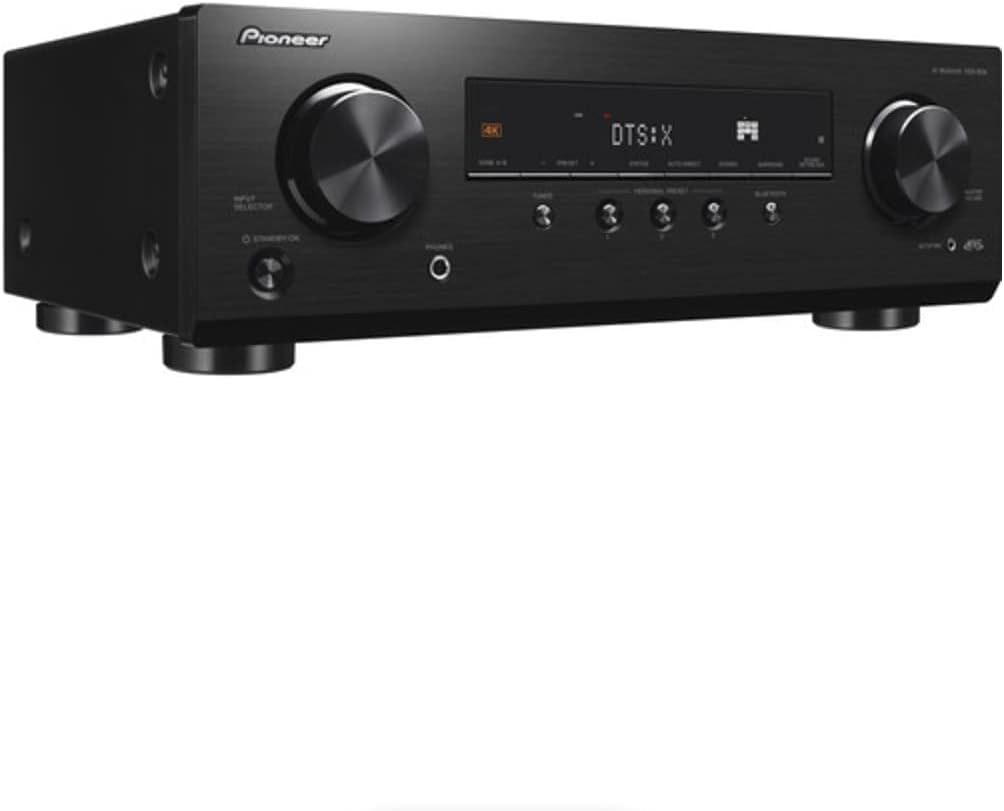
Hoto 1: Gaba view of the Pioneer VSX-834 AV Receiver.
Mabuɗin Siffofin
- 4K Video Support: Supports pass-through for HDR10, HLG (Hybrid Log-Gamma), and Dolby Vision signals. All HDMI terminals support 4K (60p/4:4:4/24-bit), wide color gamut (BT.2020), and HDCP 2.2.
- Sauti mai zurfafawa: Compatible with Dolby Atmos and DTS:X audio formats, including Dolby Atmos Height Virtualizer and DTS Virtual:X for virtual surround effects without physical height or surround speakers.
- MCACC (Multi-Channel Acoustic Calibration System): Pioneer's proprietary system automatically compensates for differences in speaker size, level, and distance, and equalizes response for optimal acoustic environment.
- Zone B Audio Output: Expand main zone sound by connecting wireless headphones, allowing music playback in another room.
- Ginin Bluetooth: Stream audio wirelessly from compatible devices (Ver. 4.2 + LE) with A2DP/AVRCP profiles and SBC/AAC codecs.
- Personal Preset: Save up to three preferred settings (volume, listening mode) for quick recall via the front panel button or remote control.
Saita
1. Ana kwashe kaya
Carefully remove the AV Receiver and all accessories from the packaging. The box should contain the AC Receiver, remote control, setup microphone, and FM/AM antennas.
2. Haɗi
Ensure the receiver is powered off and unplugged before making any connections.

Figure 2: Rear panel connections for the Pioneer VSX-834 AV Receiver.
- Haɗin HDMI: Connect your source devices (Blu-ray player, game console, streaming device) to the HDMI IN ports. Connect your TV or projector to the HDMI OUT port.
- Haɗin Magana: Connect your speakers to the corresponding terminals on the rear panel. Pay attention to polarity (+/-) for each speaker. The receiver supports 5.1ch or 7.1/5.1.2ch configurations.
- Haɗin Antenna: Connect the supplied FM and AM antennas for radio reception.
- Ƙarfi: Once all connections are made, plug the power cord into an AC outlet.
3. Initial Configuration (MCACC)
Use the supplied setup microphone and the MCACC system to automatically calibrate your speakers for optimal sound performance in your listening environment. Follow the on-screen instructions displayed on your connected TV.
Umarnin Aiki
1. Basic Aiki
- Kunnawa/Kashewa: Danna maɓallin TSIRA/ONA button a gaban panel ko m iko.
- Zaɓin shigarwa: Yi amfani da MAI GABATAR DA MA'AIKATA knob on the front panel or the input buttons on the remote control to choose your desired source (e.g., BD/DVD, GAME, CBL/SAT).
- Sarrafa ƙara: Daidaita MAGANAR MALAM matsi a gaban panel ko MAGANA +/- maɓalli a kan ramut.
2. Na gaba Features
- Yawo na Bluetooth: Danna maɓallin BLUETOOTH button on the front panel to activate Bluetooth mode. Pair your device with the receiver to stream audio.
- Personal Presets: To save current settings, press and hold the SAITA TA KAI TSAYE button for three seconds. To recall, press the button briefly. Up to three presets can be stored.
- Audio Zone B: Connect wireless headphones to the Zone B audio output terminals to enjoy audio from the main zone in a separate location.
Kulawa
- Tsaftacewa: Shafa naúrar da laushi, bushe bushe. Kada a yi amfani da masu tsabtace abrasive ko kaushi.
- Samun iska: Ensure adequate ventilation around the receiver to prevent overheating. Do not block any vents.
- Igiyar Wuta: Duba wutar lantarki akai-akai don kowace lalacewa.
Shirya matsala
- Babu Ƙarfi: Duba ko an haɗa igiyar wutar lantarki da kyau kuma wurin fitar da wutar yana aiki.
- Babu Sauti: Verify speaker connections, input selection, and volume level. Ensure the mute function is not active.
- Babu Bidiyo: Check HDMI cable connections between the source, receiver, and TV. Confirm correct input selection on both the receiver and TV.
- Matsalolin Haɗin Bluetooth: Ensure the receiver is in Bluetooth mode and your device is in pairing mode. Check for interference from other wireless devices.
For more detailed troubleshooting, refer to the comprehensive online manual available on the Pioneer support website.
Ƙayyadaddun bayanai
| Girman samfur | 17.1 x 12.6 x 6.8 inci |
| Nauyin Abu | 19 fam |
| Lambar Samfura | VSX834 |
| Fasahar Haɗuwa | Bluetooth |
| Jimillar tashoshin jiragen ruwa na HDMI | 5 |
| Rikodin Audio | DTS |
| Yanayin Fitarwa na Audio | Kewaye |
| Kewaye Sauti Kanfigareshan | 7.2 Channel |
| Mai ƙira | Majagaba |
Garanti da Taimako
For warranty information and customer support, please visit the official Pioneer webshafin yanar gizo ko tuntuɓi dillalin yankinku. Ajiye rasitin siyan ku a matsayin shaidar siyan don da'awar garanti.
Online resources and additional support can be found at: Tallafin Majagaba


