1. Gabatarwa
This manual provides essential instructions for the installation, operation, and maintenance of your FSP iFP600 Uninterruptible Power Supply (UPS). Please read this manual thoroughly before installing or operating the unit to ensure proper function and safety. The FSP iFP600 is designed to provide reliable power backup and surge protection for your electronic devices.

Hoto 1.1: Gaba view of the FSP iFP600 UPS, showcasing its compact design and integrated LCD display.
2. Umarnin Tsaro
Please adhere to these important safety guidelines during installation, operation, and maintenance of the UPS:
- Kar a buɗe UPS casing. Babu sassan da za a iya amfani da su a ciki. Koma duk hidima ga ƙwararrun ma'aikatan sabis.
- Do not connect appliances that could overload the UPS, such as laser printers, vacuum cleaners, or heaters.
- Tabbatar cewa an haɗa UPS ɗin zuwa wurin wutar lantarki na AC da aka gina.
- Avoid placing the UPS in direct sunlight, near heat sources, or in environments with excessive dust, humidity, or corrosive substances.
- Position the UPS in a well-ventilated area to prevent overheating.
- In case of fire, use a dry chemical extinguisher. Water can be hazardous.
- Ba za a iya maye gurbin batirin da ke cikin UPS ɗin ba ga mai amfani. Ma'aikata masu ƙwarewa ne kawai ya kamata su maye gurbin batirin.
3. Samfurin Ya Ƙareview
The FSP iFP600 UPS provides reliable power protection for your critical electronics. It features a compact design and an intuitive LCD display for monitoring status.
Abubuwan Kunshin 3.1
Bayan buɗe kunshin, da fatan za a tabbatar cewa duk abubuwan da aka gyara suna nan kuma basu lalace:
- FSP iFP600 UPS Unit
- Jagorar mai amfani (wannan takaddar)
- Igiyar Wutar Lantarki
- Kebul na Sadarwa
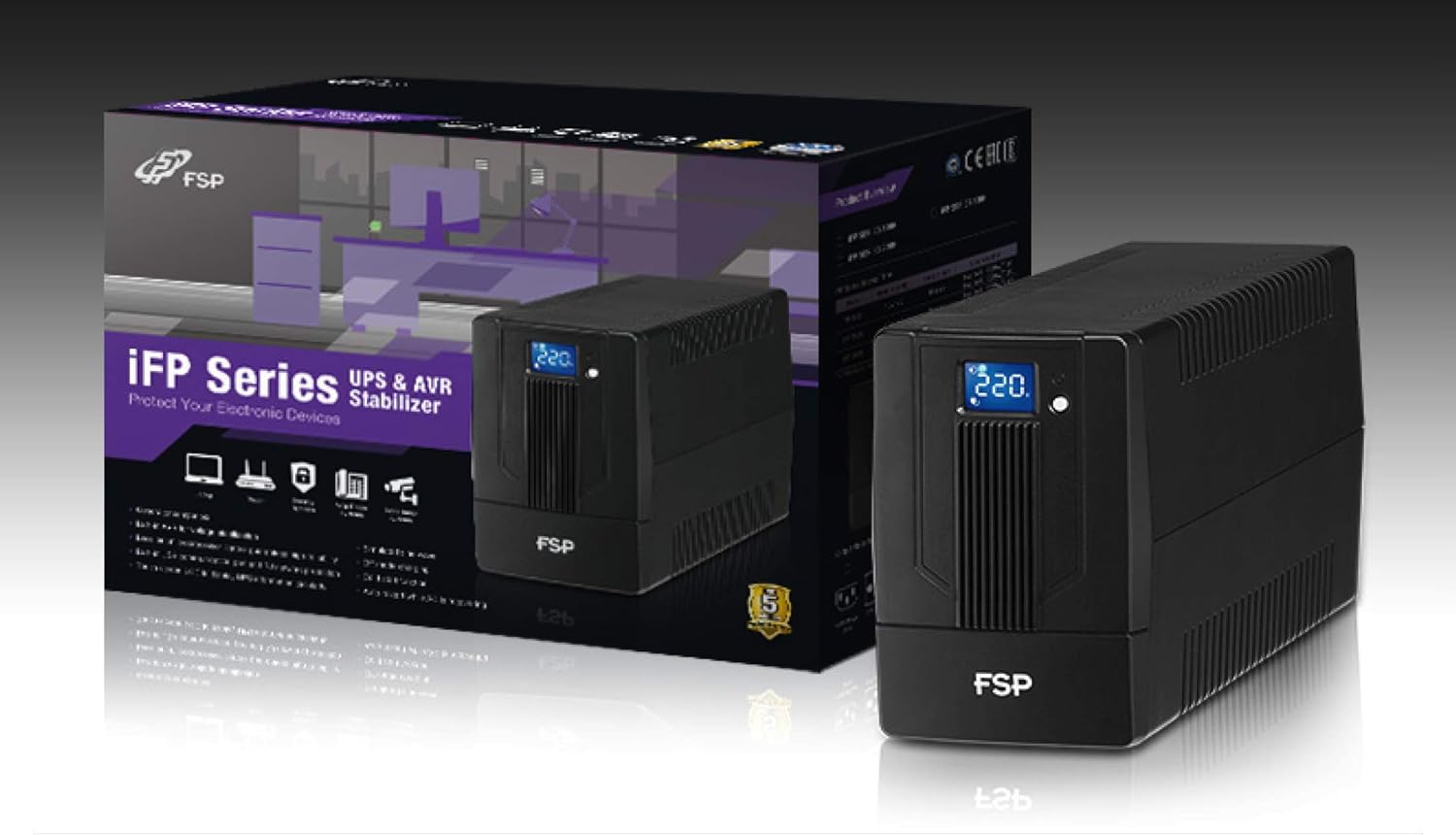
Image 3.1: The FSP iFP600 UPS shown alongside its retail packaging, illustrating the product's presentation.
3.2 Abubuwan da aka gyara Panel
Familiarize yourself with the connections on the rear panel of the UPS:

Hoto 3.2: Cikakken bayani view of the FSP iFP600 UPS rear panel, highlighting connection points.
- Katuna: Two SCHUKO type outlets for connecting protected equipment.
- Shigar AC: Connects the UPS to the main utility power.
- Fuse/Breaker: Kariyar da ke wuce gona da iri ga UPS.
- Sadarwar USB: Port for connecting to a computer for monitoring and management.
- Combo RJ11/RJ45 Surge Protection: Provides surge protection for telephone/network lines.
4. Saita da Shigarwa
Follow these steps to set up your FSP iFP600 UPS:
- Cire kaya: A hankali a cire UPS ɗin daga cikin marufinsa. A duba ko akwai lalacewar jigilar kaya.
- Wuri: Place the UPS on a flat, stable surface in a clean, cool, and well-ventilated area. Ensure adequate clearance around the unit for airflow.
- Cajin Farko: Connect the UPS to a standard grounded AC outlet using the provided power cord. Allow the unit to charge for at least 4-6 hours before initial use to ensure optimal battery performance. The UPS will charge whether it is turned on or off.
- Kayan Haɗin Kai: Plug your computer, monitor, and other critical electronic devices into the UPS outlets (A). Do not connect surge suppressors or power strips to the UPS outlets.
- Sadarwar USB (Zaɓi ne): Connect the USB cable from the UPS USB port (D) to your computer's USB port to enable power management software features (software not included, typically downloaded from manufacturer's websaiti).
- RJ11/RJ45 Protection (Optional): For surge protection of your telephone or network line, connect the incoming line to the 'IN' port of the Combo RJ11/RJ45 (E) and connect the 'OUT' port to your device.
5. Umarnin Aiki
5.1 Kunnawa / Kashewa
- Don Kunnawa: Press and hold the power button on the front panel for approximately 2 seconds until you hear a beep and the LCD display illuminates.
- Don Kashe: Press and hold the power button for approximately 2 seconds until you hear a beep and the LCD display turns off.
5.2 LCD Display Information
The FSP iFP600 features an LCD display that provides real-time status information. The display is touch-sensitive for navigating information.

Image 5.1: The LCD display of the FSP iFP600 UPS, indicating voltage output and its touch-screen functionality.
The LCD display typically shows:
- Shigar da Voltage
- Fitarwa Voltage
- Matsayin Cajin baturi
- Matsayin lodi
- Operating Mode (e.g., AC mode, Battery mode)
- Warning/Fault Indicators
5.3 Battery Mode Operation
When the utility power fails or fluctuates outside acceptable limits, the UPS will automatically switch to battery mode. During battery mode, the UPS will provide power to connected equipment from its internal battery. An audible alarm will sound to indicate battery operation.
6. Kulawa
Proper maintenance ensures the longevity and reliability of your UPS.
- Tsaftacewa: Use a soft, dry cloth to clean the exterior of the UPS. Do not use liquid or aerosol cleaners.
- Kulawar Baturi: To maximize battery life, ensure the UPS is connected to AC power and fully charged. If the UPS is stored for an extended period, recharge it every three months to prevent battery degradation.
- Madadin Baturi: The internal battery (12V / 7Ah x1) is not user-serviceable. Battery replacement should only be performed by FSP-certified service personnel or a qualified technician. Incorrect battery replacement can pose a risk of explosion or injury.
- Ajiya: Store the UPS in a cool, dry place with adequate ventilation. Ensure the battery is fully charged before storage.
7. Shirya matsala
Refer to the following table for common issues and their solutions. If the problem persists, contact FSP support.
| Alama | Ƙararrawa Mai Ji | Dalili mai yiwuwa | Magani |
|---|---|---|---|
| UPS operating on battery power | Kira kowane dakika 10 | Utility power failure or fluctuation | Save work and shut down equipment if power outage is prolonged. UPS will return to AC mode when power is restored. |
| Ƙarancin gargaɗin baturi | Ƙara ƙara kowane daƙiƙa | Cajin baturi yayi ƙasa sosai | Immediately save work and shut down connected equipment. |
| Yanayin lodi | Ƙara ƙara kowane sakan 0.5 | Kayan aikin da aka haɗa sun wuce ƙarfin UPS | Disconnect non-essential equipment until the alarm stops. Ensure total load is within UPS capacity. |
| Laifin UPS | Ci gaba da ƙara | Laifi na ciki ko rashin aiki | Turn off the UPS and disconnect it from the AC outlet. Contact FSP technical support. |
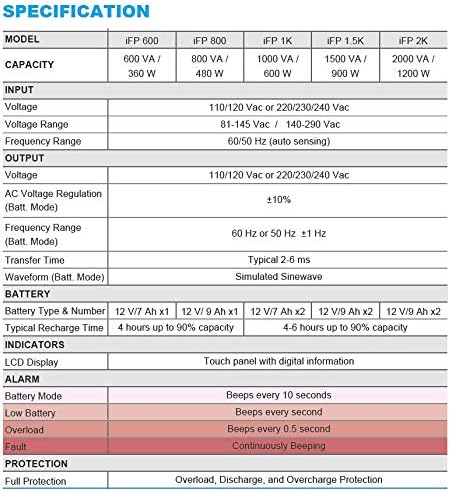
Image 7.1: Excerpt from the FSP iFP series specification table, detailing alarm indicators and their meanings.
8. Ƙayyadaddun bayanai
Detailed technical specifications for the FSP iFP600 UPS:
| Siffar | Ƙayyadaddun bayanai |
|---|---|
| Samfura | Farashin 600 |
| Iyawa | 600 VA / 360 W |
| Shigar da Voltage | 110/120 Vac or 220/230/240 Vac |
| Shigar da Voltage Range | 81-145 Vac / 140-290 Vac |
| Matsakaicin Shigarwa | 60/50 Hz (hann hankali ta atomatik) |
| Fitarwa Voltage | 110/120 Vac or 220/230/240 Vac |
| AC Voltage Tsarin (Yanayin Batt) | ± 10% |
| Output Frequency Range (Batt. Mode) | 60 Hz or 50 Hz ±1 Hz |
| Lokacin Canja wurin | Yawanci 2-6 ms |
| Waveform (Yanayin Batt) | Simurated Sinewave |
| Nau'in Baturi & Lamba | 12V / 7Ah x1 |
| Yawan Cajin Lokaci | 4 hours har zuwa 90% iya aiki |
| Manuniya | LCD Display (Touch panel with digital information) |
| Kariya | Overload, Discharge, and Overcharge Protection |
| Nauyin Abu | 9.24 fam (4.2 kg) |
| Girman Samfura (LxWxH) | 11.81 x 3.98 x 5.59 inci |
| Launi | Baki |
| Kayan abu | Karfe |
9. Garanti da Tallafawa
FSP products are designed for reliability and performance. For warranty information, please refer to the warranty card included with your product or visit the official FSP website. For technical support, troubleshooting assistance, or service inquiries, please contact FSP customer service through their official channels.
Kuna iya samun ƙarin bayani da albarkatun tallafi akan FSP Store on Amazon.


