1. Gabatarwa
The YABER V3 Mini Bluetooth Projector is designed to provide a versatile and high-quality viewing experience for home entertainment and outdoor use. Featuring native 1280x720p resolution with 1080P support, a 6000:1 contrast ratio, and an advanced German LED light source, it delivers clear and accurate images. This projector also includes Bluetooth 5.0 for wireless audio connectivity and supports wireless screen mirroring via Anycast or Chromecast (adapters sold separately).
2. Abin da ke cikin Akwatin
- YABER V3 Mini Bluetooth Projector
- HDMI Cable
- Igiyar Wutar Lantarki
- Manual mai amfani
- Cable AV
- Rigar Tsabtace Lens
- Ikon nesa (ba a haɗa batura)
3. Kayan Samfura
- Native 720P & 1080P Supported: Offers a native resolution of 1280x720 pixels, supporting up to 1080P input for clear images.
- Matsakaicin Mahimmanci: Features a 6000:1 contrast ratio for enhanced image depth and detail.
- Haɗin Bluetooth 5.0: Allows wireless connection to Bluetooth headsets, speakers, and Airpods for enhanced audio.
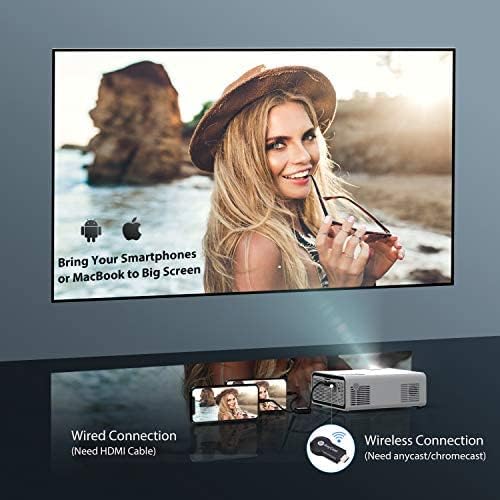
- Wireless Screen Mirroring: Supports Anycast and Chromecast for mirroring content from smartphones and other devices (adapters required).
- Ayyukan Zuƙowa: Adjusts image size from 100% to 50% using the remote control without moving the projector.
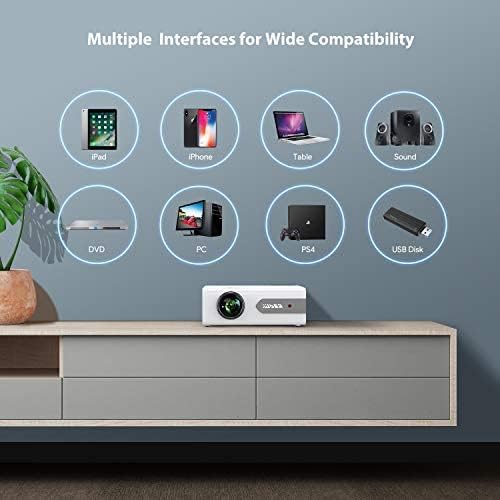
- Hanyoyi masu yawa: Equipped with HDMI, USB, VGA, AV, and Audio ports for wide compatibility with various devices.
- Sautin Sitiriyo na HIFI: Built-in dual stereo speakers with an SRS sound system provide a good auditory experience.
- Babban Tsarin Sanyaya: Designed to minimize lamp power consumption and extend lamp rayuwa har zuwa awanni 100,000.


4. Saita
4.1 Farkon Wuri
Place the projector on a stable, flat surface or mount it to the ceiling. Ensure there is adequate ventilation around the projector to prevent overheating. The projection distance and screen size can be adjusted based on your viewyanayi.

4.2 Haɗin Wuta
Connect the power cord to the projector's power input and then plug it into a power outlet.
4.3 Kunnawa / Kashewa
Latsa maɓallin wuta akan na'urar jigila ko na'urar ramut don kunna ko kashe naúrar.
5. Umarnin Aiki
5.1 Mayar da hankali da Gyaran Jigon Maɓalli
Adjust the focus ring on the projector lens until the image is clear. Use the keystone correction feature (manual or digital, if available) to correct any trapezoidal distortion of the image.
5.2 Zaɓin Tushen shigarwa
Use the 'Source' button on the remote or projector to select the desired input source (HDMI, USB, VGA, AV).
5.3 Haɗin Bluetooth
To connect to a Bluetooth audio device:
- Ensure your Bluetooth speaker or headset is in pairing mode.
- Navigate to the Bluetooth settings on the projector.
- Zaɓi na'urar ku daga lissafin samammun na'urorin don haɗawa.
- Once connected, audio will play through the Bluetooth device.
Lura: The V3 mini projector supports Bluetooth output devices (speakers, headphones) but does not connect to phones/pads via Bluetooth for mirroring. Turn off Bluetooth when not in use to avoid potential issues.
5.4 Madubin Allon Mara waya
The YABER V3 supports wireless screen mirroring from iOS and Android devices using an external Anycast or Chromecast dongle (purchased separately). Connect the dongle to an HDMI port and follow the dongle's instructions for mirroring.
5.5 Aikin Zuƙowa
To adjust the image size without moving the projector, use the zoom function via the remote control. This allows you to shrink the image from 100% down to 50%.
5.6 Yanayin Amfani
The YABER V3 projector is suitable for various applications:
- Gidan wasan kwaikwayo na Gida: Enjoy movies and shows on a large screen.
- Wasan kwaikwayo: Connect gaming consoles for an immersive experience.
- Outdoor Movies: Perfect for backyard movie nights in dark environments.

6. Kulawa
6.1 Tsaftace Ruwan tabarau
Regularly clean the projector lens using the provided lens cleaning cloth or a soft, lint-free cloth. Avoid using abrasive cleaners or harsh chemicals.
6.2 Tsabtace Tacewar iska
Check and clean the air filter periodically to ensure proper airflow and prevent dust buildup, which can affect performance and lamp rayuwa.
6.3 lamp Rayuwa
Majigi na LED lamp has a lifespan of up to 100,000 hours. Proper maintenance, including adequate ventilation and cleaning, helps maximize its longevity.
7. Shirya matsala
- Babu Hoto:
- Duba ko kebul ɗin wutar lantarki yana da haɗin da aka amince da shi.
- Tabbatar an zaɓi madaidaicin tushen shigarwa.
- Verify that the connected device (e.g., TV Stick, PC) is powered on and outputting a signal.
- Adjust focus and keystone.
- Babu Sauti:
- Bincika saitunan ƙara akan duka na'urar jijiya da na'urar da aka haɗa.
- Idan kana amfani da Bluetooth, tabbatar an haɗa na'urar daidai kuma an haɗa ta.
- If using an external speaker via AUX, ensure the cable is fully inserted.
- Some content (e.g., certain streaming services) may have audio format incompatibilities; try a different source or content.
- Hoto mai duhu:
- Daidaita zoben mayar da hankali akan ruwan tabarau.
- Tabbatar cewa saman tsinkayar yana lebur kuma injin na'urar ya tsaya tsayin daka.
- Tsaftace ruwan tabarau na na'urar hangen nesa.
- Ikon nesa Baya Aiki:
- Sauya batura a cikin ramut.
- Tabbatar babu wani cikas tsakanin na'urar nesa da na'urar karɓar IR ta na'urar hangen nesa.
- Yin zafi fiye da kima:
- Tabbatar da isassun iska a kusa da majigi.
- Clean the air filter and vents to remove dust.
- Avoid operating in excessively hot environments.
8. Ƙayyadaddun bayanai
| Lambar Samfura | V3 |
| Nuni Resolution | Native 1280 x 720 (Supports 1080P) |
| Adadin Kwatance | 6000:1 |
| Halayen Rabo | 16:9 / 4:3 |
| Hasken Haske | LED |
| Lamp Rayuwa | Har zuwa awanni 100,000 |
| Fasahar Haɗuwa | 3.5mm Jack, Bluetooth, HDMI, USB, VGA, AV |
| Sigar Bluetooth | 5.0 |
| Girman samfur | 8.19 x 6.61 x 3.07 inci |
| Nauyin Abu | 2.2 fam |
| Shawarwari Amfani | Home Cinema, Gaming, Business (not recommended for professional presentations) |
9. Garanti da Tallafawa
YABER provides a 6-month return policy and 3-year repair service for the V3 Mini Bluetooth Projector. Lifetime professional technical support is also available. For any issues or inquiries, please contact YABER customer service.


