1. Gabatarwa
This manual provides detailed instructions for the installation, setup, and operation of your Steren LOCK-500 Wi-Fi Digital Smart Lock. Please read this manual thoroughly before installation and use to ensure proper function and safety. Keep this manual for future reference.
2. Bayanin Tsaro
Muhimman Umarnin Tsaro:
- Do not attempt to disassemble or repair the lock yourself. Contact qualified service personnel.
- Ensure all components are installed correctly according to the instructions to prevent malfunction.
- Keep physical keys in a secure location away from the lock.
- Regularly check battery levels and replace them when indicated to avoid lockouts.
- Protect your numeric codes and RFID cards from unauthorized access.
- This lock is designed for indoor use or protected outdoor environments. Avoid direct exposure to extreme weather conditions.
3. Abubuwan Kunshin
Tabbatar cewa duk abubuwa suna nan a cikin kunshin ku:
- Steren LOCK-500 Digital Smart Lock (Front and Rear Panels)
- Jikin Kulle Mortise
- Strike Plate and Strike Box
- Mounting Hardware (Screws, Spindles)
- 2 x Makullan Jiki
- 4 x katunan RFID
- Samfurin Shigarwa
- Manual mai amfani (Wannan takarda)

Image: Steren LOCK-500 Smart Lock with its retail packaging, showing the lock unit, physical keys, and RFID cards.
4. Samfurin Ya Ƙareview
Familiarize yourself with the components of your Steren LOCK-500 smart lock.
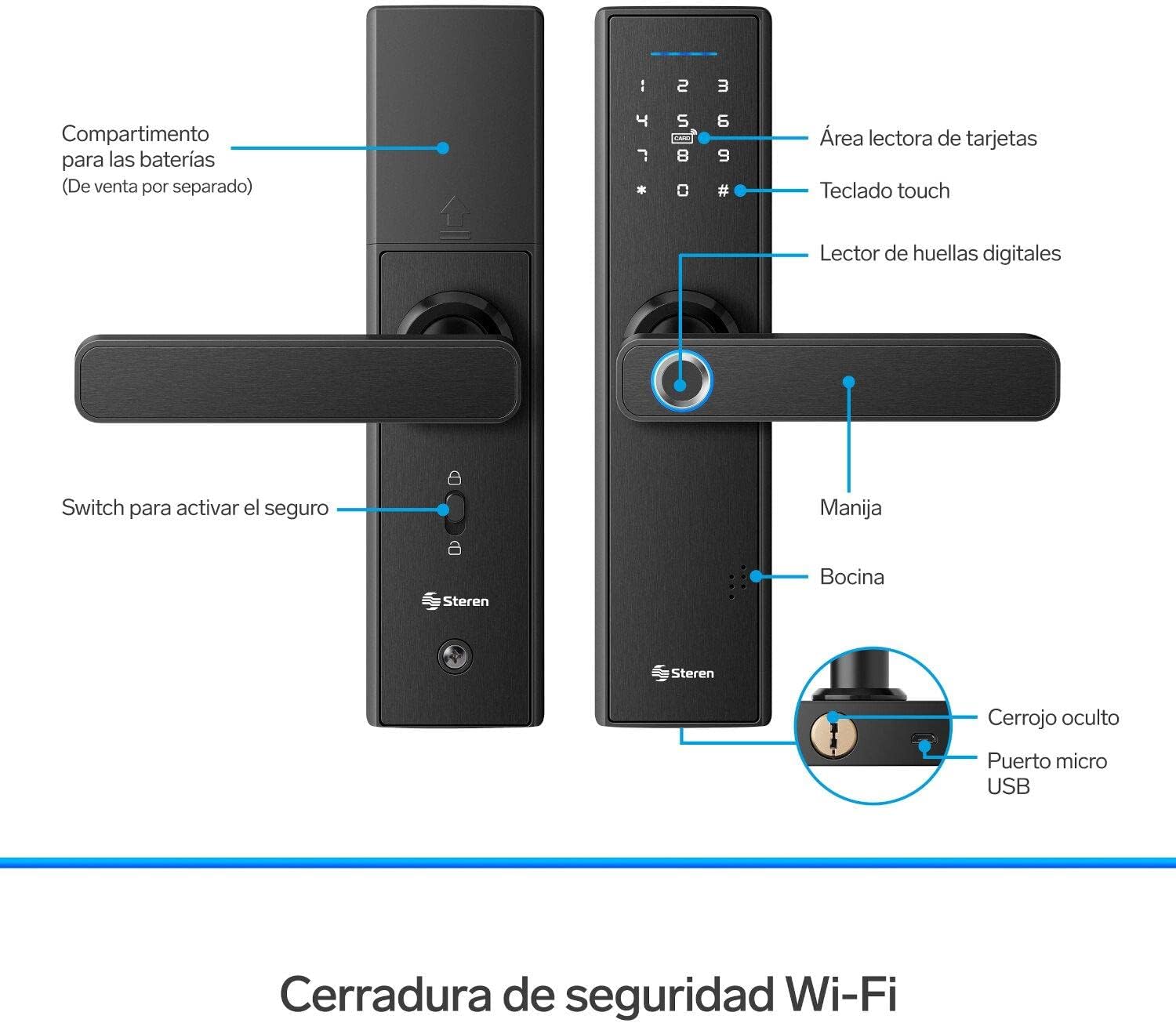
Image: Detailed diagram of the Steren LOCK-500 smart lock, highlighting key components such as the card reader area, touch keypad, fingerprint reader, handle, speaker, battery compartment, security switch, hidden deadbolt, and micro USB port.
- Card Reader Area: For RFID card access.
- Taɓa Maɓalli: For numeric code entry.
- Mai Karatun Sawun yatsa: For biometric access.
- Hannu: To open the door after successful authentication.
- Mai magana: Provides audio feedback for operations and alarms.
- Dakin Baturi: Located on the interior panel (batteries sold separately).
- Security Switch: Activates the internal deadbolt for added security.
- Hidden Deadbolt: Manual key override.
- Micro USB Port: For emergency power supply.
5. Shigarwa
The Steren LOCK-500 is designed for doors with a thickness of 35 mm to 50 mm and is compatible with both left and right-opening doors. Professional installation is recommended.
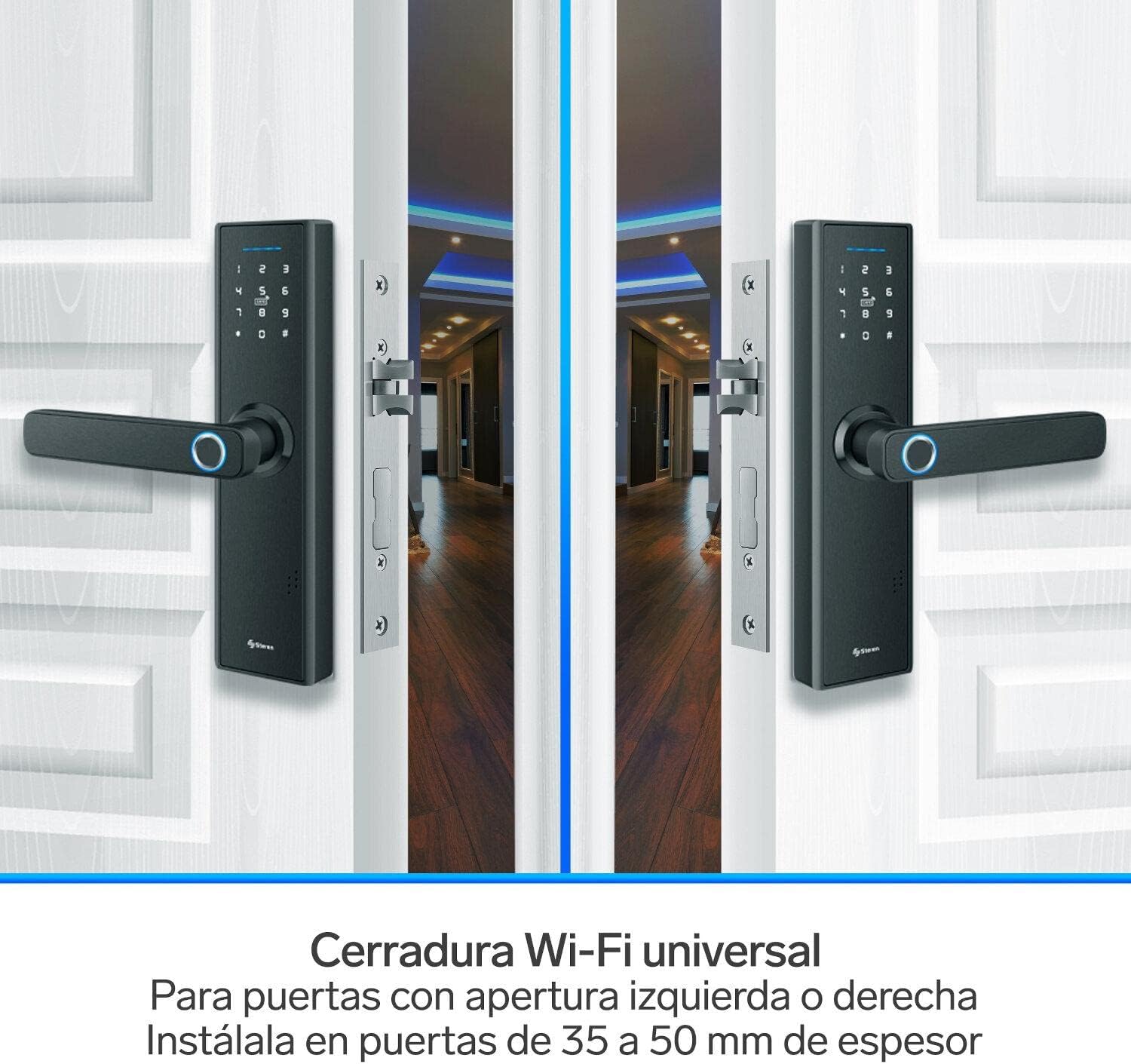
Image: Two Steren LOCK-500 smart locks installed on double doors, illustrating its universal fit for both left and right-opening doors and compatibility with door thicknesses between 35mm and 50mm.
5.1 Duban shigarwa kafin shigarwa
- Ensure your door meets the thickness requirements (35-50 mm).
- Check door frame for proper alignment and clearance.
- Gather necessary tools: screwdriver, drill, measuring tape, pencil.
5.2 Shigarwa-mataki-mataki
- Shirya Ƙofar: Use the provided template to mark and drill holes on your door.
- Install the Mortise Lock Body: Insert the mortise into the door edge and secure it with screws.
- Install the Exterior Panel: Route the cables through the door and align the exterior panel.
- Install the Interior Panel: Connect the cables from the exterior panel to the interior panel. Secure the interior panel with mounting screws.
- Saka Batura: Open the battery compartment on the interior panel and insert 4 AA batteries (not included).
- Aikin Gwaji: After installation, test all functions (handle, keypad, fingerprint, key) to ensure smooth operation.

Image: Technical drawing showing the dimensions of the Steren LOCK-500 smart lock, including its length (24 cm), width (6.2 cm), handle length (13.5 cm), and thickness (2.2 cm and 4.8 cm for the handle).
6. Saitin Farko da Haɗin Manhaja
To unlock the full potential of your Steren LOCK-500, connect it to the Steren Home App.

Image: A smartphone displaying the Steren Home App interface, showing controls for the smart lock. The lock itself is visible in the background, indicating remote control capabilities.
6.1 Download the Steren Home App
- Bincika "Steren Home" on the App Store (iOS) or Google Play Store (Android).
- Shigar da app a kan wayoyin hannu.
6.2 Haɗa zuwa Wi-Fi
- Ensure your Wi-Fi network is 2.4 GHz. The lock does not support 5 GHz networks.
- Follow the in-app instructions to add your LOCK-500 device. This typically involves putting the lock into pairing mode and entering your Wi-Fi credentials.
6.3 Gudanar da Mai amfani
- Saitin Gudanarwa: The first user registered via the app will be the administrator.
- Ƙara Masu Amfani: Use the app to add new users and assign them access methods (fingerprint, code, RFID card).
- Temporary Codes: Generate temporary numeric codes for guests or service providers directly from the app. These codes can be time-limited or single-use.

Image: Two individuals on their phones, illustrating the feature of creating and sharing temporary access codes for the smart lock with friends or family.
7. Umarnin Aiki
The Steren LOCK-500 offers multiple ways to access your property.

Image: A Steren LOCK-500 smart lock installed on a door, with icons illustrating its five primary access methods: fingerprint, numeric codes, RFID cards, mobile app control, and physical keys.
7.1 Access Methods
- Wurin yatsa: Place your registered finger on the fingerprint reader. The lock will unlock upon successful verification.
- Numeric Code: Enter your registered numeric code on the touch keypad, followed by the '#' key.
- Katin RFID: Present a registered RFID card to the card reader area. The lock will unlock.
- Mobile App (Remote Access): Use the Steren Home App on your smartphone to remotely unlock the door. Ensure your phone and the lock are connected to the internet.
- Makullin Jiki: In case of emergency or battery depletion, use the physical key to manually unlock the door. The keyhole is typically located at the bottom of the exterior handle.
7.2 Kulle Kofar
- Kulle ta atomatik: The lock can be configured to automatically lock after a set period (e.g., 5 seconds) after closing.
- Kulle Manual: From the exterior, press the '#' key for 2 seconds. From the interior, use the security switch or turn the handle upwards.
7.3 Emergency Power
If the batteries are completely depleted, you can provide emergency power using a power bank connected to the micro USB port on the exterior panel. This will allow you to use an electronic access method to open the lock and replace the batteries.
8. Kulawa
- Madadin Baturi: Replace all four AA batteries when the low battery indicator appears or when the lock provides a low battery warning sound. Do not mix old and new batteries.
- Tsaftacewa: Shafa saman makullin tare da taushi, bushe bushe. Guji yin amfani da abin goge goge ko kaushi wanda zai iya lalata ƙarshen ko kayan lantarki.
- Firikwensin yatsa: Kiyaye firikwensin yatsa mai tsabta kuma bushe don kyakkyawan aiki.
- Dubawa na yau da kullun: A duba lokaci-lokaci cewa dukkan sukurori sun matse kuma makullin yana aiki yadda ya kamata.
9. Shirya matsala
| Matsala | Dalili mai yiwuwa | Magani |
|---|---|---|
| Kulle baya amsawa. | Matattun batura. | Use emergency power via Micro USB port and replace batteries. |
| Ba a gane sawun yatsa ba. | Finger is dirty, wet, or sensor is obstructed. Fingerprint not properly registered. | Clean and dry finger/sensor. Re-register fingerprint if issues persist. |
| Numeric code not working. | Incorrect code entered. Code expired (temporary). | Verify code. Check app for code validity. |
| Ba za a iya haɗi zuwa Wi-Fi ba. | Incorrect Wi-Fi password. Router is 5 GHz only. Lock is too far from router. | Ensure 2.4 GHz network. Verify password. Move router closer or use a Wi-Fi extender. |
| Alarm sounds after multiple attempts. | Multiple incorrect access attempts. | This is a security feature. Wait for the alarm to clear or use a valid access method. |
10. Ƙayyadaddun bayanai
| Siffar | Daki-daki |
|---|---|
| Samfura | LOCK-500 |
| Alamar | STEREN |
| Hanyoyin shiga | Fingerprint, Numeric Code, RFID Card, Mobile App, Physical Key |
| Haɗuwa | Wi-Fi (2.4GHz kawai) |
| Tushen wutan lantarki | 4 x AA baturi (ba a haɗa su ba) |
| Ikon Gaggawa | Micro USB Port |
| Daidaita Kaurin Ƙofa | 35 mm - 50 mm |
| Kayan abu | Alloy Karfe |
| Girma (L x W x H) | 5.08 x 17.78 x 30.48 cm (2 x 7 x 12 inci) |
| Nauyi | 1.98 kg |
11. Garanti da Tallafawa
For warranty information and technical support, please refer to the official Steren website ko tuntuɓi sabis na abokin ciniki kai tsaye.
- Mai ƙira: Steren
- Website: www.steren.com.mx (Please check your regional Steren website for specific contact details)
- Garanti: Information regarding product warranty is typically provided with the purchase documentation or available on the manufacturer's website.


