Gabatarwa
Thank you for choosing the Eurom Cool-Eco 120 A+ Mobile Air Conditioner. This manual provides important information regarding the safe operation, installation, maintenance, and troubleshooting of your new appliance. Please read this manual thoroughly before using the air conditioner and keep it for future reference.
Muhimman Bayanan Tsaro
WARNING: To reduce the risk of fire, electric shock, or injury, always follow basic safety precautions when using this appliance.
- Tabbatar cewa wutar lantarki ta dace da voltage kayyade akan lakabin rating.
- Kada a yi aiki da na'urar kwandishan tare da lalacewa ko igiya ko toshe.
- Kar a saka yatsu ko abubuwa na waje a cikin mashigar iska ko mashigai.
- Keep the appliance away from flammable materials and open flames.
- Koyaushe cire haɗin naúrar kafin tsaftacewa ko hidima.
- Wannan na'urar ba a yi niyya don amfani da mutane ba (ciki har da yara) tare da rage ƙarfin jiki, azanci ko tunani, ko rashin ƙwarewa da ilimi, sai dai idan an ba su kulawa ko umarni game da amfani da na'urar ta wurin mutumin da ke da alhakin amincin su.
- Ya kamata a kula da yara don tabbatar da cewa ba sa wasa da na'urar.
Samfurin Ƙarsheview
Babban Unit
The Eurom Cool-Eco 120 A+ is a compact and portable air conditioning unit designed for efficient cooling. It features a sleek white design with integrated wheels for easy mobility.

This image shows the front of the Eurom Cool-Eco 120 A+ mobile air conditioner, highlighting its clean, white design and the Eurom logo at the bottom.

Wannan hoton yana nuna alamar profile of the air conditioner, revealing the connection point for the exhaust hose and the unit's compact dimensions.
Kwamitin Kulawa
The control panel is located on the top of the unit, providing easy access to all functions and settings.

This image shows a close-up of the air conditioner's top control panel, featuring buttons for power, mode, fan speed, timer, sleep, and swing, along with LED indicators.

Wannan hoton yana ba da cikakken bayani view of the digital display on the unit, showing the current temperature setting.
Ikon nesa
A convenient remote control is included for operating the air conditioner from a distance.

This image displays the remote control, which includes a small screen and buttons for adjusting temperature, mode, fan speed, and other functions.
Na'urorin haɗi
The package includes essential accessories for installation and operation.

This image shows the various accessories provided, such as the flexible exhaust hose, window slider kit, and a small drainage tube.
Saita
Ana kwashe kaya
Carefully remove the air conditioner and all accessories from the packaging. Retain the packaging for future storage or transport.
Wuri
Place the air conditioner on a flat, stable surface. Ensure there is at least 30 cm (12 inches) of space around the unit for proper airflow. Do not block the air inlets or outlets.
Shigar da Tushen Ƙarfafawa
- Screw one end of the exhaust hose onto the exhaust port on the back of the unit.
- Extend the hose to the nearest window or opening.
- Attach the window adapter to the other end of the exhaust hose.
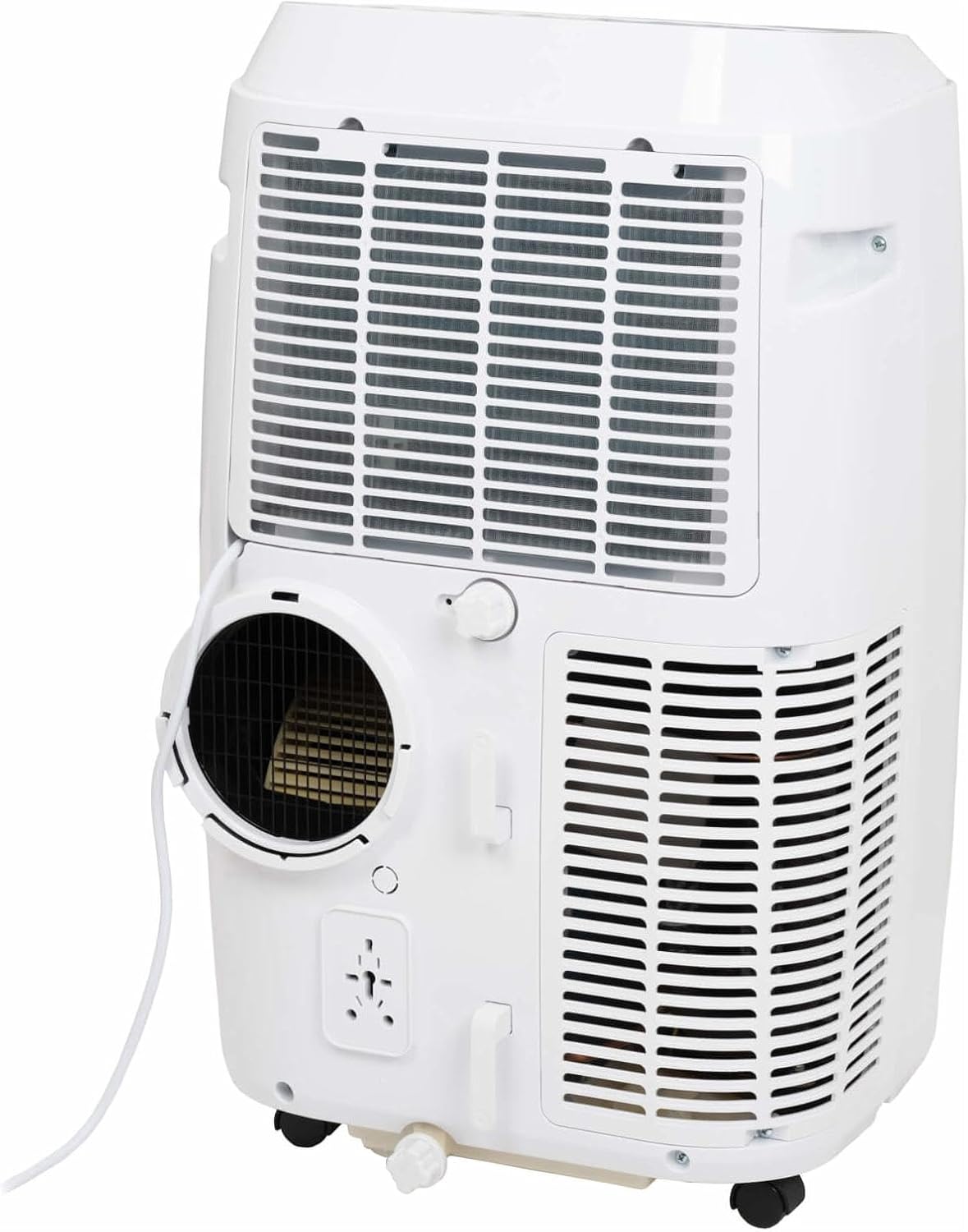
This image shows the rear of the air conditioner, illustrating where the exhaust hose connects to the unit.
Shigarwa Kit Kit
Use the provided window sealing kit to secure the exhaust hose in a window opening. Adjust the slider kit to fit your window, then place the window adapter into the opening.
Yin Amfani da Na'urar Kwandishan
Ayyukan Gudanarwa
The control panel on top of the unit allows you to manage all settings. Press the WUTA button to turn the unit on or off. Use the MODE button to cycle through cooling, fan, and dehumidification modes.
- WUTA: Yana kunna ko kashe naúrar.
- kwatance: Selects operating mode (Cool, Fan, Dry/Dehumidify).
- Kibiyoyi Sama/Ƙasa: Adjusts temperature setting or timer.
- SAURI: Changes fan speed (Low, Medium, High).
- TIMER: Sets the auto-on or auto-off time.
- SWING: Activates or deactivates the automatic louver swing.
- BARCI: Yana kunna yanayin barci don yin aiki cikin natsuwa da daidaita yanayin zafi a hankali.
Ayyukan Ikon Nesa
The remote control duplicates most functions available on the control panel, offering convenience. Ensure the remote control is pointed towards the unit's receiver when pressing buttons.
The remote control features a display showing the current settings and buttons for power, mode selection, temperature adjustment, fan speed, timer, and sleep mode.
Hanyoyin Aiki
- Yanayin Sanyi: Provides cooling. Set your desired temperature using the UP/DOWN arrows.
- Yanayin Fan: Yana zagayawa da iska ba tare da sanyaya ba. Daidaita saurin fanka kamar yadda ake so.
- Dry (Dehumidify) Mode: Reduces humidity in the room. The fan speed is fixed in this mode.
Smart App Control
This model supports Smart App Control. Refer to the separate Smart App manual or the manufacturer's website for detailed instructions on connecting and controlling your unit via the app.
Kulawa da Kulawa
Tsaftace Tacewar iska
Ya kamata a tsaftace matatar iska bayan sati biyu ko fiye da haka, ya danganta da yadda ake amfani da ita. Matatar mai datti na iya rage inganci da kuma iskar da ke shiga.
- Cire na'urar sanyaya iska daga tashar wutar lantarki.
- Nemo allon tace iska (yawanci a bayan ko gefen na'urar).
- Cire tace.
- A wanke tace da dumi, ruwan sabulu. Kurkura sosai kuma a bar shi ya bushe gaba daya kafin a sake sawa.
Ruwa Mai Ruwa
During dehumidification or in very humid conditions, water will accumulate inside the unit. The unit has an internal water tank that will trigger a "Full" indicator when full. You will need to drain the water manually.
- Sanya wani ƙaramin kasko ko akwati a ƙarƙashin tashar magudanar ruwa a ƙasan bayan na'urar.
- Cire magudanar ruwa.
- Allow all water to drain out.
- Maye gurbin magudanar ruwa amintacce.
Adana
Before storing the unit for an extended period, ensure the water tank is completely drained. Clean the air filter and store the unit in a dry, cool place, preferably in its original packaging.
Jagoran Shirya matsala
| Matsala | Dalili mai yiwuwa | Magani |
|---|---|---|
| Naúrar baya kunna. | Babu iko; An cire igiyar wutar lantarki; na'urar kashe wutar lantarki ta yi karo. | Duba haɗin wutar lantarki; sake saitin mai watsewa. |
| Naúrar baya sanyaya yadda ya kamata. | Dirty air filter; exhaust hose not properly installed; room too large; windows/doors open. | Clean air filter; ensure hose is sealed; close windows/doors; check room size suitability. |
| Water tank full indicator is on. | Tankin ruwa na ciki ya cika. | Drain the water from the unit. |
| Naúrar tana hayaniya. | Na'urar ba ta kan saman da ba shi da faɗi; toshewar fanka. | Place on a flat surface; check for obstructions in fan area. |
Ƙididdiga na Fasaha
| Siffar | Ƙayyadaddun bayanai |
|---|---|
| Alamar | Yuro |
| Lambar Samfura | 262845 |
| Ƙarfin sanyi | 12000 BTU |
| Tushen wutar lantarki | Wutar Lantarki |
| Water Capacity (Internal Tank) | 1.2 lita |
Garanti da Tallafin Abokin Ciniki
Bayanin Garanti
This product comes with a manufacturer's warranty. Please refer to the warranty card included with your purchase or visit the official Eurom website don cikakken garanti sharuɗɗa da sharuɗɗa. Ajiye shaidar siyan ku don da'awar garanti.
Tallafin Abokin Ciniki
For technical assistance, spare parts, or service, please contact Eurom customer support. Contact details can typically be found on the Eurom website or in the product packaging. When contacting support, please have your model number (262845) and serial number ready.