1. Gabatarwa
The D-Link DGS-105GL is a 5-Port Gigabit Unmanaged Desktop Switch designed to provide a simple and efficient solution for expanding network connectivity in small office/home office (SOHO) and small to medium-sized business (SMB) environments. This device offers plug-and-play functionality, requiring no complex configuration. Its fanless design ensures silent operation, and the metal housing provides durability. The DGS-105GL incorporates energy-efficient features, including IEEE 802.3az Energy-Efficient Ethernet, to reduce power consumption without compromising performance.
2. Abubuwan Kunshin
Tabbatar cewa kunshin ku ya ƙunshi abubuwa masu zuwa:
- D-Link DGS-105GL 5-Port Gigabit Unmanaged Desktop Switch
- Adaftar Wuta
Idan wasu abubuwa sun ɓace ko sun lalace, tuntuɓi mai sake siyar da D-Link na gida.
3. Samfurin Ya Ƙareview
The DGS-105GL switch features a compact, low-profile design with a durable metal housing. It is equipped with five Gigabit Ethernet ports for high-speed network connections.
3.1 Gaban gaba

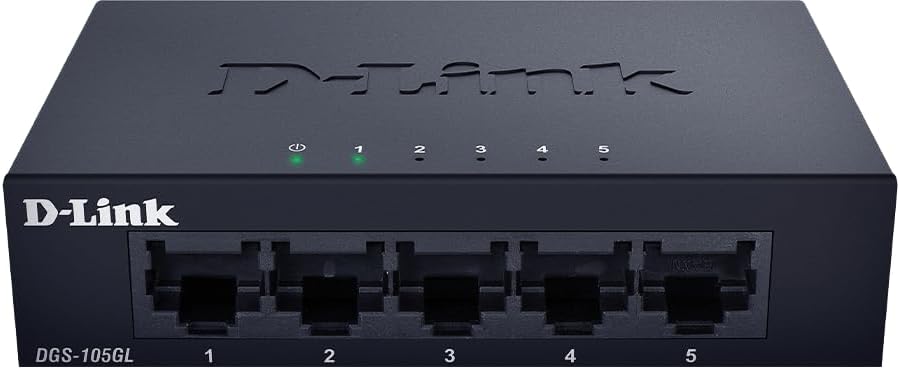
Hoto: Gaba view of the D-Link DGS-105GL switch, showing the D-Link logo, model number DGS-105GL, a power LED, five port status LEDs (1-5), and five RJ45 Gigabit Ethernet ports (1-5).
The front panel includes the following indicators and ports:
- LED Power: Yana nuna matsayin wutar lantarki.
- Ledojin tashar jiragen ruwa (1-5): Each port has an LED that indicates link status and activity. A solid light indicates a successful connection, and a blinking light indicates data transmission.
- RJ45 Gigabit Ethernet Ports (1-5): These ports are used to connect network devices such as computers, servers, and other switches.
3.2 Rear Panel

Hoto: Na baya view of the D-Link DGS-105GL switch, showing the power input port labeled '5V --- 1A'.
The rear panel contains the power input port, where the included power adapter is connected.
4. Saita
The DGS-105GL is a plug-and-play device, making installation straightforward. Follow these steps to set up your switch:
- Haɗa Adaftar Wuta: Plug the included power adapter into the power input port on the rear panel of the DGS-105GL switch. Then, plug the other end of the adapter into a standard electrical outlet. The Power LED on the front panel should illuminate.
- Haɗa Na'urorin Yanar Gizo: Connect your network devices (e.g., computers, network-attached storage, routers) to any of the five RJ45 Gigabit Ethernet ports on the front panel using standard Ethernet cables.
- Tabbatar da Haɗin kai: Once a device is connected and powered on, the corresponding Port LED on the switch's front panel should light up, indicating a successful link. If there is network activity, the LED will blink.

Image: The D-Link DGS-105GL switch placed on a desk in an office setting, connected to a laptop and other peripherals, demonstrating a typical setup.
5. Aiki da Sauyawa
The DGS-105GL operates automatically once connected. It supports auto-negotiation for speed and duplex mode, and auto-MDI/MDIX, eliminating the need for crossover cables. The switch automatically detects the speed of the connected device (10/100/1000 Mbps) and adjusts accordingly.
5.1 LED Manuniya
The LEDs provide visual feedback on the switch's status:
Hoto: Gaba view of the D-Link DGS-105GL switch with the green power LED and green port LEDs 1-5 illuminated, indicating active connections.
| LED | Matsayi | Bayani |
|---|---|---|
| Ƙarfi | Kore mai ƙarfi | An kunna sauya. |
| Ƙarfi | Kashe | Mai sauyawa baya karbar wuta. |
| Port (1-5) | Kore mai ƙarfi | A device is successfully connected to the port. |
| Port (1-5) | Koren Kiftawa | Ana aika bayanai ko karɓar su ta tashar jiragen ruwa. |
| Port (1-5) | Kashe | Babu na'ura da aka haɗa zuwa tashar jiragen ruwa, ko na'urar da aka haɗa tana kashe wuta. |
6. Kulawa
To ensure optimal performance and longevity of your DGS-105GL switch, consider the following maintenance guidelines:
- Tsaftacewa: Periodically clean the exterior of the switch with a soft, dry cloth. Avoid using liquid or aerosol cleaners directly on the device.
- Yanayin Muhalli: Ensure the switch is placed in a well-ventilated area, away from direct sunlight, heat sources, and excessive moisture. Maintain operating temperatures within the specified range (refer to specifications).
- Na'urar USB: Keep network cables neatly organized to prevent strain on ports and improve airflow around the device.
- Keke wutar lantarki: If you experience network issues, a simple power cycle (unplugging the power adapter, waiting 10 seconds, and plugging it back in) can often resolve minor problems.
7. Shirya matsala
If you encounter issues with your DGS-105GL switch, refer to the following common troubleshooting steps:
- Babu Wutar Wuta:
- Tabbatar cewa an haɗa adaftar wutar a amintacciyar hanyar haɗi zuwa duka na'urar sauya sheka da mai aiki da wutar lantarki.
- Tabbatar cewa mashigar wutar lantarki tana aiki ta hanyar haɗa wata na'ura.
- No Link LED for a Connected Device:
- Check that the Ethernet cable is securely plugged into both the switch port and the network device.
- Ensure the connected network device is powered on and functioning correctly.
- Gwada kebul na Ethernet daban don kawar da kebul mara kyau.
- Gwada haɗa na'urar zuwa tashar jiragen ruwa daban akan maɓalli.
- Slow Network Gudun:
- Tabbatar da cewa duk na'urori da kebul da aka haɗa suna tallafawa Gigabit Ethernet (Cat5e ko sama da haka).
- Bincika zirga-zirgar hanyar sadarwa da ya wuce kima ko aikace-aikacen bandwidth mai ƙarfi da ke gudana akan na'urorin da aka haɗa.
- Perform a power cycle on the switch and connected devices.
8. Ƙayyadaddun bayanai
Key technical specifications for the D-Link DGS-105GL switch:
| Siffar | Ƙayyadaddun bayanai |
|---|---|
| Lambar Samfura | Saukewa: DGS-105GL |
| Yawan Tashoshi | 5 x Gigabit Ethernet (RJ45) |
| Yawan Canja wurin Bayanai | 1 Gbps per port |
| Nau'in Interface | RJ45 |
| Kayan Harka | Karfe |
| Tsarin Ba Mara tsayi | Ee |
| Ingantaccen Makamashi | IEEE 802.3az Energy-Efficient Ethernet (EEE) |
| Shigar da Wuta | 5 Volts (DC), 1 Amps |
| Nauyin Abu | 160 Grams (5.6 oz) |
| Girman samfur | 39.37"L x 25.2"W x 0.94"H (Kimanin) |
| UPC | 790069458606 |
9. Garanti da Taimakon Fasaha
D-Link products are backed by a limited warranty. For specific warranty terms and conditions, please refer to the warranty information included with your product or visit the official D-Link website.
For technical assistance, product documentation, or to download the latest software and firmware updates, please visit the D-Link support portal or contact D-Link technical support directly. Contact information can typically be found on the D-Link website don yankinku.


