1. Gabatarwa
The ION Audio Boombox Deluxe Stereo is a versatile audio system designed to provide a range of listening experiences. It combines classic audio playback options with modern connectivity, featuring an AM/FM radio, a cassette player, Bluetooth streaming, and USB/Micro SD card playback. This manual provides detailed instructions for setting up, operating, and maintaining your device.

Hoto 1: Gaba view of the ION Audio Boombox Deluxe Stereo, showcasing its dual speakers, cassette deck, and radio tuner display.
2. Abin da ke cikin Akwatin
- Boombox Deluxe Unit
- Wutar Wuta
- Jagora na sauri
3. Saita
3.1 Ƙarfafa Naúrar
The Boombox Deluxe can be powered using the included AC power cable or by batteries for portable use. Insert the AC power cable into the AC IN port on the back of the unit and plug it into a standard wall outlet. For battery operation, open the battery compartment (typically on the bottom or back) and insert the required D-cell batteries (not included), ensuring correct polarity.
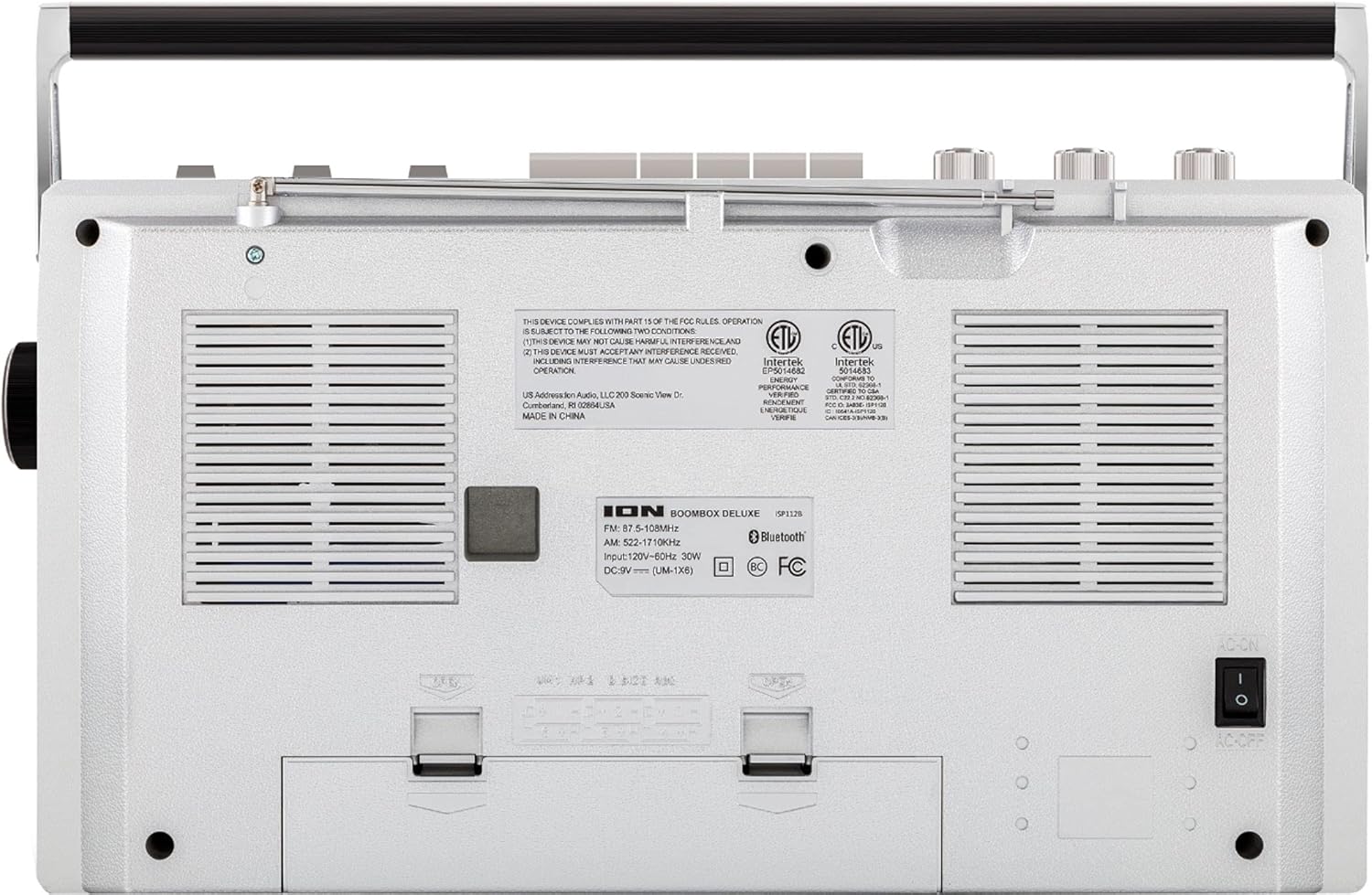
Figure 2: Rear panel of the Boombox Deluxe, highlighting the AC power input and battery compartment location.
3.2 Gyaran Eriya
For optimal AM/FM radio reception, extend the telescopic antenna located on the top of the unit. Adjust its position for the clearest signal.
4. Umarnin Aiki
4.1 Gudanarwa na Gabaɗaya
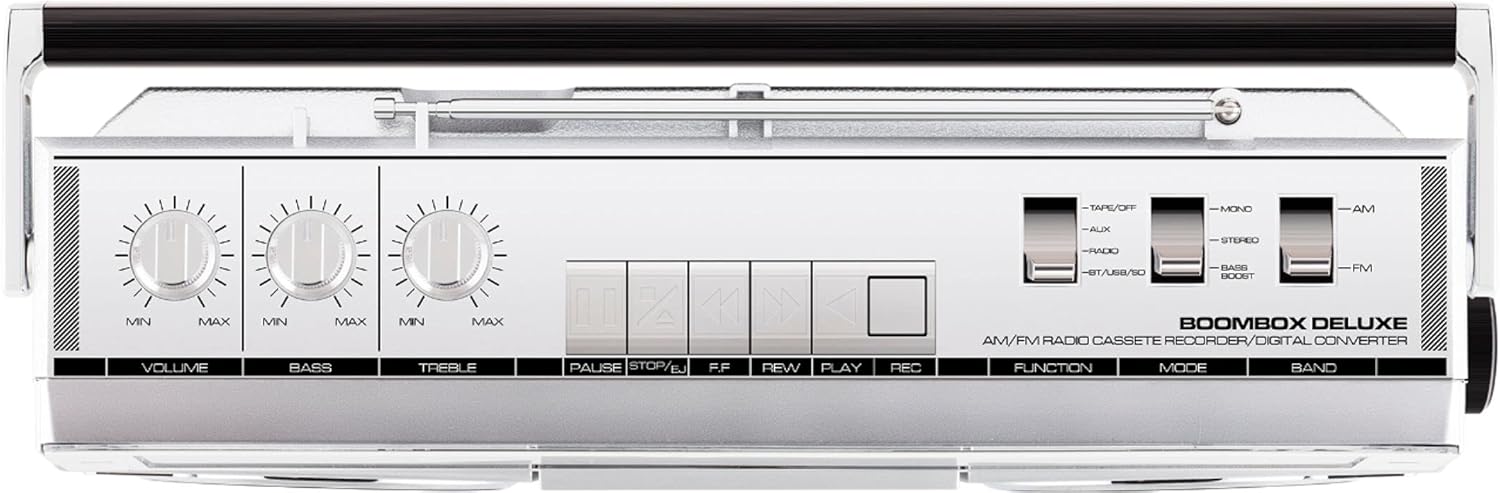
Figure 3: Top panel controls, including Volume, Bass, Treble knobs, and cassette playback buttons.
- Ƙarar Ƙarar: Yana daidaita matakin fitar da sauti gaba ɗaya.
- Bass Knob: Yana daidaita fitowar sauti mai ƙarancin mita.
- Ƙunƙarar Ƙarfafa: Yana daidaita fitowar sauti mai yawan mita.
- Canjin Aiki: Selects between Tape/Off, Aux, Radio, and BT/USB/SD modes.
- Sauya yanayi: Selects between Mono, Stereo, and Bass Boost audio modes.
- Band Switch: Yana zaɓar tsakanin tashoshin rediyo na AM da FM.
4.2 Aikin Rediyo
- Saita Aiki Canjawa to 'Radio'.
- Saita Band Canja to 'AM' or 'FM'.
- Yi amfani da Gyaran Knob to select your desired radio station. The frequency will be displayed on the tuner scale.
4.3 Aikin Mai kunna kaset
- Saita Aiki Canjawa to 'Tape/Off'.
- Danna maɓallin Tsaida / Fitar maballin don buɗe sashin kaset.
- Insert a cassette tape with the open edge facing upwards. Close the compartment.
- Danna maɓallin Wasa maballin don fara sake kunnawa.
- Amfani Rewind (REW) kuma Fast Forward (FF) maɓallan don kewaya tef.
- Latsa Dakata to temporarily stop playback. Press again to resume.
- Latsa Tsaida / Fitar to stop playback and eject the tape.
- To record, ensure the Aiki Canjawa is set to 'Tape/Off' and press the Record (REC) button simultaneously with the Wasa maballin.
4.4 Haɗin Bluetooth

Figure 4: Side panel with USB and Micro SD card slots, and playback controls for digital media.
- Saita Aiki Canjawa to 'BT/USB/SD'. The unit will enter Bluetooth pairing mode, indicated by a flashing LED.
- On your Bluetooth-enabled device (e.g., smartphone, tablet), search for 'ION Boombox Deluxe' in the Bluetooth settings.
- Select 'ION Boombox Deluxe' to pair. Once connected, a confirmation tone will sound, and the LED will stop flashing.
- You can now stream audio from your device to the Boombox Deluxe. Use your device's controls or the boombox's playback buttons (Play/Pause, Next/Previous Track) for media control.
4.5 Sake kunnawa na USB/Micro SD
- Saita Aiki Canjawa to 'BT/USB/SD'.
- Insert a USB flash drive or Micro SD card (with compatible audio files) into the respective slot on the side of the unit.
- Na'urar za ta gano ta atomatik kuma ta fara kunna sauti files.
- Use the playback control buttons (Play/Pause, Next/Previous Track, Delete) on the side panel to manage your music.
4.6 Input na taimako

Figure 5: Side panel with headphone output and auxiliary input jacks.
- Saita Aiki Canjawa to 'Aux'.
- Connect an external audio device (e.g., MP3 player, CD player) to the AUX IN jack ta amfani da kebul na sauti na 3.5mm (ba a haɗa shi ba).
- Audio from the connected device will play through the boombox speakers. Control playback from your external device.
5. Features
- Integrated Stereo System with Dual Speakers
- Yawo mara waya ta Bluetooth
- AM/FM Radio Tuner
- Cassette Player/Recorder
- USB da Micro SD Katin sake kunnawa
- Auxiliary Input for External Devices
- Adjustable Bass and Treble Controls
- Tsarin Ɗauka Mai Ɗauki Tare da Hannun Ɗauka
6. Ƙayyadaddun bayanai
| Ƙayyadaddun bayanai | Daki-daki |
|---|---|
| Alamar | ION Audio |
| Samfura | Boombox Deluxe |
| Fasahar Haɗuwa | Bluetooth, USB |
| Nau'in Kakakin | Sitiriyo |
| Tushen wutar lantarki | Battery Powered (D-cell), AC Power |
| Launi | Baki, Azurfa |
| Nauyin Abu | 8.93 fam |
| Girman Kunshin | 18.1 x 11.1 x 7.6 inci |
7. Shirya matsala
- Babu Ƙarfi:
Ensure the AC power cable is securely connected to both the unit and a working power outlet. If using batteries, check that they are inserted correctly and are not depleted. - Marasa kyawun karɓar rediyo:
Fully extend the telescopic antenna and adjust its position. Try relocating the unit to an area with better signal reception, away from potential interference sources like other electronic devices. - Cassette Tape Not Playing/Recording:
Ensure the tape is inserted correctly and the cassette compartment is fully closed. Check that the tape is not tangled or damaged. For recording, ensure both Play and Record buttons are pressed simultaneously. - Bluetooth Ba Haɗawa:
Make sure the Boombox Deluxe is in 'BT/USB/SD' mode and in pairing mode (flashing LED). Ensure Bluetooth is enabled on your external device and it is within range (typically 30 feet). Try unpairing and re-pairing the device. - No Sound from USB/Micro SD:
Verify that the USB drive or Micro SD card is inserted correctly and contains compatible audio files (e.g., MP3). Ensure the volume is turned up on the boombox.
8. Kulawa
- Tsaftacewa: Yi amfani da kyalle mai laushi da busasshe don tsaftace wajen na'urar. Kada a yi amfani da masu tsaftace ruwa ko abubuwan da ke narkewa.
- Cassette Deck Care: Lokaci-lokaci tsaftace kawunan tef da tsuke rollers tare da swab auduga da sauƙi dampened with isopropyl alcohol to ensure optimal playback and recording quality.
- Adana Baturi: Idan ba za a yi amfani da na'urar na tsawon lokaci ba, cire batirin don hana zubewa da lalacewa.
9. Garanti da Tallafawa
This product is offered as an Amazon Renewed item. Amazon Renewed products are professionally inspected and tested to work and look like new. If you are not satisfied with your purchase, renewed products are eligible for replacement or refund under the Amazon Renewed Guarantee. For specific details regarding the Amazon Renewed Guarantee, please refer to the Amazon Renewed program terms and conditions on the Amazon website.
For further assistance or technical support, please contact ION Audio customer service or refer to their official website don albarkatun tallafi.


