1. Gabatarwa
This manual provides essential information for the proper setup, operation, and maintenance of your Digital Persona U.are.u 4500 USB Fingerprint Reader. This device is designed to provide reliable and secure biometric authentication using advanced optical fingerprint scanning technology.
Muhimmiyar Bayani: This product package includes only the fingerprint reader device. Software, drivers, and detailed manuals are not provided on a physical CD and must be obtained separately or downloaded as part of your specific application's requirements.

Hoto 1.1: Kunshin Samfura
2. Features
The Digital Persona U.are.u 4500 Fingerprint Reader incorporates several key features for enhanced performance and user experience:
- Optical Scanning Technology: Utilizes advanced optical technology for superior image quality and product reliability.
- High Durability (HD): Engineered for robust performance and longevity.
- Advanced Recognition: Capable of recognizing even challenging fingerprints, including dry, moist, or rough ones.
- Babban Tsari: Features a pixel resolution of 512 dpi for detailed fingerprint capture.
- Alamar LED mai shuɗi: A soft, cool blue LED provides visual feedback and blends into various environments.
- 360-Degree Recognition: Allows for fingerprint capture from any angle, enhancing usability.
- Karamin Tsara: Small and portable for convenient use.
- SDK Availability: Compatible with DigitalPersona SDK packages for custom application development.

Hoto 2.1: Maɓallin Maɓalli na Ƙarsheview
3. Saita
Follow these steps to set up your Digital Persona U.are.u 4500 Fingerprint Reader:
- Cire na'urar: Carefully remove the fingerprint reader from its packaging.
- Cire fim ɗin kariya: If present, gently peel off any protective film from the sensor surface.
- Haɗa zuwa Kwamfuta: Plug the USB cable of the fingerprint reader into an available USB port on your computer.
- Shigar Direba: Your operating system may automatically detect and install generic drivers. However, for full functionality, you will need to install the specific drivers and software compatible with the Digital Persona U.are.u 4500. These are typically provided with the application you intend to use (e.g., DigitalPersona Pro Workstation, DigitalPersona Pro Kiosk, DigitalPersona Online, DigitalPersona Personal, or any DigitalPersona SDK packages). Refer to your software's documentation for driver installation instructions.
- Tabbatar da Haɗin kai: Once drivers are installed, the blue LED on the device should illuminate, indicating it is powered and ready for use.

Hoto 3.1: Gaba View of the Fingerprint Reader

Figure 3.2: USB Cable Connection Point
4. Umarnin Aiki
To use the Digital Persona U.are.u 4500 Fingerprint Reader for authentication or enrollment:
- Shirya Yatsanku: Ensure your finger is clean and free from excessive moisture or dryness. The device is designed to work with dry, moist, or rough fingerprints, but extreme conditions may affect performance.
- Place Finger on Sensor: Gently place the pad of your finger flat onto the illuminated sensor area of the reader. Ensure full contact with the sensor surface.
- Rike Matsayi: Hold your finger steady on the sensor until the software indicates a successful scan or enrollment. The device supports 360-degree recognition, meaning the orientation of your finger does not significantly impact the scan.
- Follow Software Prompts: Your specific application software will guide you through the enrollment or authentication process, indicating when to place or remove your finger.

Figure 4.1: Finger Placement for 360-Degree Recognition
5. Kulawa
Proper maintenance ensures the longevity and optimal performance of your fingerprint reader:
- Cleaning the Sensor: Regularly clean the sensor surface with a soft, lint-free cloth. If necessary, slightly dampen the cloth with water or a mild, non-abrasive cleaner. Do not use harsh chemicals, alcohol, or abrasive materials, as these can damage the sensor.
- Kauce wa kusoshi: Do not use sharp objects or excessive force on the sensor surface, as this can cause scratches and impair performance.
- Ajiya: When not in use, store the device in a clean, dry environment away from direct sunlight and extreme temperatures.
6. Shirya matsala
If you encounter issues with your fingerprint reader, try the following troubleshooting steps:
- Ba a Gane Na'urar:
- Ensure the USB cable is securely plugged into both the device and the computer.
- Try connecting the device to a different USB port.
- Sake kunna kwamfutarka.
- Verify that the necessary drivers are correctly installed. You may need to reinstall them.
- Poor Fingerprint Reading:
- Ensure your finger is clean and dry (or slightly moist, as appropriate).
- Clean the sensor surface as described in the Maintenance section.
- Try different fingers or adjust the placement of your finger on the sensor to ensure full contact.
- Ensure the software you are using is up-to-date and compatible with the U.are.u 4500.
- Blue LED Not On:
- Bincika haɗin USB kuma gwada wata tashar jiragen ruwa daban.
- Ensure your computer's USB ports are functioning correctly.
For further assistance, please refer to the support resources provided by Digital Persona or your software vendor.
7. Ƙayyadaddun bayanai
| Ƙayyadaddun bayanai | Daraja |
|---|---|
| Sunan Samfura | U.are.u 4500 |
| Alamar | BSTUOKEY (Manufacturer: DP) |
| Nau'in Scanner | Buga yatsa |
| Fasahar Haɗuwa | USB |
| Ƙaddamarwa | 512 dpi |
| Zurfin Launi | 8 bpp |
| Nau'in Tushen Haske | LED |
| Fasahar Sensor Na gani | Na gani |
| Nauyin Abu | 4.2 oganci (0.12 Kilogram) |
| Girman Kunshin | 7.87 x 4.72 x 2.76 inci |
| Ƙasar Asalin | China |
| Kwanan Wata Farko Akwai | Yuni 20, 2019 |
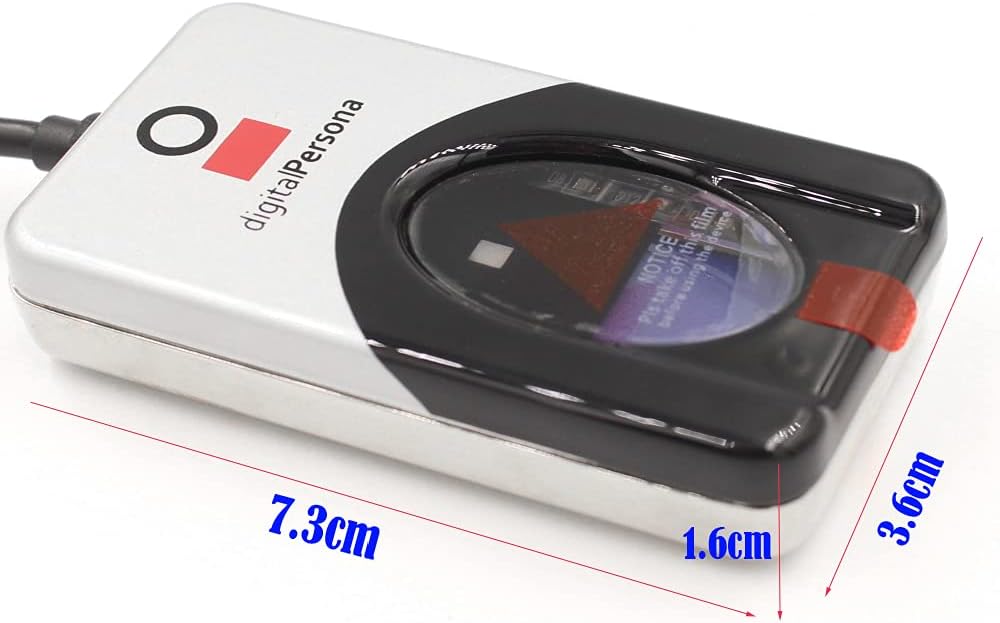
Hoto 7.1: Girman Na'urar
8. Garanti da Tallafawa
For information regarding product warranty, technical support, or service, please contact the vendor or refer to the official Digital Persona support channels. The device is designed to integrate with various Digital Persona SDK packages, and support for these integrations is typically provided by Digital Persona directly or through your software solution provider.


