1. Gabatarwa
Thank you for choosing the AVATTO WT200B-BH Smart WiFi Thermostat. This device is designed to provide intelligent temperature control for electric underfloor heating systems, enhancing comfort and energy efficiency in your home. This manual provides detailed instructions for installation, operation, programming, and smart home integration.
2. Kayan Samfura
- Mai shirye-shirye: Supports weekly programming for customized heating schedules.
- Smart Life Application: Remote control and monitoring via the Smart Life mobile application.
- Ikon murya: Mai jituwa tare da Amazon Alexa da Google Assistant don umarnin murya masu dacewa.
- Kariyar tabawa: Intuitive touch interface for local control.
- Karamin Tsara: Standard 55 x 55 mm size for seamless integration.
- Floor Heating Compatibility: Specifically designed for electric underfloor heating systems.
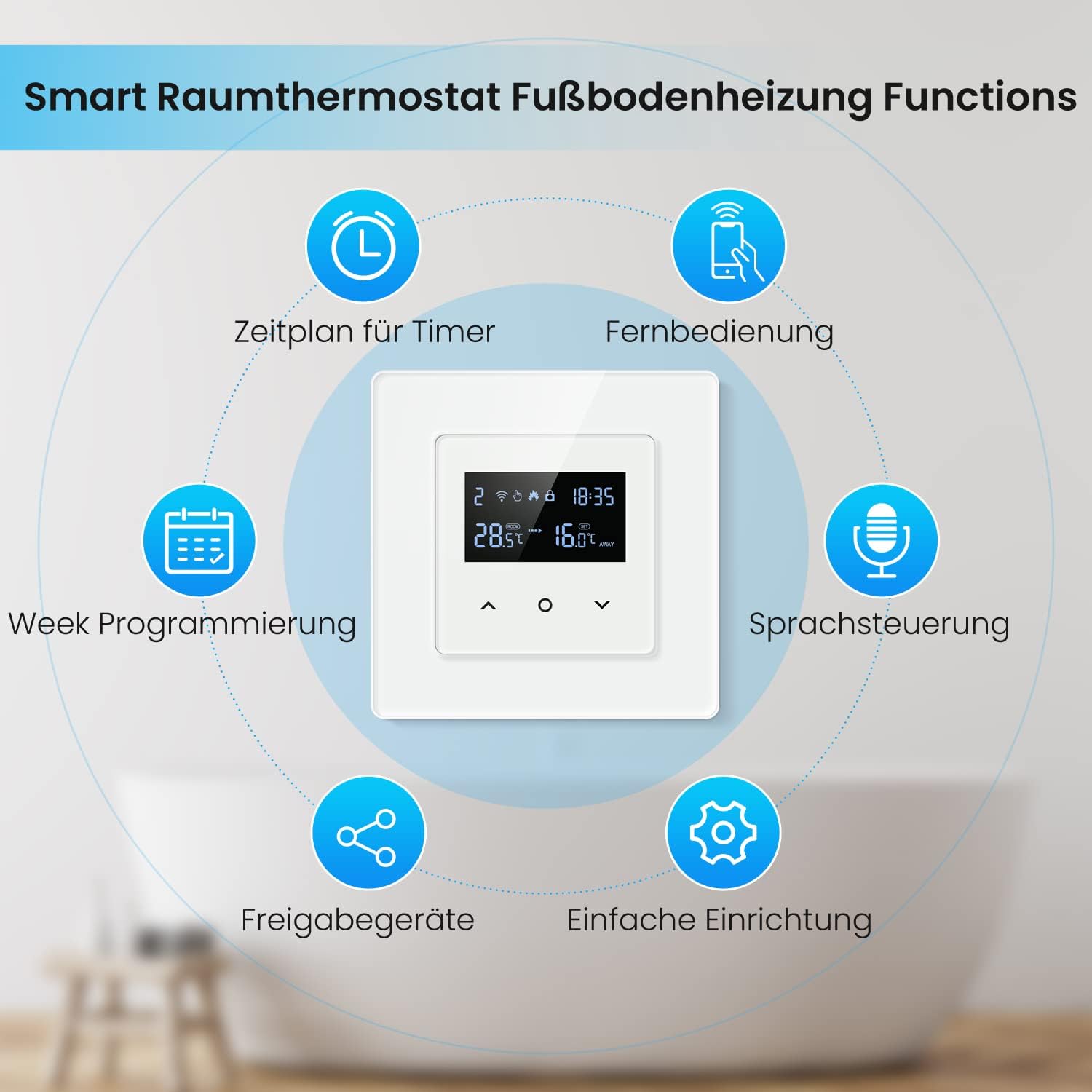
Hoto na 2.1: Ƙarsheview of AVATTO Smart Thermostat functions, including timer schedule, remote control, week programming, voice control, device sharing, and easy setup.
3. Ƙayyadaddun samfur
| Alamar | AVATTO |
| Lambar Samfura | WT200B-BH |
| Voltage | AC 100V-240V (250 Volts nominal) |
| Kayan abu | Filastik |
| Nauyin Abu | 310g ku |
| Girman Kunshin | 10.4 x 9.8 x 6.7 cm |
| Nau'in Mai Gudanarwa | Amazon Alexa, Google Assistant, Application, Voice Control |
| Takamaiman Amfani | Heated (Underfloor Heating) |

Hoto na 3.1: Detailed dimensions of the AVATTO Smart Thermostat, showing front panel measurements of 80mm x 80mm, a standard 55mm x 55mm mounting frame, and a depth of 33mm.
4. Jagoran Girkawa
Proper installation is crucial for the safe and efficient operation of your thermostat. It is recommended that installation be performed by a qualified electrician.
4.1. Hawaye
The thermostat is designed for standard wall-box installation. Ensure the power supply is disconnected before beginning installation.

Hoto na 4.1: Illustration of different installation methods for the AVATTO Smart Thermostat, including separate installation, combined installation with other modules, and replacement installation for existing products.
4.2. Tsarin Waya
Connect the thermostat according to the wiring diagram provided. Ensure all connections are secure and comply with local electrical codes. The thermostat requires Live (L) and Neutral (N) wires for power, and connections for the heating element (L1, N1) and the floor temperature sensor.
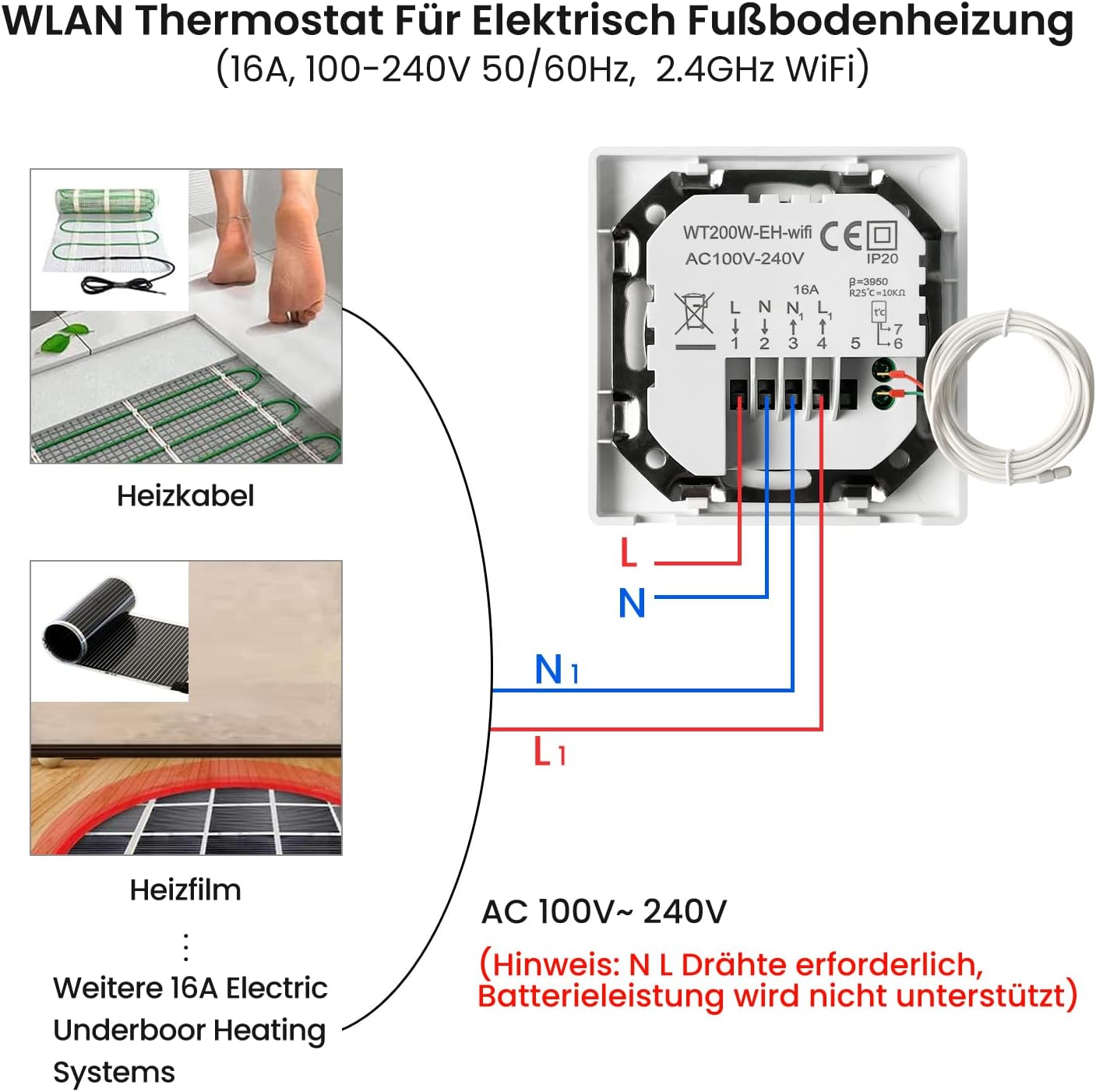
Hoto na 4.2: Detailed wiring diagram for the AVATTO Smart Thermostat, showing connections for Live (L), Neutral (N), heating load (L1, N1), and the floor sensor. This diagram is for AC 100V-240V systems and requires N and L wires; battery power is not supported.
Muhimmi: Ensure the main power supply is turned off before performing any wiring. Incorrect wiring can cause damage to the thermostat or the heating system, and poses a safety risk.
5. Basic Aiki
After successful installation and power-up, the thermostat display will show the current temperature and time. Use the touch buttons on the device to adjust settings directly.
- Kunnawa/Kashewa: Press and hold the power button (if available) or use the app.
- Daidaita Zazzabi: Yi amfani da kibiyoyi sama/ƙasa don saita zafin da ake so.
- Zaɓin Yanayin: Cycle through different operating modes (e.g., Manual, Auto, Holiday) using the mode button.
6. Shirye-shirye
The AVATTO thermostat supports weekly programming, allowing you to set different temperature schedules for various times of the day and week. This feature helps optimize energy consumption and comfort.

Hoto na 6.1: Example of weekly programming interface on the Smart Life app, showing multiple periods with set times and temperatures for a working day. The thermostat supports 5+2, 6+1, or 7-day programming options with up to 6 time periods per day.
Detailed programming instructions are available within the Smart Life application. Generally, you can set up to six time periods per day, each with a specific target temperature. This allows for flexible heating based on your daily routine.
7. Haɗin Gidan Smart
The AVATTO Smart WiFi Thermostat can be integrated with popular smart home platforms for enhanced control and automation.
7.1. Smart Life App
Download the "Smart Life" app from your mobile device's app store. Follow the in-app instructions to add your thermostat. This will enable remote control, scheduling, and advanced settings management.
7.2. Amazon Alexa & Google Assistant
Once connected to the Smart Life app, you can link your Smart Life account to Amazon Alexa or Google Assistant. This allows for voice control of your thermostat, such as adjusting the temperature or changing modes.

Hoto na 7.1: Visual representation of the AVATTO Smart Thermostat's compatibility with Smart Life, Amazon Alexa, and Google Home, demonstrating voice control capabilities and remote management via a smartphone app.
8. Kulawa
The AVATTO Smart WiFi Thermostat requires minimal maintenance. Follow these guidelines to ensure its longevity and optimal performance:
- Tsaftacewa: Goge allon kuma casing with a soft, dry cloth. Avoid using abrasive cleaners or solvents, as they may damage the surface.
- A guji Danshi: Do not expose the thermostat to excessive moisture or direct water spray.
- Sabunta software: Periodically check the Smart Life app for any available firmware updates for your thermostat to ensure you have the latest features and security enhancements.
9. Shirya matsala
If you encounter issues with your AVATTO Smart WiFi Thermostat, refer to the following common troubleshooting steps:
- Babu Wutar / Nuni Kashe: Check the circuit breaker and ensure the thermostat is correctly wired and receiving power.
- Heating Not Working: Verify the thermostat is in heating mode and the set temperature is above the ambient temperature. Check the wiring to the heating element.
- WiFi Disconnection: Ensure your home WiFi network is active and the thermostat is within range. Restart your router and the thermostat. Re-pair the device with the Smart Life app if necessary.
- Karancin Zazzabi mara inganci: Ensure the floor sensor is correctly installed and not obstructed. Avoid placing the thermostat in direct sunlight or near heat sources.
- Abubuwan Sarrafa App: Ensure your phone has an internet connection and the Smart Life app is updated to the latest version. Log out and log back into your Smart Life account.
For persistent issues, contact AVATTO customer support or consult a qualified electrician.
10. Garanti da Tallafawa
Warranty information for the AVATTO WT200B-BH Smart WiFi Thermostat should be obtained from your retailer at the time of purchase. Please retain your proof of purchase for warranty claims.
For technical support or further assistance, please refer to the contact information provided by AVATTO or your product retailer. Information regarding spare parts availability is not provided in the product specifications.


