Gabatarwa
Thank you for choosing the Mistral MSF1650R 16-inch Stand Fan. This manual provides important information regarding the assembly, operation, maintenance, and troubleshooting of your new fan. Please read it thoroughly before use and retain it for future reference.
Muhimman Umarnin Tsaro
- Always ensure the fan is placed on a stable, level surface to prevent it from tipping over.
- Kada a yi amfani da fanka da igiya ko filogi da ta lalace. Idan igiyar ta lalace, dole ne masana'anta, wakilin sabis ɗinta, ko kuma waɗanda suka cancanta su maye gurbinta da ita domin guje wa haɗari.
- Unplug the fan from the power outlet before cleaning, assembling, or disassembling parts.
- Keep fingers, pencils, or any other objects out of the fan guard when it is operating.
- Do not use the fan near water or in excessively humid environments.
- Wannan na'urar ba a yi niyya don amfani da mutane ba (ciki har da yara) tare da rage ƙarfin jiki, azanci ko tunani, ko rashin ƙwarewa da ilimi, sai dai idan an ba su kulawa ko umarni game da amfani da na'urar ta wurin mutumin da ke da alhakin amincin su.
- Ya kamata a kula da yara don tabbatar da cewa ba sa wasa da na'urar.
Abubuwan Samfur
Familiarize yourself with the main parts of your Mistral MSF1650R stand fan.
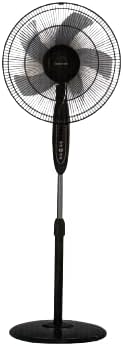
Hoto 1: Gaba view of the Mistral MSF1650R 16-inch Stand Fan, showing the fan head, control panel, adjustable stand, and round base.

Figure 2: The Mistral MSF1650R stand fan accompanied by its remote control, illustrating the convenience of remote operation.
- Gaban gaba
- Fan Blade (5 ABS blades)
- Masu Tsawa
- Gidajen Motoci
- Kwamitin Kulawa
- Daidaitacce Tsaya iyaka
- Tushen
- Ikon nesa
Umarnin Majalisa
Follow these steps to assemble your stand fan:
- Haɗa Tushen: Place the stand pole onto the base and secure it using the provided screw and washer from underneath the base.
- Install the Rear Guard: Position the rear guard onto the motor housing, ensuring it aligns with the locating pins. Secure it with the guard nut.
- Mount the Fan Blade: Slide the fan blade onto the motor shaft, aligning the notch on the blade with the pin on the shaft. Secure it with the blade cap, turning it counter-clockwise.
- Haɗa Guard Guard: Place the front guard onto the rear guard, aligning the clips. Secure the guards together using the guard ring and clip, ensuring it is tightly fastened around the perimeter.
- Daidaita Tsayi: Loosen the height adjustment knob on the stand pole, extend or retract the pole to the desired height, and then tighten the knob securely.
Umarnin Aiki
Your Mistral MSF1650R fan can be operated via the control panel on the fan body or the remote control.
Ayyukan Gudanarwa:
- Maballin KUNNA/KASHE: Danna don kunna ko kashe fan.
- Maballin GUDU: Press repeatedly to cycle through fan speeds: Low, Medium, High.
- Maɓallin MODE: Press to select between Normal, Natural, and Sleep modes.
- Maballin TIMER: Press to set the operating timer (up to 7.5 hours). Each press adds 0.5 hours.
- OSC (Oscillation) Button: Press to start or stop the fan head oscillating horizontally.
Ayyukan Ikon nesa:
The remote control duplicates all functions available on the fan's control panel for convenient operation from a distance.
- Ensure batteries are correctly inserted into the remote control.
- Point the remote control towards the fan's receiver when operating.
- Buttons on the remote correspond to the functions described above (ON/OFF, SPEED, MODE, TIMER, OSC).
Kulawa da Tsaftacewa
Tsaftacewa akai-akai zai taimaka wajen kiyaye aikin fanka da kuma tsawaita rayuwarsa.
- Cire toshe Kafin Tsaftace: Always disconnect the fan from the power supply before attempting any cleaning or maintenance.
- Tsaftace Filayen Waje: Wipe the fan's exterior surfaces with a soft, damp zane. Kada a yi amfani da masu tsabtace abrasive ko sauran ƙarfi.
- Clean Fan Blades and Guards: To clean the fan blades and inside the guards, you may need to carefully remove the front guard. Use a soft cloth or a vacuum cleaner with a brush attachment to remove dust. Ensure all parts are dry before reassembling.
- Ajiya: If storing the fan for an extended period, cover it to protect it from dust and store it in a dry, cool place.
Shirya matsala
Koma zuwa teburin da ke ƙasa don batutuwan gama gari da mafitarsu.
| Matsala | Dalili mai yiwuwa | Magani |
|---|---|---|
| Fan ba ya kunna. | Babu wutar lantarki. Fan ba a saka shi ba. Ba a danna maɓallin wuta ba. | Duba tashar wutar lantarki. Tabbatar an saka filogi gaba ɗaya. Danna maɓallin ON/KASHE. |
| Rashin iskar iska. | An saita saurin fanka ƙasa da haka. Dust accumulation on blades/guards. | Ƙara saurin fan. Clean fan blades and guards as per maintenance instructions. |
| Fan yana yin surutu da ba a saba gani ba. | Sassan sassa. Obstruction in fan blades. | Ensure all assembly screws and nuts are tight. Cire haɗin kuma duba ko akwai wani abu na waje. |
| Ikon nesa baya aiki. | Matattun batura. Toshewa tsakanin na'urar nesa da fanka. | Sauya batura. Ensure clear line of sight to the fan's receiver. |
Ƙayyadaddun bayanai
Technical details for the Mistral MSF1650R 16-inch Stand Fan.

Figure 3: Detailed specifications of the Mistral MSF1650R stand fan, including dimensions, power, and features.
| Samfura | Saukewa: MSF1650R |
| Fan Fan | 5 ABS Fan Blade |
| Voltage | 220-240V ~ 50Hz |
| Ƙarfi | 55W |
| Girman Iska | 66.49m³/min |
| Max Air Flow | 3.45 m/s |
| Girman samfur | 45 x 15 x 57 cm (D x W x H) |
| Max tsawo | 1.3m (Adjustable) |
| Cikakken nauyi | 5.85 kg |
| Siffofin Musamman | Adjustable Height, Remote Controlled, 7.5 Hours Timer, 3 Speed Selection, Normal/Natural/Sleep Modes |
Garanti da Taimako
For warranty information or technical support, please refer to the warranty card included with your purchase or contact Mistral customer service. Keep your proof of purchase for warranty claims.
For further assistance, please visit the official Mistral webshafin yanar gizo ko tuntuɓi cibiyoyin sabis ɗin da aka ba su izini.


