1. Gabatarwa
This manual provides essential instructions for the safe and efficient operation of your Crosley CR6252A-YS Portfolio 3-Speed Bluetooth Turntable. Please read this manual thoroughly before using the product and retain it for future reference.
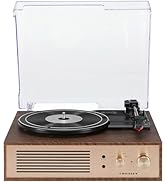
The Crosley Portfolio turntable is designed to play vinyl records at three speeds and features built-in speakers, Bluetooth connectivity for wireless audio streaming, and a moving magnetic cartridge for audio reproduction.

Figure 1.1: Crosley CR6252A-YS Portfolio Turntable (Open View)
2. Umarnin Tsaro
- Karanta duk umarnin kafin amfani.
- Ka kiyaye samfurin daga ruwa ko danshi.
- Kada a sanya kusa da hanyoyin zafi kamar radiators, rejista na zafi, murhu, ko wasu na'urori da ke samar da zafi.
- Tsaftace kawai da bushe bushe.
- Yi amfani da haɗe-haɗe-haɗe-haɗe/na'urorin haɗi kawai da mai ƙira ya ƙayyade.
- Cire wannan na'urar yayin guguwar walƙiya ko lokacin da ba a yi amfani da ita na dogon lokaci ba.
- Koma duk hidima ga ƙwararrun ma'aikatan sabis. Ana buƙatar sabis lokacin da na'urar ta lalace ta kowace hanya, kamar igiyar samar da wutar lantarki ko toshe ta lalace, ruwa ya zube ko abubuwa sun fada cikin na'urar, na'urar ta fallasa ruwan sama ko danshi, ba ya aiki yadda ya kamata. , ko kuma an jefar da shi.
3. Abubuwan Kunshin
Tabbatar cewa duk abubuwan da aka jera a ƙasa suna cikin kunshin ku:
- Crosley CR6252A-YS Portfolio Turntable
- Adaftar Wuta
- Jagorar mai amfani (wannan takaddar)
4. Siffofin Samfur da Abubuwan da aka gyara
The Crosley CR6252A-YS Portfolio Turntable includes the following key features and components:
- 3-Speed Turntable: Yana goyan bayan rikodin RPM 33 1/3, 45, da 78.
- Built-in Bluetooth Receiver: Allows wireless streaming from compatible devices.
- Adjustable Pitch Control: Fine-tune record speed.
- Moving Magnetic Cartridge: Pre-mounted for optimal sound.
- Shigar da ƙarin: Connect external audio sources.
- USB Enabled: For PC connection.
- Gina masu magana: Haɗaɗɗen fitarwa na sauti.

Figure 4.1: Turntable Mechanism and Controls
Hoto 4.2: Cikakkun Kwamitin Kulawa

Hoto 4.3: Haɗin Rukunin Rear
5. Saita
5.1 Farkon Wuri
Place the turntable on a flat, stable surface away from direct sunlight, heat sources, and excessive dust or vibrations.
5.2 Haɗin Wuta
- Connect the power adapter to the DC 12V input jack on the rear of the turntable.
- Haɗa adaftar wutar lantarki a cikin wurin fitar da wutar lantarki mai dacewa a bango.
5.3 Turntable Preparation
- Carefully remove any protective packaging materials from the turntable platter and tonearm.
- Ensure the tonearm is unlocked from its rest.
6. Umarnin Aiki
6.1 Playing Records
- Juya da KASHE/KASHE knob clockwise to power on the unit.
- Select the desired speed (33 1/3, 45, or 78 RPM) using the speed selector switch. Note: A 78 RPM stylus (not included) is required for 78 RPM records.
- Place a record on the turntable platter. If playing a 45 RPM single, place the 45 RPM adapter (if included) over the spindle.
- Lift the tonearm using the cueing lever and position it over the desired track on the record.
- Sauke hannun riga a hankali a kan rikodin ta amfani da maƙallin nuna alama. Rikodin zai fara kunnawa.
- Daidaita ƙara ta amfani da MURYA dunƙule.
- Yi amfani da FITOWA control knob to fine-tune the playback speed if necessary.
- To stop playing, lift the tonearm, return it to its rest, and turn the KASHE/KASHE ƙwanƙwasa maɓallin agogo.
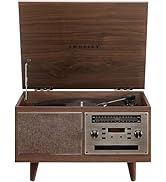
Figure 6.1: Stylus on Record
6.2 Bluetooth Aiki
- Juya da KASHE/KASHE knob clockwise to power on the unit.
- Slide the function switch to the Bluetooth position. The indicator light will flash, indicating pairing mode.
- Enable Bluetooth on your external device (e.g., smartphone, tablet) and search for "Crosley Portfolio".
- Select "Crosley Portfolio" from the list of available devices to pair. Once paired, the indicator light will stop flashing and remain solid.
- You can now stream audio wirelessly from your device to the turntable's built-in speakers.
- Daidaita ƙara ta amfani da MURYA knob on the turntable and/or your external device.
6.3 Auxiliary Input (AUX IN)
- Juya da KASHE/KASHE knob clockwise to power on the unit.
- Connect an external audio device (e.g., MP3 player, CD player) to the AUX IN port using a 3.5mm audio cable (not included).
- Mai juyawa zai canza ta atomatik zuwa yanayin AUX IN.
- Daidaita ƙara ta amfani da MURYA knob on the turntable and/or your external device.
6.4 USB Haɗin kai
The turntable features a PC-USB port for connecting to a computer. This allows for digital conversion of your vinyl records using appropriate software (not included). Refer to your chosen software's instructions for recording procedures.
7. Kulawa
7.1 Cleaning the Turntable
- Always unplug the turntable from the power outlet before cleaning.
- Use a soft, dry cloth to wipe the exterior surfaces. Do not use abrasive cleaners or solvents.
- Gently brush the stylus with a soft brush designed for stylus cleaning, moving from back to front.
7.2 Stylus Replacement
The stylus (needle) is a consumable part and will wear out over time. A worn stylus can damage your records and degrade sound quality. Replace the stylus after approximately 200-300 hours of playback. Consult your retailer or Crosley support for compatible replacement styli.
8. Shirya matsala
| Matsala | Dalili mai yiwuwa | Magani |
|---|---|---|
| Babu iko | Ba a haɗa adaftar wutar lantarki ko madaidaicin hanyar fita ba. | Tabbatar cewa adaftar wutar lantarki tana da haɗin da ya dace kuma wurin fitar wutar yana aiki. |
| Babu sauti daga masu magana | Volume too low; function switch in wrong position; Bluetooth not paired. | Increase volume; ensure function switch is set to PHONO or Bluetooth is correctly paired. |
| Tsallake rikodin | Record is dirty or damaged; stylus is worn; turntable not level. | Clean record; replace stylus; ensure turntable is on a level surface. |
| Bluetooth device won't pair | Turntable not in pairing mode; device too far; device already paired to another unit. | Ensure turntable is in Bluetooth pairing mode; move device closer; disconnect from other Bluetooth devices. |
9. Ƙayyadaddun bayanai
- Girman samfur: 12.4 x 15.28 x 6.5 inci
- Nauyin Abu: 13 fam
- Lambar Samfurin Abu: CR6252A-YS
- Alamar: Crosley
- Abubuwan da aka haɗa: CR6252A-YS Portfolio Turntable
- Salo: Vintage
- Launi: Yellow Submarine
- Tsarin sigina: Analog
- Tushen wutar lantarki: Corded Electric
- UPC: 710244246569
10. Garanti da Tallafawa
For warranty information and technical support, please refer to the warranty card included with your product or visit the official Crosley website. Ajiye rasidin siyan ku azaman tabbacin siyan kowane da'awar garanti.
Mai ƙira: Crosley
Kwanan Wata Farko Akwai: Nuwamba 30, 2021


