Gabatarwa
This manual provides detailed instructions for the setup, operation, and maintenance of your UrbanX KBM030 Rechargeable Bluetooth Keyboard and Mouse Combo. This combo is designed for broad compatibility across various operating systems and devices, offering a cable-free experience with ergonomic design and long-lasting rechargeable batteries.
Abubuwan Kunshin
Da fatan za a tabbatar cewa duk abubuwa suna nan a cikin kunshin ku:
- UrbanX KB030 Bluetooth Keyboard
- UrbanX M030 Bluetooth Mouse
- Kebul na Caji
- Barka da Jagora
Saita Umarnin
1. Saita Allon Madannai
- Caji a madannai: Connect the provided USB charging cable to the keyboard's charging port and a USB power source. The 'Charge Power' indicator light will illuminate during charging.
- Kunna Wuta: Locate the ON/OFF switch on the top right side of the keyboard and slide it to the 'ON' position. The 'Power' indicator light will briefly turn on.
- Shigar da Yanayin Haɗawa: Press the 'Connect' button, usually located near the ON/OFF switch. The 'Connect' indicator light will start blinking, indicating the keyboard is ready for pairing.
- Haɗa da Na'urar ku: On your device (computer, tablet, smartphone), enable Bluetooth and search for available devices. Select 'UrbanX Keyboard' or a similar name from the list. Follow any on-screen prompts to complete the pairing process.
- Select Operating System Mode: The keyboard supports multiple operating systems. After pairing, press the appropriate function key combination for your device's OS:
- For iOS: Press Fn + E
- For Android: Press Fn + Q
- For Windows: Press Fn + W

Image: UrbanX Bluetooth Keyboard showing the ON/OFF switch, Connect button, and indicator lights (CAPS, Charge Power). The image also illustrates the keyboard's dimensions.
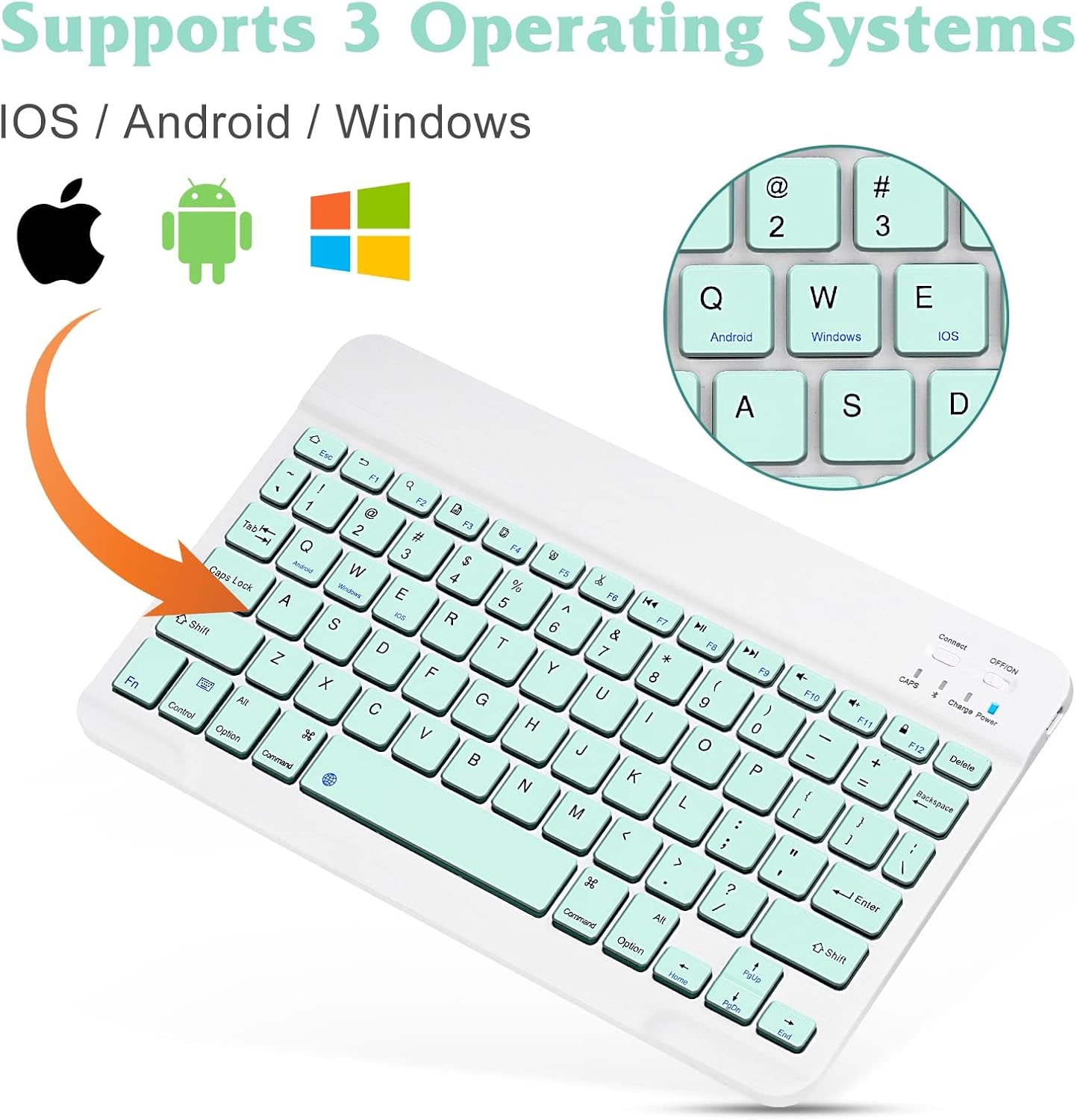
Image: UrbanX Bluetooth Keyboard highlighting its compatibility with iOS, Android, and Windows operating systems, indicated by respective logos.
2. Saitin linzamin kwamfuta
- Cajin Mouse: Connect the provided USB charging cable to the mouse's charging port and a USB power source.
- Kunna Wuta: Locate the ON/OFF switch on the bottom of the mouse and slide it to the 'ON' position.
- Shigar da Yanayin Haɗawa: The mouse typically enters pairing mode automatically when powered on for the first time or if it loses connection. If not, press the pairing button (often located near the ON/OFF switch on the bottom) until the indicator light blinks.
- Haɗa da Na'urar ku: On your device, enable Bluetooth and search for available devices. Select 'UrbanX Mouse' or a similar name from the list. Follow any on-screen prompts to complete the pairing process.
Umarnin Aiki
Ayyukan Allon madannai
- Rubutun shiru: Low-profile keys are designed for comfortable and quiet typing.
- Maɓallan Aiki: The keyboard features system-specific function keys for quick access to common functions such as volume control, media playback, and copy/paste operations. These functions are typically accessed by pressing the Fn key in combination with the corresponding F-key.
- Nisan Aiki: The keyboard operates wirelessly via Bluetooth up to a distance of 30 feet (approximately 10 meters) from your paired device.

Hoto: Rufewa view of the UrbanX Bluetooth Keyboard, illustrating the X-structure key mechanism designed for comfortable keystrokes.
Ayyukan Mouse
- Tsarin Ergonomic: The mouse is designed to reduce stress during prolonged use.
- DPI mai daidaitawa: The mouse features a DPI switch button, allowing you to cycle through three sensitivity levels: 800 DPI, 1200 DPI, and 1600 DPI. Press the button to adjust the cursor speed to your preference.

Image: Diagram illustrating the DPI switch on the UrbanX Bluetooth Mouse and the three adjustable sensitivity levels: 800, 1200, and 1600 DPI.
Umarnin caji
Both the keyboard and mouse are equipped with built-in rechargeable Li-polymer batteries.
- Tsarin Cajin: Use the provided USB charging cable to connect the keyboard or mouse to a standard USB power source (e.g., computer USB port, USB wall adapter).
- Alamomin Caji: For the keyboard, the 'Charge Power' indicator light will be on during charging and turn off when fully charged. For the mouse, an indicator light (often red) will show charging status and turn off when complete.
- Rayuwar Baturi: A single full charge provides approximately 6 months of use for the keyboard and 4 months for the mouse (based on 2 hours of non-stop use per day).
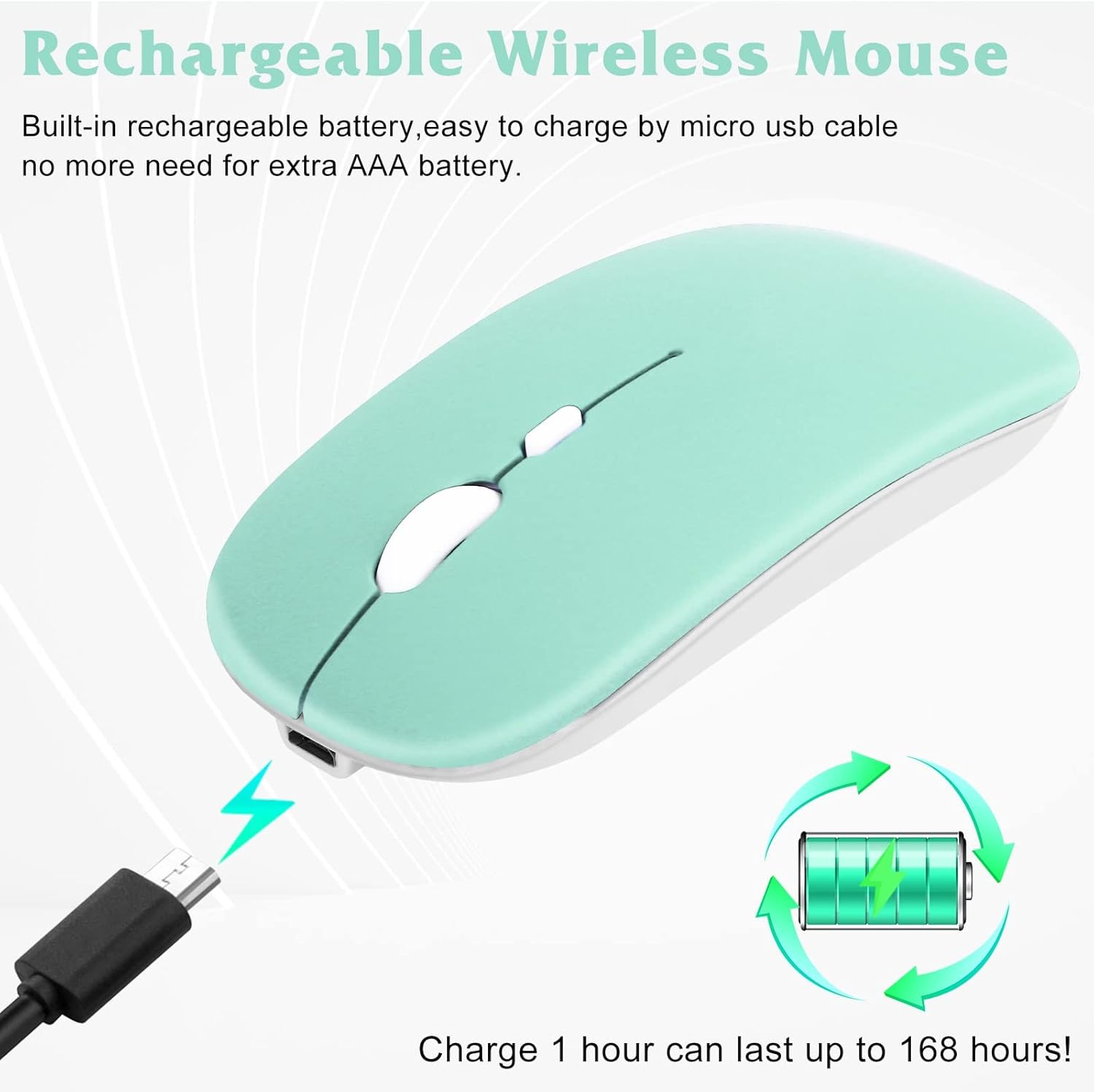
Image: UrbanX Bluetooth Mouse being charged via a Micro USB cable, with an illustration of a rechargeable battery indicating long-lasting power.
Kulawa
- Tsaftacewa: Yi amfani da laushi, bushe bushe don tsaftace saman madannai da linzamin kwamfuta. Don datti mai taurin kai, ɗan damp cloth can be used, ensuring no moisture enters the device. Avoid harsh chemicals or abrasive cleaners.
- Kulawar Baturi: To prolong battery life, avoid exposing the devices to extreme temperatures. Charge the devices regularly, even if not in constant use, to prevent deep discharge.
- Ajiya: When not in use for extended periods, store the keyboard and mouse in a cool, dry place.
Shirya matsala
- Na'urar Ba Haɗawa:
- Tabbatar cewa duka madannai da linzamin kwamfuta suna kunne kuma an yi musu caji sosai.
- Verify that Bluetooth is enabled on your host device.
- Make sure the devices are within the 30-foot (10-meter) operating range.
- Try re-entering pairing mode on the keyboard/mouse and re-pairing with your device.
- Remove previous pairings from your device's Bluetooth settings and try pairing again.
- Keyboard Not Typing:
- Check if the keyboard is connected via Bluetooth.
- Ensure the correct operating system mode (Fn+E/Q/W) is selected.
- Verify the battery level.
- Siginan linzamin kwamfuta Ba Ya Motsawa:
- Check if the mouse is connected via Bluetooth.
- Verify the battery level.
- Ensure the mouse sensor is clean and unobstructed.
- Gwada daidaita saitin DPI.
Ƙayyadaddun bayanai
| Siffar | Daki-daki |
|---|---|
| Lambar Samfura | KBM030 |
| Girman Samfura (Allon madannai) | 15.16 x 5.47 x 1.3 inci |
| Nauyin Abu (Haɗi) | 10 oz |
| Baturi | 2 batirin lithium ion (an haɗa) |
| Alamar | UrbanX |
| Fasahar Haɗuwa | Bluetooth |
| Siffofin Musamman | Ergonomic, mai caji |
| Na'urori masu jituwa | Laptop, Mobile Phone, Smartphone, T-Mobile REVVL V+ 5G, Tablet |
Garanti da Taimako
Your UrbanX KBM030 Rechargeable Bluetooth Keyboard and Mouse Combo comes with a Garanti na kwanaki 90. For any product inquiries, technical support, or warranty claims, please contact UrbanX customer service. Refer to the included Welcome Guide for specific contact information or visit the official UrbanX website.

