1. Gabatarwa
The WOOX Smart Socket R6087 is a smart plug designed to integrate your traditional home appliances into a smart home ecosystem. It allows for remote control, voice control, scheduling, and group management of connected devices, enhancing convenience and energy efficiency. This manual provides detailed instructions for the safe and effective use of your WOOX Smart Socket R6087.
2. Bayanin Tsaro
Please read and follow these safety instructions carefully before using the WOOX Smart Socket R6087:
- Kada a sake haɗa ko gyara na'urar.
- Kada a bijirar da na'urar ga ruwa, danshi, ko matsanancin yanayin zafi.
- Ensure the connected appliance's power consumption does not exceed the smart socket's maximum load capacity (16A / 3680W).
- Use only in dry indoor environments.
- A kiyaye nesa da yara.
- The product is TÜV-certified, ensuring safety and quality standards.
3. Abubuwan Kunshin
Your WOOX Smart Socket R6087 package includes:
- 4 x WOOX Smart Socket R6087
- 1 x Manual mai amfani (wannan takarda)
4. Samfurin Ya Ƙareview
The WOOX Smart Socket R6087 is a compact smart plug designed for European Type F sockets. Each plug features a power button with an integrated LED indicator for status feedback.

This image displays a pack of four white Woox Smart Socket R6087 plugs, each featuring the Woox logo and a power button with an LED indicator. These plugs are designed for European Type F sockets.

This image focuses on a single Woox Smart Socket R6087 plugged into a wall outlet. Accompanying text highlights its main features: a maximum load capacity of 16 Amperes, TUV safety certification, timer and scheduling capabilities, remote control via app, and the ability to share device access with others.
5. Jagorar Saita
Follow these steps to set up your WOOX Smart Socket R6087:
- Download the WOOX Home App: Bincika "WOOX Home" in the Apple App Store or Google Play Store and download the application to your smartphone.
- Plug in the Smart Socket: Insert the WOOX Smart Socket R6087 into a standard wall outlet. The LED indicator on the plug should start blinking, indicating it's in pairing mode.
- Ƙara Na'ura a cikin App: Open the WOOX Home app, register or log in, and follow the on-screen instructions to add a new device. Select the Smart Socket from the device list and connect it to your 2.4GHz Wi-Fi network.

This image outlines the three simple steps for setting up the Woox Smart Socket R6087. Step 1 shows downloading the 'Woox Home' app from Google Play or the App Store. Step 2 depicts plugging the smart socket into a wall outlet. Step 3 illustrates following the instructions within the 'Woox Home' app to complete the setup process.
6. Umarnin Aiki
6.1 Ikon Nesa
Control your appliances from anywhere using the WOOX Home app. Simply open the app, select your smart socket, and toggle the power on or off.
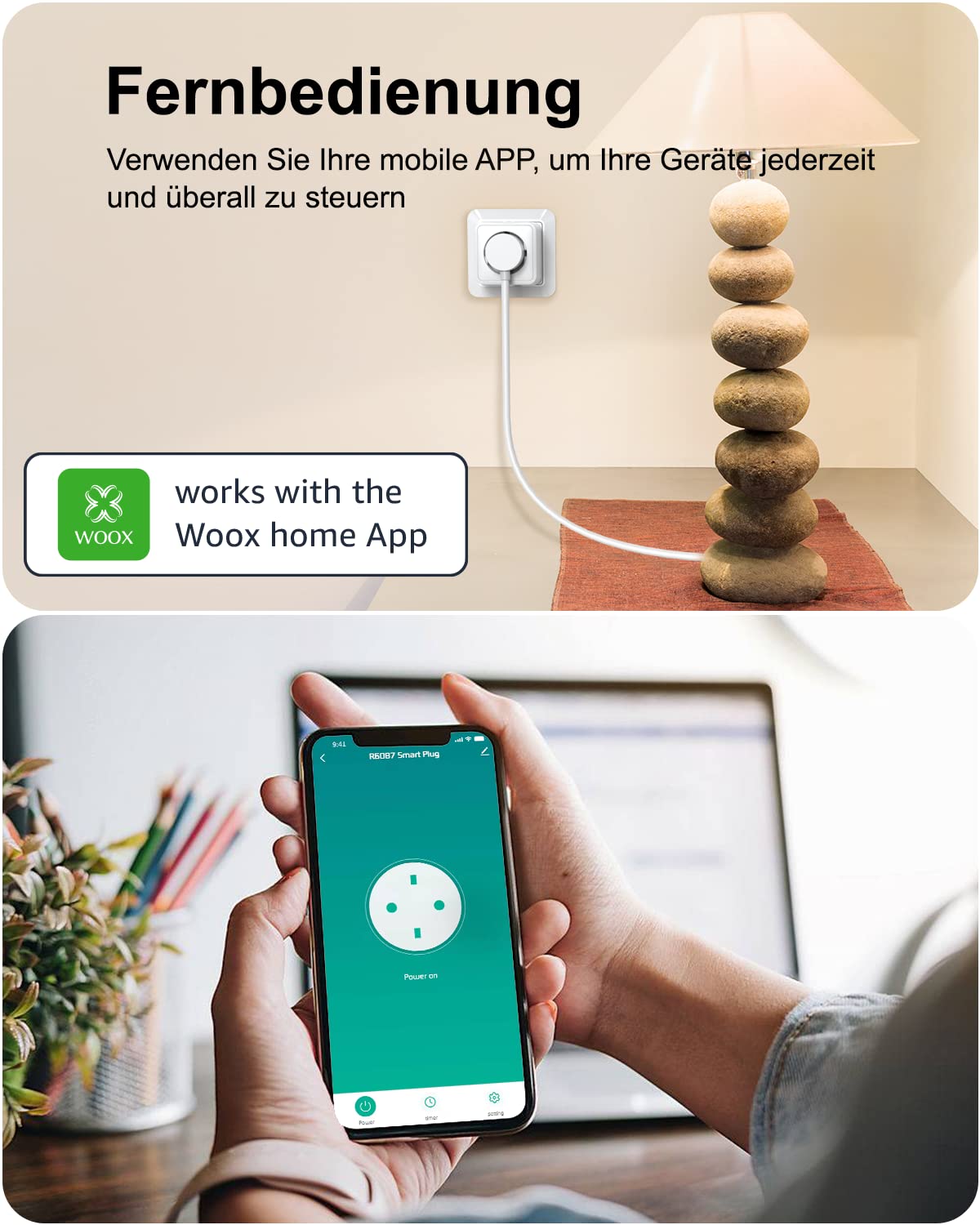
A Woox Smart Socket R6087 is shown plugged into a wall outlet, powering a table lamp. Below, a smartphone displays the Woox Home app interface, demonstrating remote control functionality for the smart plug.

A couple is shown outside a modern house, looking at a smartphone. The phone screen displays the Woox Home app, demonstrating the ability to remotely monitor and control connected home appliances, such as lights or coffee makers, from any location.
6.2 Ikon murya
The WOOX Smart Socket R6087 is compatible with Amazon Alexa and Google Assistant. Link your WOOX Home account to your voice assistant app to control devices with simple voice commands.
- Example: "Alexa, turn off the living room lights."
- Example: "Hey Google, turn on the coffee machine."

In a kitchen setting, a Woox Smart Socket R6087 powers a coffee machine. An Amazon Echo device is visible, illustrating how the smart plug can be controlled via voice commands using Alexa, allowing the user to turn on the coffee machine hands-free.

A woman is relaxing on a sofa, using voice commands to control a fan connected to a Woox Smart Socket R6087. The image highlights compatibility with smart voice systems like Alexa and Google Assistant, enabling convenient hands-free operation of devices.
6.3 Scheduling and Timer
Set custom schedules or countdown timers for your appliances to automate their operation and save energy.
- Tsaraitawa: Program specific ON/OFF times for daily or weekly routines. For example, kunna alamp at sunset and turn it off at a specific time.
- Mai ƙidayar lokaci: Use the countdown timer function for temporary control, such as turning off a device after a set duration.
An interior scene depicts a room with a table lamp and a computer setup. A smartphone screen overlays the image, displaying the Woox Home app's scheduling interface, where users can set specific ON/OFF times for connected devices, such as turning a lamp on at 7:00 AM and off at 7:30 AM.
6.4 Group Control and Device Sharing
Manage multiple smart sockets efficiently and share control with family members.
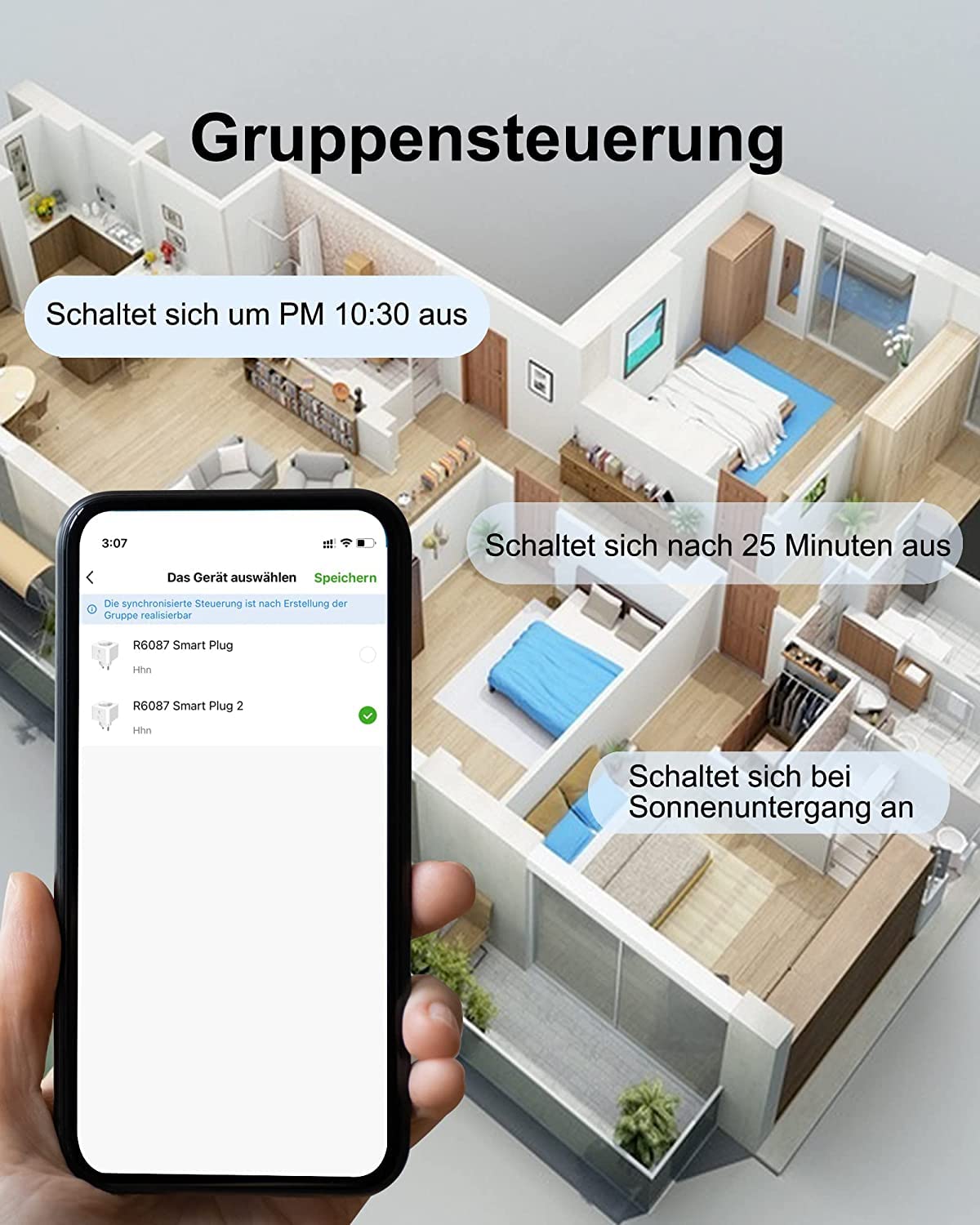
- Sarrafa Rukuni: Create groups in the WOOX Home app to control multiple smart sockets simultaneously with a single command. For example, turn off all lights in a room at once.
- Raba na'ura: Share access to your smart sockets with other users through the WOOX Home app, allowing multiple family members to control the devices.

This image illustrates the group control feature of the Woox Smart Socket R6087. A stylized house floor plan is shown, with a smartphone displaying the Woox Home app. The app interface allows users to select and control multiple smart plugs simultaneously, enabling actions like turning off all devices at 10:30 PM or activating them at sunset.

A couple is shown comfortably seated on a sofa, looking at a smartphone. The phone screen displays the Woox Home app, specifically highlighting the 'Share Device' option, which allows users to grant access and control of their smart plugs to other family members.
7. Shirya matsala
If you encounter issues with your WOOX Smart Socket R6087, refer to the following common problems and solutions:
| Matsala | Dalili mai yiwuwa | Magani |
|---|---|---|
| Device cannot connect to Wi-Fi / App shows "offline" | Incorrect Wi-Fi password, 5GHz Wi-Fi network, weak signal, or device too far from router. | Ensure you are using a 2.4GHz Wi-Fi network. Check Wi-Fi password. Move the smart socket closer to the router. Reset the smart socket and try pairing again. |
| Ikon murya baya aiki | Incorrect linking with Alexa/Google Assistant, device name not recognized, or voice assistant device is offline. | Verify that the WOOX Home account is correctly linked in your Alexa/Google Home app. Ensure the device name is simple and easily recognizable. Check the voice assistant device's internet connection. |
| Smart socket not responding | Ikon kutage, smart socket unplugged, or app connectivity issue. | Check if the smart socket is properly plugged in and receiving power. Verify your home Wi-Fi network is active. Restart the WOOX Home app. |
| Scheduling not activating | Incorrect schedule settings, or smart socket is offline at scheduled time. | Review the schedule settings in the WOOX Home app for accuracy. Ensure the smart socket has a stable Wi-Fi connection at the scheduled time. |
8. Ƙayyadaddun bayanai
| Siffar | Daki-daki |
|---|---|
| Lambar Samfura | R6087 |
| Girman samfur | 5.9 x 5.9 x 8.3 cm |
| Nauyi | 420 g (for 4 pieces) |
| Ƙididdiga na Yanzu | 16 Ampina |
| Matsakaicin Ƙarfin Wuta | 3680 W |
| Yanayin Aiki | KYAUTA |
| Nau'in Haɗawa | Screw (Type F) |
| Nau'in Canjawa | Voice Control, Remote Control, Smart |
| Kayan abu | Filastik |
| Takaddun shaida | TÜV Certified |
9. Garanti da Tallafawa
WOOX offers products and services to over 400,000 users across Europe. For any issues or support needs, 24/7 telephone service is available. Please refer to the WOOX official webshafin ko takaddun siyan ku don takamaiman sharuɗɗan garanti da bayanin lamba.


