1. Gabatarwa
This manual provides instructions for the LogiLink ID0209 Wireless Keyboard. This keyboard is designed for comfortable, precise, and quiet typing, featuring an adjustable RGB backlight and a long-lasting battery. It connects wirelessly via 2.4 GHz radio technology and is compatible with various operating systems.

Figure 1: LogiLink ID0209 Wireless Keyboard
2. Abubuwan Kunshin
Da fatan za a duba kunshin don abubuwa masu zuwa:
- LogiLink ID0209 Wireless Keyboard
- USB 2.4 GHz Receiver Dongle
- USB-A to Micro USB Charging Cable
- Jagorar mai amfani (wannan takaddar)
3. Saita
3.1 Yin Cajin Allon madannai
Before initial use, fully charge the keyboard. Connect the supplied USB-A to Micro USB cable to the keyboard's Micro USB port (located on the side) and the other end to a USB power source (e.g., computer USB port, USB wall adapter).
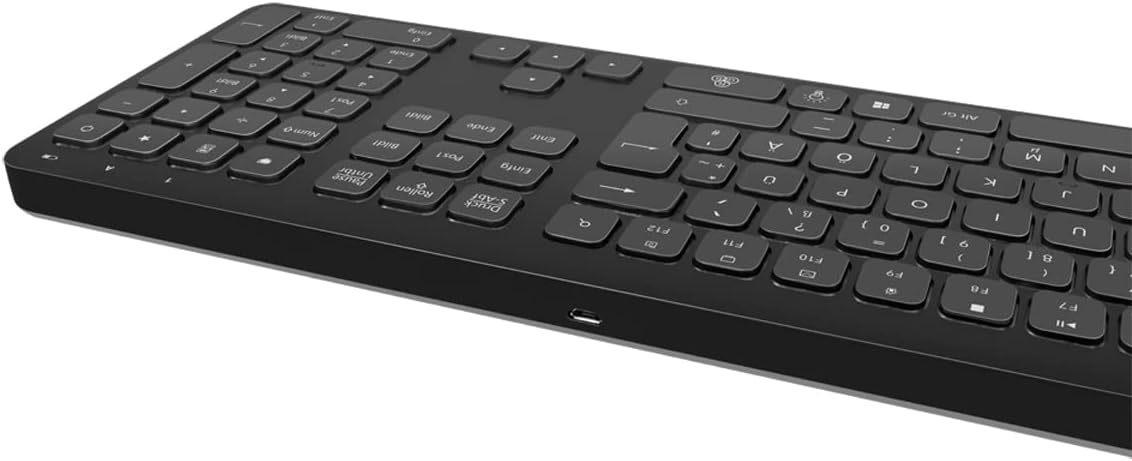
Figure 2: Keyboard side view with Micro USB charging port
3.2 Connecting the USB Receiver Dongle
Insert the 2.4 GHz USB receiver dongle into an available USB port on your computer or compatible device. The system will automatically detect and install the necessary drivers.

Figure 3: USB 2.4 GHz Receiver Dongle
3.3 Kunnawa / Kashewa
Locate the ON/OFF switch on the back of the keyboard. Slide the switch to the 'ON' position to power on the keyboard. Slide it to 'OFF' when not in use to conserve battery life.
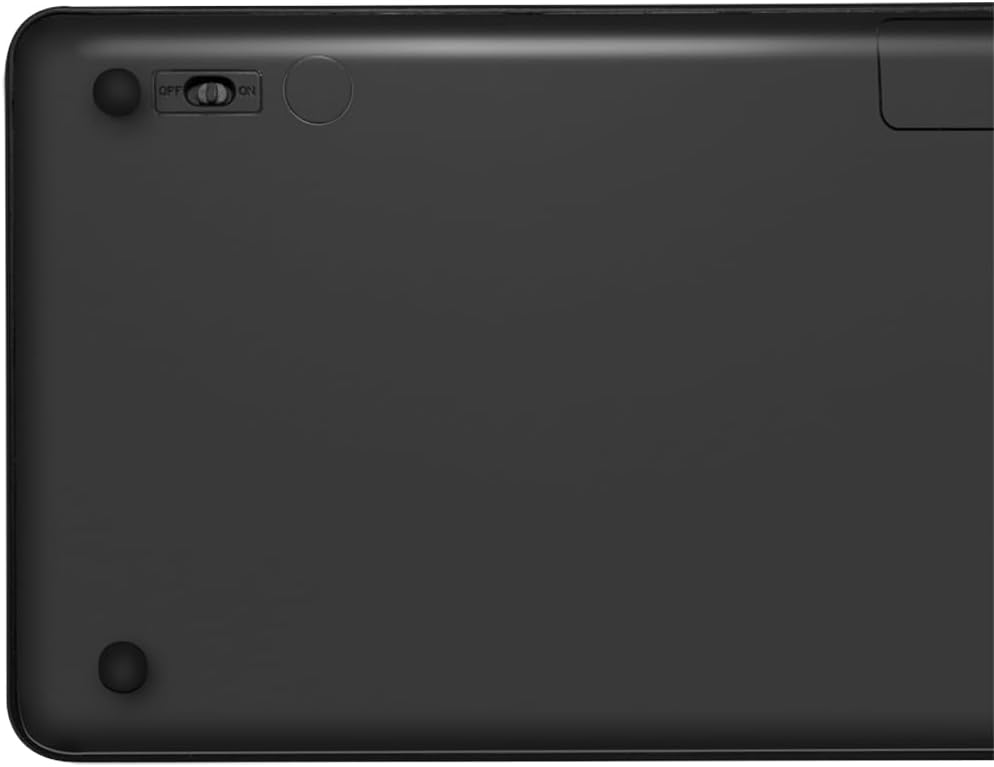
Figure 4: Keyboard back with ON/OFF switch
The keyboard should automatically connect to the USB receiver once both are powered on and within range (up to 10 meters).
4. Umarnin Aiki
4.1 Kula da Hasken Baya
The keyboard features an adjustable RGB backlight with 7 colors and 3 brightness levels, including a breathing mode.
- Canza Launuka: Danna maɓallin Fn + Light Bulb key to cycle through the 7 available colors (green, blue, yellow, purple, cyan, white, red).
- Daidaita Haske: Danna maɓallin Fn + Up Arrow key don ƙara haske da Fn + Down Arrow key to decrease brightness. There are 3 brightness levels.
- Yanayin Numfashi: Danna maɓallin Fn + RGB Cycle key (often depicted as a swirling icon) to activate or deactivate the breathing backlight mode.

Figure 5: Keyboard with RGB backlight in use
4.2 Maɓallan Gajerun hanyoyi
The keyboard includes 17 shortcut keys for quick access to various functions. Some shortcut keys are specifically designed for Windows operating systems.
To use a shortcut key, press and hold the Fn key, then press the desired function key (e.g., F1-F12, multimedia keys).
- Gudanarwar Multimedia: Play/Pause, Stop, Previous Track, Next Track, Volume Up, Volume Down, Mute.
- Yawan aiki: Open Mail, Web Browser, My Computer, Search.
- Wani: Lock Screen, Calculator.

Figure 6: Close-up of keyboard keys, including numpad and function row
4.3 Automatic Energy-Saving Mode
The keyboard is equipped with an automatic energy-saving mode. After a period of inactivity, the keyboard will enter a sleep state to conserve battery. Press any key to wake it up.
5. Kulawa
Domin tabbatar da tsawon rai da kuma ingantaccen aikin keyboard, bi waɗannan jagororin kulawa:
- Tsaftacewa: Use a soft, dry, lint-free cloth to wipe the keyboard surface. For stubborn dirt, slightly dampen zane tare da ruwa ko bayani mai tsabta mai laushi. Guji wuce gona da iri.
- Ajiya: Ajiye madannai a wuri mai sanyi da bushewa, nesa da hasken rana kai tsaye da kuma yanayin zafi mai tsanani.
- Kauce wa Ruwa: Do not expose the keyboard to liquids. In case of accidental spills, immediately power off the keyboard and allow it to dry completely before use.
- Gudanar da Kulawa: Guji jefar da madannai ko sanya shi ga tasiri mai ƙarfi.
6. Shirya matsala
If you encounter issues with your LogiLink ID0209 keyboard, refer to the following common problems and solutions:
| Matsala | Dalili mai yiwuwa | Magani |
|---|---|---|
| Allon madannai baya amsawa | Keyboard is off Ƙananan baturi Ba a haɗa mai karɓar USB ba Ban da iyaka | Ensure keyboard is ON Cajin keyboard Plug USB receiver firmly into a working USB port Move keyboard closer to the receiver (within 10m) |
| Hasken baya baya aiki | Hasken baya yana kashe Ƙananan baturi | Press Fn + Light Bulb key to turn on/cycle Cajin keyboard |
| Maɓallan suna mannewa ko kuma ba sa amsawa | Datti ko tarkace a ƙarƙashin maɓalli | Clean the keyboard as per maintenance instructions |
| Haɗin yana raguwa akai-akai | Tsangwama Ban da iyaka Ƙananan baturi | Matsar da sauran na'urorin mara waya Move keyboard closer to the receiver Cajin keyboard |
7. Ƙayyadaddun bayanai
| Siffar | Daki-daki |
|---|---|
| Alamar | LogiLink |
| Lambar Samfura | ID0209 |
| Fasahar Haɗuwa | 2.4 GHz Wireless (High-frequency) |
| Mara waya mara waya | Har zuwa mita 10 |
| Yawan Maɓallai | 111 makulli |
| Maɓallan Gajerun hanyoyi | 17 (some Windows-specific) |
| Hasken baya | Adjustable RGB (7 colors, 3 brightness levels, breathing mode) |
| Nau'in Maɓalli | Flat keys |
| Na'urori masu jituwa | Windows, Mac OS, Android, iOS, Smart TV systems |
| Siffofin Musamman | Ergonomic, Backlit, Automatic Energy-Saving Mode |
| Cajin Port | Micro USB |
| Launi | Baki |
| Kayan abu | Filastik |
| Mai ƙira | 2 kai tsaye GmbH |
| Ƙasar Asalin | China |
8. Garanti da Tallafawa
Don samun bayanai game da garanti da tallafin fasaha, da fatan za a duba takaddun da aka bayar tare da siyan ku ko kuma a ziyarci LogiLink na hukuma website. Ajiye shaidar siyan ku don da'awar garanti.


