Gabatarwa
This manual provides detailed instructions for the installation, operation, and maintenance of your COMTEC HDR963GW dual camera dashcam. Please read this manual thoroughly before using the product to ensure correct and safe operation. Keep this manual for future reference.

Image: COMTEC HDR963GW Dashcam main unit and rear camera components.
Abubuwan Kunshin
Tabbatar cewa duk abubuwan da aka jera a ƙasa suna cikin kunshin ku:
- Front Camera Unit x 1
- Rear Camera Unit x 1
- Camera Cable (approx. 9m) x 1
- Front Camera Mounting Bracket x 1
- Front Camera Mounting Bracket Double-sided Tape x 1
- Rear Camera Mounting Bracket Double-sided Tape x 1
- Digiriasing Cleaner x 1
- 12V Cigarette Lighter Power Cable (approx. 4m / 1A fuse built-in) x 1
- Sticker [HDROP-06] x 1
- Hex Wrench (for bracket angle adjustment) x 1
- Clampsx 3 ku
- microSD Card (32GB / Class 10) x 1
- SD Card Adapter x 1
- Instruction Manual (with warranty) x 1
Saita da Shigarwa
1. Zabar Wurin Shigarwa
Select a location on the windshield for the front camera that does not obstruct the driver's view and is within the wiper's sweep area. For the rear camera, choose a location on the rear window that provides a clear view and does not interfere with the defroster lines.
2. Mounting the Front Camera
- Clean the chosen area on the windshield with the provided degreasinmai tsaftacewa.
- Attach the double-sided tape to the front camera mounting bracket.
- Firmly press the bracket onto the cleaned area of the windshield.
- Attach the front camera unit to the bracket.
- Adjust the camera angle using the hex wrench to ensure a clear view na hanyar gaba.
3. Mounting the Rear Camera
- Clean the chosen area on the rear window with the provided degreasinmai tsaftacewa.
- Attach the double-sided tape to the rear camera mounting bracket.
- Firmly press the bracket onto the cleaned area of the rear window.
- Attach the rear camera unit to the bracket.
- Daidaita kusurwar kamara don tabbatar da bayyane view na hanya a baya.
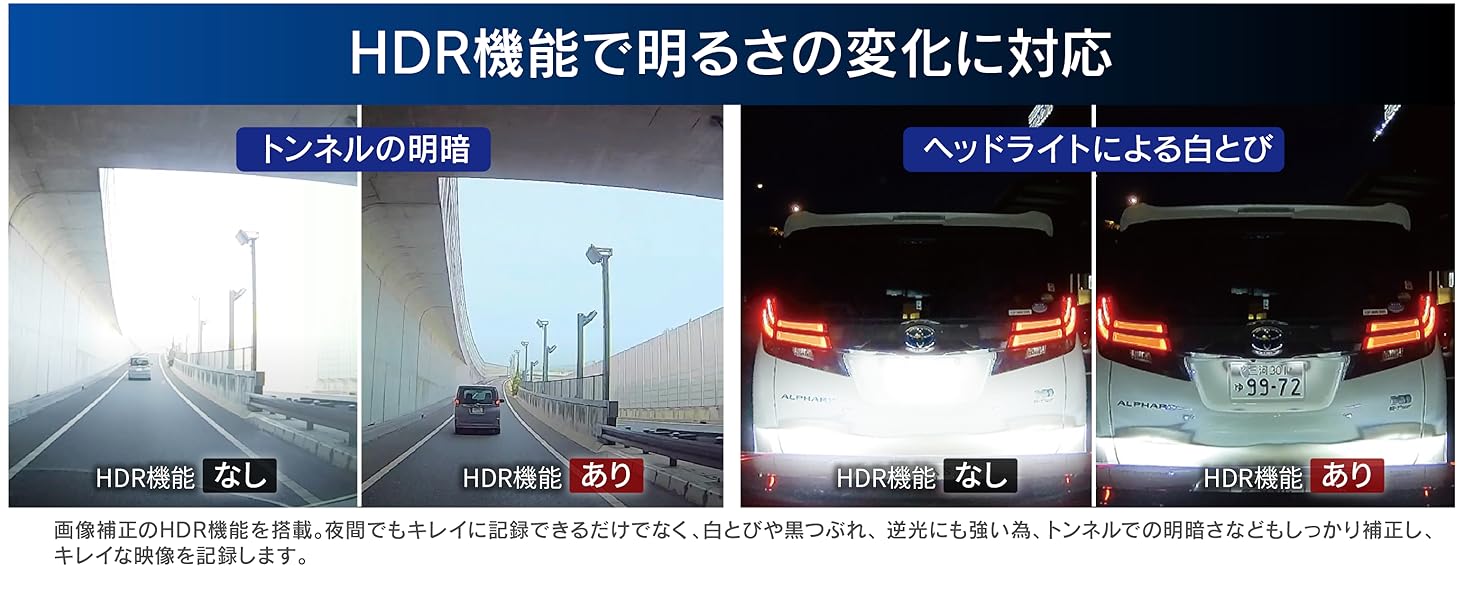
Image: Front and rear camera installation with 168-degree wide-angle views.
4. Wayoyi
- Connect the camera cable from the front camera unit to the rear camera unit. Route the cable along the vehicle's interior trim to conceal it. Use the provided cable clamps don amintar da kebul.
- Connect the 12V cigarette lighter power cable to the front camera unit.
- Insert the cigarette lighter plug into your vehicle's cigarette lighter socket.
- Ensure all cables are securely connected and do not interfere with vehicle operation.
5. Saka katin microSD
Insert the provided microSD card into the designated slot on the main unit. Ensure it is inserted correctly until it clicks into place.
Umarnin Aiki
Rikodi na asali
The HDR963GW automatically begins recording when the vehicle's ignition is turned on. Both front and rear cameras record simultaneously in Full HD (2 million pixels).
- Ci gaba da Rikodi: Automatically records in a loop, overwriting the oldest files when the microSD card is full.
- Rikodin Abubuwan: If an impact is detected by the G-sensor, the footage before and after the event is saved as a protected file.
- Rikodin da hannu: Press the designated button on the function switch to manually initiate an event recording.
Driving Support Functions
The device includes five driving support functions to enhance safety. These functions provide alerts based on real-time road conditions.
- Forward Vehicle Start Alert: Notifies you when the vehicle in front starts moving.
- Forward Vehicle Collision Warning: Alerts you if you are approaching the vehicle in front too quickly.
- Gargadin Tashi na Layi: Warns you if your vehicle drifts out of its lane.
- Drive Support Function: Detects and alerts for rapid acceleration, sudden deceleration, or abrupt steering.
- Speed Alarm Function: Notifies you if you exceed a preset speed limit.
Lura: These safety driving support functions are aids and do not prevent accidents. Always drive safely and pay attention to actual traffic conditions. Some functions require a GPS signal to operate. Performance may vary based on environmental conditions, weather, and vehicle characteristics.
GPS Alert Functions
The HDR963GW provides various alerts to support safe driving based on pre-registered GPS data. This data can be updated for free.
- Wrong-Way Driving Alert: Warns when entering areas with a risk of wrong-way driving on highways (IC/JCT, SA/PA) or urban expressways.
- Accident Point Alert: Notifies you when approaching locations with a high incidence of past accidents.
- "Hiyari Hatto" Point Alert: Alerts you when approaching dangerous spots on highways, such as sharp curves or steep descents.
- Speed Camera Route Alert: Warns you when approaching automatic speed enforcement cameras installed nationwide.
Lura: The registered data is current as of December 2019. Regular updates are recommended.
Parking Surveillance Function (Optional)
To use the parking surveillance function, the optional parking surveillance/direct wiring cord [HDROP-14] is required. This function allows the dashcam to monitor your vehicle even when parked.
- Gano Tasiri: Detects impacts while parked and records footage before and after the event.
- Ci gaba da Rikodi: Can be set to continuously record while parked.
- Rear Camera Recording: Images from the rear camera are also recorded during parking surveillance.
- Dedicated Folder: Parking surveillance images are saved to a dedicated folder for easy review.
- One-Time Parking Surveillance Mode: Temporarily activates parking surveillance even if the function is normally off. Useful for specific parking situations.
- Parking Surveillance Mode Pass Function: Temporarily disables parking surveillance in environments prone to false triggers, such as mechanical parking lots or very windy conditions.
- Rikodin Lokaci-Lokaci: Records still images at 1-second intervals, compressing them into a short video for extended surveillance periods.

Image: Parking surveillance function diagram showing impact detection and recording areas.
Lura: Recorded images may be overwritten depending on the main unit's settings and the capacity of the microSD card.
HDR/WDR for Clear Night Images
The HDR963GW is equipped with High Dynamic Range (HDR) and Wide Dynamic Range (WDR) functions to ensure clear image recording even in challenging lighting conditions.
- These functions effectively suppress "whiteout" (overexposure) and "black crush" (underexposure).
- Provides clear images even in strong backlight or scenes with significant brightness differences, such as tunnel exits.
Lura: The rear camera supports HDR only.

Image: Comparison of night recording quality with and without HDR/WDR enabled.
Aiki Canjawa
The dedicated function switch allows for quick access to key operations:
- sake kunnawa: One-touch playback of recently recorded footage.
- Rikodi: Functions as a manual recording trigger.
- Rikodin Sauti: Toggles audio recording ON/OFF with a single press.
Kulawa
microSD Card Management
The HDR963GW utilizes a proprietary file system designed to minimize data fragmentation, allowing for extended use without frequent formatting. However, for optimal performance and longevity of the microSD card, periodic formatting is recommended as microSD cards are consumable items.
- SD Card Check Function: Upon startup, the device checks the microSD card for damage. If an abnormality is detected, an alert is displayed on the LCD screen, preventing missed recordings.
Tsaftacewa
Regularly clean the camera lenses and the main unit's screen with a soft, dry cloth. Avoid using abrasive cleaners or solvents.
Shirya matsala
If you encounter issues with your HDR963GW, refer to the following common problems and solutions:
| Matsala | Dalili / Magani mai yiwuwa |
|---|---|
| Na'urar baya kunnawa. | Check the power cable connection to the cigarette lighter socket and the dashcam. Ensure the vehicle's ignition is on. |
| No recording is taking place. | Verify the microSD card is inserted correctly. Check if the SD card check function is displaying an error. Format the microSD card if necessary. |
| Images are unclear or blurry. | Clean the camera lenses. Ensure the protective film (if any) has been removed. Check if HDR/WDR settings are appropriate for the lighting conditions. |
| GPS functions are not working. | Ensure the vehicle is in an open area with a clear view of the sky to receive GPS signals. Some functions require a stable GPS signal. |
| Parking surveillance not activating. | Confirm that the optional HDROP-14 cable is installed. Check parking surveillance settings. Ensure the impact detection sensitivity is not set too low or OFF. |
| Muhimmanci files are being overwritten. | Adjust the G-sensor sensitivity for event recording. Utilize the emergency recording stop function to prevent overwriting after a severe impact. |
Viewda Software
For detailed analysis of recorded data, download the dedicated viewer software from the official COMTEC website. This software allows you to review video, audio, and G-sensor information on your PC. You can also convert recorded data into video or still image files for saving.
Ƙayyadaddun bayanai
| Siffar | Bayani |
|---|---|
| Mai ƙira | COMTEC |
| Lambar Samfura | HDR963GW |
| Girman samfur (D x W x H) | 27 x 90 x 56 mm |
| Nauyin samfur | 560g ku |
| Baturi | 1 Lithium Metal Batirin (an haɗa) |
| Matsayi | Na baya |
| Siffofin Musamman | Gina GPS |
| Launi | Baki |
| Fasahar Haɗuwa | Waya |
| Ƙimar Ɗaukar Bidiyo | 1080p (Cikakken HD) |
| Nau'in hawa | M Dutsen |
| Filin View | 168 digiri |
| Hanyar sarrafawa | Taɓa |
| Front Camera Image Sensor | 1/2.7 inch Sensor CMOS |
| Front Camera Effective Pixels | Max 2 million pixels |
| Front Camera Lens Angle | Horizontal 136°, Vertical 70° (Diagonal 168°) |
| Front Camera F-value | 2.0 |
| Front Camera Lens Material | Gilashin |
| Rear Camera Image Sensor | 1/2.7 inch Sensor CMOS |
| Rear Camera Effective Pixels | Max 2 million pixels |
| Rear Camera Lens Angle | Horizontal 136°, Vertical 70° (Diagonal 168°) |
| Rear Camera F-value | 2.0 |
| Rear Camera Lens Material | Gilashin |
Garanti da Taimako
Garanti na samfur
The main unit of this product is covered by a 3-year warranty from the date of purchase. Please retain your proof of purchase (e.g., delivery note) for warranty claims. Consumable parts such as the mounting bracket, cigarette lighter power cable, built-in battery, and microSD card are not covered by this warranty. The warranty is void if used outside Japan or without proof of purchase date.
Sabis na farfadowa da bayanai
COMTEC offers a free data recovery service for one year from the date of purchase for this drive recorder. This service aims to restore recorded data that cannot be read due to damage to the main unit or the SD card. Please note that overwritten data or data from SD cards that have reached their end-of-life cannot be recovered. For detailed terms and conditions, please refer to the official COMTEC website.
Accident Compensation Service
This product includes an accident compensation service. In the event of an accident, COMTEC will pay a uniform compensation of 20,000 yen for one year from the date of registration. Registration must be completed within one month of purchase; failure to do so will void the service. The service is valid for one year from registration and can be renewed annually for a fee (up to a maximum of 3 years). However, if compensation has been received once, the service cannot be renewed. For detailed terms and conditions, please refer to the official COMTEC website.
Bayanin hulda
For further assistance, please visit the official COMTEC website ko tuntuɓi goyon bayan abokin ciniki.
Official COMTEC Website: https://www.comtec.co.jp/


