1. Gabatarwa
This manual provides essential information for the safe installation, operation, and maintenance of your CREATE WIND CLEAR Ceiling Fan. Please read these instructions thoroughly before installation and retain them for future reference.
The CREATE WIND CLEAR Ceiling Fan is a quiet ceiling fan featuring a 40W DC brushless motor and a winter-summer reversal function. Its compact and versatile design includes retractable blades. It is suitable for small to medium-sized rooms and bedrooms, offering a built-in LED light with three adjustable color temperatures. The fan body is constructed from steel, and the blades are made of ABS. It provides 6 speed settings and a programmable timer up to 8 hours, all controllable via the included remote control and WiFi connectivity.
2. Umarnin Tsaro
- Always disconnect power at the main circuit breaker before installation, maintenance, or cleaning.
- Dole ne ƙwararren ma'aikacin lantarki ya yi shigarwa daidai da duk lambobin lantarki na gida da na ƙasa.
- Ensure the mounting structure can support the weight of the fan (refer to specifications for weight).
- Do not insert objects into the path of the fan blades.
- Tabbatar cewa duk hanyoyin haɗin suna amintacce kuma an killace su yadda ya kamata.
- Wannan na'urar ba a yi niyya don amfani da mutane ba (ciki har da yara) tare da rage ƙarfin jiki, azanci ko tunani, ko rashin ƙwarewa da ilimi, sai dai idan an ba su kulawa ko umarni game da amfani da na'urar ta wurin mutumin da ke da alhakin amincin su.
3. Abubuwan da aka haɗa
Tabbatar cewa duk abubuwan da aka gyara suna nan kafin fara shigarwa:
- CREATE WIND CLEAR Ceiling Fan Unit
- Ikon nesa
- Baturi don Gudanar da Nesa
- Mounting Hardware (screws, brackets, etc. - specific items may vary)
- Jagoran Jagora
For a visual reference of the product and its components, please see the image below:

4. Saita da Shigarwa
Professional installation is highly recommended for this ceiling fan. Ensure the power supply is disconnected before starting any installation work.
4.1 Shigarwa na Jiki
- Tushen Tsayawa: Securely attach the mounting bracket to a ceiling joist or a suitable electrical junction box rated for fan support.
- Waya: Connect the fan's electrical wires to the household wiring according to the wiring diagram provided in the full installation guide (not included in this summary). Ensure proper grounding.
- Majalisar Masoya: Carefully lift and attach the fan motor assembly to the mounting bracket.
- Shigar da ruwa: The fan features retractable blades that deploy automatically when the fan operates. No manual blade installation is typically required after the main unit is mounted.
- Shigar da Kit ɗin Haske: Attach the LED light kit to the fan housing as per the detailed instructions.
Refer to the following images for visual guidance on the fan's appearance and dimensions:


4.2 WiFi Setup
The fan supports WiFi connectivity for control via a smartphone application. Refer to the specific instructions provided with the fan for pairing the device with your home WiFi network and the CREATE smart home app.
5. Umarnin Aiki
Your CREATE WIND CLEAR Ceiling Fan can be operated using the included remote control or via the dedicated smartphone application.
5.1 Ayyuka masu nisa
- Kunnawa/Kashewa: Danna maɓallin wuta don kunna fan da kunna ko kashe.
- Gudun Masoya: Adjust between 6 fan speeds using the designated speed buttons.
- Ikon Haske: Turn the LED light on/off and cycle through three adjustable color temperatures (warm, neutral, cold).
- Mai ƙidayar lokaci: Saita fanka ta kashe ta atomatik bayan awanni 1, 2, 4, ko 8.
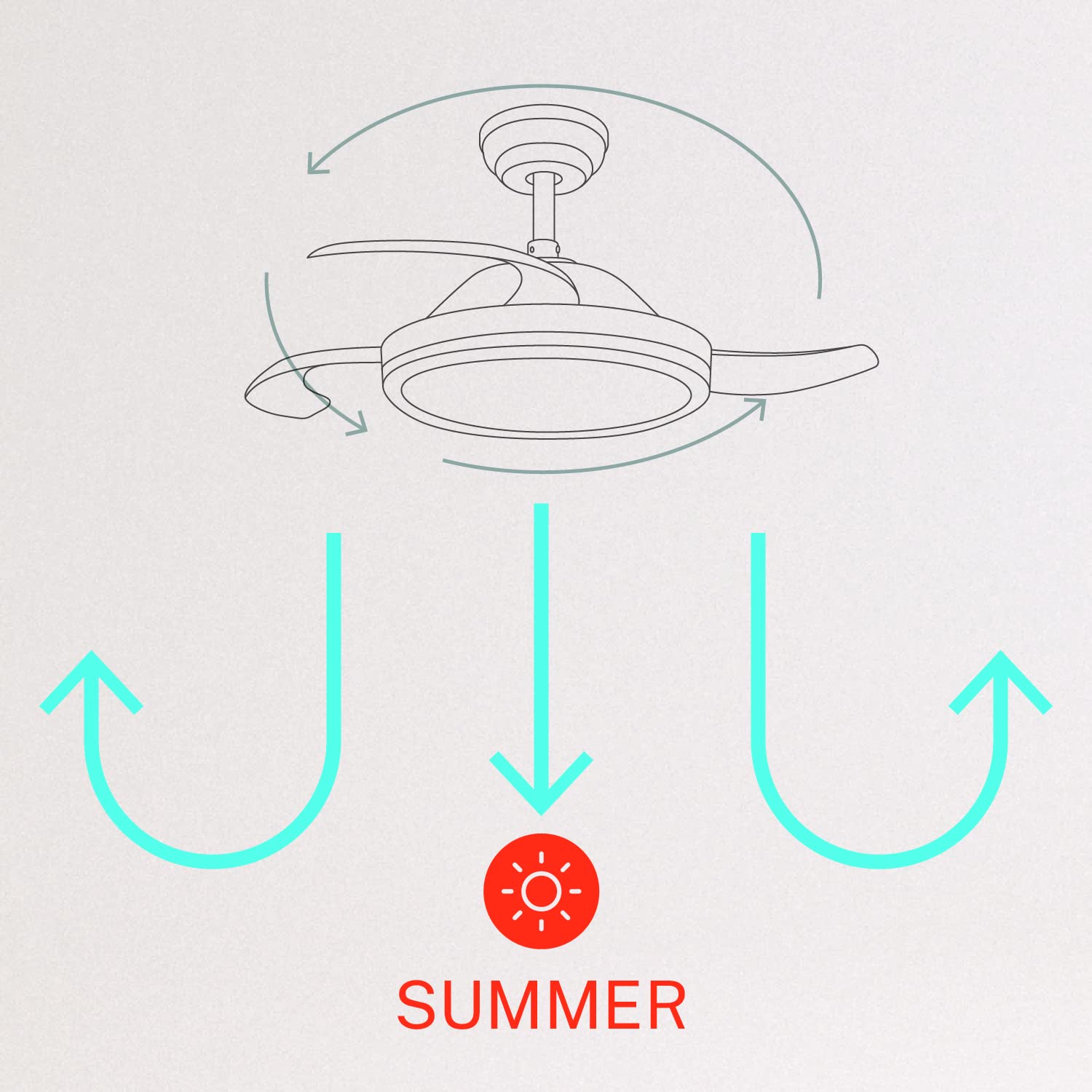
- Yanayin hunturu/bazara: Switch between forward (summer) and reverse (winter) rotation modes.

5.2 Winter and Summer Modes
The fan features a reversible motor to optimize air circulation for different seasons:
- Yanayin bazara (juyawa ta agogo baya): The fan blades rotate counter-clockwise, pushing air downwards to create a cooling breeze.
- Yanayin hunturu (juyawa ta agogo): The fan blades rotate clockwise, drawing air upwards to circulate warm air trapped near the ceiling, helping to distribute heat more evenly.

6. Kulawa
Kulawa na yau da kullun yana tabbatar da kyakkyawan aiki da tsawon rayuwar fann rufin ku.
- Tsaftacewa: Lokaci-lokaci tsaftace ruwan fanka da mahalli na mota tare da taushi, damp zane. Kada a yi amfani da masu tsabtace abrasive ko kaushi. Tabbatar an kashe fanka kuma an katse wuta kafin tsaftacewa.
- Tighting Screws: Check all mounting screws and blade attachment screws annually to ensure they are properly tightened.
- Tushen Haske: The LED light source is integrated. If it requires service, contact qualified personnel.
7. Shirya matsala
Idan kun ci karo da al'amura tare da mai son ku, koma ga matsalolin gama gari da mafita:
| Matsala | Dalili mai yiwuwa | Magani |
|---|---|---|
| Fan ba ya farawa | No power supply; Loose wiring; Remote control battery depleted | Check circuit breaker; Verify all wiring connections; Replace remote control battery. |
| Fan ta girgiza | Loose mounting screws; Unbalanced blades | Ensure mounting bracket and fan assembly screws are tight; Check for any obstructions to blade movement. |
| Haske ba ya aiki | Loose wiring; LED module fault | Check light kit wiring connections; Contact customer support if LED module is faulty. |
| Ikon nesa baya aiki | Depleted battery; Remote not paired | Replace remote control battery; Refer to pairing instructions in the full manual. |
| WiFi control issues | Poor WiFi signal; Incorrect app setup | Ensure strong WiFi signal; Reconfigure WiFi connection in the app. |
8. Ƙayyadaddun bayanai
| Siffar | Daki-daki |
|---|---|
| Alamar | Ƙirƙiri |
| Lambar Samfura | 120760_254772 |
| Launi | Fari |
| Zanen Fannonin Lantarki | Rufe Fan |
| Tushen wutar lantarki | Corded Electric |
| Salo | With WiFi |
| Girman samfur | 107D x 107W x 39H Santimita |
| Nau'in Daki | Bedroom |
| Siffa ta Musamman | Mai ƙidayar lokaci |
| Shawarwari Amfani | Zazzagewa |
| Watatage | 40 Watts |
| Abubuwan da aka haɗa | Remote, Battery |
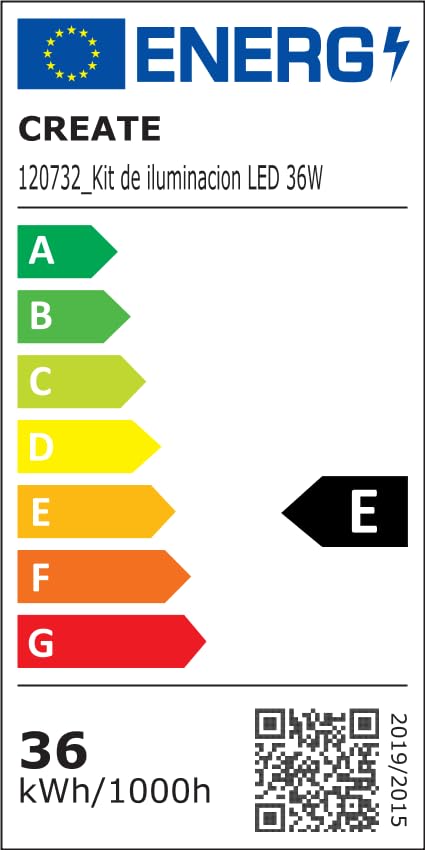
For detailed product data and energy efficiency information, please refer to the following documents:

9. Garanti da Tallafawa
For warranty information, technical support, or service inquiries, please contact CREATE customer service or refer to the official CREATE website. Ajiye rasidin siyan ku azaman shaidar siyan.


